Repository navigation
Indicator Lines get Tilted when using /**/ type comments when using SynthWave84 Theme and Fira Code Font #2239
Description

I added /* */ comments to a code-block to temporarily disable an element, and it resulted in the indicator-lines ALSO being tilted, on the Dart-VSCode-Plugin release v3.8, and VSCode 1.41.1.
Screenshot:

I am using the SynthWave84 theme, with custom css enabled in VSCode (necessary to get the theme running), using Fira Code as Font set to size 15.
And then had a short conversation on twitter with @DanTup about it ;) https://twitter.com/DanTup/status/1222532898294763522
It happened on this code-block:
Widget _buildPanel() {
  return ExpansionPanelList(
    expansionCallback: (int index, bool isExpanded) {
      setState(
        () {
          _data[index].isExpanded = !isExpanded;
        },
      );
    },
    children: _data.map<ExpansionPanel>(
      (Item item) {
        return ExpansionPanel(
          headerBuilder: (BuildContext context, bool isExpanded) {
            /*return ListTile(
              title: Text(item.headerValue),
            );*/
            return Card(
              child: Column(
                mainAxisSize: MainAxisSize.min,
                children: <Widget>[
                  Text("asdsa"),
                ],
              ),
            );
          },
          body: ListTile(
            title: Text(item.expandedValue),
            subtitle: Text('To delete this panel, tap the trash can icon'),
            trailing: Icon(Icons.delete),
            onTap: () {
              setState(
                () {
                  _data.removeWhere((currentItem) => item == currentItem);
                },
              );
            },
          ),
          isExpanded: item.isExpanded,
        );
      },
    ).toList(),
  );
}
Would love if you could take a look at this! :)
Activity
DanTup commentedon Aug 25, 2020
I'm unable to reproduce this using the SynthWave84 theme:
So I think this might be being caused by your custom CSS. If you can reproduce it without custom CSS, please let me know which theme and how to repro and I'll take a look. If it only happens with your custom CSS, I think you'd need to fix it there.
matthiaszarzecki commentedon Sep 8, 2020
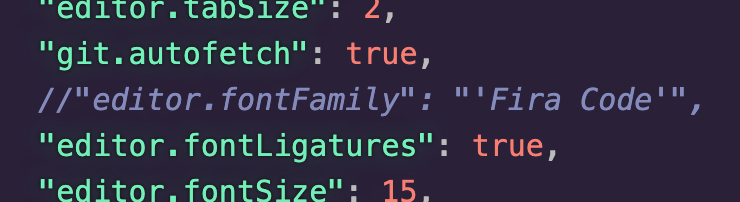
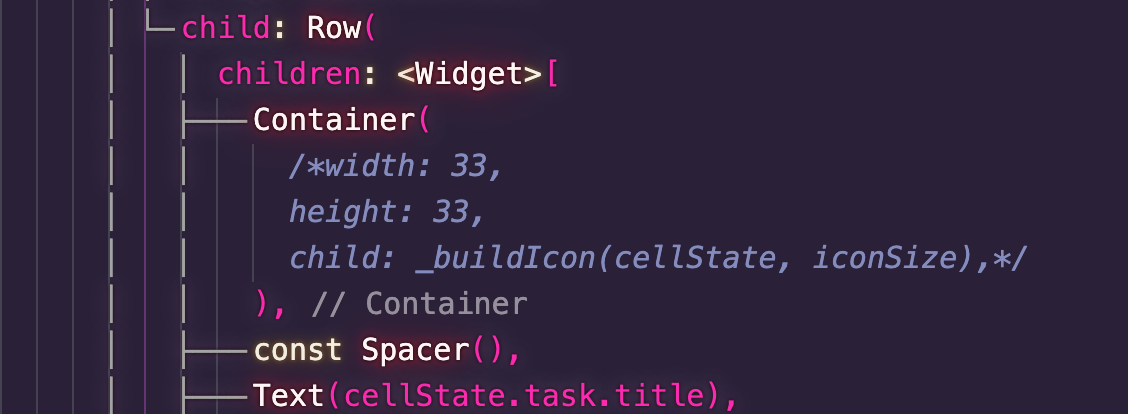
@DanTup Thanks for looking into this! I did some further experimentation enabling other extensions and elements piece by piece. Apparently this happens when using both SynthWave '84 as theme AND Fira Code as font on my Mac (main dev environment, don't think I mentioned it before). It doesn't matter in that case if custom CSS is enabled.
Synthwave 84, Fira Code Font, No Custom CSS

Synthwave 84, Fira Code Font, With Custom CSS

Synthwave 84, Default Font, With Custom CSS
Default Theme, Fira Code Font, No Custom CSS

Seeing as this is a weird conflict between 2 niche (?) settings/extensions I'd be totally fine with not putting energy and seeing this as weird edge-case, but that's up to you :)
Also updating the title of this ticket to better reflect the nature of the bug.
[-]Indicator Lines get Tilted when using /**/ type comments[/-][+]Indicator Lines get Tilted when using /**/ type comments when using SynthWave84 Theme and Fira Code Font[/+]DanTup commentedon Sep 9, 2020
Hmm, I'm still not seeing this using Fira Code and SynthWave '84 theme (also on macOS) :(
I've included a => in the screenshot so you can see it's using Fira Code+ligatures, and you can tell them theme from the colours.
Does it happen all the time? Can you provide a full file (copy/pasted, so I can copy it) that shows the issue (and ensure if you close/re-open the file it remains like that). Thanks!
matthiaszarzecki commentedon Sep 28, 2020
Thanks for trying it out again! :)
Ok, new attempt. Doing a completely fresh VSCode install (using these instructions to remove all traces and previous settings https://stackoverflow.com/questions/42603103/how-to-completely-uninstall-vscode-on-mac )
Everything fine until here

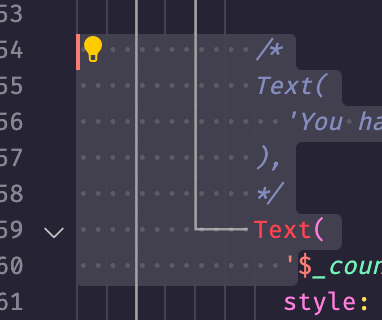
Now we get the tilted lines again.

New discovery: Tilted lines turn into regular lines when selected
settings:
FontLigatures are on for Fira Code, but the tilted lines also appear without it being enabled.
Here is the content from one file as an example for you to try to reproduce, in lines 54 & 55 (which I have closed and re-opened to check if it still appears). It doesn't matter if the file compiles or not.
I'm out of ideas. What else could we be looking at here? System Language Settings? Default Keyboard? ;P
DanTup commentedon Sep 29, 2020
Still not seeing it 🤷♂️
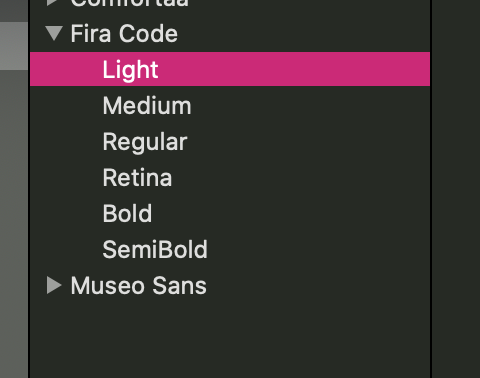
Do you have all of the parts of the Fira Code font installed and are you on the latest version?
matthiaszarzecki commentedon Oct 6, 2020
Yup, Fira Code is the newest. Old ones uninstalled, fresh download (via download-link & zip, not command-line), used the ttf's, looks the same as on your side.

Do you have any other ideas? :D
DanTup commentedon Oct 7, 2020
Hmmm, no :-)
Do you have access to any other machine to test there to maybe help identify if it's just you, or just me?
If not, could you try with VS Code Insiders to see which behaviour that has? Or launching VS Code with a temporary
--user-data-dir(to clear all settings/extensions) and see if you can repro there to eliminate any other settings/extensions interfering?matthiaszarzecki commentedon Oct 11, 2020
Good ideas!
The previous reports were run on my Work-mac (16 inch 2019), now I tried it on my private one (13 inch 2019).
Then I started code with the --user-data-dir command, removed all plugins (except synthwave and dart) and set the settings to the minimally necessary settings again
Still get tilted lines :(
DanTup commentedon Oct 12, 2020
Very strange. I still can't reproduce - however @BootBlock is able to (on Windows!). He's going to take a look if he can fix. Thanks!
matthiaszarzecki commentedon Oct 12, 2020
Sweet, glad to hear I am not the only one! :D
Stop Flutter UI guidelines being tilted for certain fonts