Repository navigation
Support Signature Help/Parameter Hints for Type Arguments #2834
Description

Is your feature request related to a problem? Please describe.
I'm always frustrated when, I am filling type parameters of a class or a method because I don't know which type parameters I need to fill, how many there are, what the do usw.
I then need to move to my mouse, hover over the method or class to get that information. In the moment I have moved to the keyboard again, I again have forgotten the type arguments.
Describe the solution you'd like
When I am typing the "," after the double in the screenshot, it would be nice when a popup would appear, with the signature of the method, but more importantly the name and the type constraint of the type parameter. With multiple type parameters the, current type argument should be highlighted (bold font) in the pop-up. So for example when I am typing Class<Abc, def, in the popup it should appear like "Class<Type1, Type2 extends Type3>".

I know, this is probably difficult to implement and would need support in VSCode and in Server, but it's hard for me to evaluate that.
Activity
HerrNiklasRaab commentedon Sep 30, 2020
Even more frustrating is the following situation:
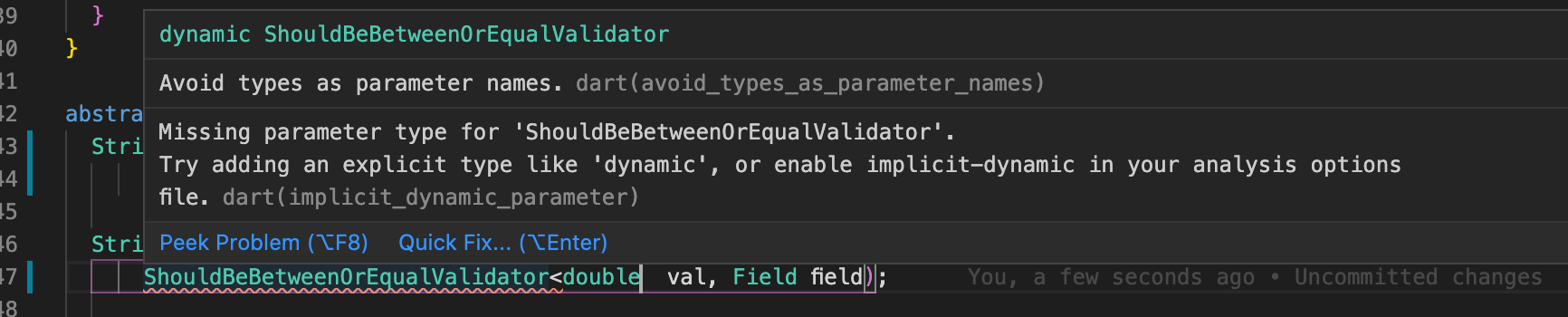
Because of the error the I can't see any type paramters.
DanTup commentedon Sep 30, 2020
I like this idea - we may be able to use the same "signature help" we use for standard arguments for type arguments.
I'm not sure there's much we can do about that from the extension (VS Code controls when to show hovers etc.), but pressing
<escape>will hide any active popup - that's about the best I have for that for now! :-)[-]Typeargument Autocomplete[/-][+]Support Signature Help/Parameter Hints for Type Arguments[/+]DanTup commentedon Jun 22, 2021
With https://dart-review.googlesource.com/c/sdk/+/204404, it will be possible to invoke Signature Help / Parameter Hints inside type arguments to get some signature help:
It would be nice to auto-trigger on the
<, but that currently seems nontrivial (at the point only<is typed, it seems ambiguous whether it's an argument list) so is not currently supported. For a similar reason, you need to have both<>typed for this to work even when manually invoking. These may be improved in future, but for now I think there's still great value in being able to invoke manually.[analysis_server] Support LSP SignatureHelp for type argument lists