Repository navigation
Running a flutter project from within vscode no longer follows the system theme #3454
Description

Describe the bug
When I run flutter apps with the theme and darkTheme properties set from within code, the launched application does not follow the linux desktop dark theme and the android emulators system theme.
To Reproduce
Steps to reproduce the behavior:
Create a new flutter application
Change the theme property to a light theme and the darkTheme property to a dark theme. Switch your system theme to a dark theme in Android or Linux GNOME desktop
Expected behavior
The flutter app follows the system theme "brightness" and switch from dark to light
Screenshots
From within vscode:

From within vscode with the android emulator:

From the terminal:

From intellij:

From intellij with android as the target:

Versions (please complete the following information):
- VS Code version: 1.57.1
- Dart extension version: v3.24.0
- Dart/Flutter SDK version: Flutter version 2.3.0-17.0.pre.622, but this happens with all channels (stable, dev, beta, master)
Additional information: this worked perfectly fine until some days ago
Edit: vscode snap or .deb - same behaviour :(
Activity
larssn commentedon Jul 2, 2021
The Monokai theme is also showing the wrong colors after this update. It's very green now.
DanTup commentedon Jul 5, 2021
@larssn I believe this issue is about the theme of the running app and not the editor. There are some comments about editor theming in #3458 (comment) though - I believe the changes are expected and what you're seeing is how the Monokai theme is intended to be. If you believe that's incorrect, please post in that issue with some specific examples, thanks!
larssn commentedon Jul 5, 2021
@DanTup You might be right. Looking at https://github.com/microsoft/vscode/blob/main/extensions/theme-monokai/themes/monokai-color-theme.json it does seem to very very green.
But strangely until the update it didn't look like that.
Maybe the conclusion is that the theme never rendered correctly in the first place, and I've been using it for years.
Anyway, thank you. 👍
DanTup commentedon Jul 5, 2021
@larssn the reason is that we only recently started using Semantic Tokens for the highlighting. These had much less information than the semantic tokens so a) could've resulted in simpler/less highlighting, and b) might be coloured differently from semantic tokens (themes can apply colours to both semantic tokens and to textmate grammars, and there's nothing to say they need to be semantically the same).
If you prefer the old way, you can disable semantic highlighting - although generally I'd suggest it should give better results, so a better option may be to just customise the theme to your liking but sticking with semantic tokens.
larssn commentedon Jul 5, 2021
I'm slowly getting used to the "Dark+" theme, which is similar'ish to what Monokai used to look like.
But thanks for the info. I'll definitely keep semantic highlighting on. 👍
Have a great day
DanTup commentedon Jul 5, 2021
Looks like when we ask the app for the
BrightnessOverridevalue we get the_resolved_value but our code assumes it was the override value. This means when we try to restore the values (which is normally after a Hot Restart, although we're currently doing this on startup too) we can end up adding an override for the brightness (of the current resolved value). This only started happening recently because restoring the toggles had become broken (and was fixed as part of #3426).I haven't fully thought it through, but I think a reasonable fix (that won't re-introduce #3426) would be:
We can't tell when the system is modifying the theme though, so if you toggle the theme in VS Code (with Toggle Brightness) we will still set an override that prevents the system toggle from working for the rest of the debug session - but I think that's resonably understandble.
@jacob314 @jonahwilliams FYI in case you have better ideas. I wonder if it would be better if the tool handled restoring these, since it knows both the resolved and overridden value, and avoids any confusion with who should restore them?
Simplify debug extensions to only re-send those we're overriding
Add tests to verify behaviour of re-sending service extension values …
Add tests to verify behaviour of re-sending service extension values …
Feichtmeier commentedon Jul 6, 2021
Thank you very much @DanTup will test this when I'm back home
DanTup commentedon Jul 6, 2021
@Feichtmeier this ended up being a bit more of a refactor than I'd expected so I don't plan to release it in a patch. It'll be included in the next release likely around the end of the month.
However I have now set up nightly builds so if you'd like the fix before then you could grab the latest one (right now it's mostly the same as the last release build but with this and a few other minor fixes). You can download it from the artifacts on the most recent job here:
https://github.com/Dart-Code/Dart-Code/actions/workflows/nightly-build.yml
Some instructions on installing are here:
https://dartcode.org/docs/installing-a-preview-release/
VS Code should automatically move you back to the stable release once it's out (it will auto-update as long as the version number on the marketplace is newer).
Feichtmeier commentedon Jul 6, 2021
I will try the nightly build! Thank you very much
Feichtmeier commentedon Jul 13, 2021
@DanTup tried the nightly build finally, sadly this issue remains.
DanTup commentedon Jul 13, 2021
@Feichtmeier are you able to capture a log (run the Dart: Capture Debugging Logs command, then run the project and repro, then click Cancel on the logging notification to open the log) and send it to me at [email protected]? I was able to reproduce your original issue perfectly, but the nightly build seemed to resolve it for me 😔
Thanks!
Feichtmeier commentedon Jul 13, 2021
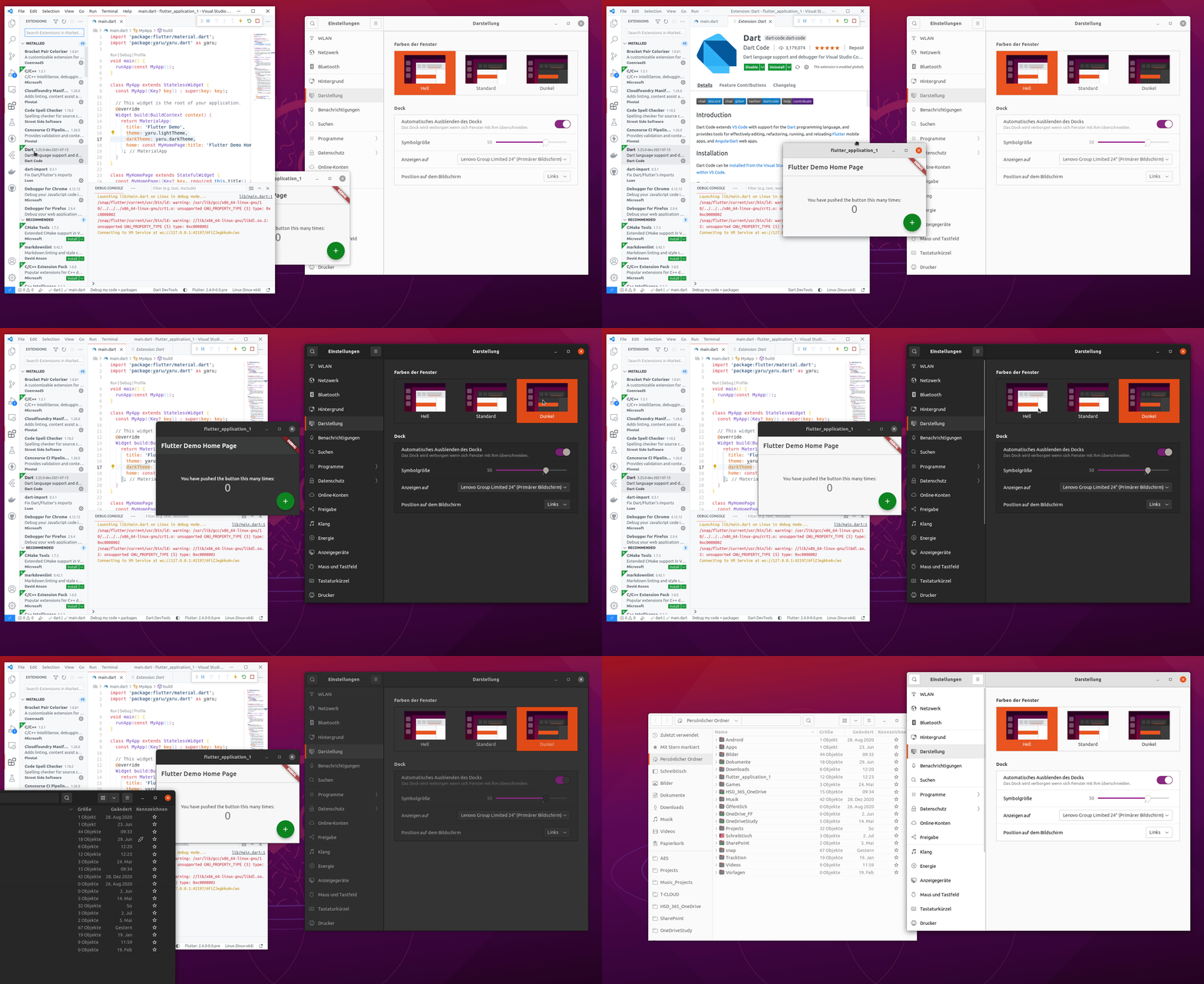
Screenrecord:
Log:
Dart-Code-Log-2021-06-02 12-25-44.txt
Edit: and thanks for looking again into this!
DanTup commentedon Jul 13, 2021
@Feichtmeier can you describe exactly what's happening in the recording? I was a little confused about what was going on (it looked like the theme did change initially, but then ended up being out of sync with the system theme?).
I checked the logs, but it doesn't look like VS Code changes the theme at all during that period, so I'm wondering it there's also another issue (if you search the logs for
"BrightnessOverride"which is the VM Service extension used to toggle it, it only seems to appear in the ServiceExtensionAdded events, but there are no calls to set it).Does this happen if you try with an Android emulator/device, or only on Linux Desktop?
Feichtmeier commentedon Jul 13, 2021
@DanTup
I toggled the gnome/ubuntu desktop theme from yaru-dark to yaru-light.
Some weeks ago ( like you can see in this example ) the flutter app started from within vscode (run button or play button) followed the system theme if both "theme" and "darkTheme" properties of the MaterialApp were set.
Now they do not follow but somehow switch to late. The first switch works, then the second and third and so on do the opposite of what would be expected.
For the the android emulator when started from vscode it is fixed 👍
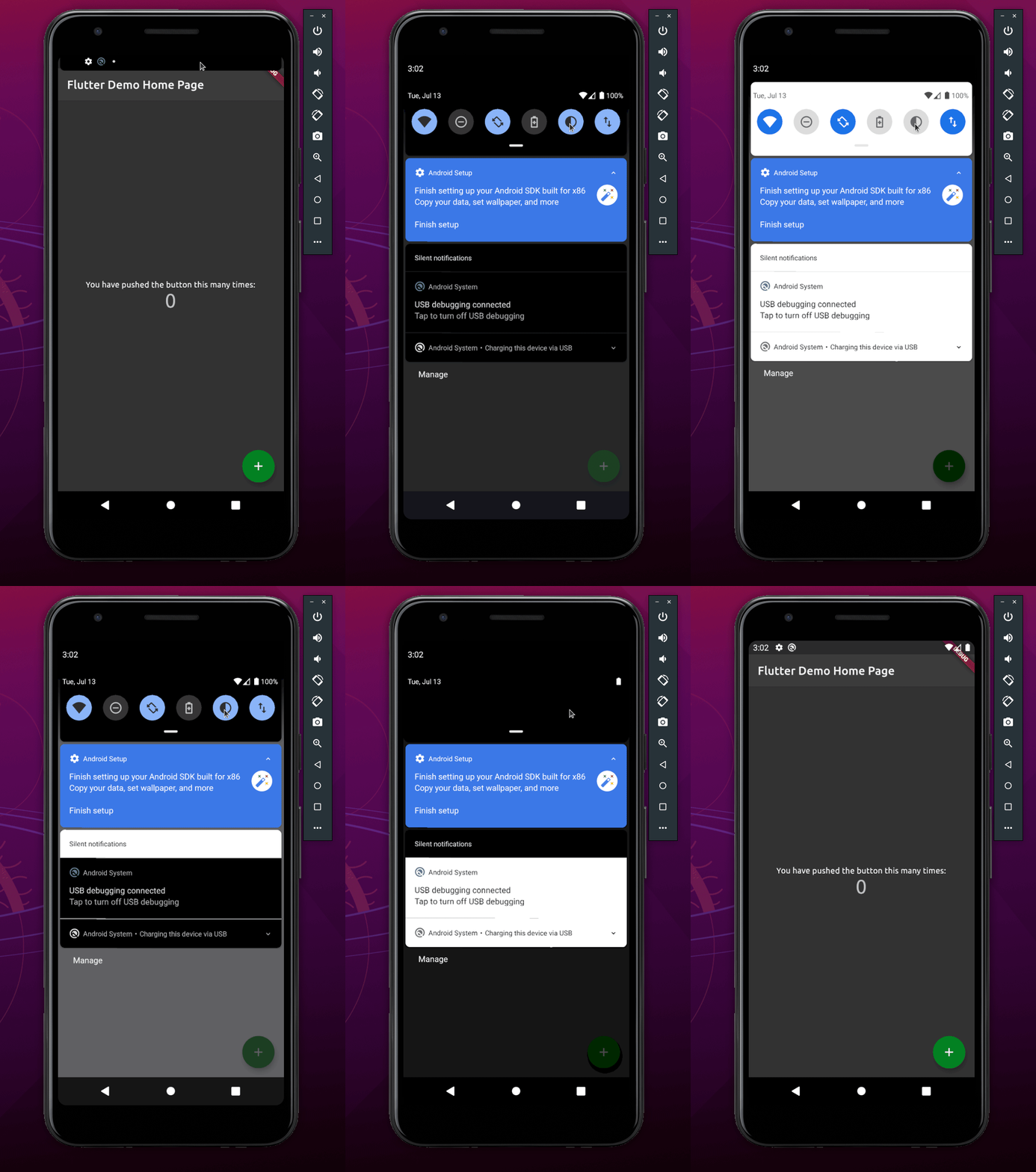
Previously as you can see in the opening post it also did not work for android if started from vscode.
DanTup commentedon Jul 13, 2021
Ok, seems like maybe there are two issues then:
I think the second one might be a Flutter issue rather than a VS Code issue (since for the most part, VS Code doesn't do anything differently - the platforms are entirely abstracted by Flutter). I'm curious if you can repro this from the terminal or from Android Studio (that might confirm it). I can't find any other issues reporting this in Flutter, but I'm not sure we can do any more in the extension here (since the log shows that we're not touching the theme at all).
DanTup commentedon Jul 13, 2021
I'm not sure if this is related (it's not clear to me whether "revise" means "fix" or this just implemented it):
flutter-team-archive/engine#25535
I'm also not sure whether that change made it into the current stable. I'd recommend testing on master/dev if you can, and also from terminal/Android Studio. If it's fixed on master/dev or repros on Android Studio/terminal, then I think it's definitely something that will need addressing in Flutter.
DanTup commentedon Jul 19, 2021
@Feichtmeier I'm going to use this issue for the first issue mentioned above which has been fixed here in the extension. If you can reproduce the other issue when running from the terminal (which I would suspect you can) then please file an issue at https://github.com/flutter/flutter/. If you can still only repro in VS Code (even when using the nightly build with the fix above) please open a new issue specifically about this and I'll have to get a Linux install set up I can do some debugging in. Thanks!
Feichtmeier commentedon Nov 5, 2021
@DanTup alright, thanks for the help and sorry for not replying for so long. Somehow this notification got lost