Repository navigation
Include device names in generated launch configs for Select & Start Debugging #3937
Description

Is your feature request related to a problem? Please describe.
Currently, when running multiple instances (e.g. on multiple devices), they are simply numbered, making it hard to identify which one is which.
Describe the solution you'd like
Specify the device name in parens such that it shows up in the running instance selector.

Activity
DanTup commentedon Apr 21, 2022
How are you starting the debug sessions? Do you have a
launch.json?Without a
launch.json, starting withF5or theRunmenu, the device ID should already be added:If you have a
launch.jsonor launch through another means, things may be a little different. I'm not sure it would make sense to overwrite the name supplied in alaunch.json. We could perhaps support some variable$deviceNameor something, although it would show literally as the variable in many places in VS Code's UI (like the sidebar) where it's not been replaced as part of launching a debug session 🤔guidezpl commentedon Apr 21, 2022
Oh, neat I didn't know it was already working in some cases.
I don't have a
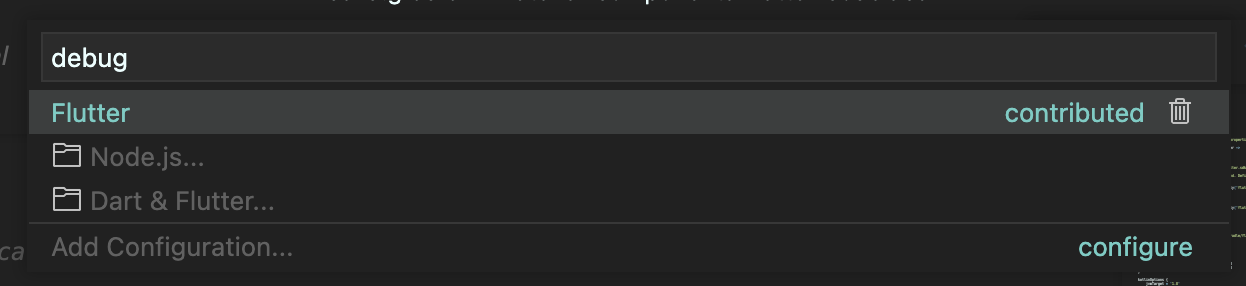
launch.json, I'm selecting "Select and start debug configuration" in the bottom bar and then selecting Flutter[-]Specify device name when running multiple instances[/-][+]Include device names in generated launch configs for Select & Start Debugging[/+]DanTup commentedon Apr 21, 2022
I can't make the name dynamic there (if I do, when you change device and then try to run from that "recently used" list, it will error, because it uses the name to look it up in the list again), but I was able to add a new entry for each supported device to the top of the list:
Since these don't change when you change your selected device, these will still work from the recently used list (which is the top entry in your screenshot, where you haven't gone into the "Dart & Flutter" section):
guidezpl commentedon Apr 21, 2022
Sweet, thanks!
DanTup commentedon Apr 28, 2022
Just an FYI, I noticed some weirdness where pressing
F5in a project without alaunch.jsonwould sometimes run on the wrong device. It's either related to VS Code being clever and picking the most recent thing I picked from Select&Start Debugging, or the top one from the list (but it seemed quite inconsistent). In case it's the latter, I'm changing these device-specific ones to appear in the list after the original one (which runs on the "current" device).guidezpl commentedon Apr 28, 2022
Ack.
Include generated launch configs for each valid device