Repository navigation
Ask which platforms to create the project for when running Flutter: New Project #4271
Description

Describe the solution you'd like
Show a checkbox list of available platforms when the command is executed (similar to Settings Sync: Configure... and Remote: Install Local Extensions in...):

Also it would be nice to have Flutter: Manage Platforms command which essentially will do the same thing but in an existing project.
Describe alternatives you've considered
While it's possible to set required platforms via --platforms when running flutter create in a terminal even after the project is created, it would be a bit easier and faster to set them during a project creation in vscode.
Activity
DanTup commentedon Nov 16, 2022
I like this idea, although I'm also hesitant to add an extra mandatory step in the flow.
It would be a little less discoverable, but I wonder if it would be better in the "settings" accessible from the cog when providing a name:
The only niggle is right now those settings are actually just modifying your local settings and are not specific to the project you're creating. I don't know whether it'd make sense to follow that pattern for this.
There is an existing way to add platforms to an existing project, though not in bulk. If you click the device manager and there's a platform that hasn't been set up, trying to set it as the active device will prompt you to add it:
This just runs
flutter createwith that platform to add the missing files. I don't think there's a nice way to invoke Flutter and ask for a platform to be removed though (although deleting the folder works, I don't know if that's a good assumption to code into the VS Code extension).@jacob314 @gspencergoog any opinions on the above (adding platform selection as a mandatory step vs having it accessible from an icon when entering the name)?
gspencergoog commentedon Nov 16, 2022
Right, there's no easy way to do that because the user may have modified the code in that directory and be sad when it disappears (although they did ask to remove it, so maybe it's OK). If we can determine that the user really really is fine with deleting possibly modified code, then we could remove the directory.
DanTup commentedon Nov 16, 2022
I wonder if it's better to just leave them to do this manually for now, to avoid any risk with us doing it.
Any opinions on the dialog up above? In particular, having it as an extra step for all Flutter: New Projects versus in a settings dialog?
We could possibly do both - have it in the cog, but also prompt the first time, with a divider at the bottom and another checkbox for "use these without asking in future" (and you could use the cog or go directly into VS Code settings to change these "defaults" you've set)? Maybe I'll mock that up and see how it looks.
gspencergoog commentedon Nov 16, 2022
I like the "do both" approach, if that works.
mpekurin commentedon Nov 17, 2022
It suggests only the platform a user is currently using and
web.Since running
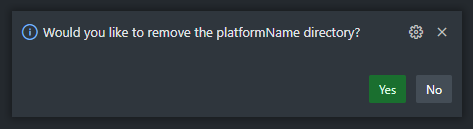
flutter create --platforms ...edits.metadata, probably an action that removes a platform should executeflutter createanyway and then ask the user what to do with the directory via a notification:In addition to this I would add a setting like
dart.flutterCreateForDefaultPlatformswithfalsevalue as default. This will allow a user to set defaults but still show the prompt each time they create a project if they want.If
truethe extension behaves as you've described but without asking the first time (sincefalseis the default value of the setting). So basically it behaves as it does now except it reads platforms from the settings instead of creating for all of them. A user can change platforms via the cog menu, which also haveSet as Defaults(writes the selected platforms todart.flutterDefaultPlatforms) andAlways Ask(setsdart.flutterCreateForDefaultPlatformstofalse) buttons.If
falseit prompts each time a project is created with defaults preselected. The prompt also haveSet as Defaults(writes the selected platforms todart.flutterDefaultPlatforms) andDon't Ask Again(setsdart.flutterCreateForDefaultPlatformstofalse) buttons.mpekurin commentedon Nov 17, 2022
The solution I see after reading the comments
Add the following settings with the respective default values:
While it's possible to use
flutter config --[no-]enable-platforminstead ofdart.flutterDefaultPlatforms, I think storing the setting in vscode would be better since this allows to sync it, doesn't touch the global config and probably it'll be a bit easier to implement.Modify
Flutter: New Projectcommand:Platformsto the cog menu. When it's pressed, show a checkbox list of available platforms with the platforms listed indart.flutterDefaultPlatformspreselected. ShowSet as Defaults,Always Ask(ifdart.flutterCreateForDefaultPlatforms == true) andApplybuttons above the list.dart.flutterCreateForDefaultPlatformsis set tofalse, show the list each time the command is executed but instead ofAlways Askbutton displayDon't Ask Againbutton.Always Askbutton setsdart.flutterCreateForDefaultPlatformstofalse,Don't Ask Againbutton sets the setting totrue.Set as Defaultswrites the selected platforms intodart.flutterDefaultPlatforms.Add
Flutter: Manage PlatformsorFlutter: Recreate Projectcommand which will:Flutter: New Projectcommand (but with different title) withSet as DefaultsandApplybuttons above the list.flutter create . --platforms ....DanTup commentedon Nov 28, 2022
@mpekurin
Sounds like something isn't right here.. in the screenshot I posted above (#4271 (comment)) I have "enable macos" as an option when the macos folder is missing.
If the
fluttertool gained a way to do this, it may makes sense. I'm not sure it's worthwhile adding an action in the VS Code extension that just deletes a folder and modifies that file though (because it's adding implementation details about.metadatato the VS Code extension I'd rather not have).I don't know what the implications are of deleting the folder without modifying
.metadatathough. It always seemed to be fine for me, but I'm not a heavy Flutter user so that might not mean much.I agree that defaults should not be tied to whether or not we show the prompt.
Agreed - I don't think we should assume that all enabled platforms are what the user wants as defaults for each newly created project.
Unfortunately we can't build UI like this in VS Code. The options are very limited. It's likely we'd just need to have another set of checkboxes at the bottom (after a divider). I'll mock something up and post back shortly.
DanTup commentedon Nov 28, 2022
I'm splitting this issue up a little, because there are a few things that need doing to achieve what's discussed above and some of them are easier than others (some require a bit of refacoring):
dart.flutterCreatePlatforms) to control which platforms are enabled by default (and showing it in the settings editor)mpekurin commentedon Nov 30, 2022
@DanTup
I guess you're using macOS so you see the option, but the menu won't suggest you to enable Windows and Linux support. At least it works like this on Windows: the menu doesn't suggest iOS, Linux and macOS. Enabling a platform from this menu causes the extension to run
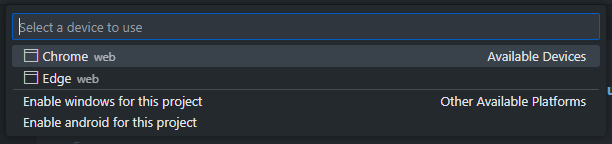
flutter create .without a--platformsargument thus adding all platforms to the project though..metadatashould be modified byflutter createcommand, not by vscode itself. The action will be useful for adding platforms to an existing project as well. So if the action is added it should:["android", "ios", "linux"]).["android", "ios", "macos"]) with the list from the previous step and detect which platforms are to be removed.["linux"]). If yes, remove the folders.flutter create --platformswith the platforms selected by the user. It'll modify.metadataas necessary and create the missing folders. E. g.flutter create --platforms=android,ios,macos .run after the previous steps will removelinuxfrom.metadata, addmacosinto it and create themacosfolder.As I understand it, platforms supported by a project depend only on platform folders presented in the project folder, and the platform list in
.metadatais used for migration to a newer flutter version.Probably it's possible to use QuickInputButton's with tooltips. They look like this:

And thanks for your efforts.
DanTup commentedon Nov 30, 2022
Ugh, I suspect I've broken this with the changes for #4284. I noticed we could pass
--platformto template types that didn't support it, but we don't have a template type when enabling platforms later. I've opened #4294 about this and will ship a fix in the coming days.Yeah, we use these icons to get to the settings (see https://dartcode.org/releases/v3-54/#flutter-new-project-platform-defaults), but they're not very obvious. I think having additional checkboxes below a divider might be better, but it'll need some testing.
Your flow above sounds fairly reasonable, although I'd prefer to avoid assumptions about the folders being tied to a platform being enabled. Flutter added a specific
getSupportedPlatformsAPI to the daemon to avoid us having to make that assumption (I can imagine a world where if your platform-specific code is completely generic with no customisations, you wouldn't need to have this folder). Perhaps if we wanted to do this we could put it into Flutter so it could supportflutter create --no-platforms windowsto disable a platform and have it do whatever is required (such as deleting the folder). As Greg says, it's a bit risky deleting potentially customised files though.There were also some questions recently about whether we could improve this new project experience by having a custom web view (eg. a small web app built in Flutter). This would avoid some of the restrictions of the VS Code UI. It needs some testing though, so I might see what that experience might be like before doing too much more on the existing command.
mpekurin commentedon Nov 30, 2022
Yeah, I didn't know about
getSupportedPlatforms.This totally makes sense.
If it won't overcomplicate things a prompt may be used. If
--no-platformsis added to Flutter then it may be complemented by--yesor--agreeoption which will allow to delete folders silently. This wayflutter create --no-platforms ...run manually by a user will ask them about deleting platform folders (e. g.This action will delete ... folders. Continue? [Y/n]), while the extension (and other tools) will be able to prompt the user via UI and then runflutter create --no-platforms ... --agree.However, a further discussion of this feature requires a new issue in flutter I guess.
Extract some code to be reused in upcoming "Flutter: New Project" cha…
DanTup commentedon May 27, 2026
With #6064, we'll now show the platform selector automatically during the Create flow, with a "Don't ask next time" option that toggles the new setting
dart.flutterCreatePromptForPlatformsthat controls this.Support prompting for platforms during "Flutter: New Project" flow