Repository navigation
How to reference dll and xml files from nuget package as a documentation source #769
Description

This is more of a best-practices question, and perhaps an attempt to determine if a better way to do this could be discovered. I have a class that is inherited from a class found in a nuget package. As per your guidance, I created a 'child' documentation project that is not built, but is rather configured in the main project as an Additional Reference Links plug-in with all the link types set to None. As an aside, it is Newtonsoft.Json and it has sample code blocks that cannot be resolved so I added the code block component and allowed missing souce code files/regions. This all works well.
The best practices question is how to properly reference the path to the nuget package contents to add it as a documentation source for the child SHFB project to consume.
There are two options that I see to accomplish this right now:
Option 1
Reference the nuget package path. Issues with this is this path may differ based on nuget configuration, and secondly, is brittle in that updating the package version requires a manual modification. In the ChildShfbProject.shfbproj I have an example of using this approach: <DocumentationSource sourceFile="%USERPROFILE%\.nuget\packages\newtonsoft.json\6.0.5\lib\net45\Newtonsoft.Json.dll" xmlns="" />
Option 2
Use the build process of the assembly being documented, via a post build step, to copy these references from the build output to a static known folder, and configure that to be the location for the documentation source. This is less brittle, but still has issues/concerns:
- If a multi-target project, would need to handle the case to only copy dependencies for the SHFB target framework.
- Depends on SHFB and when it processes the child project. My assumption is this would be done after assuring the build of the main project documentation sources is complete, in which case we can rely on the files being there.
- Visual Studio SDK projects (and probably classic projects using PackageReference) do not copy the .xml files from the nuget lib source folder to the output directory. This behavior has been under heavy discussion here: New project system doesn't copy PDBs from packages dotnet/sdk#1458 (comment)
- While the above three issues/concerns have workarounds, it requires superhuman understanding to maintain/understand. I need to understand the help doc build depends on custom build steps, injection of an 'AfterTarget' task, copying of output to a static directory, referencing the dependency properly as a documentation source. This is just yucky and unmaintainable.
This approach can be seen in the ValueTupleSandcastleDemo.csproj file (The two 'Target' elements) and in the ChildShfbProject.shfbproj where the path to these outputs is referenced. This example can be found in the zip I attached to an unrelated issue: #763 (comment)
Possible Alternate
Perhaps something kind of like #748 where Tom proposes some integration with the build pipeline of nuget restore. It may be possible to determine the package path, use that to set a variable (perhaps package name), and that variable would be available to use as part of the DocumentationSource element. This would be brittle in terms of package versions, since the packages in SHFB projects don't appear in Visual Studio Nuget manage packages for solution, but this is the only path I can see. Unless I am missing something?
Activity
EWSoftware commentedon Nov 23, 2019
I think you've got a good understanding of the situation and the possible workarounds that can be used right now, none of which are ideal. What I really need to do is come up with a better way of handling unresolved links which is the main cause of the problem.
In replacing the MSDN resolver recently, I made some additional changes to make it possible to add other link resolvers. The idea is to allow SHFB itself or other components or plug-ins to add additional sources that can be used to resolve unknown links without having to build other projects as it currently does. For example, it would be much simpler to specify that any reference link starting with
Newtonsoft.Json.*is to be rendered as a non-clickable link without issuing any warnings. Another example would be to allow specifying a manifest file of some sort that would allow it to map IDs to page names and combine it with a root URL to generate links to other help content such as other SHFB generated websites or other third-party content. Overall, that's a much simpler and cleaner solution as it completely gets rid of the additional builds and the issues that come along with them using the current plug-in.I don't have a timeline for such options but I'll try to work on them sooner rather than later.
perahoky commentedon Dec 11, 2019
Hello,
i've the same issue. Would be nice to directly reference nuget packages in Sandcastle documentation project to compile them to a documentation output.
Somewhere (or as nupkg):
NugetProject1
NugetProject2
Here:
DocumentationProject (references: NugetProject1, Nugetproject2)
NewFeature/Plugin: SetOption: "Use Project References as DocumentationSource": "Yes"
Build: Get Nugetproject1+2-Assemblies etc. and use as DocumentationSource as defined above.
Now how i solved our Issue as follows:
I have many nuget projects (1...n) somewhere.
NugetPackage1.. 2...3...n
I Created:
DocumentationProject1
Documentation.Dummy (class lib project):
Build process now takes all NugetPackage-Assemblies+Xml,
puts them into ..\InternalBin,
Documentation-build takes these manually referenced assemblies and produces the Documentation result.
IIS hosts the Documentation\InternalBin\documentation\output directory and all are happy :)
Fin :)
perahoky commentedon Dec 11, 2019
As addition to my last answer, i fixed the "i need to manually choose fiels" issue.
You can use wildcards in
<DocumentationSource sourcefile="\InternalBin\*.dll" />tag.So, just build everything that second Nuget-Dummy-Project outputs,
See SCHFB "DocumentationSource" documentation.
EWSoftware commentedon Dec 11, 2019
@perahoky I think your trying to do something different. It looks like your trying to document all of the referenced assemblies as well. That's not typically done. The intent here is to provide based type and XML comments info and suppress all the "unresolved reference link" warnings. For example, as in the original post I include NewtonSoft.Json. I don't want to drag all the documentation for that into my help, just the inherited/base type info and XML comments. If I have type derived from that assembly, there won't be any target links for those types and I don't want to be warned that they couldn't be resolved.
michaldengusiak commentedon May 1, 2020
error : Unresolved assembly referenceHi, I am new into the documentation. Not sure if this is already resolved but I could not find the answer. I am having a similar problem where I am trying to generate documentation to my library
SAMAnalyticalDynamobut in the original project, I do reference other packages via Nuget and when trying to build I got error. When I build library without reference it works fine.Is there any way to get it working?
I am not able to add any Nugetpackges here

here is my error message:
any help or guidance will be appreciated
EWSoftware commentedon May 2, 2020
You can add the references manually by navigating to the NuGet package folder and adding them from there. As noted in the original post, the Additional Reference Links plug-in can be used to include the assemblies and XML comments files. Neither approach is ideal as you need to update the assembly path if the package version changes. If you don't care about the missing reference or its inherited documentation, you can use the Binding Redirection Plug-In to ignore the missing reference.
michaldengusiak commentedon May 2, 2020
@EWSoftware I do not want to produce documentation for missing .dll seems like
reference is solution for me, not sure what exactly to do..
Do you mean install this and there should be setting to ignore missing .dlls?
I got it now installed but not sure how to ignore missing references
EWSoftware commentedon May 3, 2020
No, see the plug-ins for SHFB. You'll find them all in the Plug-Ins category in the SHFB project properties.
michaldengusiak commentedon May 3, 2020
@EWSoftware thanks a lot. Is working now. I added steps in case some struggle like me.
Add-Plugin
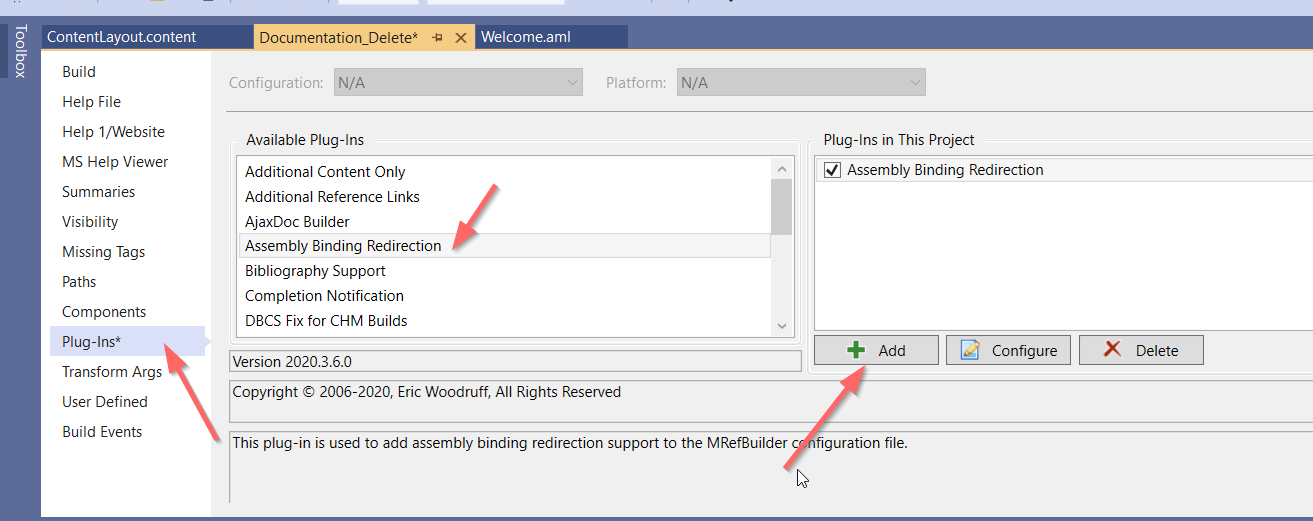
Specify missing reference, this can be taken from error message if fails to build:

try again
========== Rebuild All: 1 succeeded, 0 failed, 0 skipped ==========EWSoftware commentedon Feb 21, 2022
Merged with #899.