Repository navigation
Bug: PowerShell cannot handle a file with long non-ascii file name #13551
Description

Steps to reproduce
Create a directory named "Test"
In the directory, create a file named "测试测试测试测试测试测试测试测试测试测试测试测试测试测试测试测试测试测试测试测试测试测试测试测试测试测试测试测试测试测试测试测试测试测试测试测试测试测试测试测试.txt"
cd Test
ls
Expected behavior
Files listed normally.
Actual behavior
out-lineoutput: startIndex cannot be larger than length of string. (Parameter 'startIndex')
Environment data
Name                           Value
----                           -----
PSVersion                      7.0.3
PSEdition                      Core
GitCommitId                    7.0.3
OS                             Microsoft Windows 10.0.20201
Platform                       Win32NT
PSCompatibleVersions           {1.0, 2.0, 3.0, 4.0…}
PSRemotingProtocolVersion      2.3
SerializationVersion           1.1.0.1
WSManStackVersion              3.0
Activity
[-]out-lineoutput: startIndex cannot be larger than length of string[/-][+]PowerShell cannot handle a file with long file name[/+][-]PowerShell cannot handle a file with long file name[/-][+]PowerShell cannot handle a file with long non-ascii file name[/+][-]PowerShell cannot handle a file with long non-ascii file name[/-][+]Bug: PowerShell cannot handle a file with long non-ascii file name[/+]iSazonov commentedon Aug 31, 2020
/cc Dongbo Wang (@daxian-dbw) Can you reproduce?
daxian-dbw commentedon Aug 31, 2020
I cannot reproduce. I guess it's related to the buffer width/height that was being used. Steve (@hez2010) can you share your buffer width/height when seeing the issue?
hez2010 commentedon Sep 1, 2020
You can resize and reduce the width of window.
xtqqczze commentedon Sep 4, 2020
I also cannot reproduce using Windows Terminal v1.2.2381.0 on Windows 10.0.19041 (2004).
Steve (@hez2010) Does this issue occur when not using Windows Terminal?
hez2010 commentedon Sep 5, 2020
xtqqczze Yes
Additional information: my language and region was set to ja-jp.
And my PSReadLine is 2.1.0-beta2
iSazonov commentedon Sep 5, 2020
Do you see the issue without PSReadline?
hez2010 commentedon Sep 6, 2020
Ilya (@iSazonov) Yes, the issue still exists
Here is normal view of the error:

iSazonov commentedon Jan 18, 2021
Perhaps the same as #12485 (comment)
/cc Dustin L. Howett (@DHowett)
DHowett commentedon Jan 18, 2021
We’ll need a backtrace or a repro outside of Terminal to be sure. A repro outside of terminal would require setting the buffer size to be the same as the window size (no scrollback history)
hez2010 commentedon Jan 21, 2021
I've hit asset failure while debugging pwsh (with no modules enabled):
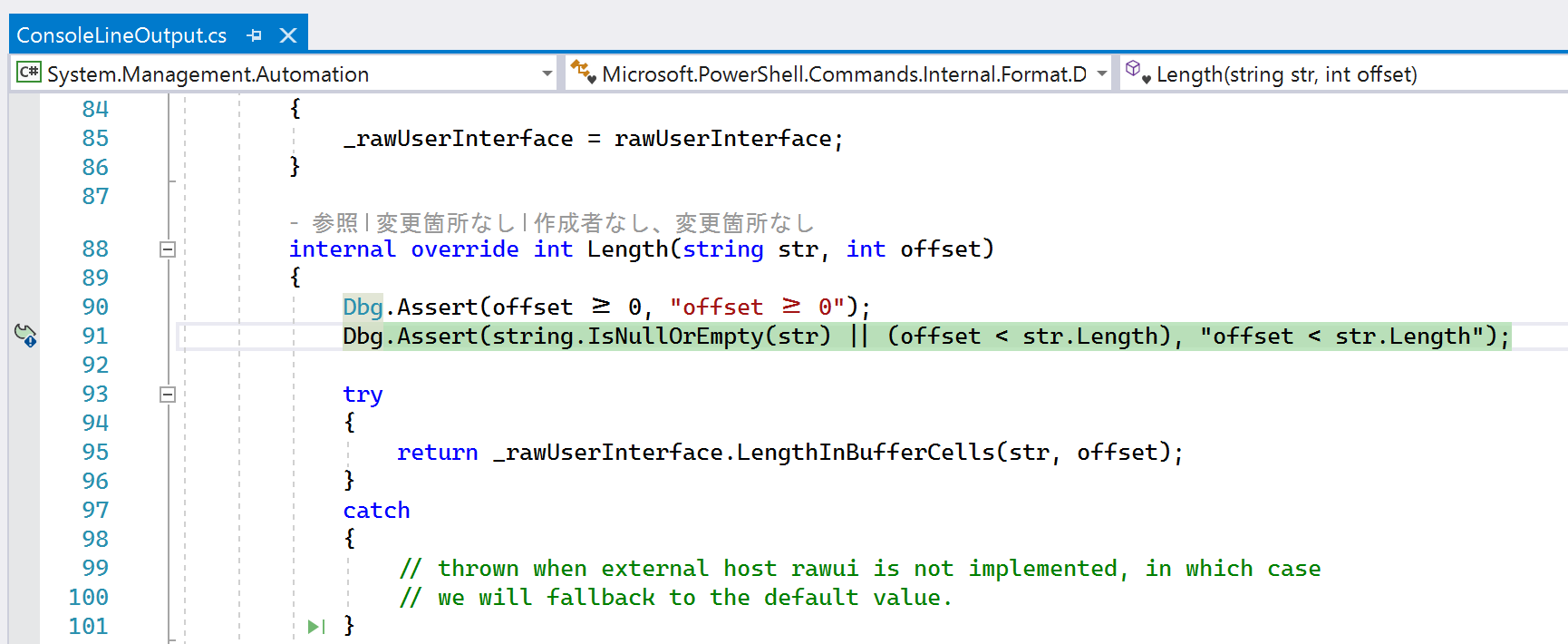
Failed for

str.Length < offsetcannot be fullfilled:Where str is "测试测试测试测试测试测试测试测试测试测试测试测试测试测试测试测试测试测试测试测试测试测试测试测试测试测试测试测试测试测试测试测试测试测试测试测试测试测试测试测试.txt", and culture is ja-JP.
pwsh version: PowerShell 7.2.0-preview.2-52-gc406f9fe68b7bee1bc4695f70d9dba86b3061ad4
iSazonov commentedon Jan 21, 2021
Steve (@hez2010) I suggest to look previous callsites in the debug, maybe GenerateLinesWithoutWordWrap().
hez2010 commentedon Jan 21, 2021
Ilya (@iSazonov) In GenerateLinesWithoutWordWrap:
iSazonov commentedon Jan 24, 2021
Steve (@hez2010) Do you think I can debug by means of screenshots? 😄 If you already run debugger you could review step by step 2-3 method levels and find a root of the issue.
iSazonov commentedon Jan 25, 2021
We split a line to fit in a window width and if on last iteration we did get zero length tail we did next iteration but we should stop.
Proposed fix iSazonov@6a9bf10
I added some cleanups to make the code more reliable.
If anyone wants, they can add tests and pull PR.
hez2010 commentedon Jan 25, 2021
I can confirm that the commit iSazonov/PowerShell@6a9bf10 can fix this issue.
kasini3000 commentedon Apr 15, 2021
interesting.
In win terminal, I cannot reproduce the problem.
In pwsh.exe, I reproduced the problem.
PowerShell 7.2.0-preview.4 ,win10
iSazonov commentedon Apr 15, 2021
kasini3000 Please check with v7.2.0-preview.5