Repository navigation
ConvertTo-JSON should allow nesting 0 #13660
Description

There seems to be an oversight of what ConvertTo-JSON allows when it comes to nesting. Since the default value is 2 (not 0) it's impossible to set it to 0, as minimal value is 1.
Steps to reproduce
[PSCustomObject] @{
    Test  = 1
    Test2 = 2
    Test3 = [PSCustomObject] @{
        IdontWantThat = 1
    }
} | ConvertTo-Json -Depth 0
Expected behavior
[PSCustomObject] @{
    Test  = 1
    Test2 = 2
    Test3 = [PSCustomObject] @{
        IdontWantThat = 1
    }
} | ConvertTo-Json -Depth 0
Should be:
{
"Test":"1",
"Test2":"2",
"Test3":"@{IDontWantThat=1}"}
or similar
Actual behavior
[PSCustomObject] @{
    Test  = 1
    Test2 = 2
    Test3 = [PSCustomObject] @{
        IdontWantThat = 1
    }
} | ConvertTo-Json -Depth 0
ConvertTo-Json : Cannot validate argument on parameter 'Depth'. The 0 argument is less than the minimum allowed range of 1. Supply an argument that is greater than or equal to 1 and then try the command again.
Environment data
Activity
[-]ConvertTo-JSON doesn't allow nesting 0[/-][+]ConvertTo-JSON should allow nesting 0[/+]kvprasoon commentedon Sep 24, 2020
Ilya (@iSazonov) Are we okay to change min to 0 ?
iSazonov commentedon Sep 25, 2020
I hope we will to move to new .Net JSON API in next milestone (7.2 LTS). In the time we will review all JSON cmdlet's issues. I expect we will get many minor and major (breaking) changes.
If the request is to make a shift 1->0, 2->1 and so on it is a breaking change. I don't see a value in the change as standalone but among many other breaking changes, this could be favored.
kvprasoon commentedon Sep 25, 2020
I think the request is just only to make min depth value to 0.
PrzemyslawKlys commentedon Sep 25, 2020
Yep, the request is allow 0 instead of 1 as minimum value. Pretty sure it's not breaking change as long as it behaves correctly.
vexx32 commentedon Sep 25, 2020
Yeah, allowing a lower minimum shouldn't break anything.
iSazonov commentedon Sep 25, 2020
With Depth 2 we get
With Depth 1
So with Depth 0:
iSazonov commentedon Sep 25, 2020
It seems we already discussed this - truncating is data lost - it is bad.
vexx32 commentedon Sep 25, 2020
Depth 0 should have:
As for truncating data, sure. This is an opt in mechanism. Nothing existing will break.
kvprasoon commentedon Sep 25, 2020
Depth 0 with code change has
PrzemyslawKlys commentedon Sep 25, 2020
I am using ConvertTo-Json to generate javascript data.
Aside from having unusable data - that is not displayed anyway, the file size gets much larger.
I've rolled out my own ConvertTo-JsonLiteral which solves this in 5.1 but I would appreciate the issue being fixed in PowerShell 7 so in the future users can decide what to do.
This is how it looks inside HTML
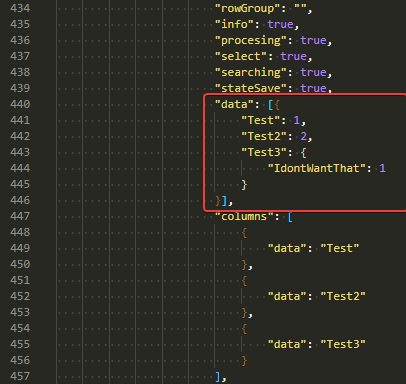
As Rain Sallow (/u/ta11ow) (@vexx32) said this is opt-in so no loss of data unless you specifically ask for it. One could argue that putting default at 2, makes anything over 2 at the same disadvantage as having 0 for nesting of 1.
iSazonov commentedon Sep 27, 2020
What is an output difference in Depth 0 and Depth 1?
vexx32 commentedon Sep 27, 2020
Depth 1:
Depth 0:
iSazonov commentedon Sep 27, 2020
Rain Sallow (/u/ta11ow) (@vexx32) Thanks! I don't see a value in this. From other discussions current intention is to follow new .Net API behavior - remove default depth, throw on truncating by default.
vexx32 commentedon Sep 27, 2020
🤷 clearly someone does, or we wouldn't have this issue. 😂
PrzemyslawKlys commentedon Sep 27, 2020
It's even worse for DateTime...
It's useless to my use case. While I understand you don't want to truncate data I have no way to show this data in one dimension view outside of PowerShell. It just adds junk that I don't need.
This is what my version of ConvertTo-JsonLiteral does
And with depth 0
And this is also an idea for what I would like from New Convert-ToJson. Ability to define DateTime format just like you have added the ability for enum.
Output for Depth 1 for Date or INT:
Output for Depth 0
At least I can see something and act. I want ConvertTo-JSON to act a bit like ConvertTo-HTML where it does what I'm asking for.
TravisEz13 commentedon Mar 22, 2021
What is the value of this behavior?
PrzemyslawKlys commentedon Mar 22, 2021
I explained it multiple times already - is it not clear? I even responded to your question in the old pull request. I also show the problem above.
TravisEz13 commentedon Mar 23, 2021
Przemysław Kłys (@PrzemyslawKlys) I see no explanation of the value of the behavior. Just the fact that it can generate a flat json. What would you do with the flat json? Why? When?
PrzemyslawKlys commentedon Mar 23, 2021
Travis Plunk (@TravisEz13) You already allow setting depth. You also specify it to a default value. I want to be able to choose that. Does
Depth 2for an object that is nested 5 levels deep is any different than what I requested?I already showed you the HTML example above. I have a PowerShell module called PSWriteHTML. By default, it uses ConvertTo-HTML which uses depth 0. However, pushing 50k users into HTML makes browsers cry when trying to show it. So I'm using the javascript approach of storing data which prevents autoloading of all 50k rows before displaying them.
Since JavaScript is very similar to JSON I'm using ConverTo-JSON to store it within an HTML file. I only require flat JSON. While I guess I could store 5 or 10 or 50 levels deep in there it doesn't make sense for me as I want to display it as a Table (so flat storage). Now imagine 50k adobjects objects each having 5 levels deep of which 4 are useless to display. While the display would still work, the size of the generated HTML would go from 80MB to 120 or 160MB in size. I don't need that.
This is just one use case. A similar use case is used within the PSTeams Powershell module. I sometimes don't want to get 2 levels deep when I require just 0.
Since it takes ages to implement this little change I wrote my own
ConvertTo-JSONLiteralwhich happens to work in PS5+ and allows me to also define how Arrays are treated (for example join them with defined char), how DateTime is converted - for example to a specific format, how numbers are treated, how enums are treated. I got a greater control for display purposes.While you specifically are thinking JSON use case is very limited I've found that JSON is really similar to JavaScript or CSS with some exceptions or small changes and I use it frequently in ways you would not expect. I don't care if I lose data, as long as I am doing this explicitly.
This change just adds the ability to go from 0 to 100, not from 1-2 to 100. It's trivial, and just fixes something that should have been there from the beginning. The bigger problem is going to remove the default Depth which is set to 2 now, but it's outside of the scope of this change.