Repository navigation
Remove-Item does not work correctly with long paths #15466
Description

From #15260 (comment).
Rename-Item and Set-Location are also affected by this issue.
Steps to reproduce
$testdrive = "$env:TEMP/test"
$longDir = 'a' * 250
$longSubDir = 'b' * 250
$fileName = "file1.txt"
$topPath = Join-Path $TestDrive $longDir
$longDirPath = Join-Path $topPath $longSubDir
$longFilePath = Join-Path $longDirPath $fileName
new-item -itemtype file -path $longFilePath -force
remove-item -Path $longFilePath
Expected behavior
file is removed successfully
Actual behavior
> remove-item -Path $longFilePath
Remove-Item: The system cannot find the path specified.
C:\Users\rjmho
> get-error

Exception             :
    Type            : System.ComponentModel.Win32Exception
    NativeErrorCode : 3
    ErrorCode       : -2147467259
    TargetSite      :
        Name          : IsReparsePointLikeSymlink
        DeclaringType : Microsoft.PowerShell.Commands.InternalSymbolicLinkLinkCodeMethods
        MemberType    : Method
        Module        : System.Management.Automation.dll
    StackTrace      :
   at Microsoft.PowerShell.Commands.InternalSymbolicLinkLinkCodeMethods.IsReparsePointLikeSymlink(FileSystemInfo
fileInfo) in System.Management.Automation.dll:token 0x60016f5+0x57
   at Microsoft.PowerShell.Commands.RemoveItemCommand.ProcessRecord() in
Microsoft.PowerShell.Commands.Management.dll:token 0x60004dd+0x2e2
   at System.Management.Automation.CommandProcessor.ProcessRecord() in System.Management.Automation.dll:token
0x60020f6+0x1ae
    Message         : The system cannot find the path specified.
    Source          : System.Management.Automation
    HResult         : -2147467259
CategoryInfo          : NotSpecified: (:) [Remove-Item], Win32Exception
FullyQualifiedErrorId : System.ComponentModel.Win32Exception,Microsoft.PowerShell.Commands.RemoveItemCommand
InvocationInfo        :
    MyCommand        : Remove-Item
    ScriptLineNumber : 1
    OffsetInLine     : 1
    HistoryId        : 4
    Line             : remove-item -Path $longFilePath
    PositionMessage  : At line:1 char:1
                       + remove-item -Path $longFilePath
                       + ~~~~~~~~~~~~~~~~~~~~~~~~~~~~~~~
    InvocationName   : remove-item
    CommandOrigin    : Internal
ScriptStackTrace      : at <ScriptBlock>, <No file>: line 1
Environment data
Name                           Value
----                           -----
PSVersion                      7.2.0-preview.6
PSEdition                      Core
GitCommitId                    7.2.0-preview.6
OS                             Microsoft Windows 10.0.19042
Platform                       Win32NT
PSCompatibleVersions           {1.0, 2.0, 3.0, 4.0…}
PSRemotingProtocolVersion      2.3
SerializationVersion           1.1.0.1
WSManStackVersion              3.0
Proposed solution
Implement long paths:
diff --git a/src/System.Management.Automation/namespaces/FileSystemProvider.cs b/src/System.Management.Automation/namespaces/FileSystemProvider.cs
index b37b4d10c..da0e4cb2d 100644
--- a/src/System.Management.Automation/namespaces/FileSystemProvider.cs
+++ b/src/System.Management.Automation/namespaces/FileSystemProvider.cs
@@ -8243,6 +8243,12 @@ namespace Microsoft.PowerShell.Commands

             WIN32_FIND_DATA data = default;
             string fullPath = Path.TrimEndingDirectorySeparator(fileInfo.FullName);
+
+            if (fullPath.Length > MAX_PATH)
+            {
+                fullPath = "\\\\?\\" + fullPath;
+            }
+
             using (var handle = FindFirstFileEx(fullPath, FINDEX_INFO_LEVELS.FindExInfoBasic, ref data, FINDEX_SEARCH_OPS.FindExSearchNameMatch, IntPtr.Zero, 0))
             {
Also ensure that the actual file exists before calling the Windows API on it so that the proper error can be thrown if not:
Activity
jborean93 commentedon May 26, 2021
Why conditionally add
\\?\if it exceeds max path, if we control what APIs are called then we should always add that prefix. The benefit there is you are always running the same code even for short paths rather than sometimes testing this edge case.You also need to be careful when dealing with UNC paths, the prefix is
\\?\UNC\$server\$shareso just prefixing isn’t enough here.jborean93 commentedon May 26, 2021
Also while PowerShell’s location can probably be fine with paths that exceed MAX_PATH I’ve encountered problems in the past with trying to set a long path to the process’ working dir. I don’t think that’s something powershell can change and might cause unknown problems down the line when spawning new processes from powershell that inherit from the file system location (not 100% sure if it actually does today).
rjmholt commentedon May 27, 2021
Sounds like we could use your review on the next PR to fix this Jordan Borean (@jborean93). (It's still in draft for a reason though)
Good to know
That suggestion was just based on a principle of minimal perturbation. But if
FindFirstFileExWis always going to succeed there, then that seems reasonable.Yeah, in this case I think the issue is due to us calling the Windows API directly in an attempt to work around OneDrive weirdness. In the process case, I think .NET does a lot more under the hood (as it does in the
PathAPIs).It may also be that the right fix for us here is to abandon the efficiency that the original change was trying to get and simply look at the file twice, once to determine whether it's OneDrive and the second time to call through .NET and take advantage of its robustness.
jborean93 commentedon May 27, 2021
I’ll have to add some comments when I’m next on a laptop. It’s hard to review actual code changes when looking from your phone :)
rjmholt commentedon May 27, 2021
Dw I was also on a phone today 🙂
svermaak commentedon Aug 23, 2022
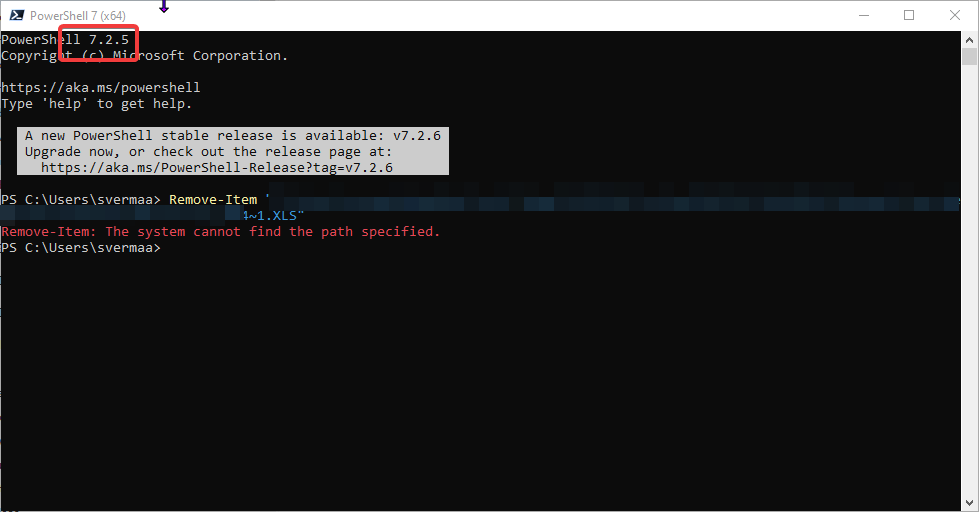
Still getting it in 7.2.5
iSazonov commentedon Aug 24, 2022
svermaak Please open new issue with exact repro steps.