Loading Native Binaries in cross platform modules #6642
Description
Activity
You could use .Net Core APIs and Add-Type cmdlet if you are talking about scripts.
Reacted by Joel BennettThis is related to #3091 XPLAT: RequiredAssemblies must automatically consider lib\framework
Until now, we do not have unified support in .Net Core for argument conversions. Without this, it makes no sense to do something here. Even the simplest type
intcan be implemented differently on different platforms. It can even have an inverted order of bytes. This is even more unpredictable forstruct-s.Ilya (@iSazonov) what does that have to do with anything? This is not an issue of types or unified anything.
We need PowerShell to do at run time the same thing that nuget does at compile time:
- Developer ships set of runtime-specific folders with assemblies in them
- Developer documents the RootModule or RequiredAssembly
- User just Imports the module
- PowerShell picks the right folder, because it knows what OS/framework/runtime it is.
Note that this is NOT only a linux vs Windows vs mac problem. PowerShell Core on Windows requires different assemblies than Windows PowerShell, even for formerly simple things shipped by Microsoft (e.g. for System.Drawing.Common).
Off the top of my head (aka not fully thought through), it seems we can try loading from a
runtimesfolder in the module base otherwise fallback to looking in the module base folder (and finally the GAC where appropriate). This would make it compatible with existing modules and Windows PowerShell.Reacted by Joel BennettMy strong thoughts is that it is not PowerShell Core engine issue. The issue exists in all portable projects using p/invokes. And it should be addressed in C# language (enhance DllImport and marshalling because DllImport and marshalling came form Windows and is limited on Unix-es) and CoreFX/CoreCLR engine. Until that we can use workarounds like ones from initial post of the Issue.
Actually, other portable projects (like PowerShell itself) using p/invoke do not have this problem, but that's because they only package the right binaries for the right platform, and have separate packages...
Despite that, I think Ilya (@iSazonov) is probably right -- I would be happy to amend my earlier post to say that PowerShellGet should do it at install time, instead of PowerShell doing it at runtime. Then it's just a packaging problem: #PowerShellGet/273
I intermediately set Resolution-External label. I think we can close the issue. But feel free to continue the discussion in any way..
I would suggest continuing discussion in the PSGet issue.


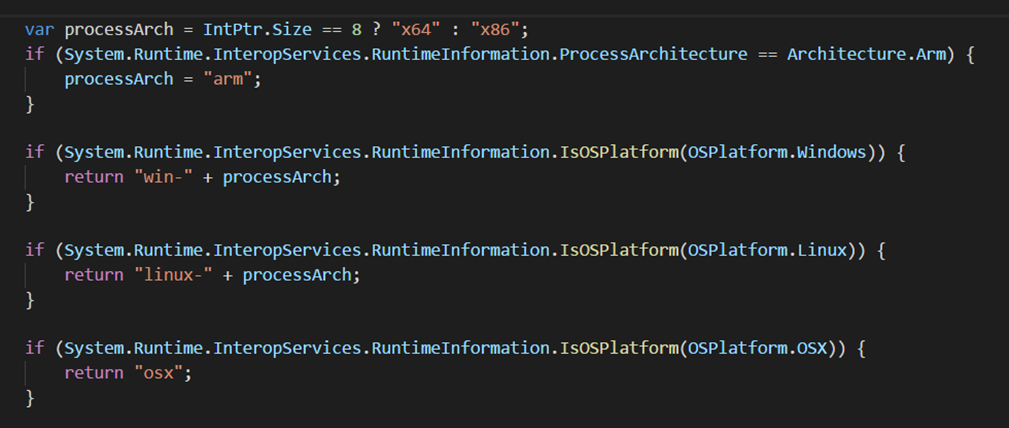
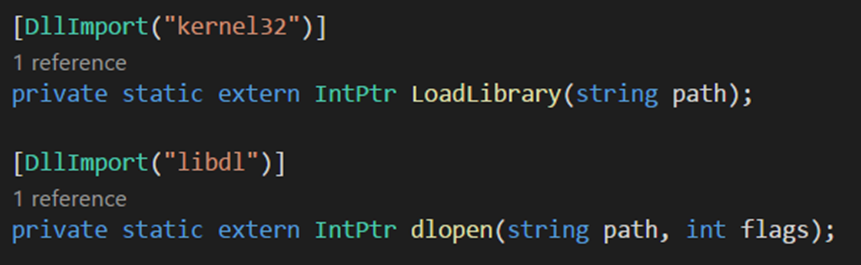
When taking dependencies (like ASP.NET Core), it may be required to load a native binary. This requires determining the correct runtime identifier and loading the correct binary at runtime.
Determine the RID:
Load the binary:
It would be great to either have some sort of capability in PowerShell to help alleviate this issue.
Another recommended approach was to update Install-Module to behave more like NuGet where it will only install the binaries required for a particular operating system or platform.