Repository navigation
Snap and MSIX install of pwsh on Ubuntu does not support Update-Help #7452

Description
Activity
/cc Travis Plunk (@TravisEz13) Could you please comment the Issue?
Aditya Patwardhan (@adityapatwardhan) I thought we changed the default target to be the user?
I verified
update-help -Scope CurrentUserfails as well with the same errorAny updates on this?
PS /home/megamorf> $PSVersionTable Name Value ---- ----- PSVersion 6.2.0-preview.2 PSEdition Core GitCommitId 6.2.0-preview.2 OS Linux 4.18.16-96.current #1 SMP PREEMPT Sun Oct 21 15:23:25 UTC 2018 Platform Unix PSCompatibleVersions {1.0, 2.0, 3.0, 4.0...} PSRemotingProtocolVersion 2.3 SerializationVersion 1.1.0.1 WSManStackVersion 3.0 PS /home/megamorf> Update-Help -Force -Verbose -Scope CurrentUser Update-Help : Read-only file system At line:1 char:1 + Update-Help -Force -Verbose -Scope CurrentUser + ~~~~~~~~~~~~~~~~~~~~~~~~~~~~~~~~~~~~~~~~~~~~~~ + CategoryInfo : NotSpecified: (:) [Update-Help], IOException + FullyQualifiedErrorId : System.IO.IOException,Microsoft.PowerShell.Commands.UpdateHelpCommandTravis Plunk (@TravisEz13) & Sebastian N. (@megamorf)
Hum! I've been using just:
Update-Help -forceWithout the "-Scope CurrentUser" parameter and is working fine on non-admin session.
Maybe the "-Scope" is not a mandatory parameter.:)
Never mind!! Only in Windows works OK.
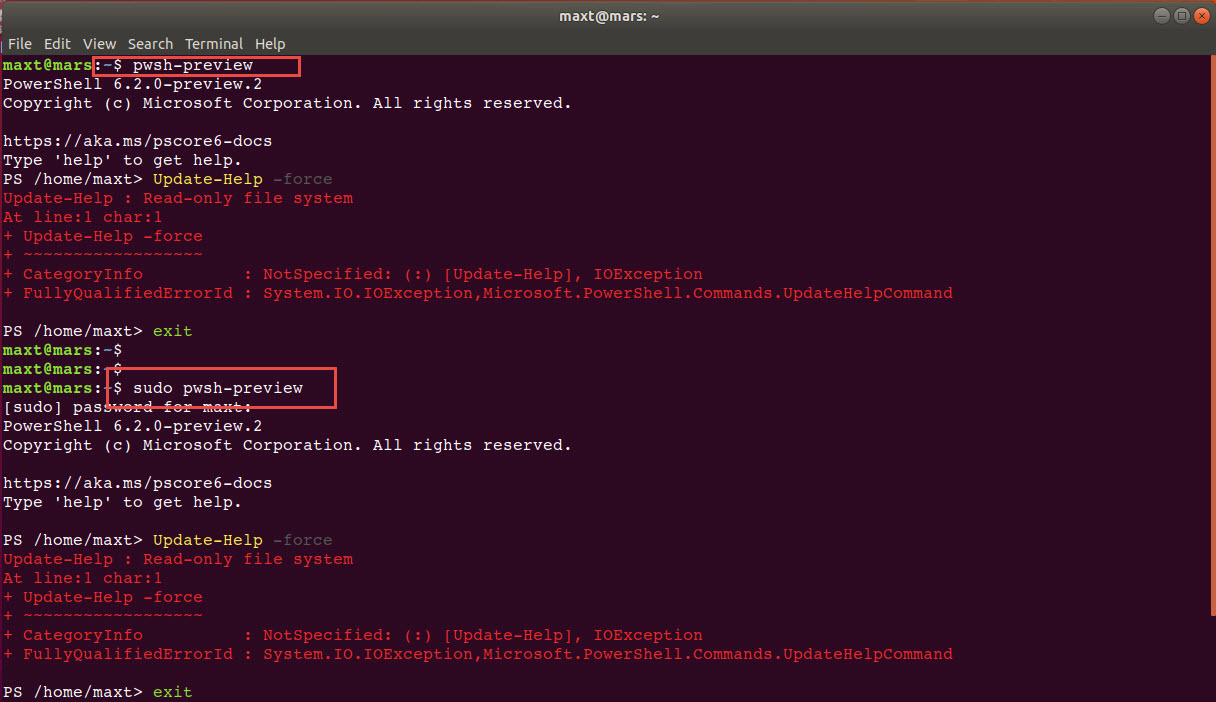
In Ubuntu 18.04, I'm getting the same error too!
maxt@mars:~$ pwsh-preview PowerShell 6.2.0-preview.2 Copyright (c) Microsoft Corporation. All rights reserved. https://aka.ms/pscore6-docs Type 'help' to get help. PS /home/maxt> Update-Help -force Update-Help : Read-only file system At line:1 char:1 + Update-Help -force + ~~~~~~~~~~~~~~~~~~ + CategoryInfo : NotSpecified: (:) [Update-Help], IOException + FullyQualifiedErrorId : System.IO.IOException,Microsoft.PowerShell.Commands.UpdateHelpCommand PS /home/maxt>BTW
You can't even use "sudo" to execute "Update-Help".
This is a bug!:)
Here is the stack trace:
PSMessageDetails      :
Exception             : System.IO.IOException: Read-only file system
                           at Interop.ThrowExceptionForIoErrno(ErrorInfo errorInfo, String path, Boolean isDirectory, Func`2 errorRewriter)
                           at Microsoft.Win32.SafeHandles.SafeFileHandle.Open(String path, OpenFlags flags, Int32 mode)
                           at System.IO.FileStream..ctor(String path, FileMode mode, FileAccess access, FileShare share, Int32 bufferSize, FileOptions options)
                           at System.IO.FileStream..ctor(String path, FileMode mode, FileAccess access, FileShare share)
                           at System.Management.Automation.Configuration.PowerShellConfig.UpdateValueInFile[T](ConfigScope scope, String key, T value, Boolean addValue)
                           at System.Management.Automation.Configuration.PowerShellConfig.WriteValueToFile[T](ConfigScope scope, String key, T value)
                           at System.Management.Automation.Configuration.PowerShellConfig.SetDisablePromptToUpdateHelp(Boolean prompt)
                           at System.Management.Automation.Help.UpdatableHelpSystem.SetDisablePromptToUpdateHelp()
                           at Microsoft.PowerShell.Commands.UpdateHelpCommand.BeginProcessing()
                           at System.Management.Automation.Cmdlet.DoBeginProcessing()
                           at System.Management.Automation.CommandProcessorBase.DoBegin()
TargetObject          :
CategoryInfo          : NotSpecified: (:) [Update-Help], IOException
FullyQualifiedErrorId : System.IO.IOException,Microsoft.PowerShell.Commands.UpdateHelpCommand
ErrorDetails          :
InvocationInfo        : System.Management.Automation.InvocationInfo
ScriptStackTrace      : at <ScriptBlock>, <No file>: line 1
PipelineIterationInfo : {}
The problem is
SetDisablePromptToUpdateHelpit always writes to the systemwide setting which are read-only in snap.This might be a good opportunity and excuse to move updatible help and profiles (which have the same problem) outside of pshome
Reacted by Bryan DadySnap allows to write to user home.
Also I guess snap allows to make any directory writable (pshome too).Please continue discussion in #9278
Reacted by Bryan DadyThe problem here is different than #9278. This cmdlet is writing the the WRONG scope even when the scope is specified. We need to fix this issue.
- changed the title
[-]Snap install of pwsh on Ubuntu does not support Update-Help[/-][+]Snap and MSIX install of pwsh on Ubuntu does not support Update-Help[/+]on Nov 6, 2019


Steps to reproduce
Expected behavior
Actual behavior
Environment data