Repository navigation
Device Request: Arctis Nova Pro Wireless #221
Description
Activity
When changing the Sidetone in Steelseries GG -> Engine.
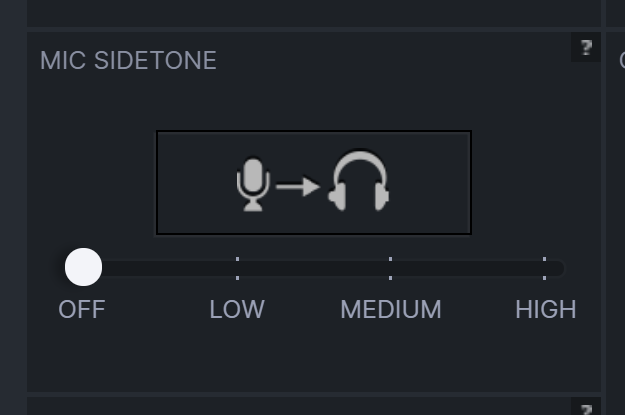
Sidetone
OFF:0000 1b 00 c0 57 e9 b6 01 e6 ff ff 00 00 00 00 09 00 ...W............ 0010 00 02 00 13 00 04 01 40 00 00 00 06 39 *00* 00 00 [email protected]... 0020 00 00 00 00 00 00 00 00 00 00 00 00 00 00 00 00 ................ 0030 00 00 00 00 00 00 00 00 00 00 00 00 00 00 00 00 ................ 0040 00 00 00 00 00 00 00 00 00 00 00 00 00 00 00 00 ................ 0050 00 00 00 00 00 00 00 00 00 00 00 ...........Sidetone
LOW:0000 1b 00 c0 b7 6f b4 01 e6 ff ff 00 00 00 00 09 00 ....o........... 0010 00 02 00 13 00 04 01 40 00 00 00 06 39 *01* 00 00 [email protected]... 0020 00 00 00 00 00 00 00 00 00 00 00 00 00 00 00 00 ................ 0030 00 00 00 00 00 00 00 00 00 00 00 00 00 00 00 00 ................ 0040 00 00 00 00 00 00 00 00 00 00 00 00 00 00 00 00 ................ 0050 00 00 00 00 00 00 00 00 00 00 00 ...........Sidetone
MEDIUM:0000 1b 00 30 e5 a3 b4 01 e6 ff ff 00 00 00 00 09 00 ..0............. 0010 00 02 00 13 00 04 01 40 00 00 00 06 39 *02* 00 00 [email protected]... 0020 00 00 00 00 00 00 00 00 00 00 00 00 00 00 00 00 ................ 0030 00 00 00 00 00 00 00 00 00 00 00 00 00 00 00 00 ................ 0040 00 00 00 00 00 00 00 00 00 00 00 00 00 00 00 00 ................ 0050 00 00 00 00 00 00 00 00 00 00 00 ...........Sidetone
HIGH:0000 1b 00 90 c2 00 b5 01 e6 ff ff 00 00 00 00 09 00 ................ 0010 00 02 00 13 00 04 01 40 00 00 00 06 39 *03* 00 00 [email protected]... 0020 00 00 00 00 00 00 00 00 00 00 00 00 00 00 00 00 ................ 0030 00 00 00 00 00 00 00 00 00 00 00 00 00 00 00 00 ................ 0040 00 00 00 00 00 00 00 00 00 00 00 00 00 00 00 00 ................ 0050 00 00 00 00 00 00 00 00 00 00 00 ...........However, this is a
URB_INTERRUPT3581 9.680435 host 2.19.4 USB 91 URB_INTERRUPT outThe wiki mentions
When it's a Set Report, you need to use hid_send_feature_report, and for a write hid_write !!. You can call those functions directly with the raw data you see at the capturing software.
I'll try and see if I can find what to do in the case of an interrupt.
If you only see URB_INTERRUPT, it could be that Sidetone is controlled via the Audio Channels. In this case a implementation is not really possible.
See: #178You can quickly check it, by calling alsamixer in the console in Linux and then see if one of the channels modify sidetone.
Thanks @Sapd!
Wouldn't something like this work?
#define ENDPOINT_OUT 0x04
static int arctis_nova_pro_wireless_send_sidetone(hid_device* device_handle, uint8_t num)
{
    int ret = -1;

    // the range of the Arctis Nova Pro Wireless seems to be from 0x00 (also off) to 0x03
    num = map(num, 0, 128, 0x00, 0x03);

    const unsigned char data_request[64] = { 0x06, 0x39, num };
    int len = 0;
    ret = libusb_interrupt_transfer(device_handle, ENDPOINT_OUT, data_request, sizeof(data_request), &len, 0);

    if (ret >= 0) {
        ret = arctis_nova_pro_wireless_save_state(device_handle);
    }

    return ret;
}
It uses
libusbinstead ofhidapi, but when I go to https://github.com/signal11/hidapi, it saysHIDAPI has four back-ends:
* Windows (using hid.dll)
* Linux/hidraw (using the Kernel's hidraw driver)
* Linux/libusb (using libusb-1.0)
* FreeBSD (using libusb-1.0)
* Mac (using IOHidManager)It seems to come with
libusb_interrupt_transfer.Also, I'm wondering why there's this here.
https://github.com/signal11/hidapi/blob/a6a622ffb680c55da0de787ff93b80280498330f/libusb/hid.c#L1076-L1085int HID_API_EXPORT hid_read_timeout(hid_device *dev, unsigned char *data, size_t length, int milliseconds) { int bytes_read = -1; #if 0 int transferred; int res = libusb_interrupt_transfer(dev->device_handle, dev->input_endpoint, data, length, &transferred, 5000); LOG("transferred: %d\n", transferred); return transferred; #endif
As if
hid_read_timeoutwould be able to calllibusb_interrupt_transfer? But it's#if 0...Anyway, you probably know
Cway more than me. I haven't doneCcode for over 10 years... so it's highly probable that my little investigation is very misguided :-).Okay, I feel dumb for not seeing that
hid_writeactually callslibusb_interrupt_transfer(here)int HID_API_EXPORT hid_write(hid_device *dev, const unsigned char *data, size_t length) { // ... if (dev->output_endpoint <= 0) { /* No interrupt out endpoint. Use the Control Endpoint */ // ... } else { /* Use the interrupt out endpoint */ int actual_length; res = libusb_interrupt_transfer(dev->device_handle, dev->output_endpoint, (unsigned char*)data, length, &actual_length, 1000); // ... } }
So I can probably use
hid_writeinstead. And ifHeadsetControluseslibusbas a backend... that should be fine, right?Wouldn't something like this work?
...Yes, it would work indeed and was also the way it was done in one of the earliest versions in HeadsetControl
Also, I'm wondering why there's this here. https://github.com/signal11/hidapi/blob/a6a622ffb680c55da0de787ff93b80280498330f/libusb/hid.c#L1076-L1085
As if
hid_read_timeoutwould be able to calllibusb_interrupt_transfer? But it's#if 0...The function seems to be fully threaded, and seems to use the
read_threadfunction in the same file, by calling the mutex (written in a very complicated way).It uses
libusbinstead ofhidapi, but when I go to https://github.com/signal11/hidapi, it saysHIDAPI has four back-ends:
- Windows (using hid.dll)
- Linux/hidraw (using the Kernel's hidraw driver)
- Linux/libusb (using libusb-1.0)
- FreeBSD (using libusb-1.0)
- Mac (using IOHidManager)
It seems to come with
libusb_interrupt_transfer.Yes, the default(?) backend is hidraw. Basically HID is a protocol on top of USB (and on top of Bluetooth). So it makes sense to usually directly call the HID functions of the respective OS.
The problem is, that libusb cannot be used directly in code, as it is incompatible with HID devices on Mac (as Mac does not allow talking to HID without the HID specific OS calls) and probably also making problems on Windows. And naturally it is not compatible with Bluetooth (should bluetooth only headsets be supported).Unfortunately, the HID protocol does not provide for direct control of audio devices. So it is a hard to solve problem, esp. cross-platform. IF sidetone is only controlled via an audio channel.
You can also post directly a Screenshot of how Wireshark parses the bytes to see if hid_write is possible (like bmRequestType etc.), as the bytes themselves are hard to intepret.
@Sapd hmmm true... it would not be compatible for MacOS... (but this device already has a MacOS compatibility from SteelSeries, btw).
It's possible that you've missed this message: #221 (comment)
And the screenshot with sidetone
HIGH.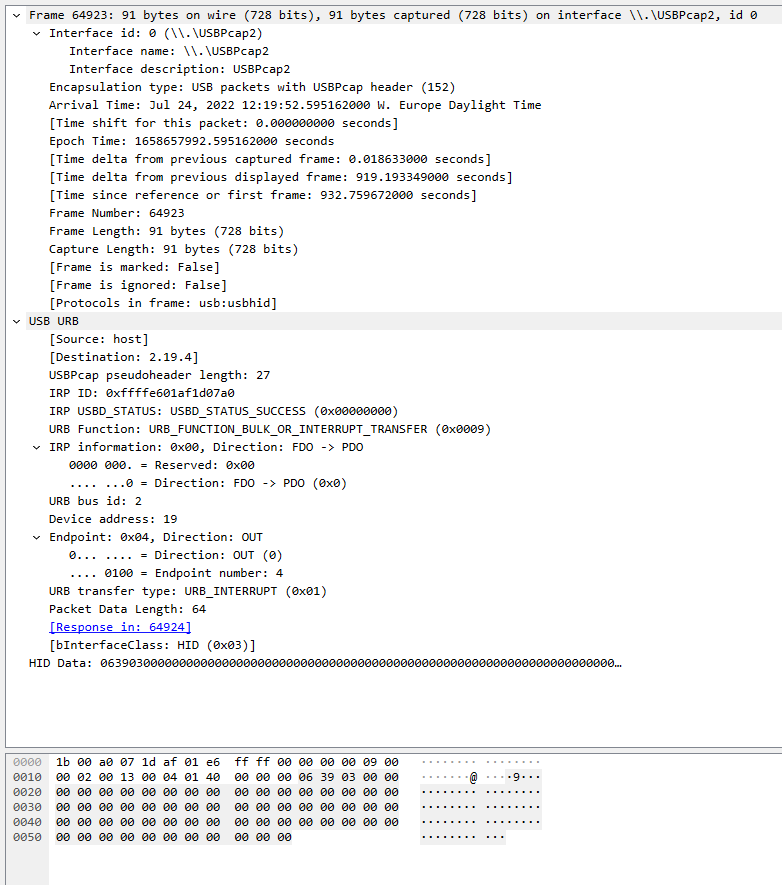
@Sapd hmmm true... it would not be compatible for MacOS... (but this device already has a MacOS compatibility from SteelSeries, btw).
It's possible that you've missed this message: #221 (comment)
And the screenshot with sidetone
HIGH.Ah yes, I cannot currently take a detailed look at that, but you can definitly try sending it.
You can btw. use the
./headsetcontrol --devfunctions for trying that (using --send)Would the new arctis nova 7 implementation fit this device?
@fyx Arctis Nova 7 support is already present in master: it was added in #233 / #248 and works for me - or at least, battery status and sidetone control are working.
In case you are on Windows: support is not yet in the latest released binaries, so you have to build from master. Or if you're in a trusting mood, you can download the build I just compiled - no promises about it staying available indefinitely though!
@Sapd hmmm true... it would not be compatible for MacOS... (but this device already has a MacOS compatibility from SteelSeries, btw).
It's possible that you've missed this message: #221 (comment)
And the screenshot with sidetone
HIGH.I'm able to get the sidetone to change via the commandline, but when I try to add the device in C I get a timeout.
Here's the commands in which I'm able to turn on and off the sidetone using the same values that you found (it also doesn't seem to work on interface 3):
Turn ON max:
headsetcontrol --dev -- --device 0x1038:0x12e0 --interface 4 --send-feature "
0x06, 0x39, 0x03"
Turn OFF: headsetcontrol --dev -- --device 0x1038:0x12e0 --interface 4 --send-feature "
0x06, 0x39, 0x00"I'm able to get the sidetone to change via the commandline, but when I try to add the device in C I get a timeout.
Here's the commands in which I'm able to turn on and off the sidetone using the same values that you found (it also doesn't seem to work on interface 3): Turn ON max: headsetcontrol --dev -- --device 0x1038:0x12e0 --interface 4 --send-feature " 0x06, 0x39, 0x03" Turn OFF: headsetcontrol --dev -- --device 0x1038:0x12e0 --interface 4 --send-feature " 0x06, 0x39, 0x00"
Can you show me the C code? When it works via the --dev commands, it must also work in code.
In case it's helpful, I have the Arctis Nova Pro Wireless (PC/Xbox version) and the following detailed info:
$ ./headsetcontrol --dev -- --list --device 0x1038:0x12e5
Device Found
  VendorID: 0x1038
 ProductID: 0x12e5
  path: /dev/hidraw1
  serial_number:
  Manufacturer: SteelSeries
  Product:      Arctis Nova Pro Wireless
  Interface:    3
  Usage-Page: 0x0 Usageid: 0x0

Device Found
  VendorID: 0x1038
 ProductID: 0x12e5
  path: /dev/hidraw2
  serial_number:
  Manufacturer: SteelSeries
  Product:      Arctis Nova Pro Wireless
  Interface:    4
  Usage-Page: 0x0 Usageid: 0x0
I tried adding the product ID 0x12e5 to
devices/steelseries_arctis_nova_7.cbut that unfortunately didn't work. For example, here's what happens when I tried to check the battery:$ sudo ./headsetcontrol -b Found SteelSeries Arctis Nova 7! Failed to set/request battery status. Error: -1: (null)Setting the sidetone using the commands in a previous comment does work, e.g. the following turns sidetone OFF:
$ ./headsetcontrol --dev -- --device 0x1038:0x12e5 --interface 4 --send-feature "0x06, 0x39, 0x00"Modifying the code so the sidetone function sends data in this format to interface 4 does allow me to modify sidetone from the command line. I'm not yet sure how I might be able to retrieve battery info. I don't know if I'll be able to take this further, but even if I don't perhaps this will be useful to others working on support for this headset.
This issue is stale because it has been open 300 days with no activity. Remove stale label or comment or this will be closed in 60 days.
This issue was closed because it has been stalled with no activity.


Description
I just received mine. I'll try and see after work if I can follow the steps from your Wiki and find the proper values.
Headset Name
Arctis Nova Pro Wireless
Device information
Detailed Device Information