Repository navigation
Image processing exception: out of memory #597
Description
Activity
How much memory is available in your azure instance? What's the code that fails here, what's the input image (size and format)?
Can you update to beta 4 and see how you get on please?
same error as mine, I updated my nuget to beta 4 last night and when I tried to run in VS2017 I got this:
Exception happens here:
using (Image image = Image.Load(filename))Exception Message:
Method not found: 'System.Span1<!!1> System.Runtime.InteropServices.MemoryMarshal.Cast(System.Span1<!!0>)'.Stack Trace:
at SixLabors.ImageSharp.Memory.ArrayPoolMemoryManager.Buffer1.get_Span() at SixLabors.ImageSharp.Image.<>c__DisplayClass0_0.<InternalDetectFormat>b__0(IImageFormatDetector x) at System.Linq.Enumerable.WhereSelectEnumerableIterator2.MoveNext()
at System.Linq.Enumerable.LastOrDefault[TSource](IEnumerable1 source, Func2 predicate)
at SixLabors.ImageSharp.Image.InternalDetectFormat(Stream stream, Configuration config)
at SixLabors.ImageSharp.Image.DiscoverDecoder(Stream stream, Configuration config, IImageFormat& format)
at SixLabors.ImageSharp.Image.Decode[TPixel](Stream stream, Configuration config)
at SixLabors.ImageSharp.Image.<>c__DisplayClass46_01.<Load>b__0(Stream s) at SixLabors.ImageSharp.Image.WithSeekableStream[T](Configuration config, Stream stream, Func2 action)
at SixLabors.ImageSharp.Image.Load[TPixel](Configuration config, Stream stream, IImageFormat& format)
at SixLabors.ImageSharp.Image.Load[TPixel](Configuration config, String path)
at SixLabors.ImageSharp.Image.Load(String path)
at Test.Controls.ImageHelper.LoadImage(String filename, Int32 size) in C:\Source\Test\Test\Controls\ImageHelper.cs:line 19
at Test.ViewModel.MainViewModel.<>c__DisplayClass140_0.b__0() in C:\Source\Test\Test\ViewModel\MainViewModel.cs:line 325
at System.Threading.Tasks.Task.InnerInvoke()
at System.Threading.Tasks.Task.Execute()Update: It seems that only the beta4 of ,NET framework (mine is 4.7.1) has the problem. My base class library also uses beta 4 (Net Standard 2.0) and did not shown any issues at all.
@Spawnkid That’s not the same exception. You’ve got reference issues.
Hi Jim, thanks for the response. I don't exactly understand why I got reference issues only when using beta 4 (in the .net 4.7 wpf). But just reverting back to beta 3 everything worked. Odd is, all the 3 netstandard classes that used by the .net 4.7 project uses beta 4 of imagesharp and imagesharp.drawing and no error was thrown out when I'm calling them. Do I need to add new reference dll when I use the beta 4 of .net 4.7 imagesharp/drawing?
@JimBobSquarePants and @jongleur1983 , i do not have an example. A customer uploaded it and i do not have the image as it didnt get saved. All i know it's a jpeg and and unknow size. We allow images to be uploaded up to 30 MB and we've configured ImageSharp to do the following:
Configuration.Default.MemoryManager = ArrayPoolMemoryManager.CreateWithMinimalPooling();I do not know how to reproduce it, nor will i be able to confirm if it's absent in V4 if i do upgrade.
@isualize do you know the memory limit of your container? If it's too low is it possible to scale it up? Any info/estimation regarding your load? (no of requests/minute)
Not my favorite advice but also try out
SimpleGcMemoryManager.@antonfirsov it's running on it's own app service plan with 3.5 GB's of RAM available. We've got autoscaling setup with the following rules:
average cpu percentage >= 70 -> increase instance count by 1
average memory percentage >= 70 -> increase instance count by 1average cpu percentage <= 50 -> decrease instance count by 1
average memory percentage <= 55 -> decrease instance count by 1The minimum number of instances is 1, the max is 6. These are the charts with running at 3 instances:
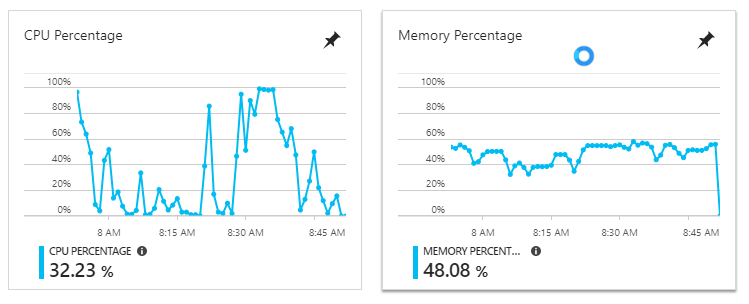
Any idea's what's wrong? It's not going above 60% memory usage according to the charts. Im not sure about using a different memory manager.. I've removed the following line and let it run a day:
Configuration.Default.MemoryManager = ArrayPoolMemoryManager.CreateWithMinimalPooling();However with the default memory manager assigned to imagesharp i'm still getting the same out of memory exceptions in the logs. :(
@isualize your usage data might be super-valuable for us!
If we add allocation tracing to beta5, are you interested sharing future ImageSharp logs with us?This would help us solving memory issues.
@antonfirsov i'd have to ask work sine it's their code, but that's definately a yes from me :)
Is there anything else i can do to help you track down the issue at the moment?
@antonfirsov We have ImageSharp.Web running in production resizing a few hundred images a day. Happy to get the logs from beta5 / nightly if that can help.
@isualize @andymac4182 thanks! 👍 @tocsoft is working on a Telemetry solution that will minimize the efforts on your side, hope we can make it into beta5.
I also hope that with #642 I can significantly reduce the memory consumption for resizing use-cases. It is planned for RC1.
Looking forward to it @antonfirsov. Once I see #642 merged I will look at trialling in in our dev environment. We are running from the myget feed currently so should be a fairly small change.
@antonfirsov thanks for the quick answer. I'll be waiting for a fix then. If you need anything, let me know.
@antonfirsov, @JimBobSquarePants just 1 question:
Regarding this post from Jim at #636:
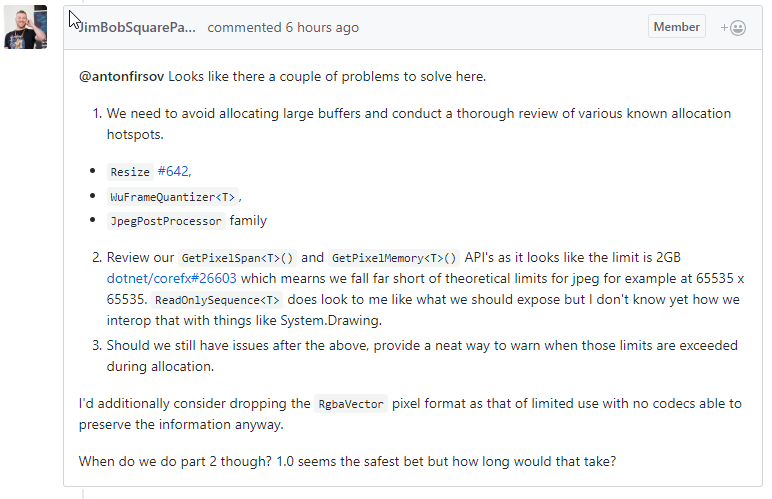
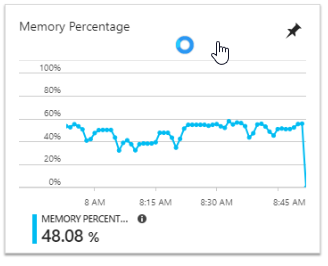
Does this issue apply here as well? Are we limited to ~2GB's in .net core? This would explain the ~60% memory usage in this chart (mentioned earlier above this post)
@isualize the upper limit for overall memory usage under a 64bit process depends on your container/OS, it can be as high as 8 TB. I've been just wondering if there is a theoretical/practical limit for a single contiguous buffer allocation putting an upper limit on our image dimensions.
Reacted by James Jackson-South@antonfirsov If you are still interested in finding a real-world consumer that can gather usage logs to help you diagnose this issue, I would be happy to help. We're using ImageSharp.Web in a production service hosted in Azure that sees a fair amount of traffic (10s of requests per second). Earlier this year we discovered that we would eventually run into lots of OutOfMemory exceptions when trying to resize images from their source resolution (2560x1440) to something that was still reasonably large (eg: 1280 width). The issues did not seem to happen if we limited our use of resizing operations to smaller resolutions (<512 width).
NOTE: We're currently running ImageSharp beta4 (and ImageSharp.Web beta3). I'm in the process of testing an upgrade to beta5 on both packages and can experiment with re-enabling large image resize requests if you think beta5 has already addressed this.
Reacted by Anton Firszov and Bernard Vander Beken@kroymann thank you, this would be very helpful, and we are super interested in this!
I'm quite busy with all kind of stuff these weeks (kinda "out of SixLabors imaginary office"), so it's unlikely that we will be able to add common logging/telemetry before 1.0.
However, if you have a logging logic in your application it would be very helpful if you share any kind of ImageSharp-specific logs with us!
Event's we are interested in:
- decoding/encoding images: format, dimensions, file sizes (if available)
- processing: parameters (eg. in case of resize: source dimensions, dest dimensions, resampler type)
- OOM (when occures): stack trace
General data:
- Timestamps for all events
- Hardware configuration (type of CPU, available memory)
If you are able to share this kind of usage data, feel free to PM me on our gitter channel.
Beta 4 is so last year. All the cool kids are on Beta 6.
Reacted by Dirk Lemstra and Anton Firszov@Tarek-Samy further memory management improvements are planned to upcoming versions. Those assemly loading errors really suck, but I think it's not a sustainable strategy to stick with an old version.
Can you open an issue describing the error you get with beta 6 adding as many details as possible? (Project structure all referenced packages etc.)
I hope we can find a workaround for you, and also help other people facing these issues.
Reacted by James Jackson-South and Robin Scheper@Tarek-Samy Heads up. There's a new update from MS where they specifically recommend a minimum of NET Framework 4.7.2 When referencing netstandard 2.0 binaries.
That's out of our hands now. You'll have to upgrade.
Reacted by Bernard Vander BekenClosing. Fixed in #888


Prerequisites
DEBUGandRELEASEmodeDescription
We deployed ImageSharp to an Azure App Service running in 64 bit mode. We've included the following runtime configuration, which let's it run in 64 bit mode:
<RuntimeIdentifiers>win-x64</RuntimeIdentifiers>I can expect this Exception to occur in 32-bit mode, but not in 64-bit mode:
SixLabors.ImageSharp.ImageProcessingException: An error occurred when processing the image using ResizeProcessor1. See the inner exception for more detail. ---> System.OutOfMemoryException: Exception of type 'System.OutOfMemoryException' was thrown.at System.Buffers.ConfigurableArrayPool
1.Rent(Int32 minimumLength) at SixLabors.ImageSharp.Memory.ArrayPoolMemoryManager.Allocate[T](Int32 length, Boolean clear) at SixLabors.ImageSharp.Memory.MemoryManagerExtensions.Allocate2D[T](MemoryManager memoryManager, Int32 width, Int32 height, Boolean clear) at SixLabors.ImageSharp.Processing.Transforms.Processors.ResizeProcessor1.OnFrameApply(ImageFrame1 source, ImageFrame1 destination, Rectangle sourceRectangle, Configuration configuration)at SixLabors.ImageSharp.Processing.Processors.CloningImageProcessor
1.CloneAndApply(Image1 source, Rectangle sourceRectangle)--- End of inner exception stack trace ---
at SixLabors.ImageSharp.Processing.Processors.CloningImageProcessor
1.CloneAndApply(Image1 source, Rectangle sourceRectangle)at SixLabors.ImageSharp.Processing.Processors.CloningImageProcessor
1.Apply(Image1 source, Rectangle sourceRectangle)at SixLabors.ImageSharp.Processing.DefaultInternalImageProcessorContext
1.ApplyProcessor(IImageProcessor1 processor, Rectangle rectangle)at SixLabors.ImageSharp.Processing.DefaultInternalImageProcessorContext
1.ApplyProcessor(IImageProcessor1 processor)at Editor.Libraries.Images.ImageExtensions.<>c__DisplayClass0_0.b__0(IImageProcessingContext
1 operation)Steps to Reproduce
To be honest, i can't reproduce it yet. Probably a customer has generated this Exception.
System Configuration
We're running this in an Azure App service running on 64-bit.
ImageSharp version:
1.0.0-beta0003
Environment (Operating system, version and so on):
Azure App Service (64 bit)
.NET Framework version:
asp.net core 2.0