Repository navigation
Saving JPEG Quality defaults to below 5 - ignoring default of 75 #845

Description
Activity
Going down the rabbit hole, it seems ImageSharp does a wrong quality estimation based on the Quantization Table. The estimation is based on a formula of ImageMagick.
Further digging i found this paper:
Determining JPEG Image Standard Quality Factor from the Quantization TablesThe code provided in the paper is what JpegSnoop uses to determine the quality factor. JpegSnoop gives me a 98.25 approx quality factor on the same image i used above
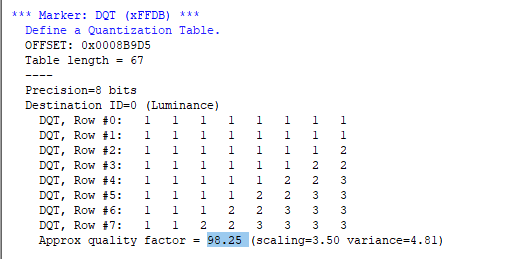
I got a 3 in ImageSharp (while the quality is clearly high)The paper is also mention the method used in ImageMagick is fairly inaccurate
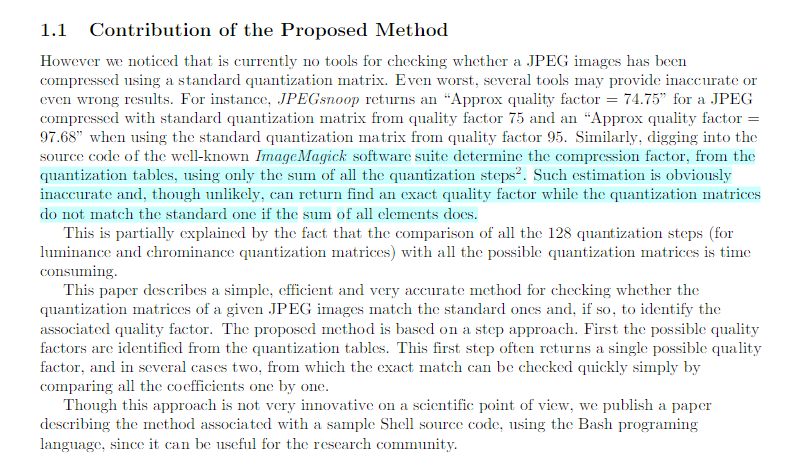
Is this where my problem lies? Is it worth further investigation?
Edit:
Using ImageMagick directly produces these qualities:

Is it just wrongly implemented in ImageSharp?Reacted by ErikVenema, Anton Firszov, James Jackson-South and Christopher de WindtWe based ours on ImageMagick but I did the port and don’t read C well at all. I’ve most likely messed it up so please have a look if you can.
I can take a look at this when I am back home in two weeks. Might be possible we made some changes in ImageMagick since this was added to ImageSharp.
Reacted by Anton Firszov, Gerard Gunnewijk, Marcel and James Jackson-South@dlemstra Just compared the current master source to the point in time source i ported from. It's identical so I must have missed something.
I've compared the code to the ImageMagick one. All the logic and table seems the same.
The quality here is set to 3, and then it always keeps hitting continue on line 109, until it exits the method with quality 3.
The only thing i don't understand is ImageMagic's version of the quality variable here what does quantval do? its not a c syntax no? does it only get the value at that position like its translated in c#?
There is a difference in the code. The sum does not check if the quantum tables are null. But that does not seem to be the case here.
Reacted by James Jackson-South@dlemstra Good spot! That should simply mean we're adding a bunch of zeros we don't need to but I've just realized
Block8x8Fdoesn't implementIEquatable<T>so we might be getting issues there.@Marcel0024 By my understanding they are simply the tables themselves.
jpeg_info->quant_tbl_ptrs[0]->quantval[53]is the 53rd index of the first quantization table.@dlemstra Confirmed. Test example1.jpg now returns 99. I'll push a fix.
Reacted by Gerard GunnewijkNice!


Prerequisites
DEBUGandRELEASEmodeDescription
Saving certain Jpeg images without defining the JpegEnconder quality defaults to a quality below 5.
There's a few jpeg I've seem with this behavior, can't pin point an common trait. Examples further below.
Steps to Reproduce
Results:
With Quality at 50:
Results:
As you can see quality 50 produces a higher quality image.
Here are 3 examples images:
quality-loss-example.zip
I've managed to track it down to SixLabors.ImageSharp.Formats.Jpeg.Components.Decoder.QualityEvaluator#EstimateQuality method.

'Normal' jpeg this method returns a 75 default quality. My example images the method returns 3 or 2.
System Configuration