Repository navigation
')}' and '))' form ligatures that you can't place the cursor between, and it's not clear how to turn it off #296
Description
Activity
- changed the title
[-]')' and '}' together form a ligature that you can't place the cursor between, and it's not clear how to turn it off[/-][+]')}' and '))' form ligatures that you can't place the cursor between, and it's not clear how to turn it off[/+]on Jan 15, 2020 Hey Ian, thanks for using Recursive and for reporting this issue! Possibly, those code ligatures aren't really needed. Strangely, though, this works quite differently on my setup, which is partly why I hadn't caught this, yet.
I'm guessing you're on Windows 10, VS Code? Recursive 1.030?
Do you use any extensions for bracket highlighting? Are you running to this in JavaScript, or something else?
I don't know of any good ways to control which code ligatures are on or off ... there are so many different ones, it would get pretty complicated to match them to stylistic sets or something similar. But yeah, perhaps the set of bracket ligatures could be either under a stylistic set or just left out of the family.
Thanks for your response. I am using 1.030 and encountering this. It wasn't present in 1.027. VSCode, Windows 10.
It seems that there are a couple issues here. The first is that you can't place the cursor in the middle of the ligature. You can do this with other ligatures, like
==>and==and?:, but not for the bracket ones like((and)). This makes it really challenging to select text or figure out where you're typing.The second issue is with bracket highlighting. I use a very popular extension called "Bracket Pair Colorizer 2" and the problem occurs with something like this:
{ text ( innerText )}. The{is highlighted as yellow and the(is purple, as expected. But then the closing)}is entirely purple, which is really confusing.Screenshot:
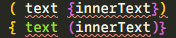
I know not every user of this font will use a bracket pair colorizer, so I think for them leaving the bracket ligatures accessible would be helpful. But for the people who do use it, it causes a serious headache.
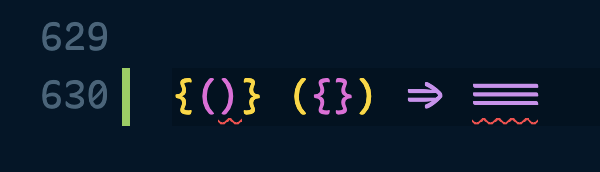
This is fixed as of v1.042. Thanks for the report, @iansan5653!
Reacted by Ian Sanders


)}and))both form ligatures that you can't put the cursor between, which can be very frustrating for programming.Also, I can't see how I can specifically turn just this ligature off, as even if I could put a cursor in the middle, they break bracket pair highlighting in code editors.