Repository navigation
Invalid cutout/slice data for rice tile compressed images. #9955
Description
Activity
Re: Magically fixed -- Are you able to see a pattern in the data for when it gets "magically fix" or not?
Did you also try this on a Linux machine, just in case the behavior is OS-dependent?
Re: Magically fixed -- Are you able to see a pattern in the data for when it gets "magically fix" or not?
Example of the "magically fixed" file:
        outfile = "output_image_compressed.fits.fz"
        infile = "ADP.2018-11-15T10_35_06.695.fits.fz" # you can get the input file from http://dataportal.eso.org/dataPortal/file/ADP.2018-11-15T10:35:06.695
        hdus = fits.open(infile, scale_back=True)
        slices = tuple([slice(start, stop) for (start, stop) in [(0, 1000), (0, 1000)]])
        hdus[1].data = hdus[1].data[slices]
        new_hdus = hdus[0:2]
        print(hdus[1].data[1][0:100])
        new_hdus.writeto(outfile, overwrite=True)
        hdus.close()

        hdus = fits.open(outfile)
        print(hdus[1].data[1][0:100])
        hdus.close()
If you pass the
scale_back=Trueflag, then the outputs is correct. If you don't, then you can again see the characteristic pattern and output data are invalid. But this flag does not always help (see the file I mentioned in my first comment).Did you also try this on a Linux machine, just in case the behavior is OS-dependent?
Yes, the same effects were produced on a Linux box:
Linux-3.10.0-693.el7.x86_64-x86_64-with-redhat-7.4-Nitrogen
Python 3.7.3 (default, Mar 27 2019, 22:11:17) [GCC 7.3.0]
Numpy 1.17.2
astropy 3.2.2Thanks for all the info! Personally, I do not have time to look into this, but hopefully your info will help whoever who is interested to investigate this further.
Also, please look at other issues related to FITS with Rice compression to see if you are experiencing one of the symptoms of those known issues.
Can you share a file to reproduce this issue ? In private if needed.
Also please try with the latest version of Astropy.
@saimn links to both files are provided with the code snippets. They are publicly available via ESO data portal:
http://dataportal.eso.org/dataPortal/file/ADP.2020-02-12T10:26:25.400
http://dataportal.eso.org/dataPortal/file/ADP.2018-11-15T10:35:06.695I will check with astropy 4.0
edit: The same results with 4.0
Ok I found the reason why
scale_backflag sometimes works and sometimes doesn't -> it all depends on theBSCALEkeyword value. In my two example files the only difference is that in the first oneBSCALEis1.and thus parts of the astropy code related to scaling the image are not applied and thescale_backpart is also skipped.Specifically I think this part is the key:
self.data = np.array(np.around(self.data), dtype=_type) # 0.7.7.1
It does similar thing to what I was suggesting in my initial comment as strange way to "fix" the problem ->
np.uint32(hdus[1].data[slices]), however this is only done in caseBSCALEis not1, so does not get applied for my first image, causing the outcome to be invalid. By changing the BSCALE to some1+epsilonI was able to get valid results.The question is: why is there a special case for
BSCALE=1, and why in such case astropy yields invalid results?edit: In fact just doing
self.data = np.array(self.data)in this place is enough to trigger the valid results forBSCALE=1, which suggests that it's all about some action triggered by assigningdatato HDU.@Pharisaeus - Thanks, I missed the links above in the comments, sorry. So this is indeed a bug, I think the problem is that it goes through a feature of ImageHDU, where the data from an HDU that has not been modified is copied directly, which here cannot work with the tiles algorithm.
Thanks for looking into this!
For now I will simply use thedo_not_scale_image_data=Trueplusdata = np.array(data)trick, because it seems to produce correct results in any case. Hopefully you can figure out how to fix this "properly" in the meantime.Reacted by P. L. LimActually that's the same issue as #2150 (I thought it was different initially). So one easy workaround is to use something like:
hdus[1].data = np.ascontiguousarray(hdus[1].data[slices])And the fix is basically the same thing but I need to write some tests, should be doable soon.
Reacted by S.P.Reacted by P. L. Lim- added 2 commits that reference this issue
on Feb 19, 2020


EDIT: See #9955 (comment) for workaround.
Description
When slicing rice tile compressed image, the output data are invalid. In some cases this gets magically fixed if
scale_back=Trueflag is passed when opening the fits file, but on some other cases it has no effect.To clarify what I mean by valid and invalid data, see attached examples.
Expected behavior
This is what I would expect to get:
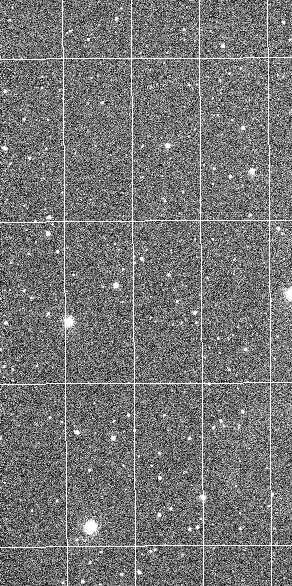
Actual behavior
And this is what is produced:
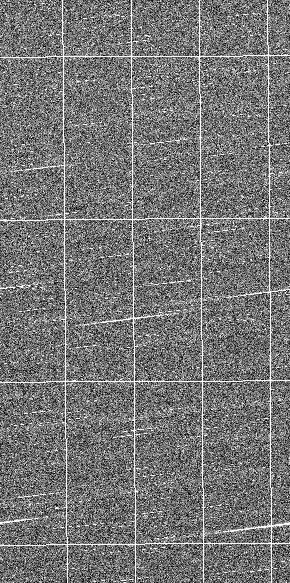
(obviously the data are totally wrong, but the images show this much better than tables)
Steps to Reproduce
This can be easily reproduced by:
It's also pretty easy to see that the actual data saved to the file, are not what you'd expect. If we extend the above example to:
We get two very different sets of data printed out, even though they should be the same.
Interestingly enough, if I cast the data to
uint32, then the output is correct:But this in turn sets BSCALE to 1, and since the cast is to unsigned values, if there were negative values in the data, then they get turned into maxint, which is also a bit inconvenient.
I tried using the
do_not_scale_image_data=Trueandscale_back=Trueflags but they have no effect.Am I doing something wrong here?
System Details
Windows-10-10.0.17763-SP0
Python 3.7.3 (default, Apr 24 2019, 15:29:51) [MSC v.1915 64 bit (AMD64)]
Numpy 1.16.4
astropy 3.2.1