

nvim-flow is a Neovim workflow runner for file-based commands defined in .flow.yml, with cursor-local execution for shell code blocks in Markdown.
Create a .flow.yml next to your project files:
demo.py:
  cmd: python "{{filepath}}" --name mike
Open the file in Neovim and run :FlowRun or :FlowDebug — nvim-flow resolves the command for the current file and executes it in a split. In the default buffer mode, output is rendered in a normal Neovim buffer so narrow splits do not hard-wrap PTY output:
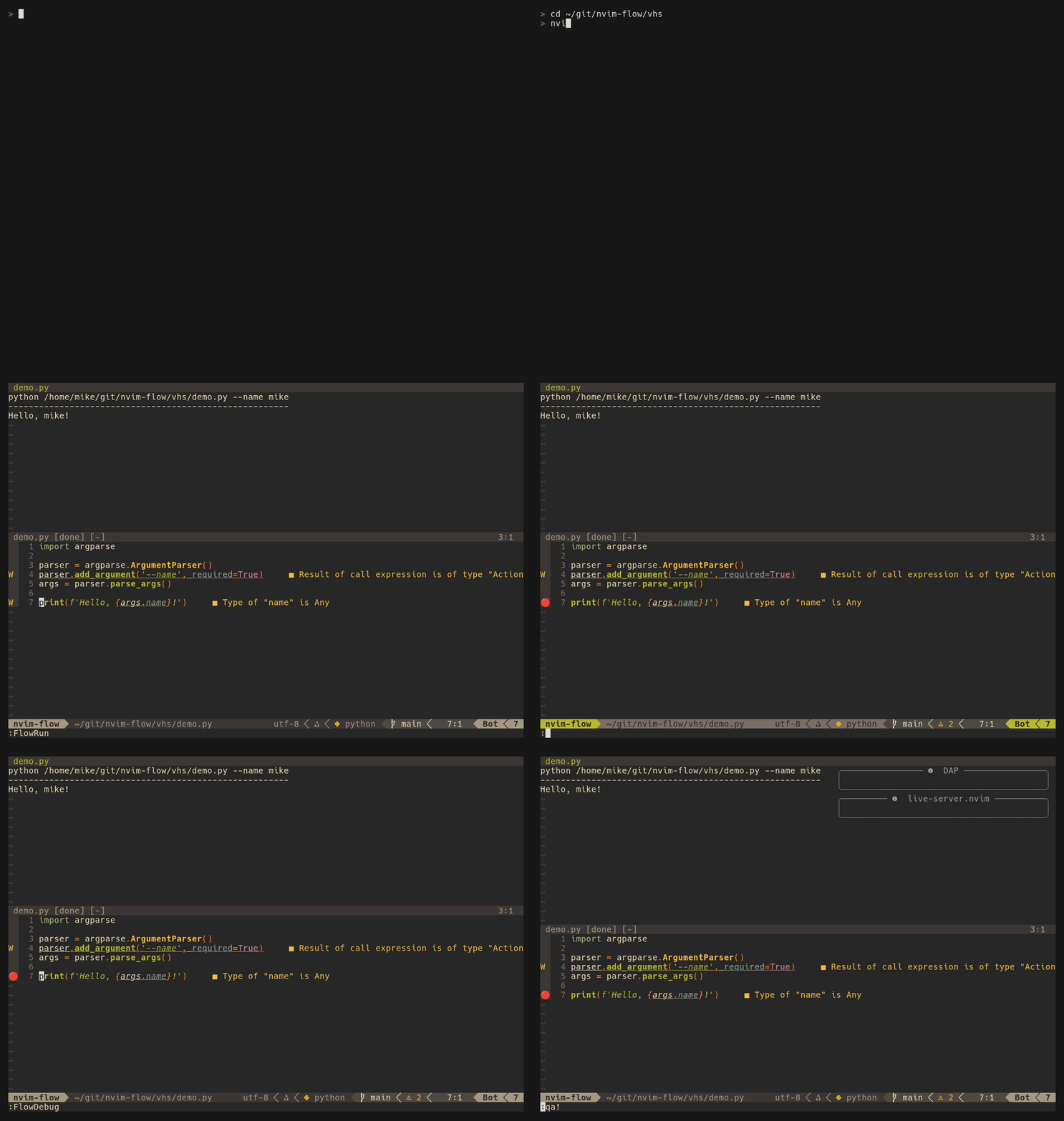
I wanted a workflow that matches how I actually work in Neovim: simple YAML config, fast command resolution, and quick run/debug feedback. YAML workflows have no parser dependencies; Markdown execution uses Neovim's Tree-sitter API and a Markdown parser.
| Feature | nvim-flow | overseer.nvim | code_runner.nvim | zuzu.nvim |
|---|---|---|---|---|
| Config format | YAML (.flow.yml) + Markdown shell fences |
Lua / VS Code tasks.json |
Lua / JSON | Lua |
| Per-file command args | ✅ native YAML + locked Markdown templates | ❌ filetype-level only | ||
| Recursive config merge | ✅ dir → $HOME |
❌ | ❌ | ❌ |
nvim-dap integration |
✅ built-in :FlowDebug |
✅ via preLaunchTask |
❌ | ❌ |
| Quickfix integration | ✅ Python traceback | ✅ generic output parsing | ❌ | ✅ diagnostics |
| Command preview | ✅ floating window | ❌ | ❌ | ❌ |
| Wrapped output buffer | ✅ built-in buffer mode | ❌ no documented plain-buffer output | ❌ terminal-style modes only | |
| Jump to config source | ✅ :FlowEdit |
❌ | ❌ | ❌ |
| Match resolution | basename / glob / ext / folder / repo | manual task selection | filetype-based | filetype + dir depth |
| Multi-step workflows | ❌ | ✅ | ❌ | ❌ |
| VS Code tasks compat | ❌ | ✅ | ✅ JSON import | ❌ |
| Dependencies | none for YAML; Tree-sitter Markdown parser for Markdown | none (pure Lua) | none (pure Lua) | none (pure Lua) |
| Setup complexity | low — one YAML file | high — Lua templates + ECS components | low — Lua table | medium — Lua profiles + hooks |
Why nvim-flow? If you run the same file with different arguments across projects and want those profiles stored in a simple, versionable YAML file next to your code — nvim-flow is the lightest path. overseer.nvim is the better choice for complex multi-step build pipelines or VS Code compatibility. code_runner.nvim works well if filetype-level granularity is sufficient. zuzu.nvim offers advanced profile resolution but has a steeper learning curve.
- First-class
nvim-dapintegration through:FlowDebug - Run an entry from
.flow.ymlor a shell fence from Markdown under the cursor (:FlowRunHere) - Run supported Markdown shell fences in the configured output split
- Flow source jump (
:FlowEdit) to open the matched.flow.ymldefinition - File lock support (
:FlowToggleLock) - Command preview in a floating window (
:FlowPreview) - Python traceback -> quickfix parser (
:FlowQuickfix) - YAML config (
.flow.yml) - Recursive flow discovery + merge (file dir ->
$HOME, closer wins) - Optional
matcharrays for reusable command definitions - Configurable keymaps through
setup()
return {
  { "bytehound-labs/nvim-flow" },
}return {
{
"bytehound-labs/nvim-flow",
event = { "BufReadPost", "BufNewFile" },
cmd = { "FlowRun", "FlowRunHere", "FlowDebug", "FlowEdit", "FlowToggleLock", "FlowPreview", "FlowQuickfix" },
opts = {
config_file = ".flow.yml",
cwd = "repo", -- "repo" | "nvim"
terminal_height = 15,
terminal_position = "top",
output_mode = "buffer",
edit_open_command = "tabedit",
stop_at_home = true,
show_command = true,
keymaps = {
run = "<CR>",
debug = "<leader>fd",
edit = "<leader>fe",
toggle_lock = "<leader>fl",
preview = "<leader>fp",
quickfix = "<leader>fq",
},
},
},
}setup() is only needed when you want to override defaults.
If you skip setup, nvim-flow still works with built-in defaults.
require("nvim-flow").setup({
  config_file = ".flow.yml",
  terminal_height = 15,
  terminal_position = "top", -- "top" | "bottom"
  output_mode = "buffer", -- "terminal" | "buffer"
  edit_open_command = "tabedit", -- e.g. "tabedit" | "edit" | "split" | "vsplit"
  stop_at_home = true,
  show_command = true,
  keymaps = {
    run = nil,
    debug = nil,
    edit = nil, -- suggested: "<leader>fe"
    toggle_lock = nil,
    preview = nil,
    quickfix = nil,
  },
})config_file(string, default:".flow.yml")- Filename to search while walking directories upward.
cwd("repo" | "nvim", default:"repo")"repo"runs in the nearest Git repository root for the command context; outside a repository it uses the context file's directory."nvim"captures Neovim's current working directory when the command is resolved. Neither policy changes Neovim's own working directory.
terminal_height(number, default:15)- Height of the terminal split used by
FlowRun.
- Height of the terminal split used by
terminal_position("top" | "bottom", default:"top")- Where the terminal split opens.
output_mode("terminal" | "buffer", default:"buffer")"buffer"— stream command output into a normal scratch buffer with soft-wrap enabled. The buffer name reflects job state:flow://<source_key> [running],flow://<source_key> [done], orflow://<source_key> [failed:N]. Press<C-c>while focused on the flow buffer to interrupt the running job. Avoids hard-wrap caused by narrow terminal PTY width."terminal"— run commands in a PTY-backed terminal buffer.
edit_open_command(string, default:"tabedit")- Vim command used by
FlowEditto open the matched.flow.ymllocation (for example:tabedit,edit,split,vsplit).
- Vim command used by
stop_at_home(boolean, default:true)- Stop recursive config search at
$HOMEinstead of/.
- Stop recursive config search at
show_command(boolean, default:true)- Print resolved command before execution output.
keymaps(table, default: allnil)- Optional mappings for:
rundebugedittoggle_lockpreviewquickfix
- Set any key to
nilto leave it unmapped.
- Optional mappings for:
:FlowRun- run the resolved flow command in the configured split output mode:FlowRunHere- run the flow entry under the cursor in.flow.yml, or the shell fence under the cursor in Markdown:FlowDebug- debug the resolved flow command, or the Markdown shell fence under the cursor:FlowEdit- open the matched.flow.ymlfile and jump to the resolved command line:FlowToggleLock[ {filepath}]- toggle lock (or set lock to explicit path):FlowSet {filepath}- compatibility alias for setting lock directly:FlowPreview- show the resolved command for the current (or locked) file, or the Markdown shell fence under the cursor:FlowQuickfix- parse the last flow output as Python traceback and fill quickfix
FlowEdit follows the same YAML resolution pipeline as FlowRun, then opens the corresponding .flow.yml and jumps to the resolved command line. This remains true when the current buffer is Markdown.
By default it opens in a new tab (edit_open_command = "tabedit"). Change edit_open_command if you prefer edit, split, or vsplit.
Sometimes you want to launch a flow without opening its source file. From inside a .flow.yml buffer, place the cursor anywhere in an entry's block (its key, match, cmd, or comments) and run :FlowRunHere. nvim-flow runs the entry the cursor sits in, bypassing match resolution entirely. It reads the live buffer, so unsaved edits are honored.
The run keymap is context-aware: inside a .flow.yml buffer it runs the entry under the cursor, and inside a Markdown buffer it runs the shell fence under the cursor. Elsewhere it runs the flow resolved for the current file. A single mapping — for example run = "<CR>" — covers all three contexts.
Entries whose cmd and cwd use no file-scoped template variables ({{filepath}}, {{filename}}, {{ext}}) run from the .flow.yml context — ideal for named, project-level tasks. When either field uses a file-scoped variable, nvim-flow resolves a single source file with this precedence:
- the locked file, if one is set (
:FlowSet/:FlowToggleLock) - otherwise the entry's
match/key path patterns are globbed under the repo root (or config directory outside Git), requiring exactly one match
If a file-scoped variable is used but zero or multiple files match (and no lock is set), the run is aborted with a message — narrow the match, or set a lock. Project variables ({{dir}}, {{repo}}, {{folder}}) resolve from the resolved source file, or from the .flow.yml's own location when no source file is needed. Commands run from the nearest Git root for that context by default. An entry's optional cwd overrides the execution directory; relative paths are resolved from the selected default directory, POSIX or Windows absolute paths are used directly, and template variables are expanded. The target must be an existing directory.
compare-prosafe-pou:
  match: ['**/compare/prosafe/pou.py']
  cwd: .
  cmd: |
    uv run yok compare prosafe pou /mnt/nas /mnt/hp --controller SCS0130 --detail
Running :FlowRunHere anywhere in this block executes the command directly. The path-like match alone does not resolve a target; add a file-scoped variable to cmd or cwd, or set a lock, if the command needs one.
Open a .md or .markdown file and place the cursor anywhere inside a closed sh, bash, or shell fenced code block, including on its opening or closing fence. Run :FlowRunHere or use the configured run keymap. Fences inside blockquotes and lists are supported. The code block is read from the live buffer, so unsaved changes are honored. FlowPreview previews the selected block, and FlowDebug passes it to the existing debugger integration.
# Project checks

```bash
printf 'Running checks for {{repo}}\n'
```
Shell fence labels select executable blocks; they do not change the interpreter. Commands use Bash by default, and a shebang on the first line of the block overrides it. Normal execution uses the configured terminal or buffer split, and output is not inserted into the Markdown document. FlowRun and FlowEdit continue to use .flow.yml resolution when a Markdown file is open.
Markdown execution requires the Tree-sitter markdown parser to be available on Neovim's runtime path. Install the parser with nvim-treesitter or another parser installer; nvim-flow uses Neovim's built-in Tree-sitter API and does not require the nvim-treesitter plugin at runtime. YAML workflows continue to work without the Markdown parser. If the parser is missing, Markdown actions report an error instead of falling back to YAML.
The default execution directory is the nearest Git root for the Markdown context, or the Markdown file's directory when it is outside a Git repository. Project template variables such as {{dir}}, {{repo}}, and {{folder}} still refer to the Markdown file's location. If the block uses file-scoped variables ({{filepath}}, {{filename}}, or {{ext}}), set a target with :FlowSet path/to/file; the locked target supplies both template context and the repository root. Use an explicit shell cd for a one-block directory exception. To restore inherited Neovim-cwd behavior for all commands, configure cwd = "nvim". The resolved directory is shown separately in :FlowPreview; no policy changes Neovim's working directory.
Only sh, bash, and shell fences are executable. Unlabeled blocks, other languages, empty blocks, and fences without a closing delimiter are rejected. Opening a Markdown file never runs its contents, but running a shell fence executes its commands locally, so only run blocks from documents you trust.
For file-based commands, FlowDebug uses the same resolution pipeline as FlowRun, then parses the command to create a debug configuration for nvim-dap and calls dap.continue(). Generated Python and Node configurations use the resolved execution directory. In a Markdown buffer, it instead uses the shell fence under the cursor.
Supported command families include python / python3, uv run ... (including module mode), and node.
Example:
py:
  cmd: python "{{filepath}}" --env dev
Running :FlowDebug on a Python buffer resolves this flow, builds the debug launch config, and starts the debugger.
default:
  cmd: '{{filepath}}'

py:
  cmd: python "{{filepath}}"

main.py:
cmd: python "{{filepath}}" --mode=devpython-group:
match: [py, pyw, 'test_*.py', 'scripts/']
cmd: python "{{filepath}}"If match is omitted, the top-level key is used as before.
Resolution order:
- basename (e.g.,
main.py) matchentries- folder name
- repo name
- extension (
.pythenpy) default
Example definitions for each priority type:
main.py:
  cmd: echo "1 basename"

python-group:
  match: [py, 'test_*.py']
  cmd: echo "2 match"

tests:
  cmd: echo "3 folder"

my-repo:
  cmd: echo "4 repo"

.py:
  cmd: echo "5 extension-dot"

py:
  cmd: echo "5 extension"

default:
  cmd: echo "6 default"
Mini winner scenario:
- For
/work/my-repo/tests/main.py,main.py(basename) wins. - If the basename entry is removed,
matchentries are checked before folder/repo/extension/default.
If multiple match entries apply, nvim-flow uses deterministic precedence: nearest config file first, then YAML declaration order within that file.
When running from /a/b/c/file.py, nvim-flow searches for .flow.yml in:
/a/b/c/.flow.yml/a/b/.flow.yml/a/.flow.yml- ... up to
$HOME/.flow.yml(ifstop_at_home = true)
All found configs are merged. Closer files override farther files.
nvim-flow expands these variables in cmd:
{{filepath}}{{dir}}{{filename}}{{ext}}{{repo}}{{folder}}
- Default runner: terminal split (
runner: vimor omitted) - Terminal split opens at the top by default; set
terminal_position = "bottom"to open below. - With
show_command = true, the separator line is sized to the command width (capped by terminal width in terminal mode; display width in buffer mode). output_mode = "terminal"uses Neovim's terminal/PTY path. Long lines follow the PTY width, so narrow splits hard-wrap output just like any other terminal pane.output_mode = "buffer"uses a normal scratch buffer for display, preventing hard-wrap on long lines. The buffer has soft-wrap and linebreak enabled. Commands run in a PTY-backed job with the split width/height so terminal-aware programs andstty sizestill see terminal dimensions, and output streams into the buffer as it arrives. New output is followed automatically like terminal mode; auto-follow pauses if you scroll up and resumes when the cursor returns to the last line. The buffer name tracks state asflow://<source_key> [running],flow://<source_key> [done], orflow://<source_key> [failed:N]. Press<C-c>while focused on the flow buffer to interrupt the running job. To answer an interactive prompt (e.g. ay/nquestion), pressi/awhile focused on the running flow buffer — nvim-flow asks for a line and forwards it to the job's stdin. Terminal cursor-control sequences are stripped from the rendered text, so progress-style redraws degrade to plain text instead of leaking raw escape codes. Full carriage-return/progress-line emulation is not part of this mode.- Debug runner:
runner: debugor:FlowDebug(requiresnvim-dap)
If your commands print wide tables, long paths, or text-heavy logs, buffer mode is usually the better fit. It keeps the same split UX while rendering output like a normal wrapped buffer instead of a fixed-width terminal.
Flow output buffers are tagged so external cleanup/session logic can recognize and protect them:
b:nvim_flow_terminal = 1marks both terminal- and buffer-mode flow buffers.b:nvim_flow_job_idholds the running job id in buffer mode while a command is in flight, and is cleared on exit.require("nvim-flow.runner").is_buffer_job_running(bufnr)reports whether a buffer-mode job is still alive. Unlike terminal buffers, buffer-mode output lives in a normalnofilebuffer, so Neovim's native "job still running" protection does not apply — use this helper before force-closing flow buffers (e.g. in a "close all" mapping) to avoid killing a running command.require("nvim-flow.runner").send_buffer_input(bufnr, text)forwardstextverbatim to a running buffer-mode job's stdin (include a trailing\nto submit a line);prompt_buffer_input(bufnr)asks for a line viavim.ui.inputand sends it. These power the built-ini/amappings and let you script interactive responses.
FlowQuickfix parses the last FlowRun output and extracts Python traceback lines. Relative filenames are resolved against that command's working directory:
File "/path/file.py", line 42, in ...
Then it populates and opens the quickfix list.
This plugin uses plenary's busted harness.
Markdown tests require a Tree-sitter markdown parser on the runtime path. CI builds the pinned tree-sitter-markdown v0.3.2 parser and provides it through MARKDOWN_PARSER_PATH. Local test setups can install the parser with nvim-treesitter.
Run tests:
nvim --headless -u tests/minimal_init.lua \
  -c "PlenaryBustedDirectory tests/nvim-flow { minimal_init = 'tests/minimal_init.lua' }" \
-c "qa"This repo includes a VHS tape at vhs/nvim-flow-demo.tape that records a demo using ./vhs/demo.py and .flow.yml.
The demo shows:
:FlowRun— execute the command in the configured split output mode- Set a breakpoint with
<space>db, then:FlowDebug(nvim-dap)
Run it with:
./vhs/record-demo-gif.shThe script records vhs/nvim-flow-demo.gif, publishes it to vhs.charm.sh, rewrites the README demo embed URL, and stages the README update.
lefthook runs that script before commit on the main branch when staged changes include Lua files (**/*.lua). On other branches it is skipped, so feature-branch commits stay fast and do not rewrite the demo embed.
This project was inspired by ideas from vim-flow, with substantial changes for this codebase and workflow:
https://github.com/jonmorehouse/vim-flow