Repository navigation
More nuanced color support #364
Description

Changing the colour of text in terminals is tricky, because you never know what the background colour is, so the text may be unreadable or just look ugly. This is especially an issue with lighter backgrounds.
A -no-color switch or something to that would be useful. Right now I have to pipe stuff to cat to make the colours go away, which isn't very convenient.
Activity
joshtriplett commentedon Feb 12, 2020
@arp242 It's possible (albeit tricky) to detect whether the terminal has a light or dark background. Alternatively, there are a few colors that work well on both.
zapo commentedon Feb 19, 2020
Maybe something similar to
ls --colorflag would make sense like I suggested in #447 :mislav commentedon Feb 19, 2020
@arp242 Thank you for reporting! We would appreciate screenshots of low-readability of gh output in various terminal color configurations. (If the data is sensitive, you could run the same command against an open source repo.)
Git has excellent configurability regarding disabling/forcing/changing default colors— perhaps we should allow some configurability as well.
limzykenneth commentedon Feb 29, 2020
I'm using a white background on my terminal and also finding text, especially grey text very hard to read. I'm attaching a screenshot. Some configurability would be nice but I would prefer some nice defaults to start with that could work with common dark and light backgrounds.
trych commentedon Mar 6, 2020
Have the same issue with a white background. Especially bad with some inline code snippets:
juanibiapina commentedon Mar 27, 2020
I'd like to add that I'm piping output to
fzfand I can't get any colors because they get disabled by default. Whatever solution is found here, I think it should also include the option to force colors.Here's an example:
doi-t commentedon Apr 24, 2020
I also have a problem with color. I'm using Iterm2 Builtin Solarized Dark.
Gray color text is completely invisible as shown below.

It seems cli/cli v0.7.0 now supports
NO_COLOR.I wonder if it is desirable to implement something like
gh config set color offto disable color only forghcommand andgh config set color lightto enable Light option for a white background. 🤔Ultimately, I want to keep using my favorite terminal color scheme without disabling
ghcolor output. 😢[-]No way to disable colour output[/-][+]More nuanced color support[/+]Schahen commentedon May 27, 2020
In my opinion
--no-coloris something very useful however having an opportunity to have a coloured output tuned for white screen is even a better option.vilmibm commentedon May 27, 2020
we should have a light theme mode for sure. I don't think we have an issue for that yet.
keysmashes commentedon Jun 8, 2020
is there any particular reason for the issue body text to be printed in a non-default colour? personally I find the grey text to be a little hard to read even on a dark background.
also the output of
gh issue viewis at least partially unreadable (either the body text or the author/timestamp) on both dark and light backgrounds for me, fwiw:screenshots
vilmibm commentedon Jun 9, 2020
No real reason; it's just the default behavior of the markdown library we're using. Part of this issue should be auditing its palette to ensure legibility in more contexts.
benknoble commentedon Jul 18, 2020
This is a dark background/palette (dracula-based) in Alacritty; it's mildly more readable in Terminal.app (but the them is slightly different). Some text is effectively invisible:
Personally, I think this needs to be a bigger priority than it seems to be now (based on the Feb 12 issue creation and not much traction/progress to date). I understand that new features are fun or sexy, but
ghdoesn't yet meet a minimum of usability for certain users—and I don't think they should be ignored!To put it a little more strongly, I am saddened that this is not a Must have in the backlog—there is a real accessibility concern here, not just an issue about "not my favorite colors." I understand if that needs to be a separate issue from this one. Even just the ability to stop using color altogether—or maybe rely on high contrast/bolding for a few elements—could be a big improvement. But you probably want to consult with someone who knows what they're talking about in this space.
Contrast seems to be the biggest legibility issue, based on the screenshots I'm seeing.
auouymous commentedon Jul 19, 2020
This patch disables color.
The following patch and glamour 20200527 would allow disabling color with the GLAMOUR_STYLE=notty environment variable. Or setting it to ansi, light, dark or a custom style the user creates.
mislav commentedon Jul 21, 2020
Here is how one could currently disable color output from all gh commands:
NO_COLORenvironment variablegh repo view | catIn the future we will add equivalents of
--color=neverand--color=alwaysflags to explicitly disable or force color output.I've opened a PR to address the issue with markdown rendering on light terminal backgrounds.
@doi-t I'm really puzzled by themes such as "Builtin Solarized Dark" in iTerm. Here is it in action:
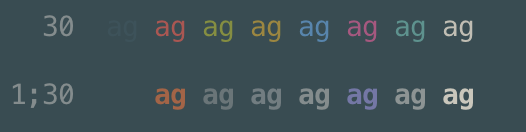
Observe that "bold black" (
1;30) that we use as equivalent for "gray" is virtually invisible, and other "bold" colors are mostly converted to grayscale.For comparison, here is iTerm with a more default setting:
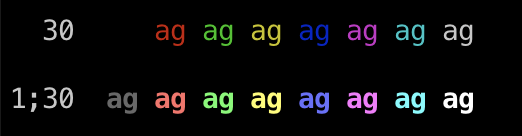
However, as more people report problems with how what we render "gray" looks in their color schemes, I'm beginning to think that we never should have used
1;30("bold/increased intensity black") as a way to render gray color jqlang/jq#1252. We will revisit this in subsequent updates.fmcgough commentedon Sep 3, 2020
I'm finding that the
NO_COLORenvironment variable isn't respected when I rungh pr create, meaning that the default suggested title for a pull request isn't visible on my light terminal background (I only realised it was there by highlighting the text). Would be good to see this addressed at the same time as markdown rendering.mislav commentedon Sep 16, 2020
Hi all 👋 thank you for all the reports!
We've fixed:
For new issues with color that you experience in current
trunkor after the next release, please open a new issue. 🙇@juanibiapina Forcing colors is now possible using
CLICOLOR_FORCE=1, but that still doesn't trigger the nice table + colors layout fromgh issue/pr listthat we reserve for TTY output only. We aim to enable thefzfusage as you are describing in a future release ✨doi-t commentedon Sep 21, 2020
Awesome! I tested it with
trunkbranch and the gray color is now nicely printed out. 🤩slafs commentedon Jul 14, 2021
Hello. Sorry for commenting on a closed and old issue. I'm currently struggling with displaying a nice preview functionality with fzf i.e. trying to do something like
but as mentioned here, the display in preview isn't very pretty.
@mislav you mentioned
Any more details on that? Should I open a new issue?
vilmibm commentedon Jul 15, 2021
@slafs Feel free to open a new issue specifically about this.
enmanuelr commentedon Oct 19, 2021
I had no idea
fzfcould that. That's pretty awesome. This will be the way I look at PRs moving forward.mislav commentedon Oct 20, 2021
fzf protip using GH_FORCE_TTY:
timja commentedon Oct 20, 2021
Wow cool, is there a way to combine that with checkout so that when you press enter on one it gets checked out?
mislav commentedon Oct 20, 2021
@timja Of course! Anything is possible. The fzf tool will print out the line that was selected when pressing Enter; you can then feed that line into any other program. For example, the
mislav/gh-branchextension uses fzf to checkout the selected branch https://github.com/mislav/gh-branch/blob/fd4f3de8253040e865712f287eadb0022471a759/gh-branch#L102-L111timja commentedon Oct 20, 2021
Thanks! Installed it, not quite what I was after but gives me enough to build my own
❤️
slafs commentedon Oct 20, 2021
Hmmmmm @mislav this should give a "richer" output of the the PR than what you've attached in the screenshot. The issue view seems OK though.
Compare:
with:
I'm on
gh version 2.1.0 (2021-10-14)BTW. I can open a separate issue if you want.dandavison commentedon Jan 10, 2026
Sorry to comment on an old issue, but I couldn't find a single up-to-date place with instuctions for using
ghfor light background terminal users. Some of the discussion above is about colors in rendered markdown. It's still the case today that markdown rendered by commands such asgh pr viewuses grey text that's not readable against a white terminal background, and it isn't obvious fromghdocumentation how to fix this.gh config set accessible_colors enabledmerely changes it to use the terminal's default white color (37) which isn't the solution.However, setting the underlying markdown rendering library to use its light theme fixes it:
GLAMOUR_STYLE=light