Repository navigation
gh run view: --log returns empty #5011
Description
Activity
Hi, can you reproduce this in an open source repo, for example ours?
gh run view -R cli/cli --log --job 4768147741You can also set the
DEBUG=apienvironment variable to see verbose logging. Even if you probably can't paste us the full output due to privacy reasons, maybe you could scan it to see if some part of it stands out to you and which you can share here?Lastly, what is your gh version and operating system? Thank you
Hello, I'm experiencing the same issue. Running the following:
gh run view --log --job=5873545885Results in no output. This job viewed in the web UI works just fine.
Reacted by Elizabeth Santorella and Ryan Williams@braddeibert Are you able to reproduce the problem in an open source repo?
Does the problem persist when trying to view other jobs in the same repo?
Does setting
DEBUG=apireveal any extra information? Feel free to post the logs in a gist or here after scrubbing out personal information.With
GH_DEBUG=true, running the same command spits out a couple requests to "api.github.com":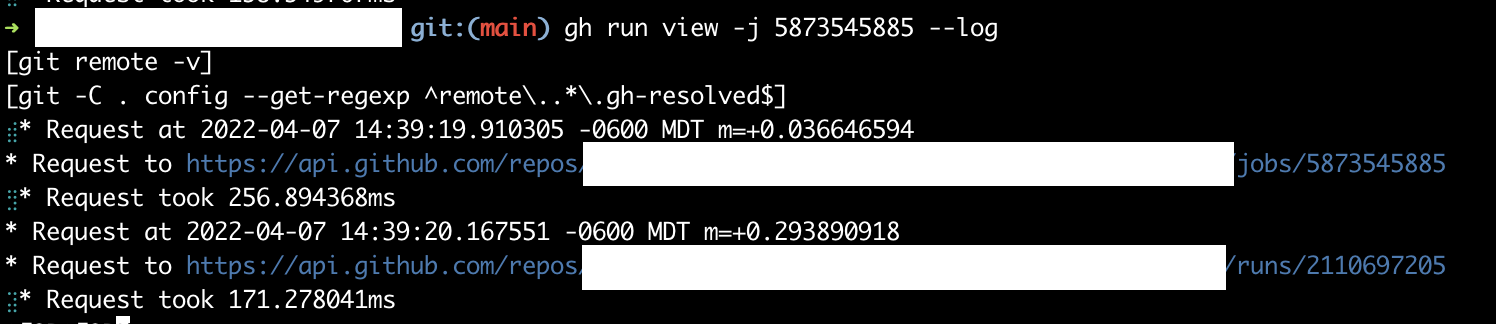
Those are both returning the following:
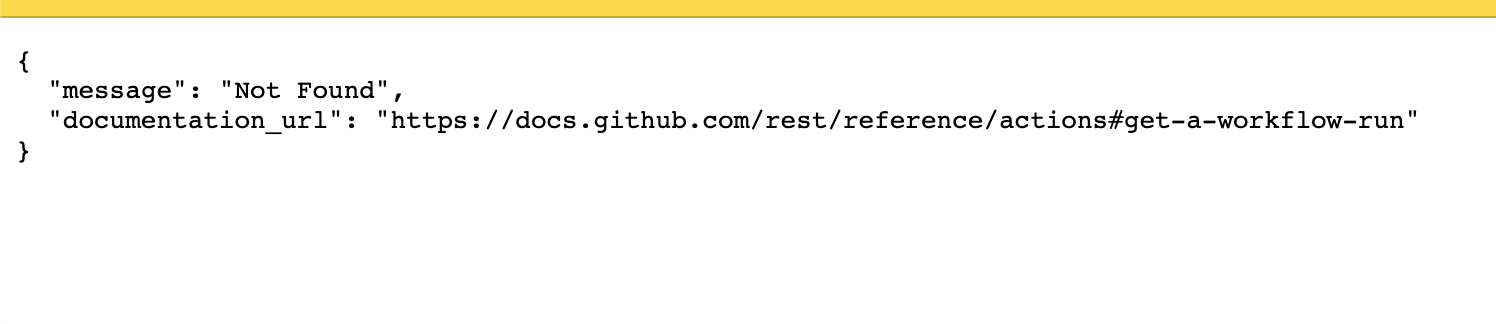
Trying to view logs for different jobs in the same repo seems to produce the same result.
@braddeibert If you set
GH_DEBUG=apiorDEBUG=api, as per my previous comment, the log will also contain HTTP traffic information such as complete queries and response JSON.If the response to these requests is 404 not found, are you sure that you are passing the right job ID?
This job viewed in the web UI works just fine.
Where did you find the job ID in the web UI?
Also, I'm puzzled that even though a 404 might be happening under the scenes, your command did not produce any output. I get this for invalid jobs:
$ gh run view --log --job=5873545885 failed to get job: HTTP 404: Not Found (https://api.github.com/repos/cli/cli/actions/jobs/5873545885)Closing due to lack of activity, please provide additional information if you would like our help with continued debugging 🙇
Hello,
I am having the same issue:
$ gh --version
gh version 2.12.1 (2022-06-09)
https://github.com/cli/cli/releases/tag/v2.12.1
$ gh run view --job=6813037845

X dev Deploy · 2468513429
Triggered via push about 44 minutes ago

X terragrunt-apply / Terragrunt apply in 8m14s (ID 6813037845)
  _ Set up job
  _ Checkout
  _ Setup Terraform
  _ Setup Terragrunt
  X Terraform Apply
  _ Post Checkout
  _ Complete job

ANNOTATIONS
X Process completed with exit code 1.
terragrunt-apply / Terragrunt apply: .github#6065


To see the logs for the failed steps, try: gh run view --log-failed --job=6813037845
Here is the output of the command:
$ GH_DEBUG=true DEBUG=api gh run view --job=6813037845 --log-failed
[git remote -v]
[git -C . config --get-regexp ^remote\..*\.gh-resolved$]
* Request at 2022-06-09 15:42:51.948675224 +0200 CEST m=+0.015870397
_* Request to https://api.github.com/repos/XXXXXXXXXXXXXXXXX/actions/jobs/6813037845
_* Request took 508.389505ms
* Request at 2022-06-09 15:42:52.457877855 +0200 CEST m=+0.525073023
* Request to https://api.github.com/repos/XXXXXXXXXXXXXXXXX/actions/runs/2468513429
_* Request took 209.415868ms
$ curl  https://api.github.com/repos/XXXXXXXXXXXXXX/actions/jobs/6813037845
{
  "message": "Not Found",
  "documentation_url": "https://docs.github.com/rest/reference/actions#get-a-job-for-a-workflow-run"
}
$ curl  https://api.github.com/repos/XXXXXXXXXXXXX/actions/runs/2468513429
{
  "message": "Not Found",
  "documentation_url": "https://docs.github.com/rest/reference/actions#get-a-workflow-run"
}
I hope it could help.
Kind regards,
JMReacted by mkq, Richard Fu and Scott Wyman Neagle41 remaining items
I have the same issue, no logs for the jobs if I use
gh run view --log --job "${jobid}"but I do get logs if I access the API directly, i.e.gh api \ -H "Accept: application/vnd.github+json" \ -H "X-GitHub-Api-Version: 2022-11-28" \ /repos/${owner}/${repo}/actions/jobs/${jobid}/logs@knrc can you provide a link, or your workflow yaml, or some redacted form, if it is private. Without seeing the workflow it will be very hard to figure out where the discrepancy is.
@williammartin The issue seems to be a mismatch in the expectations of the
attachRunLogcode versus the contents of the run log.The code appears to be expecting individual logs for each step, creating regexps for each, however that's not what I'm seeing come back in the zip. The log zip only contains two files,
0_mark-building.txtwhich contains the log for all steps in the job, andmark-building/system.txtwhich contains a few lines about the runner and waiting for it to come online.If you could provide a sample workflow yaml that produces the same structure, that would be very helpful.
Here's a job where
gh run view --logerroneously exits 0 while printing no logs:gh run view --job 40019409570 --log # ❌ exits 0, prints nothingI don't see any issues with the job name, or other causes mentioned above.
Same issue with the corresponding workflow run:
gh run view --log 14276171882 # ❌ exits 0, prints nothingReacted by William MartinSame here with
2.70.0, failed with or w/o--log:> gh run view ? Select a workflow run X <Blah blah blah> [main] 16m55s ago head: |: No such file or directory head: cat: No such file or directory > gh run view 14608596784 --log head: |: No such file or directory head: cat: No such file or directory > gh run view --job 40982301786 --log head: |: No such file or directory head: cat: No such file or directory
Repo Link
Failed Workflow I wanna log (So Cursor can read the log and fix the error)@furic without including the repo we can't reproduce your example.
Reacted by Richard Fu@ryan-williams this is almost certainly because the new results service is replacing disallowed chars in filenames with
_rather than the empty space. @babakks can you file a new issue for this.See contents:
➜  run-log-14276171882-1743811298 ll
total 37704
-rw-rw-r--  1 williammartin  staff   1.9M Nov 30  1979 10_build (ubuntu-24.04, 3.11) _ build.txt
-rw-rw-r--  1 williammartin  staff    24K Nov 30  1979 11_build (ubuntu-24.04, 3.11) _ lint.txt
-rw-rw-r--  1 williammartin  staff   1.8M Nov 30  1979 12_build (macos-latest, 3.9) _ build.txt
-rw-rw-r--  1 williammartin  staff   1.8M Nov 30  1979 13_build (macos-latest, 3.13) _ build.txt
-rw-rw-r--  1 williammartin  staff   1.9M Nov 30  1979 14_build (ubuntu-24.04, 3.13) _ build.txt
-rw-rw-r--  1 williammartin  staff   1.9M Nov 30  1979 15_build (ubuntu-24.04, 3.12) _ build.txt
-rw-rw-r--  1 williammartin  staff   1.7M Nov 30  1979 16_build (macos-latest, 3.12) _ build.txt
-rw-rw-r--  1 williammartin  staff   1.8M Nov 30  1979 17_build (macos-latest, 3.10) _ build.txt
-rw-rw-r--  1 williammartin  staff   1.8M Nov 30  1979 18_build (macos-latest, 3.11) _ build.txt
-rw-rw-r--  1 williammartin  staff   1.9M Nov 30  1979 19_build (ubuntu-24.04, 3.10) _ build.txt
-rw-rw-r--  1 williammartin  staff   1.9M Nov 30  1979 9_build (ubuntu-24.04, 3.9) _ build.txt
drwxr-xr-x  3 williammartin  staff    96B Apr 23 11:54 build (macos-latest, 3.10) _ build
drwxr-xr-x  3 williammartin  staff    96B Apr 23 11:54 build (macos-latest, 3.11) _ build
drwxr-xr-x  3 williammartin  staff    96B Apr 23 11:54 build (macos-latest, 3.12) _ build
drwxr-xr-x  3 williammartin  staff    96B Apr 23 11:54 build (macos-latest, 3.13) _ build
drwxr-xr-x  3 williammartin  staff    96B Apr 23 11:54 build (macos-latest, 3.9) _ build
drwxr-xr-x  3 williammartin  staff    96B Apr 23 11:54 build (ubuntu-24.04, 3.10) _ build
drwxr-xr-x  3 williammartin  staff    96B Apr 23 11:54 build (ubuntu-24.04, 3.11) _ build
drwxr-xr-x  3 williammartin  staff    96B Apr 23 11:54 build (ubuntu-24.04, 3.11) _ lint
drwxr-xr-x  3 williammartin  staff    96B Apr 23 11:54 build (ubuntu-24.04, 3.12) _ build
drwxr-xr-x  3 williammartin  staff    96B Apr 23 11:54 build (ubuntu-24.04, 3.13) _ build
drwxr-xr-x  3 williammartin  staff    96B Apr 23 11:54 build (ubuntu-24.04, 3.9) _ build
The workflow uses build matrix which uses
/as a separator:name: TileDB-SOMA Python CI (Full) # This workflow calls ./python-ci-single.yml on the full {os} x {python version} # matrix. Since that's CI-resource-intensive, it runs only for main branch and # releases. on: push: branches: - main - 'release-*' release: types: [published] # You can also invoke this workflow manually from # https://github.com/single-cell-data/TileDB-SOMA/actions/workflows/python-ci-full.yml # to test a working branch on the full matrix. workflow_dispatch: jobs: build: strategy: fail-fast: false matrix: # TODO: decide on Windows CI coverage os: [ubuntu-24.04, macos-latest] # os: [ubuntu-24.04, macos-latest, windows-2019] # https://github.com/single-cell-data/TileDB-SOMA/issues/1849 python-version: ['3.9', '3.10', '3.11', '3.12', '3.13'] include: - os: ubuntu-24.04 cc: gcc-13 cxx: g++-13 - os: macos-latest cc: clang cxx: clang++ uses: ./.github/workflows/python-ci-single.yml with: os: ${{ matrix.os }} python_version: ${{ matrix.python-version }} cc: ${{ matrix.cc }} cxx: ${{ matrix.cxx }} report_codecov: ${{ matrix.os == 'ubuntu-24.04' && matrix.python-version == '3.11' }} run_lint: ${{ matrix.os == 'ubuntu-24.04' && matrix.python-version == '3.11' }} secrets: inherit
Reacted by Ryan Williams@williammartin thank you! I thought the
/separator might be causing an issue, but AFAICT I'm unable to configure/change it, as that part of the job name is auto-generated by GHA.If you can file a fresh issue about it (or want me to), that would be great. I was going to try to put together an MRE but it seems like you've already confirmed the issue.
If you are up for writing the issue that would be great thanks.
@williammartin I filed #10853; it doesn't seem as simple as "
/in job names":- I also get no logs from simple jobs (without
matrix/workflow_callor/s in names), e.g. 41001342582. - The same workflow+job returns logs fine in my fork: 41020345782 (with
matrix/workflow_call, and/in job names).
AFAICT, the issue is specific to the single-cell-data/TileDB-SOMA repo, and doesn't happen in my fork ryan-williams/TileDB-SOMA.
Can continue discussion on #10853…
- I also get no logs from simple jobs (without
I just got here searching for why
gh run viewwould be returning nothing/empty output.Reacted by Alex Drysdale and Scott Wyman Neagle- I don't know how things have evolved lastly, but at some point there was the idea that gh itself should cope with the different formats used to provide the logs. I wish this will not happen as it would not be fair to other interfaces, compared to having a clear and well-documented API for fetching thelogs, on which all the clients, including but not limited to gh could rely.


Describe the bug
The
--logparameter (and--log-failed) returns nothing.gh run view --job 4749057122 --loggives an empty response for all job ids.Everything else works fine.
Steps to reproduce the behavior
gh run view --job 4749057122 --logExpected vs actual behavior
I would expect to see the logs that I can see in the web view.
Logs