Repository navigation
docs(readme): update UI screenshot to new v1.4 dashboard - #2839
myasnikovdaniil wants to merge 1 commit into
Conversation


Assisted-By: Claude <[email protected]>
Signed-off-by: Myasnikov Daniil <[email protected]>
 github-actions
Bot
added
size/XS
github-actions
Bot
added
size/XS

Summary of ChangesHello, I'm Gemini Code Assist1! I'm currently reviewing this pull request and will post my feedback shortly. In the meantime, here's a summary to help you and other reviewers quickly get up to speed! This pull request improves the project documentation by replacing an outdated dark-themed UI screenshot with the current v1.4 dashboard view, ensuring that the README accurately represents the latest version of the platform. Highlights
New Features🧠 You can now enable Memory (public preview) to help Gemini Code Assist learn from your team's feedback. This makes future code reviews more consistent and personalized to your project's style. Click here to enable Memory in your admin console. Using Gemini Code AssistThe full guide for Gemini Code Assist can be found on our documentation page, here are some quick tips. Invoking Gemini You can request assistance from Gemini at any point by creating a comment using either
Customization To customize the Gemini Code Assist for GitHub experience, repository maintainers can create a configuration file and/or provide a custom code review style guide (such as PEP-8 for Python) by creating and adding files to a Limitations & Feedback Gemini Code Assist may make mistakes. Please leave feedback on any instances where its feedback is incorrect or counterproductive. You can react with 👍 and 👎 on Gemini (@gemini-code-assist) comments. If you're interested in giving your feedback about your experience with Gemini Code Assist for GitHub and other Google products, sign up here. Footnotes
|

📝 WalkthroughWalkthroughThe README banner image reference is updated from a Cozystack screenshot to a new Cozystack user interface carousel image pointing to ChangesDocumentation
Suggested labels
Suggested reviewers
Poem
🎯 1 (Trivial) | ⏱️ ~2 minutes 🚥 Pre-merge checks | ✅ 5✅ Passed checks (5 passed)
✏️ Tip: You can configure your own custom pre-merge checks in the settings. ✨ Finishing Touches🧪 Generate unit tests (beta)
Thanks for using CodeRabbit! It's free for OSS, and your support helps us grow. If you like it, consider giving us a shout-out. Comment |

![gemini-code-assist[bot]](https://avatars.githubusercontent.com/in/956858?s=60&v=4)

There was a problem hiding this comment.
Code Review
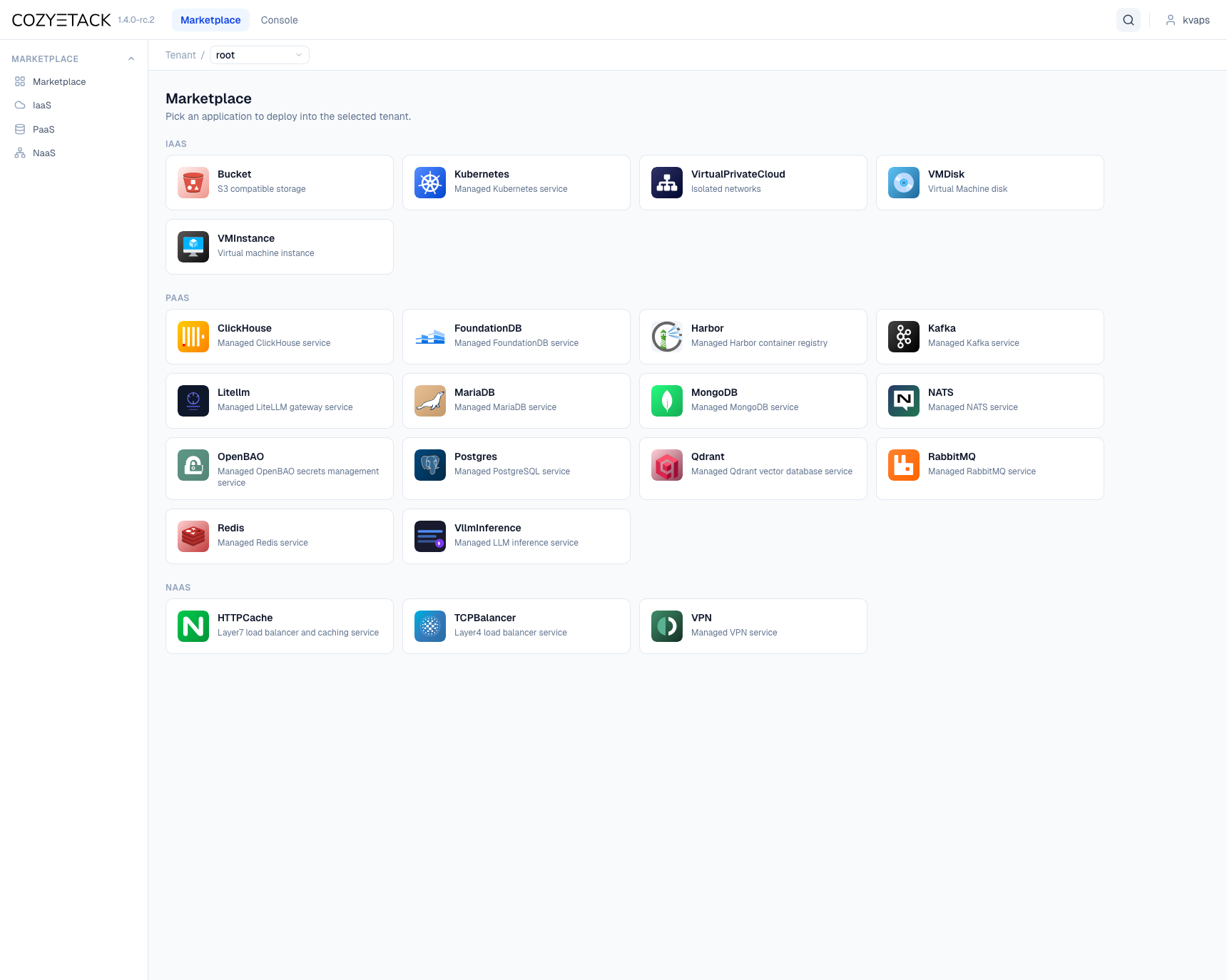
This pull request updates the Cozystack user interface screenshot URL in the README.md file to point to a new carousel image. There are no review comments, and I have no feedback to provide.
Important
The consumer version of Gemini Code Assist on GitHub is being sunset. Starting June 18, 2026, new organization installations will be blocked, and all code review activity will officially cease on July 17, 2026.
For more details on the timeline and next steps, please review the Help Documentation.
![coderabbitai[bot]](https://avatars.githubusercontent.com/in/347564?s=60&v=4)

There was a problem hiding this comment.
🧹 Nitpick comments (1)
README.md (1)
23-23: 💤 Low valueConsider a more descriptive alt text.
The alt text "Cozystack user interface" is functional, but could be more specific to match the PR objectives and improve accessibility. Consider updating it to reflect that this is the v1.4 dashboard Marketplace view.
📝 Suggested improvement
- +🤖 Prompt for AI Agents
Verify each finding against current code. Fix only still-valid issues, skip the
rest with a brief reason, keep changes minimal, and validate.

In `@README.md` at line 23, Replace the generic alt text "Cozystack user
interface" in the Markdown image tag (the string inside the square brackets for
the image with URL https://cozystack.io/img/carousel/1.png) with a more specific
description such as "Cozystack v1.4 dashboard Marketplace view" so the image’s
alt text accurately reflects the PR objective and improves accessibility.
🤖 Prompt for all review comments with AI agents
Verify each finding against current code. Fix only still-valid issues, skip the
rest with a brief reason, keep changes minimal, and validate.

Nitpick comments:
In `@README.md`:
- Line 23: Replace the generic alt text "Cozystack user interface" in the
Markdown image tag (the string inside the square brackets for the image with URL
https://cozystack.io/img/carousel/1.png) with a more specific description such
as "Cozystack v1.4 dashboard Marketplace view" so the image’s alt text
accurately reflects the PR objective and improves accessibility.

|
need to add new screenshots with new logo |


 Aleksei Sviridkin (lexfrei)
left a comment
Aleksei Sviridkin (lexfrei)
left a comment
Aleksei Sviridkin (lexfrei)
left a comment
There was a problem hiding this comment.
LGTM — approving.
Business context: refreshes the README banner from the legacy dark UI screenshot to the current v1.4 Marketplace dashboard.
Blockers: none.
- The new image resolves and is a valid asset, not a dangling link. Evidence:
GET https://cozystack.io/img/carousel/1.pngreturns HTTP 200,content-type: image/png, 1720x1374, 230350 bytes, and renders the v1.4.0-rc.2 Marketplace view that matches the PR description (README.md:23). - The replaced
screenshot-dark.pngis referenced nowhere else in the tree, so no stale links remain. Evidence:git grep screenshot-darkreturns no matches.
Non-blocking:
- The new URL targets a positionally-indexed carousel slide (
img/carousel/1.png) rather than a stably-named asset. If the website carousel is reordered or its slides are replaced,1.pngcan silently become a different image and change what the README banner shows. The replacedscreenshot-dark.pngwas a stable, descriptive name. Consider targeting a stably-named asset, or vendoring the screenshot into the repo so the banner is pinned. Evidence: README.md:23https://cozystack.io/img/carousel/1.png. - The alt text
Cozystack user interfacecould name the specific view (for example, the v1.4 Marketplace dashboard) to improve accessibility. Evidence: README.md:23.
This is a draft and the author has signalled a follow-up to add new-logo screenshots, so the asset may be refreshed again; the change as written is correct on its own.
|
Closing in favour of #3484. The blocker here is producing dashboard captures on the current logo, not the README edit — that is a one-line swap and the last step. No point holding an approved one-liner open while waiting on images. Branch |
2 participants


What this PR does
Replaces the README UI screenshot with the new v1.4 dashboard (Marketplace view). The previous image showed the legacy dark UI; the website gallery was already refreshed with new captures, so the README now points to the up-to-date one.
Release note
Summary by CodeRabbit