


tflens lets you compare Terraform modules across environments.
Note
tflens is alpha software. Its behaviour and interface are likely to change for a while.
Download a pre-built binary from the latest release. See Verifying release artifacts for instructions on verifying your download.
You can also install from source using the go toolchain:
go install github.com/dhth/tflens@latestCreate a configuration file if you do not already have one:
tflens config sample > tflens.ymlEdit the generated file with the paths to your .tf files and labels for your environments. The sample defines a comparison named apps and extracts version numbers from each module's source attribute.
Validate the configuration, then run the comparison:
tflens config validate
tflens compare-modules apps
For three environments named dev, prod-us, and prod-eu, the output might look like this:
 module       dev        prod-us     prod-eu     in-sync

 module_a     1.0.24     1.0.24      1.0.24      ✓
 module_b     0.2.0      0.2.0       -           ✗
 module_c     1.1.1      1.1.1       1.1.0       ✗
- means the module is missing from that environment or does not define the selected attribute. By default, missing values count as out of sync; use --ignore-missing-modules to ignore their absence. Terminal comparisons exit with a non-zero status when modules are out of sync, so you can also use them in CI.
| Command | What it does |
|---|---|
tflens config sample |
Print a sample configuration |
tflens config validate |
Validate the configuration |
tflens compare-modules <COMPARISON> |
Compare modules for a named comparison |
tflens help |
Show all commands and flags |
Run tflens <command> --help for details about a particular command.
tflens reads configuration from tflens.yml in the current directory by default. Use --config-path (or -c) with config validate or compare-modules to read a different file. Source paths are relative to the current directory, not the configuration file.
Each comparison has a name, an attribute to compare, and at least two sources. The generated sample configuration looks like this:
# tflens.yml

compareModules:
  # Define one or more named comparisons.
  comparisons:
    - name: apps
      # The module attribute to compare, such as source or version.
      attributeKey: source
      # Compare at least two .tf files. Paths are relative to the current directory.
      sources:
        - path: environments/dev/virginia/apps/main.tf
          # This label appears in the comparison output.
          label: dev
        - path: environments/prod/virginia/apps/main.tf
          label: prod-us
        - path: environments/prod/frankfurt/apps/main.tf
          label: prod-eu

  # Optional. Extract version numbers instead of comparing the full attribute.
  # Applies to all comparisons unless overridden by a comparison.
  # Uses the first capture group; falls back to the full value if there is no match.
  valueRegex: 'v?(\d+\.\d+\.\d+)'
Add more entries to comparisons to compare other groups of modules. For Terraform Registry modules, use attributeKey: version to compare the configured version attributes rather than the source addresses.
Without valueRegex, tflens compares the full attribute value. The regex above extracts 1.3.0 from a source such as [email protected]:owner/repo//modules/module_a?ref=module-a-v1.3.0.
Set valueRegex under compareModules to apply it to all comparisons, or under an individual comparison to override it for that comparison.
tflens uses the first capture group. If the regex does not match or has no capture group, it compares the original attribute value.
To exclude specific modules, add ignoreModules to the comparison:
ignoreModules:
  - module_x
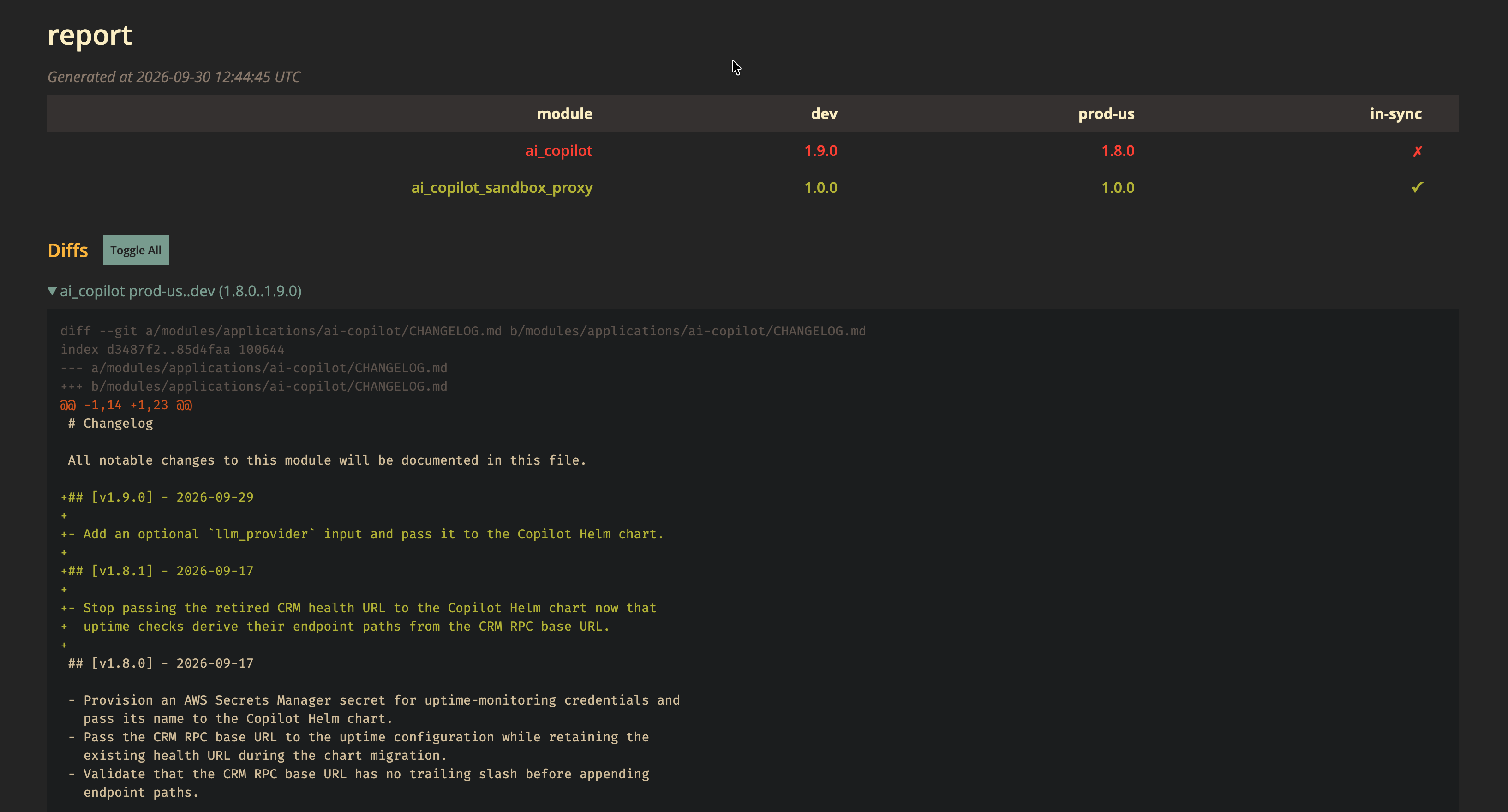
- module_yGenerate a report you can open in a browser:
tflens compare-modules apps --output-format htmlThe report is written to tflens-report.html by default. Set --html-output to choose another path, --html-title to change the title, or --html-template to use a custom template.

If the compared values are version tags, you can include diffs in terminal or HTML output. Add diffConfig to the comparison, choosing the base and head environment labels and a command that generates the diff:
diffConfig:
  baseLabel: prod-us
  headLabel: dev
  cmd: ["./scripts/generate-diff.sh", "apps"]
Provide your own script or command. tflens passes it these environment variables:
| Variable | What it contains |
|---|---|
TFLENS_DIFF_BASE_REF |
Compared value from the base environment |
TFLENS_DIFF_HEAD_REF |
Compared value from the head environment |
TFLENS_DIFF_MODULE_NAME |
Name of the module being compared |
The command's stdout becomes the diff. Enable diff generation with --include-diffs.
Each release includes checksums for all artifacts. The checksum file is signed using cosign (version 3.1.3).
Every release artifact’s origin and integrity can be verified using the GitHub CLI:
gh attestation verify <file> --repo dhth/tflensReplace x.y.z below with the release version you want to verify.
-
Get the checksum and cosign signature bundle from the release:
curl -sSLO https://github.com/dhth/tflens/releases/download/vx.y.z/tflens_x.y.z_checksums.txt
curl -sSLO https://github.com/dhth/tflens/releases/download/vx.y.z/tflens_x.y.z_checksums.txt.sigstore.json
-
Verify the checksum file's signature:
cosign verify-blob \ --bundle tflens_x.y.z_checksums.txt.sigstore.json \ --certificate-identity-regexp 'https://github\.com/dhth/tflens/\.github/workflows/.+' \ --certificate-oidc-issuer "https://token.actions.githubusercontent.com" \ tflens_x.y.z_checksums.txt -
Download the archive for your platform and validate its checksum. For example, for Linux x86-64:
curl -sSLO https://github.com/dhth/tflens/releases/download/vx.y.z/tflens_x.y.z_linux_amd64.tar.gz
sha256sum --ignore-missing -c tflens_x.y.z_checksums.txt
-
Once both checks pass, extract the archive:
tar -xzf tflens_x.y.z_linux_amd64.tar.gz
./tflens -h