Repository navigation
Layout Explorer not displaying accurate height of Widget in visualizer #2175
Description
Activity
- changed the title
[-]Layout Explorer not showing the actual height of Widget[/-][+]Layout Explorer not displaying accurate height of Widget in visualizer[/+]on Jun 20, 2020 flutter doctor -v
[✓] Flutter (Channel master, 1.20.0-1.0.pre.132, on Mac OS X 10.15.5 19F101, locale en-GB) • Flutter version 1.20.0-1.0.pre.132 at /Users/tahatesser/Code/flutter_master • Framework revision 5995661777 (2 days ago), 2020-06-19 16:15:58 -0700 • Engine revision 676cd566f7 • Dart version 2.9.0 (build 2.9.0-17.0.dev 7e72c9ae7e) [✓] Android toolchain - develop for Android devices (Android SDK version 29.0.3) • Android SDK at /Users/tahatesser/Code/sdk • Platform android-29, build-tools 29.0.3 • ANDROID_HOME = /Users/tahatesser/Code/sdk • Java binary at: /Applications/Android Studio.app/Contents/jre/jdk/Contents/Home/bin/java • Java version OpenJDK Runtime Environment (build 1.8.0_242-release-1644-b3-6222593) • All Android licenses accepted. [✓] Xcode - develop for iOS and macOS (Xcode 11.5) • Xcode at /Applications/Xcode.app/Contents/Developer • Xcode 11.5, Build version 11E608c • CocoaPods version 1.9.3 [✓] Chrome - develop for the web • Chrome at /Applications/Google Chrome.app/Contents/MacOS/Google Chrome [✓] Android Studio (version 4.0) • Android Studio at /Applications/Android Studio.app/Contents • Flutter plugin version 46.0.2 • Dart plugin version 193.7361 • Java version OpenJDK Runtime Environment (build 1.8.0_242-release-1644-b3-6222593) [✓] VS Code (version 1.46.1) • VS Code at /Applications/Visual Studio Code.app/Contents • Flutter extension version 3.11.0 [✓] Connected device (5 available) • SM M305F • 32003c30dc19668f • android-arm64 • Android 10 (API 29) • Taha’s iPhone • 00008020-001059882212002E • ios • iOS 13.5.1 • macOS desktop • macos • darwin-x64 • Mac OS X 10.15.5 19F101 • Web Server • web-server • web-javascript • Flutter Tools • Chrome • chrome • web-javascript • Google Chrome 83.0.4103.106 • No issues found!Interestingly we are showing the height as zero in your screenshot although we are visualizing it like it is non-zero.
Reacted by Albertus Angga Raharja@jacob314 because of the early design and decision on the scaling algorithm in Layout Explorer, we will always try to display and visualize a zero width/height on the Layout Explorer. But yes this is indeed a bug on the visualization widget. In this case the Layout Explorer should not have visualized the
TextandVerticalDividerheight equally...


Steps to Reproduce
Expected results:
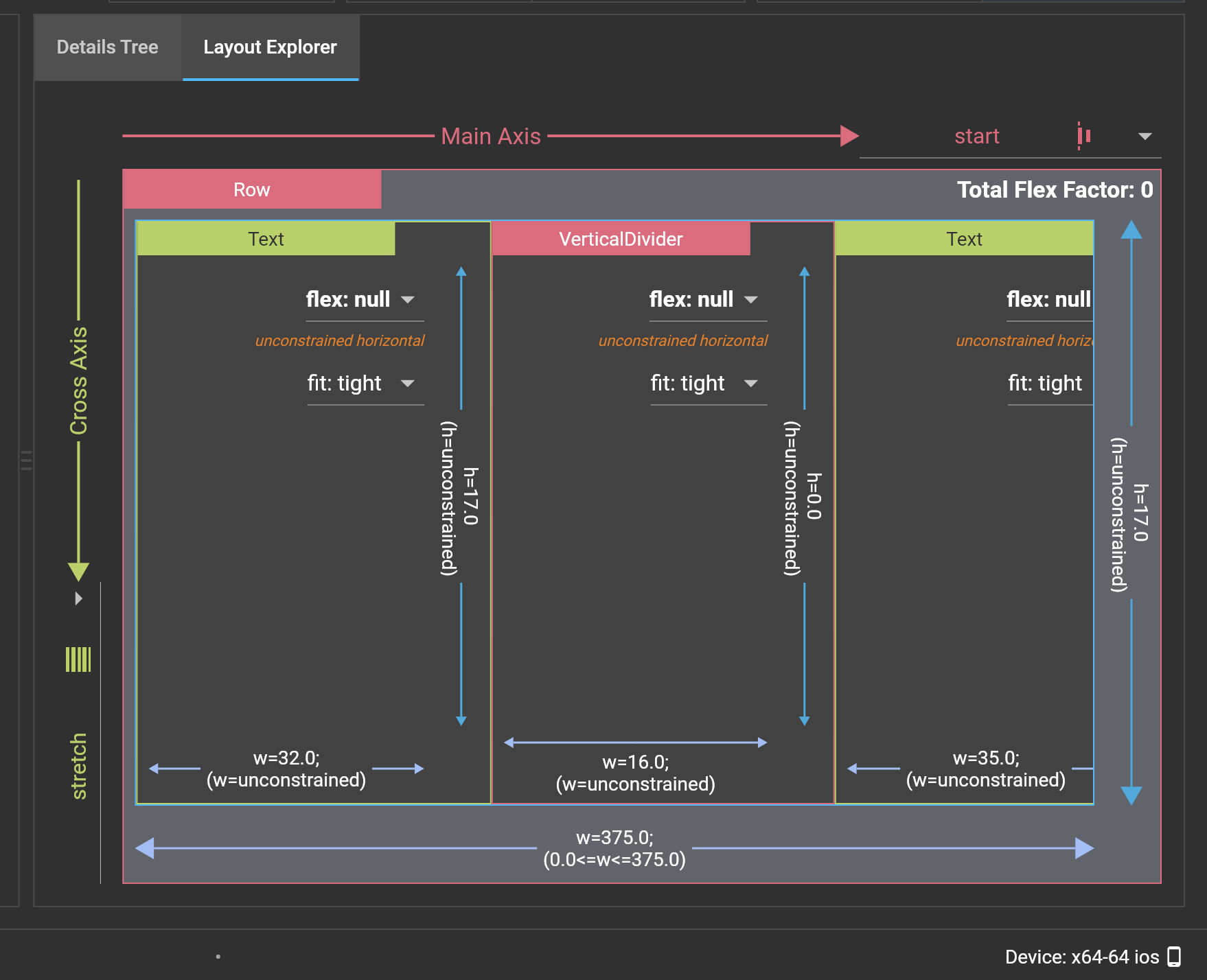
Nothing shows on Layout Explorer screen since adding CrossAxisAlginment.Stretch to the Row widget will create an error.
Actual results:
VerticalDivider increases in height in the Layout Explorer visualizer, but the actual height remains 0.
Logs