Repository navigation
Adjacent Material Widgets in a Column/Row do not cast a shadow on each other #12206
Description

Internal: b/292548582
Steps to Reproduce
When you create a widget that has a build method like this:
Widget build(BuildContext context) => return new Scaffold(
      appBar: new AppBar(
        title: new Text('Test'),
      ),
      body: new Column(
        children: <Widget>[
          new Material(
            color: Colors.blue.shade500,
            child: new Container(height: 100.0),
            elevation: 20.0,
          ),
          new Material(
            color: Colors.white,
            child: new Container(height: 100.0),
            elevation: 10.0,
          ),
          new Material(
            color: Colors.orange.shade500,
            child: new Container(height: 100.0),
            elevation: 20.0,
          ),
        ],
      ),
    );
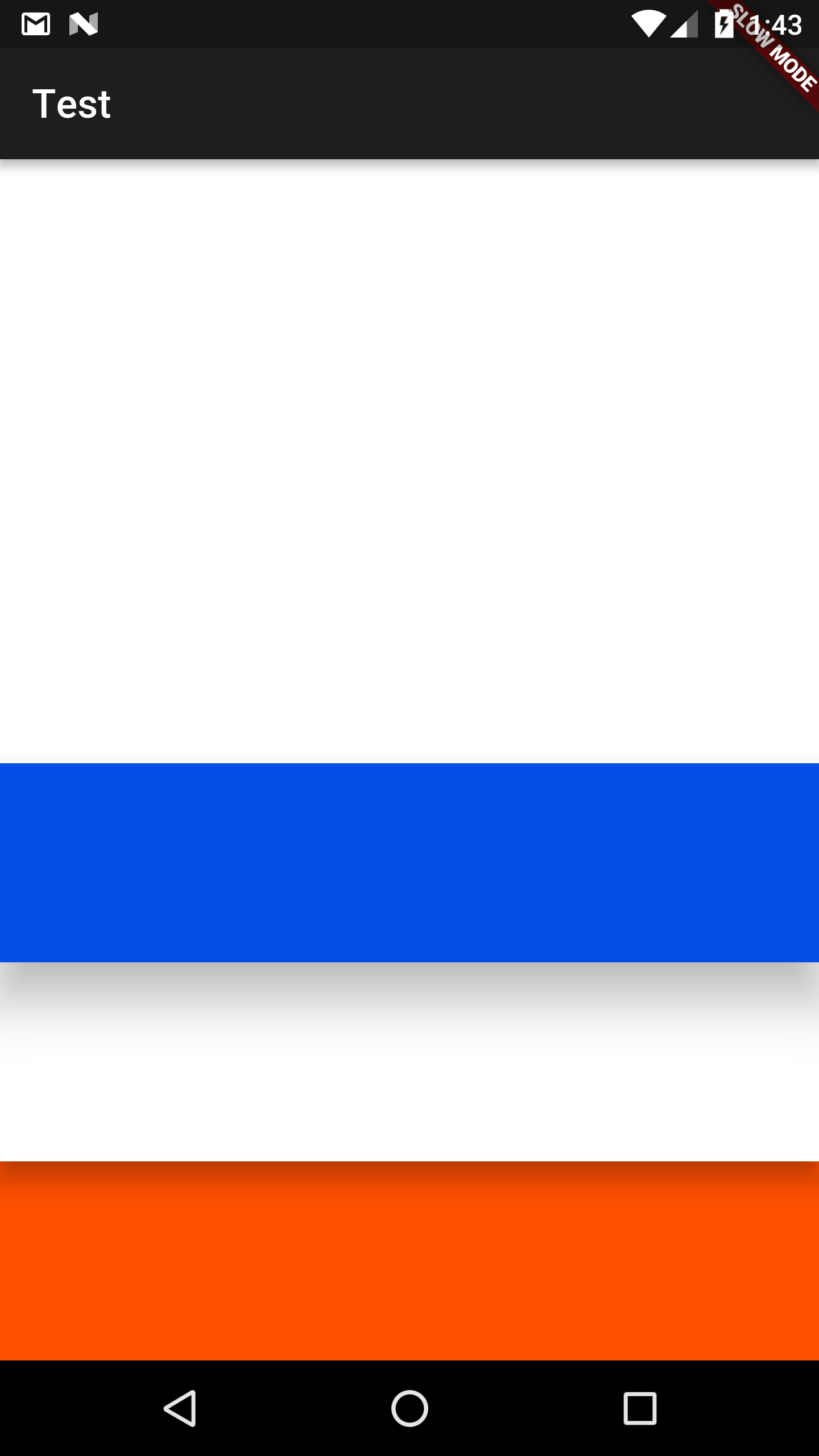
You get this result:

As you can see, only the shadow from the bottom-most, orange Material is rendered. I would expect there to be a shadow rendered over the middle, white Material from both the above and below, as both of those have higher elevation.
For bonus points, I would also expect the shadow over the white Material to be about half as large as the one cast over the scaffold background by the orange Material (because the former is going from elevation 20 to 10, while the latter is going from elevation 20 to 0).
Activity
zzzev commentedon Sep 21, 2017
Additionally -- though I'm less sure of this part -- the top Material should probably also be casting a shadow on the AppBar, which has an elevation of 6.0 vs. the Material's elevation of 20.0, but instead the Material has a shadow cast onto it from the AppBar.
Hixie commentedon Sep 21, 2017
We don't do "real" shadows on Android and iOS, so I wouldn't expect the shadows to paint according to the elevations (e.g. the blue material should paint under the white material and the appbar).
It's weird that the white and orange boxes don't paint shadows on their previous siblings though...
Hixie commentedon Sep 21, 2017
What happens if you flip the order of the boxes and use
verticalDirection: VerticalDirection.upon the column?zzzev commentedon Sep 21, 2017
With your suggested change:
This makes more sense, but even with everything you mention I'm surprised the blue Material isn't casting a shadow upwards onto the scaffold like the orange one does in the first screenshot.
This also makes me even more confused about why the white one has no shadow in the first screenshot, very confusing. I think there must be some bug here, though I'm not sure how to dig in further exactly.
Aside from this behavior, a question: given this, if we do want to control the z-indexing more explicitly (i.e. to enable a layout like the one implied by the first example), is using a Stack or other more complex layout widget the way to go? It would be nice if we could get the layout behavior or row/column but decoupled from the ordering of rendering, i.e. allowing us to specify render ordering (in terms of timing, not layout), sort of like the inverse of how flex-box in css allows you to specify the order property.
Hixie commentedon Sep 21, 2017
There's definitely a bug here, though I can't imagine what it is. It's almost like we're clipping more than we should...
To control the paint order, you can use
verticalDirection, that's basically what I was testing above. We don't have a trivial way with Column to control the order in more precision than that. You can of course make your own layout widgets and then you can have them paint in whatever order you want.JeffersonBledsoe commentedon Sep 8, 2018
Just came across this myself and a quick workaround is to reverse the order of children in the column and set the verticalDirection to VerticalDirection.up. This causes the drop shadow to be drawn correctly.
Manual roll of engine 7ea9884...5b94c8a (#40275)
Roll engine from 7ea9884..3c6383f (77 commits 🔥) (#40372)
Roll engine to 6e6de94
17 remaining items
yahya-uddin commentedon Jun 14, 2022
Any update on this issue?
darshankawar commentedon Dec 27, 2022
Verified on latest versions and observed that the issue persists.
stable, master flutter doctor -v