Repository navigation
Add-to-app - unable to install iOS app having embedded flutter framework #122183
Description

Is there an existing issue for this?
- I have searched the existing issues
- I have read the guide to filing a bug
Steps to reproduce
run flutter create --template module my_flutter
add code in /lib folder
run flutter build ios-framework --output=/Users/ihi/Desktop/my_flutter_module_framework/
4 .xcframework are generated - App, Flutter, FlutterPlugin & shared_prefs_foundation.xcframework
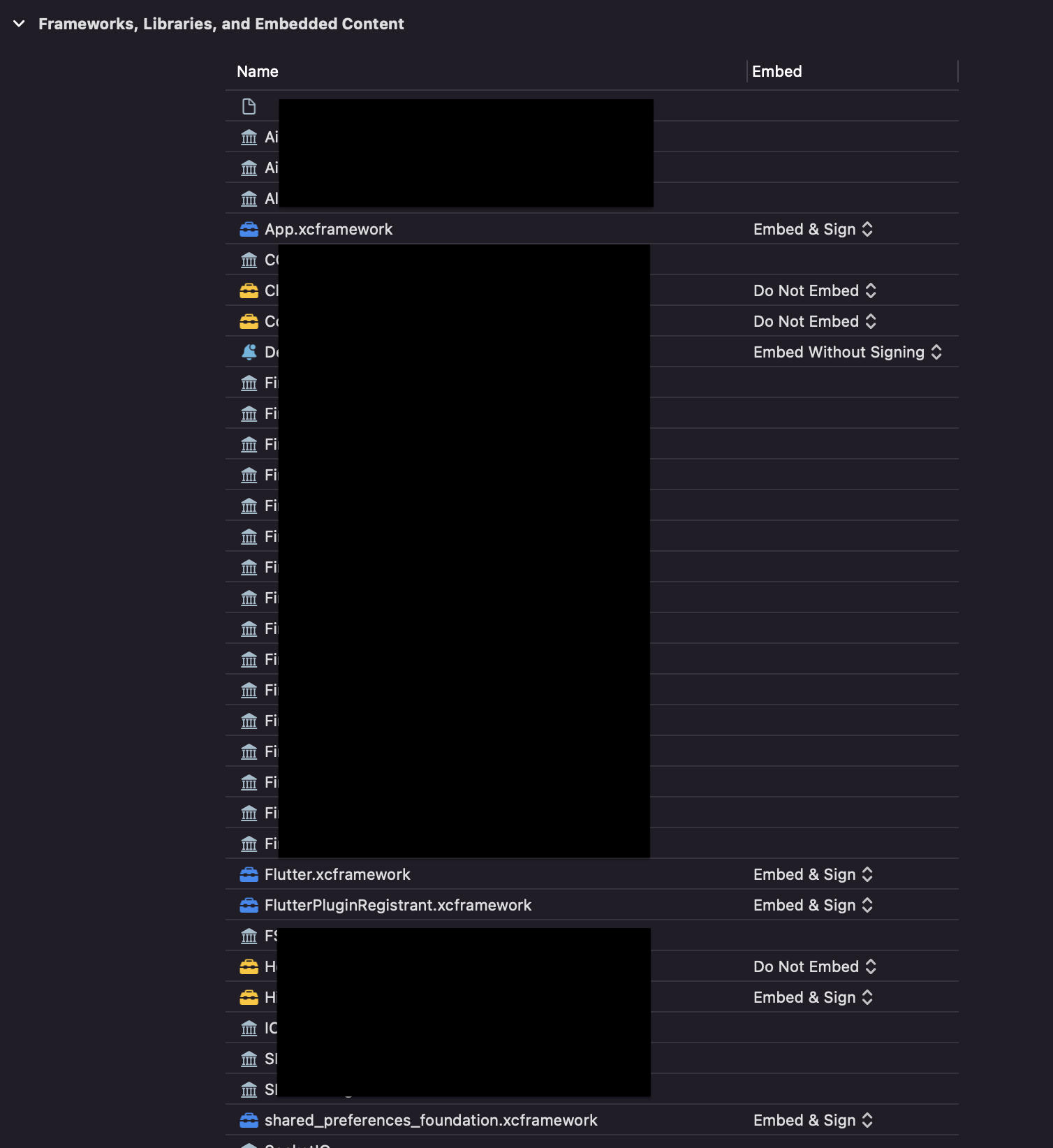
integrate generated .xcframework 's into existing Xcode project. Select Embed and Sign for all.
archive app to distribute via firebase distribution
when I try to install this, I get this alert

Actual results
Followed - https://docs.flutter.dev/development/add-to-app
First when i added the frameworks generated in Debug folder, I was able to debug the app fine on my phone. But for release on Firebase I replaced the same with frameworks generated in release folder. I was able to archive fine but the build is not installing.
Mac OS - 12.6 Monterey
Xcode - 14.0
Flutter - 3.7.6
Logs
Logs
<!-- Paste your logs here -->
Flutter Doctor output
Doctor output
<!-- calender % flutter doctor -v
[✓] Flutter (Channel stable, 3.7.6, on macOS 12.6 21G115 darwin-x64, locale
    en-IN)
    • Flutter version 3.7.6 on channel stable at
      /Users/ichi14/Documents/everythingFlutter/flutter
    • Upstream repository https://github.com/flutter/flutter.git
    • Framework revision 12cb4eb7a0 (7 days ago), 2023-03-01 10:29:26 -0800
    • Engine revision ada363ee93
    • Dart version 2.19.3
    • DevTools version 2.20.1

[✗] Android toolchain - develop for Android devices
    ✗ Unable to locate Android SDK.
      Install Android Studio from:
      https://developer.android.com/studio/index.html
      On first launch it will assist you in installing the Android SDK
      components.
      (or visit https://flutter.dev/docs/get-started/install/macos#android-setup
      for detailed instructions).
      If the Android SDK has been installed to a custom location, please use
      `flutter config --android-sdk` to update to that location.


[✓] Xcode - develop for iOS and macOS (Xcode 14.0)
    • Xcode at /Applications/Xcode.app/Contents/Developer
    • Build 14A309
    • CocoaPods version 1.11.3

[✗] Chrome - develop for the web (Cannot find Chrome executable at
    /Applications/Google Chrome.app/Contents/MacOS/Google Chrome)
    ! Cannot find Chrome. Try setting CHROME_EXECUTABLE to a Chrome executable.

[!] Android Studio (not installed)
    • Android Studio not found; download from
      https://developer.android.com/studio/index.html
      (or visit https://flutter.dev/docs/get-started/install/macos#android-setup
      for detailed instructions).

[✓] VS Code (version 1.76.0)
    • VS Code at /Applications/Visual Studio Code.app/Contents
    • Flutter extension version 3.60.0

[✓] Connected device (1 available)
    • macOS (desktop) • macos • darwin-x64 • macOS 12.6 21G115 darwin-x64

[✓] HTTP Host Availability
    • All required HTTP hosts are available -->
Activity
huycozy commentedon Mar 9, 2023
It seems something goes wrong in XCode configurations. You can try this SO answer and also other answers there if it works for you.
Also, what are your minimum deployments and the current iOS device version?
hemantchauhan commentedon Mar 9, 2023
minimum deployment - 15.0, device version - 15.5
I removed the flutter frameworks, commented the flutter code, archived and shared on firebase - Now build is installing fine on the same device.
Re-checked all the steps mentioned in using-the-latest-code-signature-format and everything seems ok on provisioning/signature end.
Also the above link says -
I think maybe Xcode configuration/code signing that is generated by
flutter build ios-frameworkmight be causing the issue.How can I debug this? or disallow code-signing?
I am validating the same archive and getting this error


I don't see
FlutterPluginRegistrant.xcframeworkon this list here while archiving, I have added it though. see both screenshotshuycozy commentedon Mar 9, 2023
I check this with my sample code but got another error when running on my physical device (
The code signature version is no longer supported.) but it works on the emulator. I'm addingwebview_flutterandflutter_inappwebviewin my sample code. And I added all frameworks from Release folder instead of Debug as you did. Could it be the cause of my error?Can you please copy the error when you validate the archive here? (It starts with `Invalid bundle structure....)
And please share your completed and minimal reproducible code sample if possible, then I will retry your sample code.
Also, FYI, it seems the original issue will not appear when building with XCode 13 (see https://developer.apple.com/forums/thread/682067).
hemantchauhan commentedon Mar 9, 2023
App will not run directly on connected device from Xcode, when we have added frameworks from release folder, as they are marked for release and not available for debug.
I will try to create a sample for this to share.
Validation Archive error -
I am using Xcode 14.0(released in September 22)
huycozy commentedon Mar 10, 2023
I see this issue now with my sample code on the latest Flutter stable and master channels.
Steps to reproduce
Review ***.ipa content, there is missingFlutterPluginRegistrant.xcframework:.ipafile on your device via Apple Configurator or Firebase Distribution as OP (I haven't tried Firebase Distribution yet), then can see the issue:Issue analysis
Adding more information about output files:
Release directory tree - level 1
➜  Release git:(main) ✗ tree -L 1
.
├── App.xcframework
├── Flutter.xcframework
├── FlutterPluginRegistrant.xcframework
├── OrderedSet.xcframework
├── flutter_inappwebview.xcframework
└── webview_flutter_wkwebview.xcframework

7 directories, 0 files
Release directory tree - level 4
➜ Release git:(main) ✗ tree -L 4 . ├── App.xcframework │ ├── Info.plist │ ├── ios-arm64 │ │ └── App.framework │ │ ├── App │ │ ├── Info.plist │ │ ├── _CodeSignature │ │ └── flutter_assets │ └── ios-arm64_x86_64-simulator │ └── App.framework │ ├── App │ ├── Info.plist │ ├── _CodeSignature │ └── flutter_assets ├── Flutter.xcframework │ ├── Info.plist │ ├── ios-arm64 │ │ └── Flutter.framework │ │ ├── Flutter │ │ ├── Headers │ │ ├── Info.plist │ │ ├── Modules │ │ ├── _CodeSignature │ │ └── icudtl.dat │ └── ios-arm64_x86_64-simulator │ └── Flutter.framework │ ├── Flutter │ ├── Headers │ ├── Info.plist │ ├── Modules │ ├── _CodeSignature │ └── icudtl.dat ├── FlutterPluginRegistrant.xcframework │ ├── Info.plist │ ├── ios-arm64 │ │ └── FlutterPluginRegistrant.framework │ │ ├── FlutterPluginRegistrant │ │ ├── Headers │ │ ├── Info.plist │ │ └── Modules │ └── ios-arm64_x86_64-simulator │ └── FlutterPluginRegistrant.framework │ ├── FlutterPluginRegistrant │ ├── Headers │ ├── Info.plist │ ├── Modules │ └── _CodeSignature ├── OrderedSet.xcframework │ ├── Info.plist │ ├── ios-arm64 │ │ ├── OrderedSet.framework │ │ │ ├── Headers │ │ │ ├── Info.plist │ │ │ ├── Modules │ │ │ └── OrderedSet │ │ └── dSYMs │ │ └── OrderedSet.framework.dSYM │ └── ios-arm64_x86_64-simulator │ └── OrderedSet.framework │ ├── Headers │ ├── Info.plist │ ├── Modules │ ├── OrderedSet │ └── _CodeSignature ├── flutter_inappwebview.xcframework │ ├── Info.plist │ ├── ios-arm64 │ │ ├── dSYMs │ │ │ └── flutter_inappwebview.framework.dSYM │ │ └── flutter_inappwebview.framework │ │ ├── Headers │ │ ├── Info.plist │ │ ├── Modules │ │ ├── WebView.storyboardc │ │ └── flutter_inappwebview │ └── ios-arm64_x86_64-simulator │ └── flutter_inappwebview.framework │ ├── Headers │ ├── Info.plist │ ├── Modules │ ├── WebView.storyboardc │ ├── _CodeSignature │ └── flutter_inappwebview └── webview_flutter_wkwebview.xcframework ├── Info.plist ├── ios-arm64 │ ├── dSYMs │ │ └── webview_flutter_wkwebview.framework.dSYM │ └── webview_flutter_wkwebview.framework │ ├── Headers │ ├── Info.plist │ ├── Modules │ └── webview_flutter_wkwebview └── ios-arm64_x86_64-simulator └── webview_flutter_wkwebview.framework ├── Headers ├── Info.plist ├── Modules ├── _CodeSignature └── webview_flutter_wkwebview 69 directories, 32 filesNotice this, we can see
FlutterPluginRegistrantis a static framework and others are dynamic. Taking a look at Embed the frameworks, it looks like this feature hasn't been supported yet (see #52217).Labeling the issue for further insights.
flutter doctor -v (stable and master)
[✓] Flutter (Channel stable, 3.7.7, on macOS 13.0.1 22A400 darwin-x64, locale en-EE) • Flutter version 3.7.7 on channel stable at /Users/huynq/Documents/GitHub/flutter • Upstream repository https://github.com/flutter/flutter.git • Framework revision 2ad6cd72c0 (10 hours ago), 2023-03-08 09:41:59 -0800 • Engine revision 1837b5be5f • Dart version 2.19.4 • DevTools version 2.20.1 [✓] Android toolchain - develop for Android devices (Android SDK version 31.0.0) • Android SDK at /Users/huynq/Library/Android/sdk • Platform android-33, build-tools 31.0.0 • ANDROID_HOME = /Users/huynq/Library/Android/sdk • Java binary at: /Applications/Android Studio.app/Contents/jbr/Contents/Home/bin/java • Java version OpenJDK Runtime Environment (build 11.0.15+0-b2043.56-8887301) • All Android licenses accepted. [✓] Xcode - develop for iOS and macOS (Xcode 14.1) • Xcode at /Applications/Xcode.app/Contents/Developer • Build 14B47b • CocoaPods version 1.11.3 [✓] Chrome - develop for the web • Chrome at /Applications/Google Chrome.app/Contents/MacOS/Google Chrome [!] Android Studio • Android Studio at /Applications/Android Studio Preview.app/Contents • Flutter plugin can be installed from: 🔨 https://plugins.jetbrains.com/plugin/9212-flutter • Dart plugin can be installed from: 🔨 https://plugins.jetbrains.com/plugin/6351-dart ✗ Unable to find bundled Java version. • Try updating or re-installing Android Studio. [✓] Android Studio (version 2022.1) • Android Studio at /Applications/Android Studio.app/Contents • Flutter plugin can be installed from: 🔨 https://plugins.jetbrains.com/plugin/9212-flutter • Dart plugin can be installed from: 🔨 https://plugins.jetbrains.com/plugin/6351-dart • Java version OpenJDK Runtime Environment (build 11.0.15+0-b2043.56-8887301) [✓] IntelliJ IDEA Community Edition (version 2022.1.1) • IntelliJ at /Users/huynq/Library/Application Support/JetBrains/Toolbox/apps/IDEA-C/ch-0/221.5591.52/IntelliJ IDEA CE.app • Flutter plugin can be installed from: 🔨 https://plugins.jetbrains.com/plugin/9212-flutter • Dart plugin can be installed from: 🔨 https://plugins.jetbrains.com/plugin/6351-dart [✓] VS Code (version 1.76.0) • VS Code at /Applications/Visual Studio Code.app/Contents • Flutter extension version 3.60.0 [✓] Connected device (2 available) • macOS (desktop) • macos • darwin-x64 • macOS 13.0.1 22A400 darwin-x64 • Chrome (web) • chrome • web-javascript • Google Chrome 110.0.5481.177 [✓] HTTP Host Availability • All required HTTP hosts are available ! Doctor found issues in 1 category./cc @jmagman: to help to correct this if any of the above steps/information are incorrect (as I see your comment at #110562 (comment)). Thank you!
hemantchauhan commentedon Mar 10, 2023
Yes right. I was able to resolve this issue after selecting

Do not EmbedforFlutterPluginRegistrant.xcframework, as it is a static framework.Thanks for your support.
huycozy commentedon Mar 10, 2023
Ah yeah, it works, I forgot to try that case :). I just tested it and see it works now. I will close this issue in favor of #52217. Please follow up on that issue for further updates.
jmagman commentedon Mar 10, 2023
Thanks for helping debug @huycozy. However this isn't a duplicate of #52217,
FlutterPluginRegistrant.xcframeworkis a static framework on purpose, and there's no plans to make it dynamic. See #40401huycozy commentedon Mar 11, 2023
Thanks for clarifying this :)
github-actions commentedon Mar 25, 2023
This thread has been automatically locked since there has not been any recent activity after it was closed. If you are still experiencing a similar issue, please open a new bug, including the output of
flutter doctor -vand a minimal reproduction of the issue.