Repository navigation
[google_sign_in]: source release 1.8 requires target release 1.8 error with older AGP/Gradle versions #125482

Description

Is there an existing issue for this?
- I have searched the existing issues
- I have read the guide to filing a bug
Steps to reproduce
- take the latest google_sign_in: ^6.1.0 pub upgrade
- it will point to google_sign_in_android: ^6.1.11
- and run the application.
note: it is working with google_sign_in_android: 6.1.9
issue facing from the latest version.
Expected results
The build should run as google_sign_in_android: 6.1.9 version.
Actual results
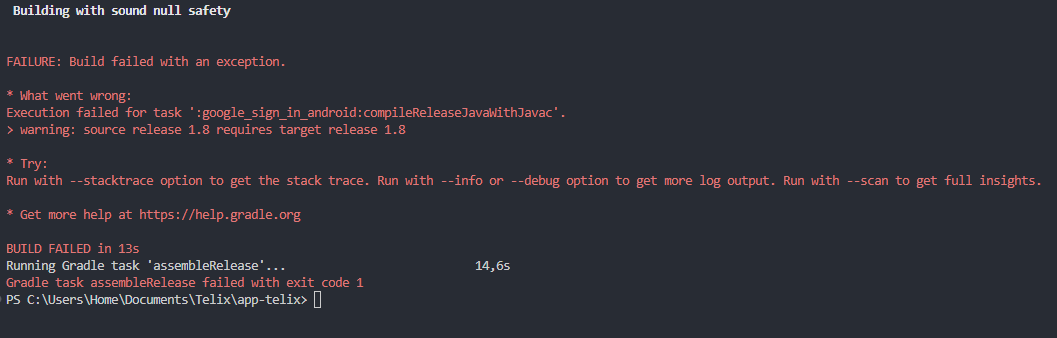
Execution failed for task ':google_sign_in_android:compileReleaseJavaWithJavac'.
warning: source release 1.8 requires target release 1.8
Build got failed.
Code sample
Code sample
[Paste your code here]Screenshots or Video
Screenshots / Video demonstration
[Upload media here]
Logs
Logs
Task failed with an exception.
-----------
* What went wrong:
Execution failed for task ':google_sign_in_android:compileReleaseJavaWithJavac'.
> warning: source release 1.8 requires target release 1.8
in android build.gradle using same java versions.
        targetCompatibility JavaVersion.VERSION_1_8
        sourceCompatibility JavaVersion.VERSION_1_8
Flutter Doctor output
Doctor output
[✓] Flutter (Channel stable, 3.7.8, on macOS 13.2 22D49 darwin-arm64, locale en-IN)
    • Flutter version 3.7.8 on channel stable at /Users/mohmedsafvankp/flutter_sdk/flutter
    • Upstream repository https://github.com/flutter/flutter.git
    • Framework revision 90c64ed42b (5 weeks ago), 2023-03-21 11:27:08 -0500
    • Engine revision 9aa7816315
    • Dart version 2.19.5
    • DevTools version 2.20.1

[✓] Android toolchain - develop for Android devices (Android SDK version 33.0.1)
    • Android SDK at /Users/mohmedsafvankp/Library/Android/sdk
    • Platform android-33, build-tools 33.0.1
    • Java binary at: /Applications/Android Studio.app/Contents/jbr/Contents/Home/bin/java
    • Java version OpenJDK Runtime Environment (build 11.0.15+0-b2043.56-8887301)
    • All Android licenses accepted.

[✓] Xcode - develop for iOS and macOS (Xcode 14.2)
    • Xcode at /Applications/Xcode.app/Contents/Developer
    • Build 14C18
    • CocoaPods version 1.11.3

[✓] Chrome - develop for the web
    • Chrome at /Applications/Google Chrome.app/Contents/MacOS/Google Chrome

[✓] Android Studio (version 2022.1)
    • Android Studio at /Applications/Android Studio.app/Contents
    • Flutter plugin can be installed from:
      🔨 https://plugins.jetbrains.com/plugin/9212-flutter
    • Dart plugin can be installed from:
      🔨 https://plugins.jetbrains.com/plugin/6351-dart
    • Java version OpenJDK Runtime Environment (build 11.0.15+0-b2043.56-8887301)

[✓] IntelliJ IDEA Community Edition (version 2023.1)
    • IntelliJ at /Applications/IntelliJ IDEA CE.app
    • Flutter plugin can be installed from:
      🔨 https://plugins.jetbrains.com/plugin/9212-flutter
    • Dart plugin can be installed from:
      🔨 https://plugins.jetbrains.com/plugin/6351-dart

[✓] VS Code (version 1.76.2)
    • VS Code at /Applications/Visual Studio Code.app/Contents
    • Flutter extension version 3.60.0

[✓] Connected device (3 available)
    • sdk gphone64 arm64 (mobile) • emulator-5554 • android-arm64  • Android 12 (API 31) (emulator)
    • macOS (desktop)             • macos         • darwin-arm64   • macOS 13.2 22D49 darwin-arm64
    • Chrome (web)                • chrome        • web-javascript • Google Chrome 112.0.5615.137

[✓] HTTP Host Availability
    • All required HTTP hosts are available

• No issues found!
Activity
stuartmorgan-g commentedon Apr 25, 2023
Interesting; I didn't include an explicit
targetCompatibilitybecause current docs say it defaults to the value ofsourceCompatibility. It sounds like that wasn't always the case, so I'll add it in.What version of the Android Gradle Plugin and of Gradle are you using in your project?
caua-n commentedon Apr 25, 2023
I have the same issue, cant debug and cant compile. Nothing
stuartmorgan-g commentedon Apr 25, 2023
What version of the Android Gradle Plugin and of Gradle are you using in your project?
MohamedSafvanKP-MSIL commentedon Apr 25, 2023
@stuartmorgan kindly find my grade version details:
classpath 'com.android.tools.build:gradle:4.1.1'
and
https://services.gradle.org/distributions/gradle-6.5-all.zip
[-]Recent google_sign_in_android: ^6.1.11 having issue while generating android build related to java version.[/-][+][google_sign_in]: `source release 1.8 requires target release 1.8` error with older AGP/Gradle versions[/+]EwanZaidi commentedon Apr 26, 2023
Same issue with me, how can I fix it? Need to deploy to play store immediately
stuartmorgan-g commentedon Apr 26, 2023
If you need an immediate workaround, you can pin an earlier version of
google_sign_in_android, as noted in the original report. Alternately, I expect that updating the version of AGP and Gradle used in your project would resolve the issue.caua-n commentedon Apr 26, 2023
classpath 'com.android.tools.build:gradle:4.1.0'
[various] Add `targetCompatibility` to build.gradle (#3825)
MohamedSafvanKP-MSIL commentedon Apr 27, 2023
donaldamadi commentedon Apr 28, 2023
For a quick workaround, changing my AGP to classpath 'com.android.tools.build:gradle:4.2.0' did the trick for me
github-actions commentedon May 12, 2023
This thread has been automatically locked since there has not been any recent activity after it was closed. If you are still experiencing a similar issue, please open a new bug, including the output of
flutter doctor -vand a minimal reproduction of the issue.[various] Add `targetCompatibility` to build.gradle (flutter#3825)
[various] Add `targetCompatibility` to build.gradle (flutter#3825)
[various] Add `targetCompatibility` to build.gradle (flutter#3825)