Repository navigation
Xcode build failure after adding FlutterFire to project #15168
Description

Steps to Reproduce
Not entirely sure what steps are necessary to reproduce this issue because I seem to be the only one having it. I'll go ahead and share what appears to be the cause.
1. Add firebase_database: ^0.3.6 and/or firebase_core: ^0.0.7 to the pubspec.yaml file
2. Use the flutter run command in the Terminal with a Simulator
The app runs perfectly on Android and successfully connects to a Firebase Database but when building for iOS, it gives the following error:
/Users/nathanbird/AndroidStudioProjects/wersafety/ios/Runner/GeneratedPluginRegistrant.m:6:9: fatal error: 'firebase_core/FirebaseCorePlugin.h' file not found
I opened the GeneratedPluginRegistrant.m file and Xcode is giving a similar error:

If I remove the dependencies from the pubspec.yaml file, the errors disappear on the next build.
Logs
    Failed to build iOS app
    Error output from Xcode build:
    ↳
        ** BUILD FAILED **

    Xcode's output:
    ↳
    === BUILD TARGET firebase_database OF PROJECT Pods WITH CONFIGURATION Debug ===
    ld: warning: -undefined dynamic_lookup is deprecated on iOS

    === BUILD TARGET firebase_database OF PROJECT Pods WITH CONFIGURATION Debug ===
    ld: warning: -undefined dynamic_lookup is deprecated on iOS

    === BUILD TARGET Runner OF PROJECT Runner WITH CONFIGURATION Debug ===
    The use of Swift 3 @objc inference in Swift 4 mode is deprecated. Please address deprecated @objc inference warnings, test your code with “Use of deprecated Swift 3 @objc inference” logging enabled, and then disable inference by changing the "Swift 3 @objc Inference" build setting to "Default" for the "Runner" target.

    === BUILD TARGET Runner OF PROJECT Runner WITH CONFIGURATION Debug ===
    /Users/nathanbird/AndroidStudioProjects/wersafety/ios/Runner/GeneratedPluginRegistrant.m:6:9: fatal error: 'firebase_core/FirebaseCorePlugin.h' file not found
    #import <firebase_core/FirebaseCorePlugin.h>
            ^~~~~~~~~~~~~~~~~~~~~~~~~~~~~~~~~~~~
    1 error generated.
Could not build the application for the simulator.
Flutter Doctor
[✓] Flutter (on Mac OS X 10.12.6 16G29, locale en-US, channel dev)
    • Flutter version 0.1.4 at /Users/nathanbird/flutter
    • Framework revision f914e701c5 (2 weeks ago), 2018-02-19 21:12:17 +0000
    • Engine revision 13cf22c284
    • Dart version 2.0.0-dev.27.0-flutter-0d5cf900b0

[✓] Android toolchain - develop for Android devices (Android SDK 27.0.3)
    • Android SDK at /Users/nathanbird/Library/Android/sdk
    • Android NDK at /Users/nathanbird/Library/Android/sdk/ndk-bundle
    • Platform android-27, build-tools 27.0.3
    • Java binary at: /Applications/Android Studio.app/Contents/jre/jdk/Contents/Home/bin/java
    • Java version OpenJDK Runtime Environment (build 1.8.0_152-release-915-b08)

[✓] iOS toolchain - develop for iOS devices (Xcode 9.2)
    • Xcode at /Applications/Xcode.app/Contents/Developer
    • Xcode 9.2, Build version 9C40b
    • ios-deploy 1.9.2
    • CocoaPods version 1.3.0

[✓] Android Studio (version 3.0)
    • Android Studio at /Applications/Android Studio.app/Contents
    • Java version OpenJDK Runtime Environment (build 1.8.0_152-release-915-b08)

[!] VS Code (version 1.19.3)
    • VS Code at /Applications/Visual Studio Code.app/Contents
    • Dart Code extension not installed; install from
      https://marketplace.visualstudio.com/items?itemName=Dart-Code.dart-code

[✓] Connected devices
    • Nexus 6P      • 84B7N16804000234                         • android-arm64 • Android 8.1.0 (API 27)
    • iPhone 8 Plus • 25E17EA3-F66F-4BE9-A1E1-49C4FEFE03D8     • ios           • iOS 11.2 (simulator)
Activity
abogdanovich1 commentedon Mar 6, 2018
Not sure if the same error, I'll open another ticket if it is not related, but I get this output after adding firebase_auth >=0.4.5
Note: This compiles, runs, and works with firebase_auth on the Android side. Only an issue when building to iOS device. (iPhone 6s running 11.2.6)
Here's my flutter doctor output
nathansbird commentedon Mar 6, 2018
@abogdanovich1 Yep, I think it's the same problem
abogdanovich1 commentedon Mar 8, 2018
@theEpicality I found a workaround if you are still having issues.
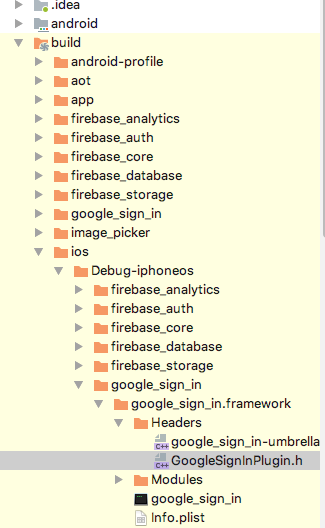
The problem is that the .h files are missing from the "headers" directory in the iOS files. I looked up the missing .h files from the github repo and manually added all the missing ones. Built and it ran just fine! here's a screenshot of where I put mine
In the screenshot provided, the project previously only had the "google_sign_in-umbrella.h" file in it. I simply added "GoogleSignInPlugin.h" from github, as well as the .h files for auth, database, storage, core, and analytics into their respective directories.
Hope that helps!
nathansbird commentedon Mar 8, 2018
@abogdanovich1 Thank you so much! I've been trying to find a workaround all day!
csga5000 commentedon Mar 9, 2018
As I reported here: #15335 (comment)
I'm also having this issue with any package. I'll try @abogdanovich1 's workaround
Edit: Okay, his work around fixed flutter running, however, if for whatever reason you want to run from xcode (for example, if you have platform code and want to debug it like me), then it won't work.
You need to add the relevant .h files to the ios/Pods/Target Supporting Files/PACKAGE_NAME/ folder. Then open that same directory in the xcode navigation, right click any file, and hit "Add Files to "Pods". Select the files that in the directory (but not added to the xcode project). Once you've added them, you'll have to reconfigure the membership, so click the .h file in the nav, then in the right panel under target membership change the checked item to the name of the package, and to the right click the dropdown and choose "Public".
Stroi commentedon Mar 10, 2018
While doing the "Firebase-Flutter" tutorial I followed the steps to import the Firebase. When I run the app, I got the "'FirebaseAnalyticsPlugin.h' file not found" error. So I tried to use this workaround and it worked for the Analytics. When I fixed Analytics a got same error with FirebaseDatabase. I did the same thing as before but it didn't work. >> I'm getting "FirebaseDatabasePlugin.h not found".

Here is where I put the header files:
Any ideas why it works for one but not for the other ?
abogdanovich1 commentedon Mar 10, 2018
Hmm, that’s weird.
Yeah it seems like this isn’t just a few people having this issue, I wonder if the devs are gonna get around to fixing this anytime soon. Kinda annoying having a cross platform framework only compile to one set of devices hahah
csga5000 commentedon Mar 10, 2018
@Stroi You're running in debug mode for the simulator? If you want to run on a device
you have to fix the non simulator folder. You could try my added fix as well, for xcode, see if you can build through that.
@abogdanovich1 flutters been pretty painless, for me they've done a great job, but it does seem Android dev is a little more stable than iOS. To be fair iOS dev is usually less stable anyway and it's incredible what they've got done. For me it works fine unless it's a swift project ("flutter create -i swift proj_name") so it seems like a bug they just missed that only applies to a small subset of people. That's fair for a beta product, and I'm sure they'll fix it
abogdanovich1 commentedon Mar 10, 2018
Yeah I can’t really complain too much. It’s working for me now without issues for about 4 days and I’m that time I’ve made about 50% of my app, in 1/5 the code it took to complete my app in Swift 😅
This is already a great product, can’t wait till it’s stable!
nathansbird commentedon Mar 14, 2018
Great news! @zoechi pointed out that there's been a commit to make plugins work in Swift. (See here) I did as recommended and it fixed everything. StackOverflow question
bartektartanus commentedon Apr 5, 2018
Looks like Android Studio issue. Removing old project, creating new and moving all the dart, yaml and assets files fixed the problem.
Stoneman790 commentedon Apr 13, 2018
For me no plugins work after adding dependencies to the pubspec.yaml file. When I run the app on iOS device or simulator in debug, I get errors like this. fatal error: 'firebase_auth/FirebaseAuthPlugin.h' file not found. I have tried all of the suggestions and workarounds with no success.
Stoneman790 commentedon Apr 14, 2018
What solved it for me was to:
There are plenty of guides on how to do the cocoapod stuff, so I won't post them here.
No more missing header file errors! Now I'm running into web socket issues. Sometimes it works, sometimes not.
fmatosqg commentedon Apr 21, 2018
See fix for pod 1.5.0 on #16273
7 remaining items
MarcelEdward commentedon Dec 18, 2018
Getting the headers error sometimes ... rebuild most of the time makes it go away
nathansbird commentedon Dec 19, 2018
@ChristBKK, @gunhansancar, @salmaanahmed, @MarcelEdward. This issue has been closed because the problem was fixed. If you're still experiencing similar problems, please open a new issue. Thanks.
timbergus commentedon Apr 3, 2019
Not working for me. I have cleaned all multiple times. I have downgraded cocoa pods, and I'm still having the same error with firebase_auth missing headers :(
Right now I'm only developing using the Android simulator because iOS is dead.
And if I use the latest template from Flutter for Podfile, I have this error.
And stays there forever and ever.
neelu004 commentedon Apr 24, 2019
Hi, I am adding the dependency of shared_preference and it is working fine when I am running my project on android using windows but when I am using Mac(Xcode) it is giving me error as ld: warning: directory not found for option '-L/Users/ghanshyam/Development/Android/Workspace/my_app/build/ios/Debug-iphoneos/shared_preferences'
ld: library not found for -lshared_preferences
clang: error: linker command failed with exit code 1 (use -v to see invocation)
I had tried using the following methods but that doesn't works for me. They are:-
pod install
pod upgrade
flutter clean
flutter packages get
flutter packages upgrade
flutter run using command it is working fine but works on simulator still could not run on my real iPhone device using the same command.
also when I am using flutter build ios, this will creates the Runner.app but how can I install this Runner.app on my iPhone device.
Please suggest some solution for the same.
Thanks!
johnvarg commentedon Jun 7, 2019
After several trial and error here is what I find
a) repro steps to break
b) steps to clean and fix
REPRO STEPS
Xcode build done. 12.3s
Failed to build iOS app
Error output from Xcode build:
↳
** BUILD FAILED **
Xcode's output:
↳
=== BUILD TARGET Runner OF PROJECT Runner WITH CONFIGURATION Debug ===
The use of Swift 3 @objc inference in Swift 4 mode is deprecated. Please address deprecated @objc inference warnings, test your code with “Use of deprecated Swift 3 @objc inference” logging enabled, and then disable inference by changing the "Swift 3 @objc Inference" build setting to "Default" for the "Runner" target.
=== BUILD TARGET Runner OF PROJECT Runner WITH CONFIGURATION Debug ===
/Users/joe/Documents/Development/signin_demo/ios/Runner/GeneratedPluginRegistrant.m:6:9: fatal error: 'firebase_auth/FirebaseAuthPlugin.h' file not found
#import <firebase_auth/FirebaseAuthPlugin.h>
^~~~~~~~~~~~~~~~~~~~~~~~~~~~~~~~~~~~
1 error generated.
<<<<<<<<<<<<<<<<
Xcode build done. 2.9s
Failed to build iOS app
Error output from Xcode build:
↳
** BUILD FAILED **
Xcode's output:
↳
=== BUILD TARGET Runner OF PROJECT Runner WITH CONFIGURATION Debug ===
The use of Swift 3 @objc inference in Swift 4 mode is deprecated. Please address deprecated @objc inference warnings, test your code with “Use of deprecated Swift 3 @objc inference” logging enabled, and then disable inference by changing the "Swift 3 @objc Inference" build setting to "Default" for the "Runner" target.
=== BUILD TARGET Runner OF PROJECT Runner WITH CONFIGURATION Debug ===
diff: /Users/joe/Documents/Development/signin_demo/ios/Pods/Manifest.lock: No such file or directory
error: The sandbox is not in sync with the Podfile.lock. Run 'pod install' or update your CocoaPods installation.
Could not build the application for the simulator.
Error launching application on iPhone Xʀ.
<<<<<<<<<<<<<<<<<<<<<<<<<
STEPS TO CLEANLY FIX
ojordann commentedon Jun 15, 2019
Updating
cocoapodsto the latest version,sudo gem install cocoapods, and runningpod repo updateworked for me.sof9816 commentedon Jul 10, 2019
I read the comments and yours was little bit helpful, when you mentioned the pod i remembered to install the pods again, and i did and it all worked just fine .
iamatulkumar commentedon Aug 6, 2019
It works!
i just copied Podfileobjc
(https://github.com/flutter/flutter/tree/master/packages/flutter_tools/templates/cocoapods)
to my projects iOS/Podfile
Thanks a lot :)
kutran commentedon Aug 12, 2019
This works! How does this work? I am assuming that the script parses the yaml file and extract the projects, then add them to the Pod?
cyrsis commentedon Aug 18, 2019
Try to set the deployment target to iOS 9 or later.
Worked for me
pridemusvaire commentedon Aug 20, 2019
Worked for me, thanks
daniele777 commentedon Mar 9, 2020
== Building for iOS ==
== /usr/local/bin/flutter build ios --debug --no-codesign ==
Warning: Building for device with codesigning disabled. You will have to manually codesign before deploying to device.
Building com.corte.takeaway for device (ios)...
Running pod install...
2.0s
Running Xcode build...
Xcode build done. 45.3s
Failed to build iOS app
Error output from Xcode build:
↳
** BUILD FAILED **
Xcode's output:
↳
/Users/builder/clone/ios/Runner/GeneratedPluginRegistrant.m:10:9: fatal error: module 'firebase_auth' not found
@import firebase_auth;
~~~~~~~^~~~~~~~~~~~~
1 error generated.
/Users/builder/clone/ios/Runner/GeneratedPluginRegistrant.m:10:9: fatal error: module 'firebase_auth' not found
@import firebase_auth;
~~~~~~~^~~~~~~~~~~~~
1 error generated.
note: Using new build system
note: Planning build
note: Constructing build description
Encountered error while building for device.
Guys i have this error with codemagic...
daniele777 commentedon Mar 9, 2020
C:\Users\Dani\Documents\lacortetakeaway\ios>pod install
Analyzing dependencies
Downloading dependencies
Generating Pods project
Integrating client project
Pod installation complete! There are 0 dependencies from the Podfile and 0 total pods installed.
[!] The Podfile does not contain any dependencies.
[!] Automatically assigning platform
iOSwith version8.0on targetRunnerbecause no platform was specified. Please specify a platform for this target in your Podfile. Seehttps://guides.cocoapods.org/syntax/podfile.html#platform.[!] CocoaPods did not set the base configuration of your project because your project already has a custom config set. In order for CocoaPods integration to work at all, please either set the base configurations of the target
RunnertoTarget Support Files/Pods-Runner/Pods-Runner.debug.xcconfigor include theTarget Support Files/Pods-Runner/Pods-Runner.debug.xcconfigin your build configuration (Flutter/Debug.xcconfig).[!] CocoaPods did not set the base configuration of your project because your project already has a custom config set. In order for CocoaPods integration to work at all, please either set the base configurations of the target
RunnertoTarget Support Files/Pods-Runner/Pods-Runner.release.xcconfigor include theTarget Support Files/Pods-Runner/Pods-Runner.release.xcconfigin your build configuration (Flutter/Release.xcconfig).[!] CocoaPods did not set the base configuration of your project because your project already has a custom config set. In order for CocoaPods integration to work at all, please either set the base configurations of the target
RunnertoTarget Support Files/Pods-Runner/Pods-Runner.profile.xcconfigor include theTarget Support Files/Pods-Runner/Pods-Runner.profile.xcconfigin your build configuration (Flutter/Release.xcconfig).C:\Users\Dani\Documents\lacortetakeaway\ios>
github-actions commentedon Aug 22, 2021
This thread has been automatically locked since there has not been any recent activity after it was closed. If you are still experiencing a similar issue, please open a new bug, including the output of
flutter doctor -vand a minimal reproduction of the issue.