Repository navigation
Bezier demo does not hit 60fps #17889
Description

I've not tested it myself, but this came in through another customer.
Here is the example:
https://github.com/eseidelGoogle/bezier_perf
There also is likely a bug in either my integration code or the original sample as it does not redraw correctly while animating. If you hit the "p" key in flutter run (or any other key which forces a redraw) you can see it's actually animating, just not redrawing.
@HansMuller might see the redraw bug off the top of his head.
@chinmaygarde volunteered to take a look at the perf.
Activity
eseidelGoogle commentedon May 24, 2018
If you set the blur value to something other than 0.0 the animation shows up. I haven't looked into the details of why.
HansMuller commentedon May 24, 2018
Here's a version that animates: https://gist.github.com/HansMuller/d3470c74d6c677075b6e1705e8ea8da0
I noticed a few odd things about the code although I doubt any of them would have a significant performance impact:
At the moment, I don't have time to look into this in more detail.
eseidelGoogle commentedon May 29, 2018
Learn anything @chinmaygarde?
chinmaygarde commentedon May 29, 2018
Note: This is using the reduced test case posted by Hans above.
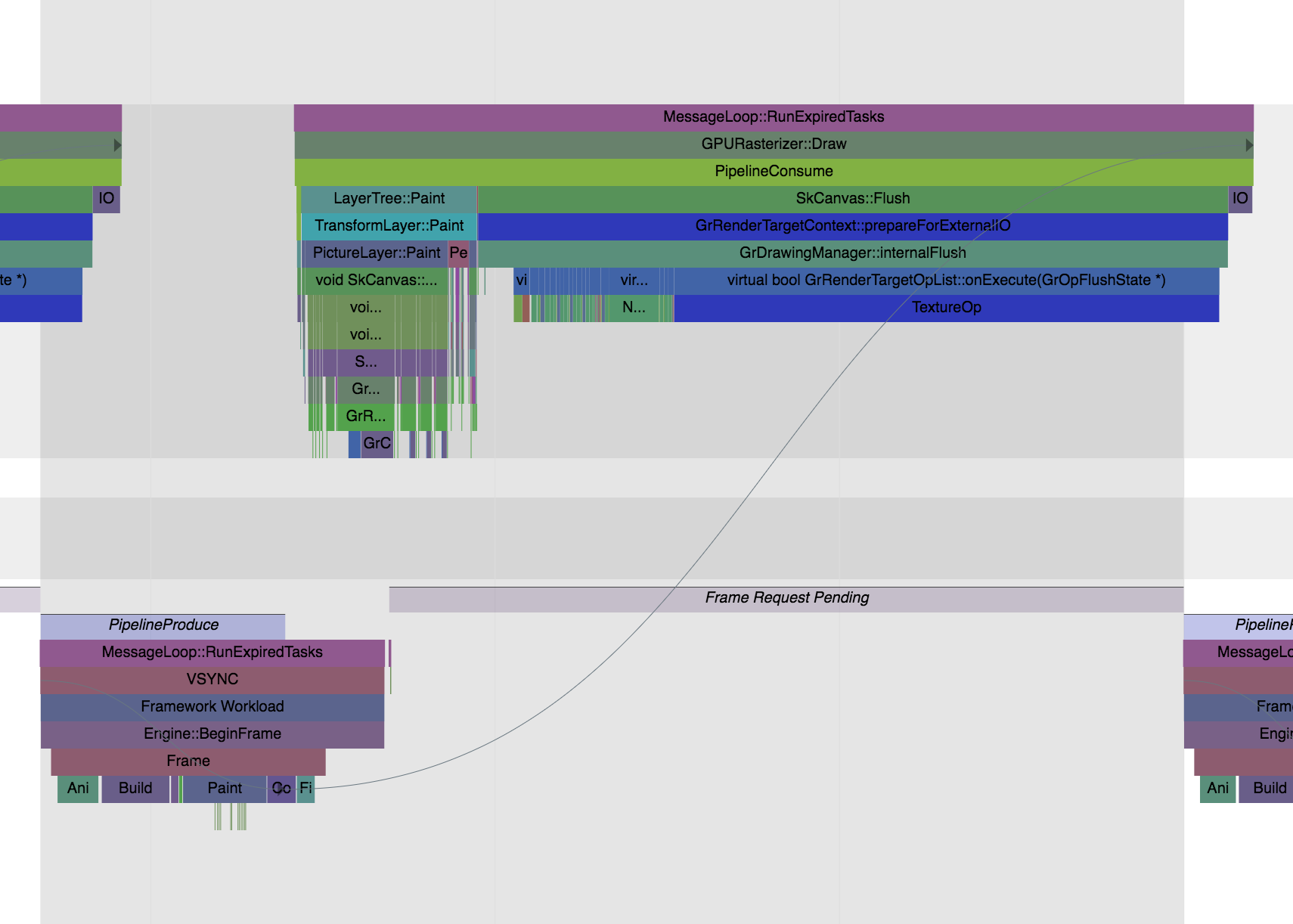
Update: This appears to be a surprisingly slow edge case in the GPU renderer. Switching to the software renderer for this specific scene makes Flutter comfortably meet its frame budget. This is a
trace of scene using the slow GPU renderer and this one traces the same scene with the software renderer.
Slow:
Fast:
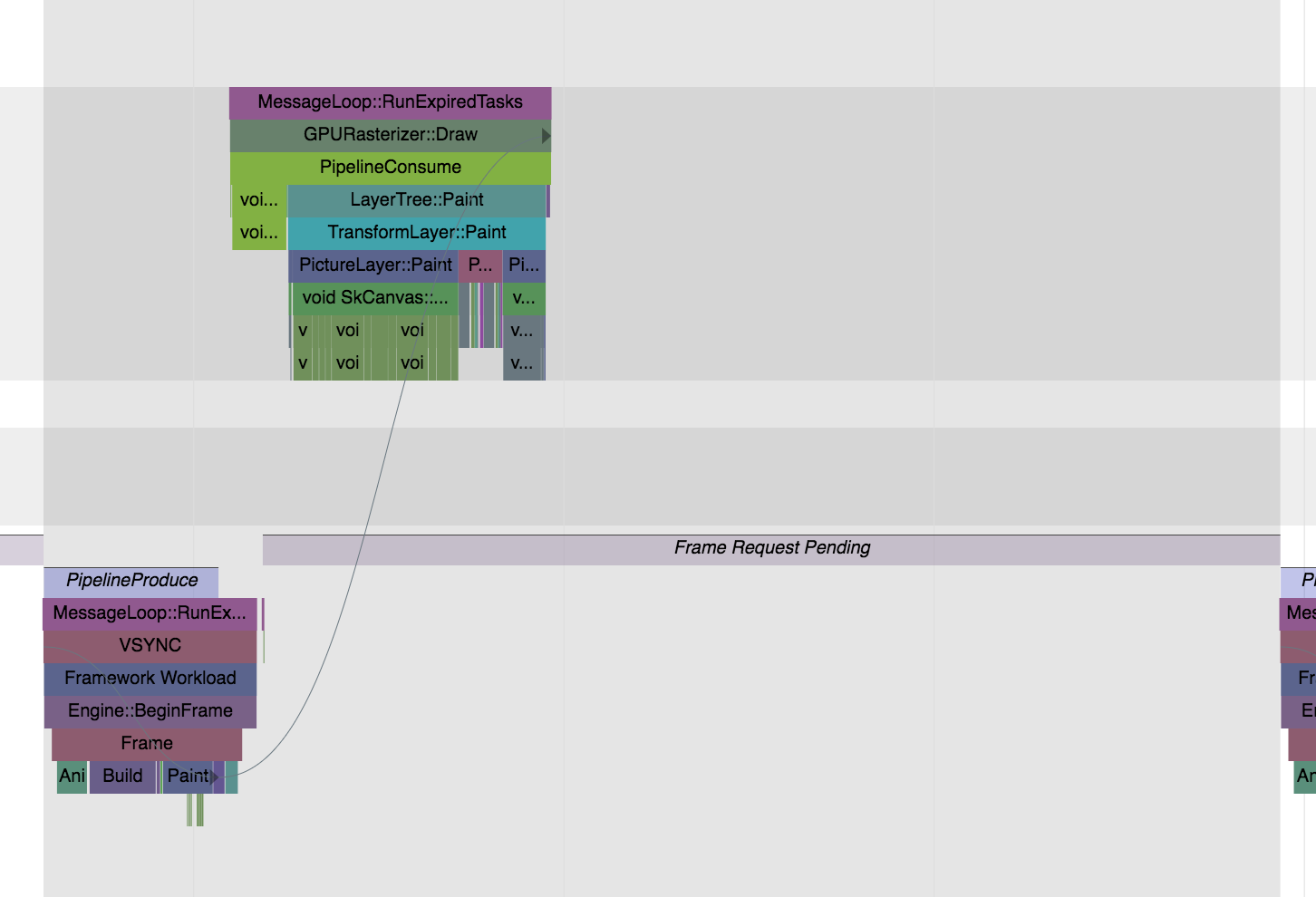
In the slow GPU trace, the renderer seems to be creating a bitmap texture for subsequent upload. The scribble into this texture seems to be taking an extremely long time as shown. There are two surprising outcomes here. We should not be doing a per frame texture allocation, scribble and upload. Also, the scribble done by the software renderer is way faster than that in the GPU renderer.
The offending call seems to be the

TextureOpinvirtual bool GrRenderTargetOpList::onExecute(GrOpFlushState *):We have the issue isolated. The fix is not clear ATM. But this scene should be easy to render in a performant manner once this issue is fixed.
Just an update.
eseidelGoogle commentedon May 29, 2018
Thank you @chinmaygarde!
chinmaygarde commentedon May 29, 2018
cc @brianosman
chinmaygarde commentedon May 30, 2018
More update: Marking the path as volatile (
setIsVolatile) and disabling thefAllowPathMaskCachingGrContext option did not seem to help. Traces for this are here.chinmaygarde commentedon May 30, 2018
SKP Trace for the scene as requested.
brianosman commentedon May 30, 2018
cc @bsalomon
bsalomon commentedon May 30, 2018
What device reproduces the slowness?
chinmaygarde commentedon May 30, 2018
Those traces were captured on an iPhone 8.
21 remaining items
liyuqian commentedon Oct 5, 2018
With the new CCPR, this is no longer an issue as we're always fast even if we don't setIsVolatile:
windrunner414 commentedon Apr 10, 2019
I found that using the bezier curve was still very slow.
#27453 is there any way to solve it? i converted dart to native java it's very smooth.but in flutter is very slow
csmartdalton86 commentedon Apr 10, 2019
CCPR is temporarily disabled and an MSAA implementation is in the works. It should land within the next few weeks, at which time bezier curves will be fast again.
windrunner414 commentedon Apr 10, 2019
@csmartdalton86 sounds great.I will test it after land
windrunner414 commentedon Apr 14, 2019
@csmartdalton86 hi.when was CCPR disabled? I found this issue in february(stable1.0). ccpr may be disabled last month?Is my issue caused by it?
liyuqian commentedon Apr 15, 2019
Yes, CCPR is only disabled recently, but I'm not sure whether it's enabled in Flutter v1.0. It has only been enabled by default probably a few months ago. @csmartdalton86 : can you please provide a commit in Skia that enables CCPR by default for all (or most) paths?
csmartdalton86 commentedon Apr 15, 2019
Looks like it was disabled March 18:
https://skia-review.googlesource.com/c/skia/+/201938
CCPR was enabled some time last year, so in February it should have been enabled.
@windrunner414, do you have a specific bezier drawing case in mind that you can share for us to look at?
liyuqian commentedon Apr 16, 2019
@csmartdalton86 : v1.0 was released last year and it was cut on 5391447 which was in November last year. So it would be nice to check that CCPR was enabled at that time.
Meanwhile, @windrunner414 , can you please post a sample Flutter app (which hopefully only has a single main.dart file) that includes your slow bezier path drawing so we can debug locally to see if it's CCPR or something else?
csmartdalton86 commentedon Apr 16, 2019
CCPR was enabled on June 24, 2018.
https://skia-review.googlesource.com/c/skia/+/137207
Stroking was implemented on September 3, 2018:
https://skia-review.googlesource.com/c/skia/+/151188
liyuqian commentedon Apr 16, 2019
Thanks @csmartdalton86 ! So it should definitely be there in v1.0. We'll need more information about the path to see why it's slow, @windrunner414 .
windrunner414 commentedon Apr 16, 2019
@liyuqian @csmartdalton86 you can see #27453.
I write the details in it
windrunner414 commentedon Apr 16, 2019
This is a very simple example, which is much more complicated in my book reader app.
I write a native app use similar code (only convert dart to java) is very smooth in Samsung galaxy note3 but the flutter app is pretty janky
github-actions commentedon Aug 15, 2021
This thread has been automatically locked since there has not been any recent activity after it was closed. If you are still experiencing a similar issue, please open a new bug, including the output of
flutter doctor -vand a minimal reproduction of the issue.