Skip to content

SearchDelegate should respect InputDecoration theme override #19734

Closed

Description

@DFreds

Internal: b/165582972

Currently, the search bar contained in SearchDelegate uses the following code to set the colors of the app:

  ThemeData appBarTheme(BuildContext context) {
    assert(context != null);
    final ThemeData theme = Theme.of(context);
    assert(theme != null);
    return theme.copyWith(
      primaryColor: Colors.white,
      primaryIconTheme: theme.primaryIconTheme.copyWith(color: Colors.grey),
      primaryColorBrightness: Brightness.light,
      primaryTextTheme: theme.textTheme,
    );
  }

This requires a specific override of appBarTheme for each SearchDelegate or else it looks horrible for dark themes (even the default ThemeData.dark()). Frankly, I don't see why it needs to explicitly specify Colors.white or Colors.grey. It should inherit something from the currently applied theme just like the regular app bar.

I attached two images (light and dark) to prove my point.

screenshot_1532475976
screenshot_1532475953

Activity

  1. DFreds commented on Jul 25, 2018

    @DFreds
    Author

    The style of the search text field in the _SearchPageState needs to be updated as well.

    The code I'm referring to is on line 420 of search.dart.

            title: new TextField(
              controller: queryTextController,
              focusNode: widget.delegate._focusNode,
              style: theme.textTheme.title,
              onSubmitted: (String _) {
                widget.delegate.showResults(context);
              },
              decoration: new InputDecoration(
                border: InputBorder.none,
                hintText: MaterialLocalizations.of(context).searchFieldLabel,
              ),
            ),

    I have the following code to override the app bar style.

     @override
     ThemeData appBarTheme(BuildContext context) {
       final ThemeData theme = Theme.of(context);
       return theme.copyWith(
         primaryColor: theme.primaryColor,
         primaryIconTheme: theme.primaryIconTheme,
         primaryColorBrightness: theme.primaryColorBrightness,
         primaryTextTheme: theme.primaryTextTheme,
       );
     }

    Which makes it look like this

    screen shot 2018-07-24 at 7 58 31 pm

    I'm able to update the text field with this code in my overridden method:

    textTheme: theme.textTheme.copyWith(title: theme.textTheme.title.copyWith(color: theme.primaryTextTheme.title.color))

    Which makes it look like this

    screen shot 2018-07-24 at 8 00 25 pm

    However, the 'Search' hint text is still grey as shown

    screen shot 2018-07-24 at 8 00 55 pm

    I'm unsure how to fix that part.

  2. added
    frameworkflutter/packages/flutter repository. See also f: labels.
    p: material_uimaterial_ui package in flutter/packages
    a: qualityA truly polished experience
    on Jul 25, 2018
  3. goderbauer commented on Aug 14, 2018

    @goderbauer
    Member

    @DFreds I do understand the problem you describe in your second post. We need to provide a way to customize the hint text.

    However, I don't understand your issue in the fist post. Overriding appBarTheme is the hook to customize the colors used in the app bar of the search screen. What are you missing from there?

  4. added
    waiting for responseThe Flutter team cannot make further progress on this issue until the original reporter responds
    on Aug 14, 2018
  5. DFreds commented on Aug 15, 2018

    @DFreds
    Author

    It isn't so much an issue as it is unexpected behavior of the search widget. I'm struggling to understand why it would default to Colors.white and Colors.grey for the primary color and primary icon theme instead of inheriting something from the theme like (almost all?) other widgets with color. I think having the override for the theme of it is great for unique customization, but I assumed that it would match the rest of my application by default when I added it.

    My example pointed out dark mode. As it stands, I have to do basically zero work if I want a dark mode in my app. Obviously I can customize it, but widgets such as cards, text, icons, etc. all change to match the dark theme. The search widget does not.

    Does that clear it up?

  6. removed
    waiting for responseThe Flutter team cannot make further progress on this issue until the original reporter responds
    on Aug 15, 2018
  7. changed the title [-]SearchDelegate should not set specific colors for the app bar by default[/-] [+]SearchDelegate should respect the theme more[/+] on Aug 15, 2018
  8. goderbauer commented on Aug 15, 2018

    @goderbauer
    Member

    That makes sense. Thanks for the clarification.

  9. arieslee commented on Dec 3, 2018

    @arieslee

    The style of the search text field in the _SearchPageState needs to be updated as well.

    The code I'm referring to is on line 420 of search.dart.

            title: new TextField(
              controller: queryTextController,
              focusNode: widget.delegate._focusNode,
              style: theme.textTheme.title,
              onSubmitted: (String _) {
                widget.delegate.showResults(context);
              },
              decoration: new InputDecoration(
                border: InputBorder.none,
                hintText: MaterialLocalizations.of(context).searchFieldLabel,
              ),
            ),

    I have the following code to override the app bar style.

     @override
     ThemeData appBarTheme(BuildContext context) {
       final ThemeData theme = Theme.of(context);
       return theme.copyWith(
         primaryColor: theme.primaryColor,
         primaryIconTheme: theme.primaryIconTheme,
         primaryColorBrightness: theme.primaryColorBrightness,
         primaryTextTheme: theme.primaryTextTheme,
       );
     }

    Which makes it look like this

    screen shot 2018-07-24 at 7 58 31 pm

    I'm able to update the text field with this code in my overridden method:

    textTheme: theme.textTheme.copyWith(title: theme.textTheme.title.copyWith(color: theme.primaryTextTheme.title.color))

    Which makes it look like this

    screen shot 2018-07-24 at 8 00 25 pm

    However, the 'Search' hint text is still grey as shown

    screen shot 2018-07-24 at 8 00 55 pm

    I'm unsure how to fix that part.

    I have the same problem. Have you solved it?

  10. DFreds commented on Dec 4, 2018

    @DFreds
    Author

    I did not solve it. I ended up using the default styling for now

  11. added this to the milestone on Dec 5, 2018
  12. maxgmer commented on Jan 13, 2019

    @maxgmer

    Same issue, we need a way to customize hint color

  13. guojiex commented on Jan 17, 2019

    @guojiex
    Contributor

    I changed the search.dart at 433 line by adding the hintstyle:

    title: TextField(
                controller: queryTextController,
                focusNode: widget.delegate._focusNode,
                style: theme.textTheme.title,
                textInputAction: TextInputAction.search,
                onSubmitted: (String _) {
                  widget.delegate.showResults(context);
                },
                decoration: InputDecoration(
                  border: InputBorder.none,
                  hintText: searchFieldLabel,
                  hintStyle: theme.inputDecorationTheme.hintStyle,
                ),
              ),

    Then I override the appBarTheme function (adding inputDecorationTheme):

    @override
      ThemeData appBarTheme(BuildContext context) {
        final ThemeData theme = Theme.of(context);
        return theme.copyWith(
            inputDecorationTheme: InputDecorationTheme(
                hintStyle: TextStyle(color: theme.primaryTextTheme.title.color)),
            primaryColor: theme.primaryColor,
            primaryIconTheme: theme.primaryIconTheme,
            primaryColorBrightness: theme.primaryColorBrightness,
            primaryTextTheme: theme.primaryTextTheme,
            textTheme: theme.textTheme.copyWith(
                title: theme.textTheme.title
                    .copyWith(color: theme.primaryTextTheme.title.color)));
      }

    And the hinttext 'Search' looks like:
    2

    Without the change in search.dart, the hinttext is black on my screen:
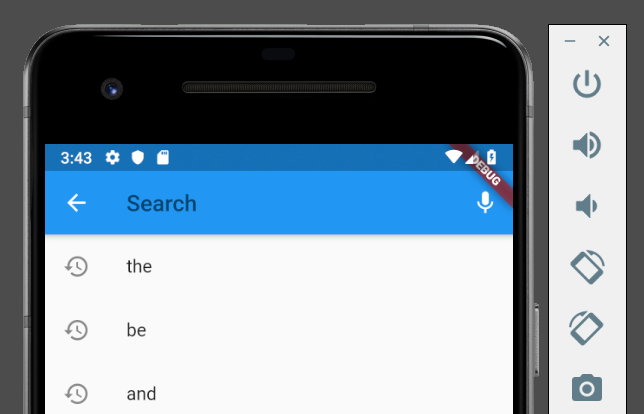
    3

  14. 6 remaining items

  15. mciekurs2 commented on Jun 18, 2019

    @mciekurs2

    As of temporary fix for dark theme I changed line 398 in search.dart
    from final ThemeData theme = widget.delegate.appBarTheme(context);
    to final ThemeData theme = ThemeData.dark();.

  16. chitgoks commented on Jan 2, 2020

    @chitgoks

    The suggestions here work. except for the cursor color. is there a workaround for this?

  17. justinmc commented on Jan 14, 2020

    @justinmc
    Contributor

    @chitgoks I don't see a way to set the cursor color in SearchDelegate. Can you open a separate issue for that? It would be a pretty straightforward PR if anyone is interested in opening one.

  18. zubisofts commented on Feb 6, 2020

    @zubisofts

    You can override the below methods in your search delegate to customize your search widget.

    `class SearchWidget extends SearchDelegate {

    @OverRide
    String get searchFieldLabel => "Search Movie";

    @OverRide
    ThemeData appBarTheme(BuildContext context) {
    return Theme.of(context);
    }`
    image

  19. aminikhil commented on May 26, 2020

    @aminikhil

    The style of the search text field in the _SearchPageState needs to be updated as well.

    The code I'm referring to is on line 420 of search.dart.

            title: new TextField(
              controller: queryTextController,
              focusNode: widget.delegate._focusNode,
              style: theme.textTheme.title,
              onSubmitted: (String _) {
                widget.delegate.showResults(context);
              },
              decoration: new InputDecoration(
                border: InputBorder.none,
                hintText: MaterialLocalizations.of(context).searchFieldLabel,
              ),
            ),

    I have the following code to override the app bar style.

     @override
     ThemeData appBarTheme(BuildContext context) {
       final ThemeData theme = Theme.of(context);
       return theme.copyWith(
         primaryColor: theme.primaryColor,
         primaryIconTheme: theme.primaryIconTheme,
         primaryColorBrightness: theme.primaryColorBrightness,
         primaryTextTheme: theme.primaryTextTheme,
       );
     }

    Which makes it look like this

    screen shot 2018-07-24 at 7 58 31 pm

    I'm able to update the text field with this code in my overridden method:

    textTheme: theme.textTheme.copyWith(title: theme.textTheme.title.copyWith(color: theme.primaryTextTheme.title.color))

    Which makes it look like this

    screen shot 2018-07-24 at 8 00 25 pm

    However, the 'Search' hint text is still grey as shown

    screen shot 2018-07-24 at 8 00 55 pm

    I'm unsure how to fix that part.

    You can simply add this in theme.copyWith()

    inputDecorationTheme: theme.inputDecorationTheme.copyWith(
    hintStyle: theme.textTheme.title.copyWith(
    color: Colors.white70,
    fontWeight: FontWeight.w400,
    ),
    ),

  20. king-11 commented on May 27, 2020

    @king-11

    The style of the search text field in the _SearchPageState needs to be updated as well.
    The code I'm referring to is on line 420 of search.dart.

            title: new TextField(
              controller: queryTextController,
              focusNode: widget.delegate._focusNode,
              style: theme.textTheme.title,
              onSubmitted: (String _) {
                widget.delegate.showResults(context);
              },
              decoration: new InputDecoration(
                border: InputBorder.none,
                hintText: MaterialLocalizations.of(context).searchFieldLabel,
              ),
            ),

    I have the following code to override the app bar style.

     @override
     ThemeData appBarTheme(BuildContext context) {
       final ThemeData theme = Theme.of(context);
       return theme.copyWith(
         primaryColor: theme.primaryColor,
         primaryIconTheme: theme.primaryIconTheme,
         primaryColorBrightness: theme.primaryColorBrightness,
         primaryTextTheme: theme.primaryTextTheme,
       );
     }

    Which makes it look like this
    screen shot 2018-07-24 at 7 58 31 pm
    I'm able to update the text field with this code in my overridden method:
    textTheme: theme.textTheme.copyWith(title: theme.textTheme.title.copyWith(color: theme.primaryTextTheme.title.color))
    Which makes it look like this
    screen shot 2018-07-24 at 8 00 25 pm
    However, the 'Search' hint text is still grey as shown
    screen shot 2018-07-24 at 8 00 55 pm
    I'm unsure how to fix that part.

    You can simply add this in theme.copyWith()

    inputDecorationTheme: theme.inputDecorationTheme.copyWith(
    hintStyle: theme.textTheme.title.copyWith(
    color: Colors.white70,
    fontWeight: FontWeight.w400,
    ),
    ),

    title has been deprecated using subtitle1 is a better alternate.

  21. charleshan commented on Aug 1, 2020

    @charleshan

    It looks like we can't override InputDecoration as shown in the source code:

        // material/search.dart
        ...
        return Semantics(
          explicitChildNodes: true,
          scopesRoute: true,
          namesRoute: true,
          label: routeName,
          child: Scaffold(
            appBar: AppBar(
              backgroundColor: theme.primaryColor,
              iconTheme: theme.primaryIconTheme,
              textTheme: theme.primaryTextTheme,
              brightness: theme.primaryColorBrightness,
              leading: widget.delegate.buildLeading(context),
              title: TextField(
                controller: widget.delegate._queryTextController,
                focusNode: focusNode,
                style: theme.textTheme.headline6,
                textInputAction: widget.delegate.textInputAction,
                keyboardType: widget.delegate.keyboardType,
                onSubmitted: (String _) {
                  widget.delegate.showResults(context);
                },
                decoration: InputDecoration(
                  border: InputBorder.none,
                  hintText: searchFieldLabel,
                  hintStyle: searchFieldStyle,
                ),
              ),
              actions: widget.delegate.buildActions(context),
            ),
            body: AnimatedSwitcher(
              duration: const Duration(milliseconds: 300),
              child: body,
            ),
          ),
        );
        ...
    
  22. changed the title [-]SearchDelegate should respect the theme more[/-] [+]SearchDelegate should respect InputDecoration theme override[/+] on Aug 31, 2020
  23. added
    P1High-priority issues at the top of the work list
    on Aug 31, 2020
  24. mehmetf commented on Aug 31, 2020

    @mehmetf
    Contributor

    This issue is quite old at this point and is too generic IMO. I am refocusing it to be primarily about InputDecoration theme which remains an issue also raised by several internal teams. Marking as p3 for now.

  25. GuvanchBayryyyev commented on Nov 23, 2020

    @GuvanchBayryyyev

    I have found the solution !!!

    1. Remove building Widget
      Widget buildLeading(BuildContext context) { 
    // TODO: implement buildLeading 
           return Container( 
          height: 0,  
            );  
          } 
    
    1. You need to override buildActions to put custom Input
      List<Widget> buildActions(BuildContext context) {
        // TODO: implement buildActions
        return [
          Expanded(flex: 1),
          Expanded(flex: 7),
          Expanded(flex: 2),
        ];
      }
    
    1. First Expanded Widget is "Back button"
    2. Second Expanded Widget is "TextFormField", then you can override decoration: InputDecoration....
    3. Third Expanded Widget is clearing textformfield input
  26. github-actions commented on Aug 9, 2021

    @github-actions

    This thread has been automatically locked since there has not been any recent activity after it was closed. If you are still experiencing a similar issue, please open a new bug, including the output of flutter doctor -v and a minimal reproduction of the issue.

  27. locked as resolved and limited conversation to collaborators on Aug 9, 2021
Sign up for free to join this conversation on GitHub. Already have an account? Sign in to comment

Metadata

Metadata

Assignees

No one assigned

    Labels

    P1High-priority issues at the top of the work lista: qualityA truly polished experiencecustomer: googleVarious Google teamsframeworkflutter/packages/flutter repository. See also f: labels.p: material_uimaterial_ui package in flutter/packages

    Type

    No type

    Projects

    No projects

      Milestone

      No milestone

      Relationships

      None yet

      Development

      No branches or pull requests

      Issue actions