You signed in with another tab or window. Reload to refresh your session.You signed out in another tab or window. Reload to refresh your session.You switched accounts on another tab or window. Reload to refresh your session.Dismiss alert
{{ message }}
Repository navigation
Create a comparison tool for page transition #22862
The default animation, when navigating between routes in a cupertino app doesn't look right.
it is way too slow
it seems as if it's completely linear without any acceleration curves
This results in a very bland and boring transition that doesn't feel native to iOS apps.
I know that I can define my own animations if I define the CupertinoRoute myself, but if I want to use the default router I didn't find a way to do that. I also think that out of the box, the animation should be as close to the native behaviour as possible.
╔════════════════════════════════════════════════════════════════════════════╗
║ A new version of Flutter is available! ║
║ ║
║ To update to the latest version, run "flutter upgrade". ║
╚════════════════════════════════════════════════════════════════════════════╝
[✓] Flutter (Channel master, v0.9.7-pre.10, on Mac OS X 10.14 18A389, locale en-AT)
• Flutter version 0.9.7-pre.10 at /Users/enyo/local/flutter
• Framework revision b08f36e3cc (6 days ago), 2018-10-03 02:27:58 -0400
• Engine revision 74662ab695
• Dart version 2.1.0-dev.6.0.flutter-d2c5a24fd9
[✗] Android toolchain - develop for Android devices
✗ Unable to locate Android SDK.
Install Android Studio from: https://developer.android.com/studio/index.html
On first launch it will assist you in installing the Android SDK components.
(or visit https://flutter.io/setup/#android-setup for detailed instructions).
If Android SDK has been installed to a custom location, set $ANDROID_HOME to that location.
You may also want to add it to your PATH environment variable.
[✓] iOS toolchain - develop for iOS devices (Xcode 10.0)
• Xcode at /Applications/Xcode.app/Contents/Developer
• Xcode 10.0, Build version 10A255
• ios-deploy 2.0.0
• CocoaPods version 1.5.3
[✓] Android Studio (version 3.1)
• Android Studio at /Applications/Android Studio.app/Contents
✗ Flutter plugin not installed; this adds Flutter specific functionality.
✗ Dart plugin not installed; this adds Dart specific functionality.
• Java version OpenJDK Runtime Environment (build 1.8.0_152-release-1024-b01)
[✓] VS Code (version 1.27.2)
• VS Code at /Applications/Visual Studio Code.app/Contents
• Flutter extension version 2.18.0
[✓] Connected device (1 available)
• iPhone XS Max • 8CC14555-4A03-4DF5-AED3-B0BB581ED902 • ios • iOS 12.0 (simulator)
! Doctor found issues in 1 category.
FYI: Updating to the latest flutter version did not resolve the animation issue.
Reacted by Günter Zöchbauer, Calvin and Marco Scannadinari
changed the title [-]The cupertino scaffold transition animation doesn't look native[/-][+]Create a comparison tool for page transition [/+]on Dec 14, 2018
Create a golden test tool like https://github.com/flutter/scroll_overlay where a native view and a Flutter view are overlaid and both are page transitioning at the same time.
To help is adjust the curve if the next iOS version changes; and
To produce videos showing the curve is the same with native.
After testing the fullscreen Cupertino page route on my app, I've concluded that the curve that is currently in use still falls short somewhat (the end is too abrupt).
Would be great to get some insights on this. @OscarFarrer can you share the raw data from your tool so we can compare it with the curve we use currently?
@marcoms lately I seemed to notice that the full page transition on iOS was too fast so I thought I would measure it.
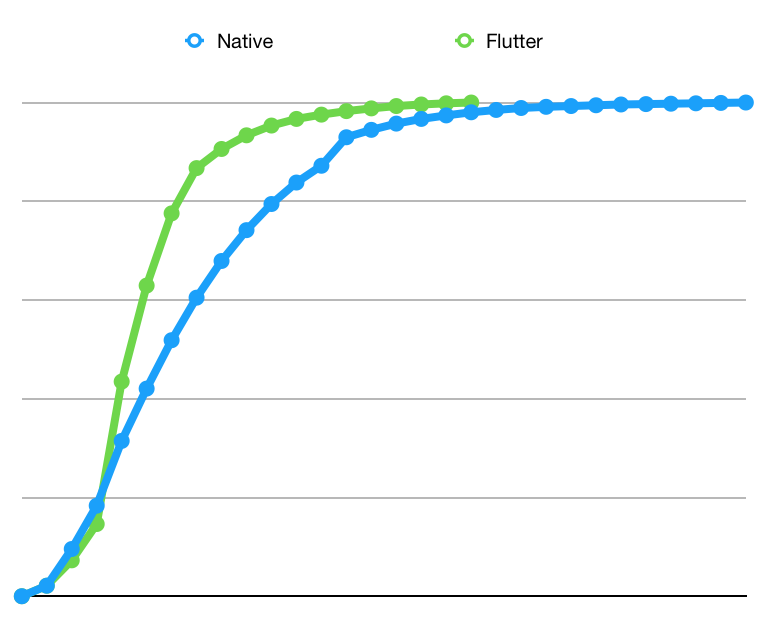
From measuring the top of the page at every frame from a screen recording I got the following curves:
Notice here that the flutter curve ends a lot sooner than the native curve.
When only plotting the flutter curve I get this:
Which indeed looks quite similar to the native curve
I tested this on an iPad with the apps in slideover.
I'm also wondering if maybe the length of the animation is not fixed on native iOS since it took the native app 29 frames to finish the animation which is longer than the current 400ms that is used by the CupertinoPageRoute
This thread has been automatically locked since there has not been any recent activity after it was closed. If you are still experiencing a similar issue, please open a new bug, including the output of flutter doctor -v and a minimal reproduction of the issue.
Activity
zoechi commentedon Oct 9, 2018
Please add the output of
flutter doctor -v.enyo commentedon Oct 9, 2018
FYI: Updating to the latest flutter version did not resolve the animation issue.
[-]The cupertino scaffold transition animation doesn't look native[/-][+]Create a comparison tool for page transition [/+]xster commentedon Dec 14, 2018
I'm going to re-appropriate this issue.
Create a golden test tool like https://github.com/flutter/scroll_overlay where a native view and a Flutter view are overlaid and both are page transitioning at the same time.
Use Curves.fastOutSlowIn for Cupertino route animations involving motion
OscarFarrer commentedon Feb 7, 2019
I wrote an example comparing
UINavigationControlleranimation withCupertinoPageRoute. If you want I can share it to make it better.I've noticed that the push animation is longer than the iOS native one and that the back screen is moved more than iOS when swiped back.
I also made a video:
marcoms commentedon Feb 7, 2019
@OscarFarrer this looks very useful!
We actually recently updated the animation curve (#25488). Could you try this on the master/dev channel?
14 remaining items
marcoms commentedon Apr 15, 2019
After testing the fullscreen Cupertino page route on my app, I've concluded that the curve that is currently in use still falls short somewhat (the end is too abrupt).
Would be great to get some insights on this. @OscarFarrer can you share the raw data from your tool so we can compare it with the curve we use currently?
Kavantix commentedon Aug 15, 2019
@marcoms lately I seemed to notice that the full page transition on iOS was too fast so I thought I would measure it.

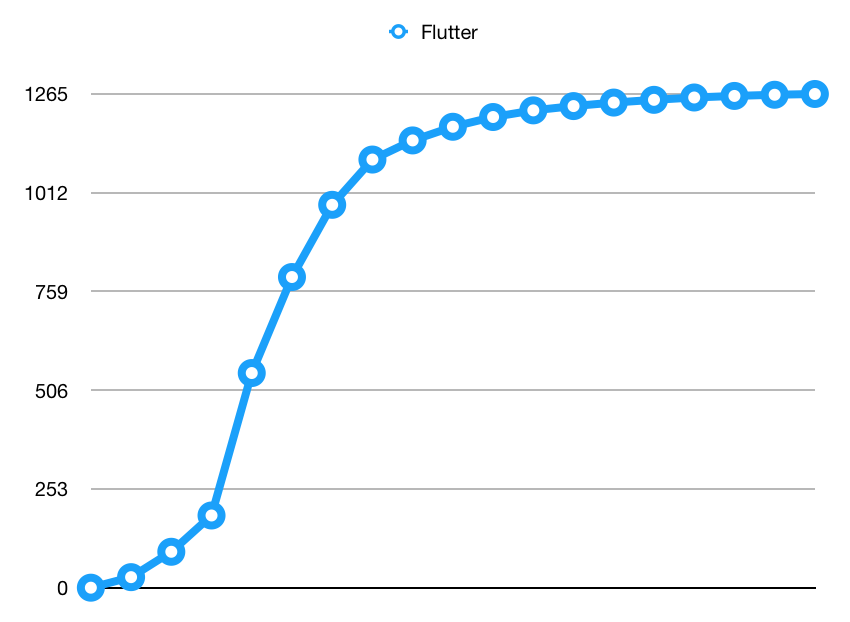
From measuring the top of the page at every frame from a screen recording I got the following curves:
Notice here that the flutter curve ends a lot sooner than the native curve.
When only plotting the flutter curve I get this:
Which indeed looks quite similar to the native curve
I tested this on an iPad with the apps in slideover.
I'm also wondering if maybe the length of the animation is not fixed on native iOS since it took the native app 29 frames to finish the animation which is longer than the current 400ms that is used by the CupertinoPageRoute
DanielEdrisian commentedon Oct 10, 2020
@OscarFarrer If you can, please update flutter/platform_tests#1 so we could merge and close this issue.
github-actions commentedon Mar 13, 2023
This thread has been automatically locked since there has not been any recent activity after it was closed. If you are still experiencing a similar issue, please open a new bug, including the output of
flutter doctor -vand a minimal reproduction of the issue.