Skip to content

SweepGradient startAngle doesn't work as expected. #23648

Closed

Description

@seniorbee

I want to create something like this.
gear
I use shader created from SweepGradient. Here's my code.

    import 'package:flutter/material.dart';
    import 'dart:math';

    class Arc extends CustomPainter {

    double doubleToAngle(double angle) => angle * pi / 180.0;

    void drawArcWithRadius(
        Canvas canvas, Offset center, double radius, double angle, Paint paint) {
        canvas.drawArc(Rect.fromCircle(center: center, radius: radius),
          doubleToAngle(-90.0), doubleToAngle(angle), false, paint);
    }

    @override
    void paint(Canvas canvas, Size size) {
      final Offset center = Offset(size.width / 2.0, size.height / 2.0);
      final double radius = size.width / 3.0;
      double angle = 210.0;
      Paint paint = Paint()
        ..strokeCap = StrokeCap.round
        ..strokeWidth = 40.0
        ..style = PaintingStyle.stroke
        ..color = Colors.red
        ..shader = new SweepGradient(colors: [
          Color(0xFFB4EC51),
          Color(0xFF3023AE),
        ], startAngle: 0.0, endAngle: doubleToAngle(angle))
            .createShader(Rect.fromCircle(center: center, radius: radius));
  
      drawArcWithRadius(canvas, center, radius, angle, paint);
    }

    @override
    bool shouldRepaint(CustomPainter oldDelegate) {
      return true;
    }
    }

But it ends up something like this.
hvh6i
It seems like sweepAngle doesn't have any effect.

Activity

  1. zoechi commented on Oct 29, 2018

    @zoechi
    Contributor

    Please add the output of flutter doctor -v.

  2. added
    engineflutter/engine related. See also e: labels.
    on Oct 29, 2018
  3. added this to the milestone on Oct 29, 2018
  4. zoechi commented on Oct 29, 2018

    @zoechi
    Contributor

    Is this only in an emulator (ios, Android?) or also on real devices (which ones)?

  5. added
    waiting for responseThe Flutter team cannot make further progress on this issue until the original reporter responds
    on Oct 29, 2018
  6. seniorbee commented on Oct 29, 2018

    @seniorbee
    Author

    Please add the output of flutter doctor -v.

    [✓] Flutter (Channel beta, v0.9.4, on Mac OS X 10.13.6 17G65, locale en-AZ)
        • Flutter version 0.9.4 at /Users/mac/development/flutter
        • Framework revision f37c235c32 (5 weeks ago), 2018-09-25 17:45:40 -0400
        • Engine revision 74625aed32
        • Dart version 2.1.0-dev.5.0.flutter-a2eb050044
    
    [✓] Android toolchain - develop for Android devices (Android SDK 28.0.2)
        • Android SDK at /Users/mac/Library/Android/sdk
        • Android NDK location not configured (optional; useful for native profiling support)
        • Platform android-28, build-tools 28.0.2
        • Java binary at: /Applications/Android Studio.app/Contents/jre/jdk/Contents/Home/bin/java
        • Java version OpenJDK Runtime Environment (build 1.8.0_152-release-1024-b01)
        • All Android licenses accepted.
    
    [!] iOS toolchain - develop for iOS devices
        ✗ Xcode installation is incomplete; a full installation is necessary for iOS development.
          Download at: https://developer.apple.com/xcode/download/
          Or install Xcode via the App Store.
          Once installed, run:
            sudo xcode-select --switch /Applications/Xcode.app/Contents/Developer
        ✗ libimobiledevice and ideviceinstaller are not installed. To install, run:
            brew install --HEAD libimobiledevice
            brew install ideviceinstaller
        ✗ ios-deploy not installed. To install:
            brew install ios-deploy
        ✗ CocoaPods not installed.
            CocoaPods is used to retrieve the iOS platform side's plugin code that responds to your plugin usage on the Dart side.
            Without resolving iOS dependencies with CocoaPods, plugins will not work on iOS.
            For more info, see https://flutter.io/platform-plugins
          To install:
            brew install cocoapods
            pod setup
    
    [✓] Android Studio (version 3.1)
        • Android Studio at /Applications/Android Studio.app/Contents
        • Flutter plugin version 28.0.1
        • Dart plugin version 173.4700
        • Java version OpenJDK Runtime Environment (build 1.8.0_152-release-1024-b01)
    
    [✓] Connected devices (1 available)
        • Android SDK built for x86 • emulator-5554 • android-x86 • Android 9 (API 28) (emulator)
    
    ! Doctor found issues in 1 category.
    
  7. removed
    waiting for responseThe Flutter team cannot make further progress on this issue until the original reporter responds
    on Oct 29, 2018
  8. seniorbee commented on Oct 29, 2018

    @seniorbee
    Author

    Is this only in an emulator (ios, Android?) or also on real devices (which ones)?

    This is on a real device. It is Xiaomi Redmi 5. But in emulator there is another issue about gradient. Gradient colors doesn't smoothly change. They are rendered like solid colors. Here is a screenshot of emulator. With the same code.
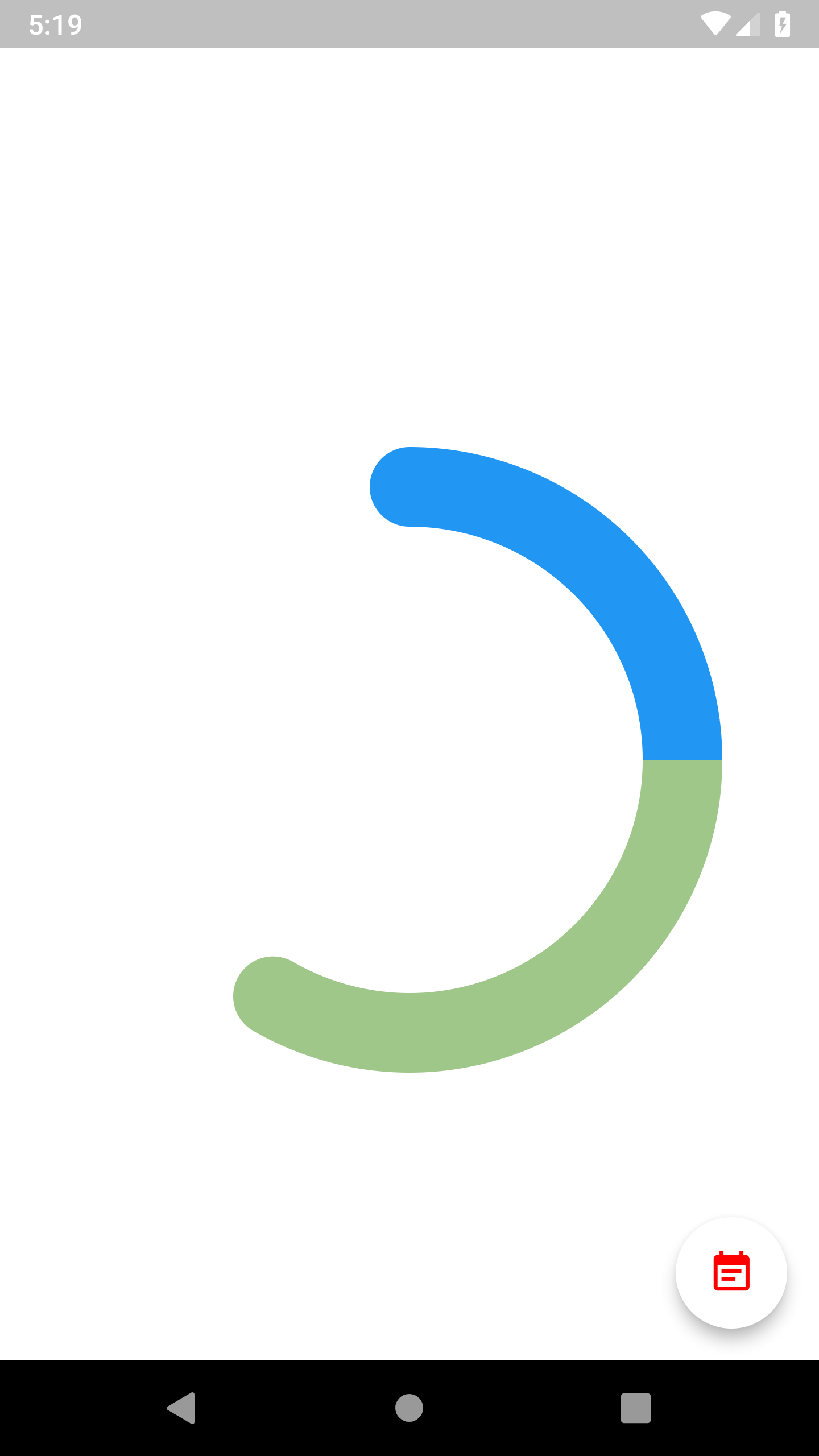
    screenshot_1540819171

  9. yumi0629 commented on Nov 2, 2018

    @yumi0629

    image

    I got the same problem, it seems that the part I circled above was been redrawn with the end color.

    My solution is rotating the canvas:

    canvas.save();
    canvas.translate(0.0, size.width);
    canvas.rotate(degToRad(-90.0));
    ······
    canvas.drawArc(
            arcRect, 0.0, degToRad(angle), false, paint);
    canvas.restore();
    

    Now, it looks right:
    image

  10. dubiao commented on Nov 7, 2018

    @dubiao

    I got the same problem, ...
    My solution is rotating the canvas: ....

    Good point.

  11. baoxiehao commented on Mar 26, 2019

    @baoxiehao

    image

    I got the same problem, it seems that the part I circled above was been redrawn with the end color.

    My solution is rotating the canvas:

    canvas.save();
    canvas.translate(0.0, size.width);
    canvas.rotate(degToRad(-90.0));
    ······
    canvas.drawArc(
            arcRect, 0.0, degToRad(angle), false, paint);
    canvas.restore();
    

    Now, it looks right:
    image

    Your code is not working for me.
    I'm using following working code, hope it helps for someone need it:

        void _drawArc(Paint paint, Rect rect, double angle) {
          final double r = sqrt(maxSize * maxSize + maxSize * maxSize) / 2;
          final alpha = atan(maxSize / maxSize); // height / width
          final beta = alpha + angle;
          final shiftY = r * sin(beta);
          final shiftX = r * cos(beta);
          final translateX = maxSize / 2 - shiftX; // width / 2
          final translateY = maxSize / 2 - shiftY; // height/ 2
          canvas.save();
          canvas.translate(translateX, translateY);
          canvas.rotate(angle);
          canvas.drawArc(rect, 0, 2 * pi, false, paint);
          canvas.restore();
        }
    
          _outerRect = Rect.fromCircle(
              center: Offset(maxSize / 2, maxSize / 2),
              radius: fixSize / 2 - _outerStrokeWidth / 2,
            );
    
          _outerGradient = SweepGradient(
              colors: <Color>[
                customTheme.primaryColorExtraLight.withOpacity(1),
                customTheme.primaryColorExtraLight.withOpacity(0),
              ],
            );
    
            _outerPaint = Paint()
              ..style = PaintingStyle.stroke
              ..strokeWidth = _outerStrokeWidth
              ..strokeCap = StrokeCap.round
              ..isAntiAlias = true;
    
        _drawArc(_outerPaint, _outerRect, outerAngle);

    where I'm using a square(so width == height), and the outerAngle is an animation value.

  12. fantasy525 commented on Apr 7, 2019

    @fantasy525

    I set startAngle -90*(pi/180),but it is not working,I expect start point at -90 deg.It's a bug?

  13. maryx commented on May 14, 2019

    @maryx
    Contributor

    I tried fiddling with the startAngle and endAngle, and also changing the order of my stops (using the example here https://docs.flutter.io/flutter/painting/SweepGradient-class.html, pasted below) and it seems like the SweepGradient always starts in the middle right...which is not ideal. As @fantasy525 points out, I would expect starting at -math.pi/2 to rotate the entire gradient so that the blue (in the example) starts at the top.

    Maybe the descriptions of startAngle and stopAngle are what cause confusion. I'm interpreting it as the angle at which the color stop 0 begins, with 0 defined as the middle right of the screen. But maybe it should be interpreted as the angle at which a gradient effect begins (all drawing begins on the middle right of the screen), so you can have a SweepGradient that only has a section that has a blurry gradient?

    Container(
      decoration: BoxDecoration(
        gradient: SweepGradient(
          center: FractionalOffset.center,
          startAngle: 0.0,
          endAngle: math.pi * 2,
          colors: const <Color>[
            Color(0xFF4285F4), // blue
            Color(0xFF34A853), // green
            Color(0xFFFBBC05), // yellow
            Color(0xFFEA4335), // red
            Color(0xFF4285F4), // blue again to seamlessly transition to the start
          ],
          stops: const <double>[0.0, 0.25, 0.5, 0.75, 1.0],
         ),
      ),
     )
    

    The workaround is wrap the SweepGradient's Container in a RotatedBox, but I would prefer to just draw the gradient already in that orientation.

  14. dnfield commented on May 15, 2019

    @dnfield
    Contributor

    /cc @xqwzts in case he has any good ideas here..

  15. 6 remaining items

  16. dnfield commented on May 16, 2019

    @dnfield
    Contributor

    Ah! We're missing the local matrix parameter - with that you could rotate just the gradient.

  17. dark-chocolate commented on May 25, 2019

    @dark-chocolate

    image

    In your build() method, use it like.

    Center(
      child: CustomPaint(
        painter: MyPainter(),
        child: Container(
          width: 300,
          height: 300,
        ),
      ),
    )
    

    Implementation (MyPainter class)

    @override
    void paint(Canvas canvas, Size size) {
      double x = 150, y = 150, radius = 150, strokeWidth = 20;
    
      Paint paint = Paint()
        ..strokeWidth = strokeWidth
        ..style = PaintingStyle.stroke
        ..strokeCap = StrokeCap.round
        ..shader = SweepGradient(colors: [Colors.white, Colors.pinkAccent]).createShader(Rect.fromCircle(center: Offset(x, y), radius: 0))
        ..color = Colors.pinkAccent;
    
      canvas.save();
      canvas.rotate(degToRad(-90));
      canvas.translate(-2 * x, 0);
      canvas.drawArc(Rect.fromCircle(center: Offset(x, y), radius: radius - strokeWidth / 2), degToRad(0), degToRad(360), false, paint);
      canvas.restore();
      paint.shader = null;
      paint.style = PaintingStyle.fill;
      canvas.drawCircle(Offset(x, strokeWidth / 2), strokeWidth, paint);
    }
    
  18. self-assigned this
    on Jun 5, 2019
  19. modified the milestones: , July 2019 on Jun 5, 2019
  20. removed
    engineflutter/engine related. See also e: labels.
    on Jun 27, 2019
  21. modified the milestones: July 2019, on Aug 6, 2019
  22. modified the milestones: , October 2019 on Aug 7, 2019
  23. dnfield commented on Oct 11, 2019

    @dnfield
    Contributor

    I've added some examples in the linked PR, but you can now rotate just the gradient by specifying the transform parameter in your gradient. Right now, only GradientRotation is implemented - if you give that the radians to rotate, it should just work.

  24. dnfield commented on Oct 11, 2019

    @dnfield
    Contributor

    And FWIW, I spent an inordinate amount of time trying to convince myself that there were no bugs elsewhere in the implementation for this, because I kept messing up the vector math - and of course, instead of thinking "Oh, I'm messing up the vector math", I kept thinking "Oh, maybe there's a bug in the engine code" or something :D. But now it's in there and it should be right :)

  25. github-actions commented on Aug 5, 2021

    @github-actions

    This thread has been automatically locked since there has not been any recent activity after it was closed. If you are still experiencing a similar issue, please open a new bug, including the output of flutter doctor -v and a minimal reproduction of the issue.

  26. locked as resolved and limited conversation to collaborators on Aug 5, 2021
Sign up for free to join this conversation on GitHub. Already have an account? Sign in to comment

Metadata

Metadata

Assignees

Labels

d: api docsIssues with https://api.flutter.dev/frameworkflutter/packages/flutter repository. See also f: labels.

Type

No type

Projects

No projects

    Milestone

    Relationships

    None yet

    Development

    No branches or pull requests

    Issue actions