Skip to content

Add boxShadow to ClipPath #25946

Open
Open

Description

@marwan-at-work

Hi there, I'm trying to add a boxShadow to a clipped container, but I can't find any docs or way to do it. The closest thing I could find is this stackoverflow answer, but it seems a bit too low level https://stackoverflow.com/questions/51232532/how-to-add-a-border-to-a-clipped-image

I assume this show could be expanded to request having the ability to add a border or a border shadow to any type of clipped widgets.

Activity

  1. added
    c: new featureNothing broken; request for a new capability
    frameworkflutter/packages/flutter repository. See also f: labels.
    on Jan 2, 2019
  2. added this to the milestone on Jan 2, 2019
  3. coman3 commented on Jan 27, 2019

    @coman3

    For anyone looking to implement something like this right away:

    I have managed to do something along the lines of this from ripping the Shadow.toPaint method to achieve the following effect: ClipDropShadow
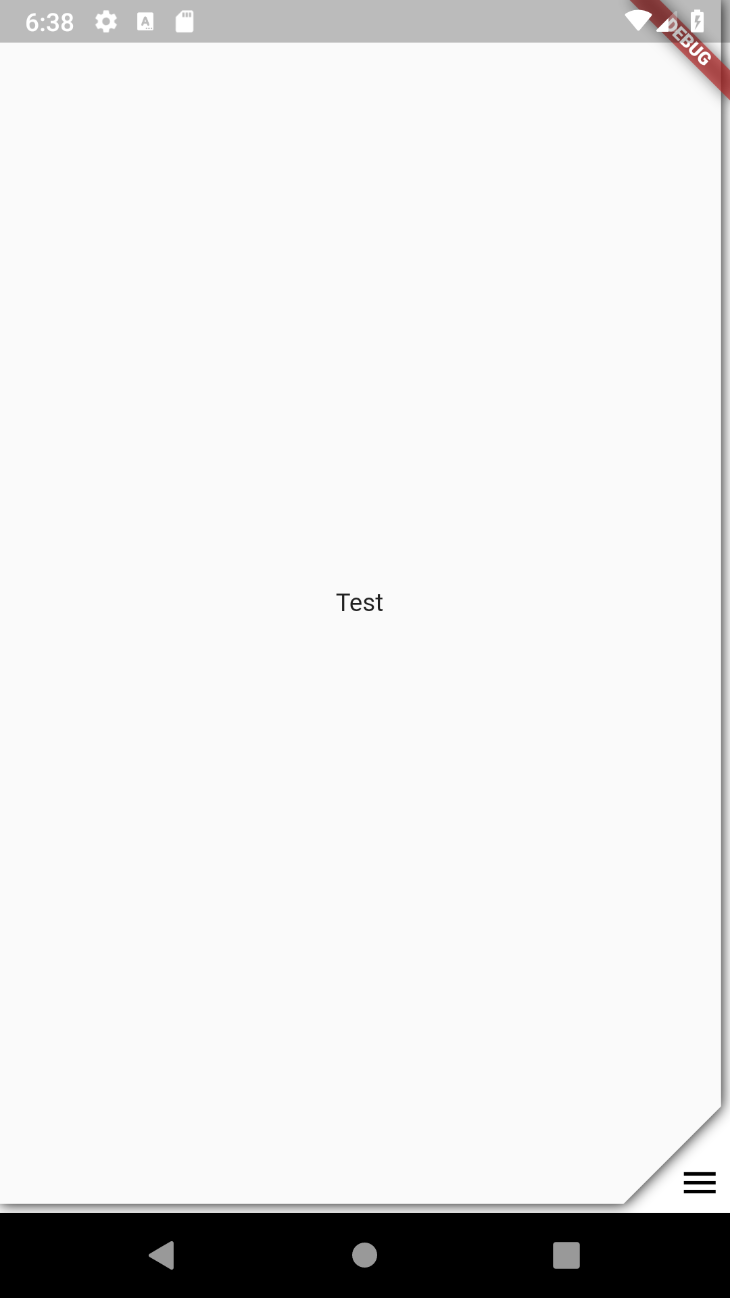
    A drop-in widget and some example code can be found here: Gist

  4. fzleite commented on Jan 29, 2019

    @fzleite

    Nice. Can you share the code?

  5. zoechi commented on Jan 29, 2019

    @zoechi
    Contributor

    @fzleite see the Gist link at the end of the comment

    A drop-in widget and some example code can be found here: Gist

  6. fzleite commented on Jan 29, 2019

    @fzleite

    It works great. Thank you

  7. aytunch commented on Apr 5, 2019

    @aytunch

    @coman3 Is there a way to do custom border outline following the Clipper just like you did for a shadow?

  8. januwA commented on Sep 5, 2019

    @januwA

    @ coman3有没有办法像Clipper一样在Clipper之后做自定义边框轮廓?

    I am also looking for a way to set the borderRadius for the clipped container. 😃

  9. added
    P2Important issues not at the top of the work list
    on May 29, 2020
  10. removed this from the milestone on Aug 17, 2020
  11. behnamsattar commented on Mar 4, 2022

    @behnamsattar

    Instead of creating a container, clipping it, and then applying a shadow to the clipper, you can create a custom-shaped container using a ShapeDecoration and apply it directly to the container.

    Here is a sample code that creates a container with a notch in the top center. The shadow is directly applied to the container. The hard part for me was to create the custom path the way I want which I think you already have.

    Sample Code
    // Usage
    Container(
      width: 350,
      height: 500,
      decoration: ShapeDecoration(
        color: HeroColors.white,
        shape: NotchedRoundedCornerShape(cutWidth: 160, cutHeight: 38, outerRadius: 15),
        shadows: [
          BoxShadow(
            color: HeroColors.black25,
            blurRadius: 40,
          ),
        ],
      ),
    );
    
    // Custom shape
    class NotchedRoundedCornerShape extends ShapeBorder {
      final double cutWidth;
      final double cutHeight;
      final double outerRadius;
    
      const NotchedRoundedCornerShape({
        required this.cutWidth,
        required this.cutHeight,
        required this.outerRadius,
      });
    
      @override
      EdgeInsetsGeometry get dimensions => EdgeInsets.zero;
    
      @override
      Path getInnerPath(Rect rect, {TextDirection? textDirection}) {
        final controlAdjustment = outerRadius / 10.0;
        final size = rect.size;
        return Path()
          ..moveTo(rect.left, rect.top + outerRadius)
          ..quadraticBezierTo(
            rect.left + controlAdjustment,
            rect.top + controlAdjustment,
            rect.left + outerRadius,
            rect.top + 0,
          )
          ..lineTo(rect.left + (size.width - cutWidth) / 2.0, rect.top)
          // Cutout start
          ..arcTo(
            Rect.fromLTWH(
              rect.left + (size.width - cutWidth) / 2.0,
              rect.top - cutHeight,
              cutHeight * 2,
              cutHeight * 2,
            ),
            _degToRad(180),
            _degToRad(-90),
            false,
          )
          ..lineTo(rect.left + (size.width + cutWidth) / 2.0 - cutHeight, rect.top + cutHeight)
          ..arcTo(
            Rect.fromLTWH(
              rect.left + ((size.width + cutWidth) / 2.0) - cutHeight * 2,
              rect.top - cutHeight,
              cutHeight * 2,
              cutHeight * 2,
            ),
            _degToRad(90),
            _degToRad(-90),
            false,
          )
          // Cutout end
          ..lineTo(rect.left + size.width - outerRadius, rect.top)
          ..quadraticBezierTo(
            rect.left + size.width - controlAdjustment,
            rect.top + controlAdjustment,
            rect.left + size.width,
            rect.top + outerRadius,
          )
          ..lineTo(rect.left + size.width, rect.top + size.height - outerRadius)
          ..quadraticBezierTo(
            rect.left + size.width - controlAdjustment,
            rect.top + size.height - controlAdjustment,
            rect.left + size.width - outerRadius,
            rect.top + size.height,
          )
          ..lineTo(rect.left + outerRadius, rect.top + size.height)
          ..quadraticBezierTo(
            rect.left + 0 + controlAdjustment,
            rect.top + size.height - controlAdjustment,
            rect.left + 0,
            rect.top + size.height - outerRadius,
          )
          ..lineTo(rect.left, rect.top + outerRadius);
      }
    
      @override
      Path getOuterPath(Rect rect, {TextDirection? textDirection}) {
        return getInnerPath(rect, textDirection: textDirection);
      }
    
      @override
      void paint(Canvas canvas, Rect rect, {TextDirection? textDirection}) {
        canvas.drawPaint(BorderSide.none.toPaint());
      }
    
      @override
      ShapeBorder scale(double t) {
        return NotchedRoundedCornerShape(
          cutWidth: cutWidth * t,
          cutHeight: cutHeight * t,
          outerRadius: outerRadius * t,
        );
      }
    
      double _degToRad(double deg) => deg * (math.pi / 180.0);
    }
    
Sign up for free to join this conversation on GitHub. Already have an account? Sign in to comment

Metadata

Metadata

Assignees

No one assigned

    Labels

    P2Important issues not at the top of the work listc: new featureNothing broken; request for a new capabilityframeworkflutter/packages/flutter repository. See also f: labels.team-frameworkOwned by Framework teamtriaged-frameworkTriaged by Framework team

    Type

    No type

    Projects

    No projects

      Milestone

      No milestone

      Relationships

      None yet

      Development

      No branches or pull requests

      Issue actions