Repository navigation
Bottom notch (iPhone X) not avoided by SafeArea when the Keyboard is open #29941

Description
Activity
i found this issues too. i don't use Scaffold and Safearea, i manage page offset manually. and when the keyboard just showed up, i got the MediaQuery.of(context).padding.bottom is 0.0, and when Keyboard was hidden, it's back to 34.0 again.
all this was tested in iPhoneX
[✓] Flutter (Channel stable, v1.2.1, on Mac OS X 10.13.4 17E199, locale zh-Hans-CN)
• Flutter version 1.2.1 at /Users/wow/env/flutter
• Framework revision 8661d8a (10 weeks ago), 2019-02-14 19:19:53 -0800
• Engine revision 3757390
• Dart version 2.1.2 (build 2.1.2-dev.0.0 0a7dcf17eb)[✓] Android toolchain - develop for Android devices (Android SDK version 28.0.3)
• Android SDK at /Users/gitkeer/Library/Android/sdk
• Android NDK location not configured (optional; useful for native profiling support)
• Platform android-28, build-tools 28.0.3
• ANDROID_HOME = /Users/gitkeer/Library/Android/sdk
• Java binary at: /Applications/Android Studio.app/Contents/jre/jdk/Contents/Home/bin/java
• Java version OpenJDK Runtime Environment (build 1.8.0_152-release-1136-b06)
• All Android licenses accepted.[✓] iOS toolchain - develop for iOS devices (Xcode 9.2)
• Xcode at /Applications/Xcode9.app/Contents/Developer
• Xcode 9.2, Build version 9C40b
• ios-deploy 1.9.4
• CocoaPods version 1.5.2[✓] Android Studio (version 3.2)
• Android Studio at /Applications/Android Studio.app/Contents
• Flutter plugin version 31.3.1
• Dart plugin version 181.5656
• Java version OpenJDK Runtime Environment (build 1.8.0_152-release-1136-b06)[✓] IntelliJ IDEA Ultimate Edition (version 2018.3.2)
• IntelliJ at /Applications/IntelliJ IDEA.app
• Flutter plugin version 32.0.2
• Dart plugin version 183.4886.3[✓] VS Code (version 1.33.1)
• VS Code at /Applications/Visual Studio Code.app/Contents
• Flutter extension version 2.25.1[✓] Connected device (1 available)
• iPhone X • 6013C2D7-8F3F-4B54-AD21-68062DA3F717 • ios • com.apple.CoreSimulator.SimRuntime.iOS-12-1 (simulator)We also run into this problem without
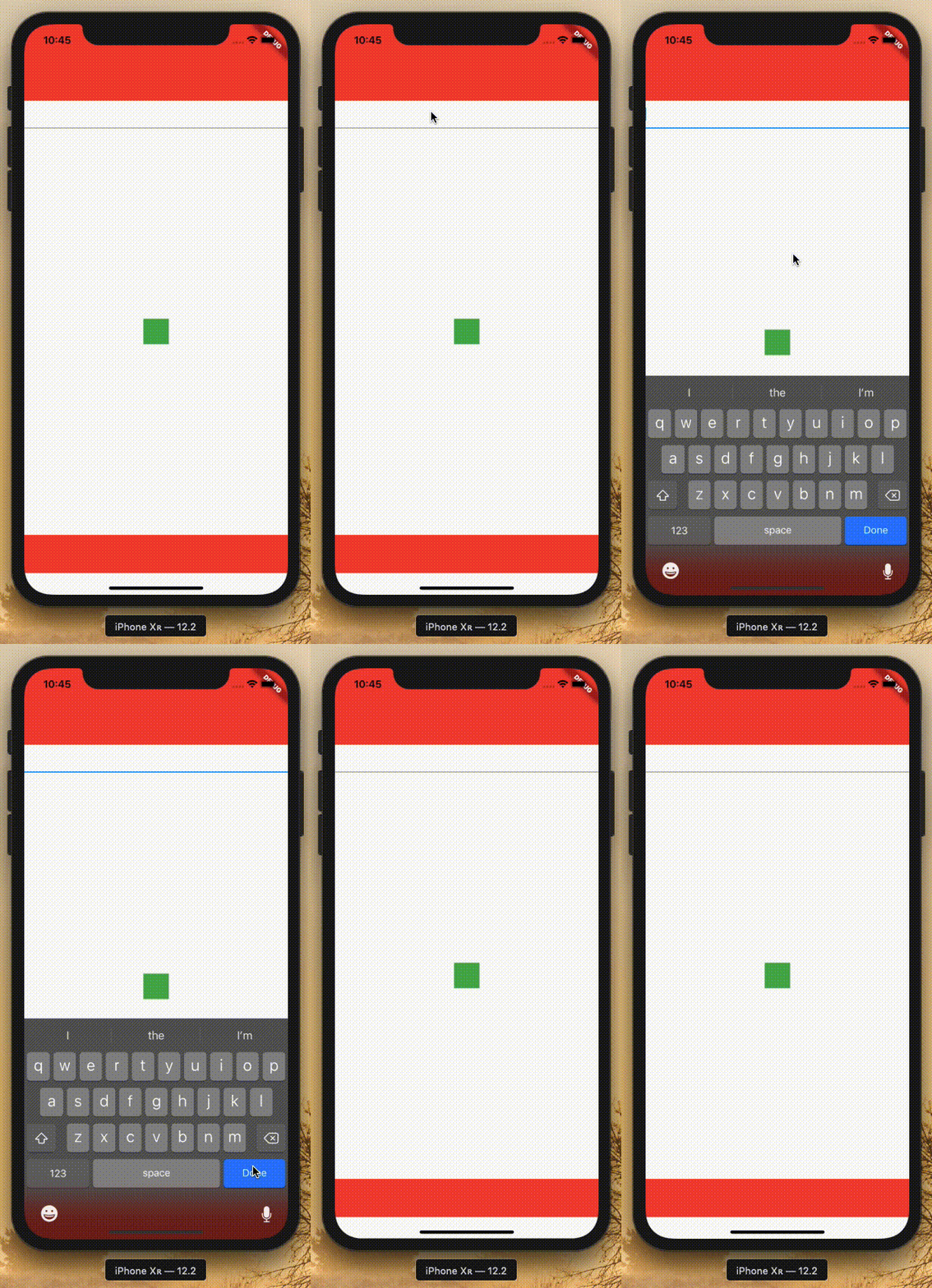
Scaffold: When content is centered, it jumps because the safe area disappears when the keyboard shows.import 'package:flutter/material.dart'; void main() => runApp(MyApp()); class MyApp extends StatelessWidget { @override Widget build(BuildContext context) => MaterialApp(home: MyHomePage()); } class MyHomePage extends StatelessWidget { @override Widget build(BuildContext context) { return Material( child: Column( children: <Widget>[ Container(color: Colors.red, height: 120), TextField(), Expanded( child: Center(child: Container(width: 40, height: 40, color: Colors.green)), ), SafeArea(top: false, child: Container(color: Colors.red, height: 60)) ], ), ); } }
[✓] Flutter (Channel unknown, v1.4.18, on Mac OS X 10.14.3 18D109, locale en-NL) • Flutter version 1.4.18 at /Users/sander/Development/.../flutter • Framework revision 8bea3fb2eb (2 weeks ago), 2019-04-11 13:11:22 -0700 • Engine revision 72986c39ea • Dart version 2.2.1 (build 2.2.1-dev.3.1 None)I just ran into this too. My main page layout scales with the screen size, so I set
resizeToAvoidBottomInset: falsein myScaffoldto avoid the content shifting when the keyboard opens. However, on iPhone X, it still shifts because the bottom notch is accounted for when the keyboard is open, but not when it's closed. This will become a release blocker for my app in about a week.Doctor summary (to see all details, run flutter doctor -v): [✓] Flutter (Channel master, v1.5.9-pre.29, on Mac OS X 10.14.4 18E226, locale en-US) [✓] Android toolchain - develop for Android devices (Android SDK version 28.0.3) [✓] iOS toolchain - develop for iOS devices (Xcode 10.2.1) [!] Android Studio (version 3.4) ✗ Flutter plugin not installed; this adds Flutter specific functionality. ✗ Dart plugin not installed; this adds Dart specific functionality. [✓] IntelliJ IDEA Community Edition (version 2019.1.1) [✓] VS Code (version 1.33.1) [✓] Connected device (1 available) ! Doctor found issues in 1 category.- added this to the milestone
on Apr 30, 2019 Our basic problem here is that the
MediaQueryloses any information about the "full screen" (media relative) safe area when the keyboard pops up. This is the correct behavior for a bunch of use cases (such as keeping a bottom nav bar tight to the keyboard), but wrong here.We need to pump that information down through MediaQuery so that the framework can use it and not lose that there's a safe area if it's choosing to ignore the inset.
Reacted by Matthew Lloyd and AdrianReally glad this is still being worked on - release of my 4 Flutter apps on iOS is now blocked by this issue... :)
I just ran into this too. My main page layout scales with the screen size, so I set
resizeToAvoidBottomInset: falsein myScaffoldto avoid the content shifting when the keyboard opens. However, on iPhone X, it still shifts because the bottom notch is accounted for when the keyboard is open, but not when it's closed. This will become a release blocker for my app in about a week.Hi @matthewlloyd, I'm working on a fix for this. Do you have a sample of this problem using
Scaffold? The sample here usesSafeArea, andSafeAreawithScaffoldas a child. I need to re-pro this issue withScaffoldto make sure it is working as expected and tested for regressions in the future. :)i found this issues too. i don't use Scaffold and Safearea, i manage page offset manually. and when the keyboard just showed up, i got the MediaQuery.of(context).padding.bottom is 0.0, and when Keyboard was hidden, it's back to 34.0 again.
Hi @guopeng1994, I think you will find that
MediaQuery.of(context).viewPaddingis now available on the master branch, which should give you the expected behavior of bottom being34.0when the keyboard is open and closed.Hi @matthewlloyd, I'm working on a fix for this. Do you have a sample of this problem using
Scaffold? The sample here usesSafeArea, andSafeAreawithScaffoldas a child. I need to re-pro this issue withScaffoldto make sure it is working as expected and tested for regressions in the future. :)Hi @Piinks, yes, run this gist on iOS and notice that the field jumps down when the keyboard opens:
https://gist.github.com/matthewlloyd/e51ee11a112dd27e1b61cf30c6fc4237
Reacted by Kate Lovettis there a solution to extend the bottom bar behind the safe area? right now the scaffold has those 34 points on the bottom
This thread has been automatically locked since there has not been any recent activity after it was closed. If you are still experiencing a similar issue, please open a new bug, including the output of
flutter doctor -vand a minimal reproduction of the issue.- locked as resolved and limited conversation to collaborators
on Aug 4, 2021


Steps to Reproduce
The padding added by a SafeArea or calculated with a MediaQuery, correctly takes the bottom notch of an iPhone X style phone into account when the keyboard is closed.
But if the keyboard is open when the
Scaffoldhave its parameterresizeToAvoidBottomInsetset tofalse, the height of the bottom notch is not taken into account in the SafeArea, making the whole page shift down the size of the bottom notch.I think the correct behavior for SafeArea/MediaQuery should be to still have a
padding.bottomvalue the height of the notch to avoid inconsistency of the total available height depending on the keyboard state.Example project:
When clicking on the TextField to open the keyboard, the whole content of the Scaffold body will shift down since the SafeArea is not compensating for the notch anymore.
Logs
Flutter doctor: