Repository navigation
flutter build ios failing: ld: framework not found App #32454
Description
Activity
I tried going back to
devchannel and got same result.I think I had the same issue, also getting this error:
ld: framework not found AppThis is how I fixed it:
I noticed that in theproject/ios/Flutterfolder,App.frameworkwas missing. Not sure what caused this, but I'm sure I did't delete it on purpose. I copied it from a new Flutter project and it works fine now.Reacted by Artur Teodorowicz, Pan, rohitg79, Onat Çipli, Gabriel Figueiredo Conte, Vijay Kumar Kanta and Igor Krupenja@FlorinMihalache
Can you runflutter build ios --release --verboseand paste the result here?found this when i run "flutter build ios --release --verbose"
Encountered error while building for device.
#0 throwToolExit (package:flutter_tools/src/base/common.dart:24:3) #1 BuildIOSCommand.runCommand (package:flutter_tools/src/commands/build_ios.dart:94:7) <asynchronous suspension> #2 FlutterCommand.verifyThenRunCommand (package:flutter_tools/src/runner/flutter_command.dart:559:18) #3 _asyncThenWrapperHelper.<anonymous closure> (dart:async-patch/async_patch.dart:77:64) #4 _rootRunUnary (dart:async/zone.dart:1132:38) #5 _CustomZone.runUnary (dart:async/zone.dart:1029:19) #6 _FutureListener.handleValue (dart:async/future_impl.dart:126:18) #7 Future._propagateToListeners.handleValueCallback (dart:async/future_impl.dart:639:45) #8 Future._propagateToListeners (dart:async/future_impl.dart:668:32) #9 Future._complete (dart:async/future_impl.dart:473:7) #10 _SyncCompleter.complete (dart:async/future_impl.dart:51:12) #11 _AsyncAwaitCompleter.complete.<anonymous closure> (dart:async-patch/async_patch.dart:33:20) #12 _rootRun (dart:async/zone.dart:1124:13) #13 _CustomZone.run (dart:async/zone.dart:1021:19) #14 _CustomZone.bindCallback.<anonymous closure> (dart:async/zone.dart:947:23) #15 _microtaskLoop (dart:async/schedule_microtask.dart:41:21) #16 _startMicrotaskLoop (dart:async/schedule_microtask.dart:50:5) #17 _runPendingImmediateCallback (dart:isolate-patch/isolate_patch.dart:115:13) #18 _RawReceivePortImpl._handleMessage (dart:isolate-patch/isolate_patch.dart:172:5)Let me make the flutter build logic more clear.
1.flutter tools would generate a Generated.xcconfig containing the flutter environment:

2.There is a xcode_backend.sh specified in Xcode project's build phases. It would do two things, copy Flutter.framework and compile App.framework based on environment variables specified in Generated.xcconfig

3.App.framework and flutter.framework are added to the project by default.

4.After adding to the project, it's linked and embeded.

This issue probably could be fixed by comparing your project setting and logic given below.Reacted by Sree and Hari PrasadIn my case, implementing Crashlytics 0.0.4+3 cause the
Flutter.framworkandApp.frameworknot be generated onflutter build ios, the build will fail and after thatflutter runresulting inld: framework not found App.I faced the same issue. For me it's because of wrong crashlytics configuration in Build scripts.
⛔️ Wrong configuration - Having Fabric and
xcode_backend.shin the same build script.
To fix this, as mentioned in firebase_crashlytics documentation, you need to create separate config for crashlytics separate from Flutter build script.
✔️ 1) Separate config for
xcode_backend.sh. Good explanation above. Basically this is responsible to copy Flutter.framework and compile App.framework based on environment variables.
✔️ 2) Separate config for Pods/Fabric
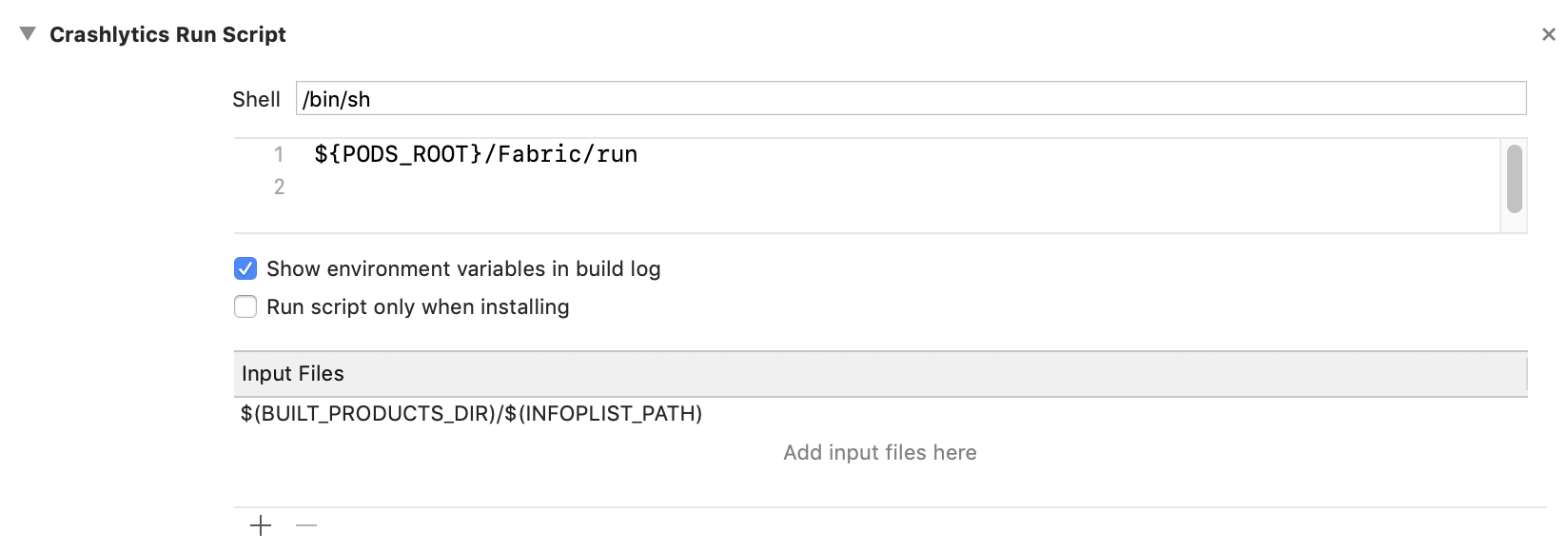
In my case the reason for the problem is, xcode_backend.sh is adding input files as arguments and this script fails to copy Flutter.framework
Hope this helps to move you in right direction.
Reacted by Ivan, Mario Oliveira and Sylvester Das | TactoWithout additional information, we are unfortunately not sure how to resolve this issue. We are therefore reluctantly going to close this bug for now. Please don't hesitate to comment on the bug if you have any more information for us; we will reopen it right away!
Thanks for your contribution.15 remaining items
app, flutter .framework does not exists in newly created dummy project via
flutter create sample... wierd..?app, flutter .framework does not exists in newly created dummy project via
flutter create sample... wierd..?The file won't exist until you run
flutter runorflutter build ios. If you're saying that it's not linked and embedded in the Xcode project, then that's behaving correctly, that's what #51453 did.My app was missing
App.frameworkandFlutter.frameworkand as a result failing to start, becauseThin Binarybuild step contained a mistake. According to https://flutter.dev/docs/development/ios-project-migration it should be:/bin/sh "$FLUTTER_ROOT/packages/flutter_tools/bin/xcode_backend.sh" embed /bin/sh "$FLUTTER_ROOT/packages/flutter_tools/bin/xcode_backend.sh" thinbut in my case it was:
/bin/sh "$FLUTTER_ROOT/packages/flutter_tools/bin/xcode_backend.sh" embed_and_thinApparently,
xcode_backend.shonchannel stableas of the time of writing this is missingembed_and_thincommand. Other channels have it, so I was able to run the app onchannel beta, for example.Reacted by sourab-sasan-sharmaMy app was missing
App.frameworkandFlutter.frameworkand as a result failing to start, becauseThin Binarybuild step contained a mistake. According to https://flutter.dev/docs/development/ios-project-migration it should be:/bin/sh "$FLUTTER_ROOT/packages/flutter_tools/bin/xcode_backend.sh" embed /bin/sh "$FLUTTER_ROOT/packages/flutter_tools/bin/xcode_backend.sh" thinbut in my case it was:
/bin/sh "$FLUTTER_ROOT/packages/flutter_tools/bin/xcode_backend.sh" embed_and_thinApparently,
xcode_backend.shonchannel stableas of the time of writing this is missingembed_and_thincommand. Other channels have it, so I was able to run the app onchannel beta, for example.That's exactly right, good investigation. In order to backport from beta/dev/master back to stable, you must have
embedandthinseparately becauseembed_and_thinisn't present in stable yet. Most users stay on stable or at least on a particular channel, so we optimize for their use cases, and try to document workarounds for the channel-hoppers.Reacted by Alexander@palexs I was hoping "If you are seeing a similar crash on iOS 13.4 or greater, please file a new Flutter GitHub issue so we can take a look." would cover it since there are about a thousand ways for code signing to fail or for the App.framework to be missing, so I don't want to point out #52084 (comment) specifically.
Reacted by AlexanderThis fixed the issue for me
flutter channel stable
flutter upgrade
We just upgrade to 1.20.0 and since then this issue has cropped up. Tried all options so far and nothing.
Another fun fact, downgrading to 1.19.0-4.3.pre resolves the issue, no more framework not found App... got a love software that makes breaking changes on a minor release.... Semantic versioning anyone? :D https://semver.org/
Reacted by Guillaume BalasWe just upgrade to 1.20.0 and since then this issue has cropped up. Tried all options so far and nothing.
Another fun fact, downgrading to 1.19.0-4.3.pre resolves the issue, no more framework not found App... got a love software that makes breaking changes on a minor release.... Semantic versioning anyone? :D https://semver.org/
try to delete
ios/Flutter/Flutter.framework/and run againWe just upgrade to 1.20.0 and since then this issue has cropped up. Tried all options so far and nothing.
Another fun fact, downgrading to 1.19.0-4.3.pre resolves the issue, no more framework not found App... got a love software that makes breaking changes on a minor release.... Semantic versioning anyone? :D https://semver.org/try to delete
ios/Flutter/Flutter.framework/and run againOur build process runs a
flutter cleanwhich wipes all intermediate directories so that's already being done.BTW. I can also build the app with 1.17.5 except for some
svgissues which is why I need the 1.19.0-4.3.pre version.flutter cleandoes not deleteios/Flutter/Flutter.framework.If you are seeing this problem, please file a new GitHub issue and completely fill out the template, and include the output of your
flutter runwith the-vverbose command.ld: framework not found Appis an extremely generic error (it means your compiled dart framework cannot be found), and I'd like to track down why you are individually seeing it.If you think this is related to https://flutter.dev/docs/development/ios-project-migration (did the migration not automatically happen for you?) that's helpful.
- locked as resolved and limited conversation to collaborators
on Aug 6, 2020


Steps to Reproduce
I am running:
Until recently, this worked. However, something is now broken and I'm having trouble identifying what. I have been trying to get Crashlytics working and I suspect it is related but it's unclear how.
Logs
I have run a build with
--verboseand have uploaded as a zip here (output was too much for gist). I have redacted only the application name from the log.This appears at several points in the log:
But I suspect there is an underlying problem causing that.
flutter doctor -voutput:If you're wondering why I'm on
master, it's because I've been going through hell trying to get an iOS build to actually complete without hanging/timeouts. That is now fixed onmasterso I'm there reluctantly until it makes its way intodevand beyond.