Repository navigation
CupertinoButton in CupertinoNavigationBar as trailing gets cut #32701

Description

Adding a CupertinoButton with Text to CupertinoNavigationBar as trailing cuts of the Text on its half height.
Steps to Reproduce
https://gist.github.com/tb2761/567623b671e5d15cfadfb1a27248fcf4
Logs
[√] Flutter (Channel stable, v1.5.4-hotfix.2, on Microsoft Windows [Version 10.0.17763.475], locale de-DE)
    • Flutter version 1.5.4-hotfix.2 at C:\Users\Tim\Flutter\src\flutter
    • Framework revision 7a4c33425d (2 weeks ago), 2019-04-29 11:05:24 -0700
    • Engine revision 52c7a1e849
    • Dart version 2.3.0 (build 2.3.0-dev.0.5 a1668566e5)

[√] Android toolchain - develop for Android devices (Android SDK version 28.0.3)
    • Android SDK at C:\Users\Tim\AppData\Local\Android\Sdk
    • Android NDK location not configured (optional; useful for native profiling support)
    • Platform android-28, build-tools 28.0.3
    • ANDROID_HOME = C:\Users\Tim\AppData\Local\Android\Sdk
    • Java binary at: C:\Program Files\Android\Android Studio\jre\bin\java
    • Java version OpenJDK Runtime Environment (build 1.8.0_152-release-1343-b01)
    • All Android licenses accepted.

[√] Android Studio (version 3.4)
    • Android Studio at C:\Program Files\Android\Android Studio
    • Flutter plugin version 35.3.1
    • Dart plugin version 183.6270
    • Java version OpenJDK Runtime Environment (build 1.8.0_152-release-1343-b01)

[√] VS Code (version 1.33.1)
    • VS Code at C:\Users\Tim\AppData\Local\Programs\Microsoft VS Code
    • Flutter extension version 3.0.2

[√] Connected device (1 available)
    • Android SDK built for x86 • emulator-5554 • android-x86 • Android 9 (API 28) (emulator)

• No issues found!
Activity
alphatroya commentedon May 29, 2019
Yes, it is cutting by half like on screenshot
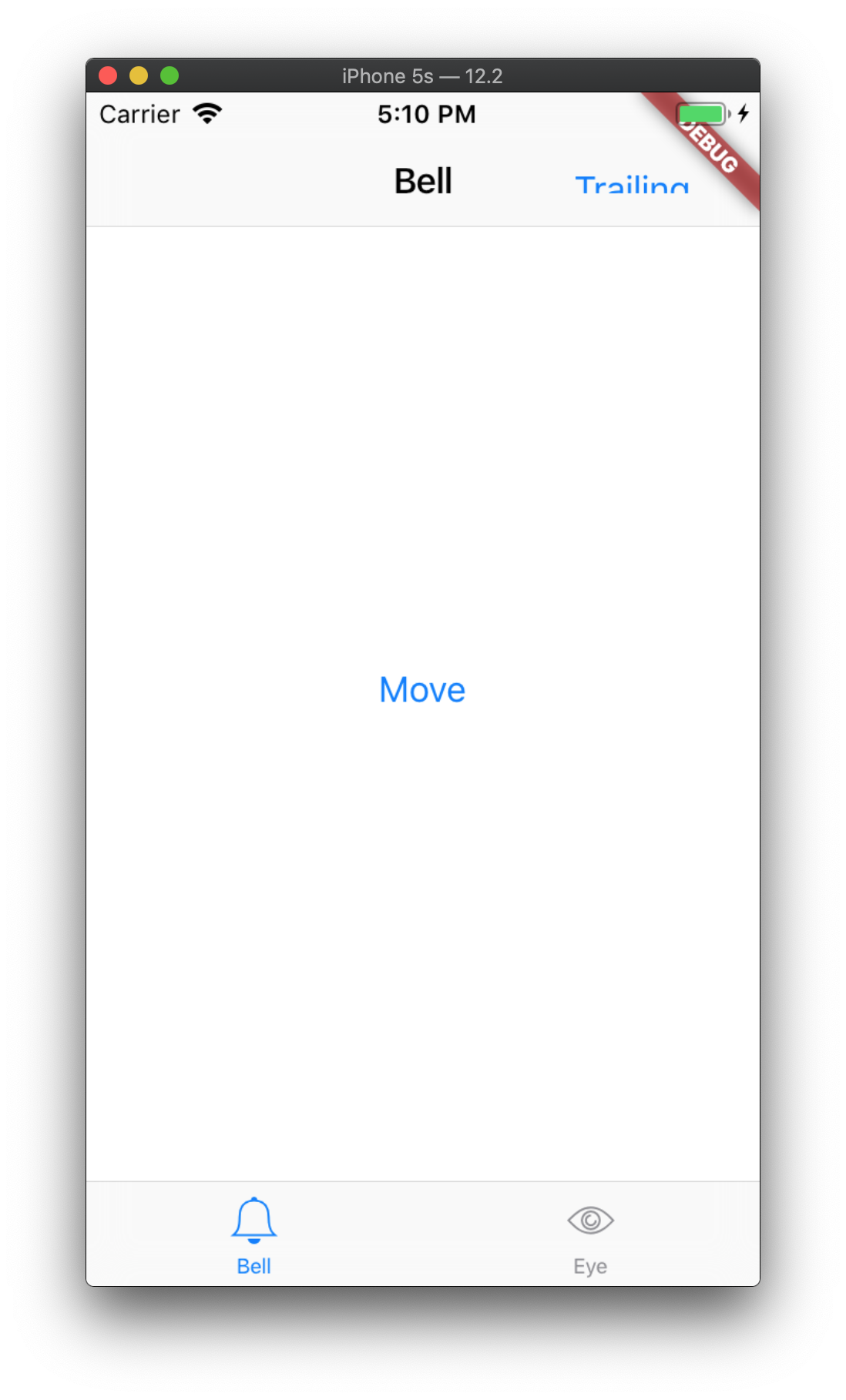
Leading position have simular issue.
ykorzikowski commentedon Jun 23, 2019
still an issue.
Workaround:
Add padding: EdgeInsets.all(10), to CUpertinoButton
bierbaumtim commentedon Jun 23, 2019
okay, thanks for the workaround
ameyer117 commentedon Mar 25, 2020
Yes this is still a problem.
xster commentedon Apr 30, 2020
We should make it somehow clearer in the doc. There's a default padding for CupertinoButton but we should prompt users to use a smaller padding when inserting into fixed sized parents like the nav bar.
glockhart8 commentedon May 9, 2020
CupertinoButton(
padding: EdgeInsets.all(0.0),
...
)
If you surround the button in padding, i think that it somehow moves where the touch point is on the button, but if you change the padding inside the button to zero, works well.
tiklup11 commentedon Nov 16, 2020
Still this is not fixed
casvanluijtelaar commentedon Feb 1, 2021
still an issue in 1.22.6
quickdashapp commentedon Feb 12, 2021
Still an Issue!! haha
Akhu commentedon Mar 21, 2021
Still an issue here with the latest version of Flutter
Piinks commentedon Mar 22, 2021
I think this is expected, please refer to the documentation for
CupertinoButton:If there is a bug around this, please file a new issue with a reproducible code sample and the output of flutter doctor.
lvyandev commentedon Mar 23, 2021
So what kind of widget is supposed to be in the trailing?
haashem commentedon Apr 20, 2021
@Ivyandev mostly buttons that user can interact with like submitting a form.
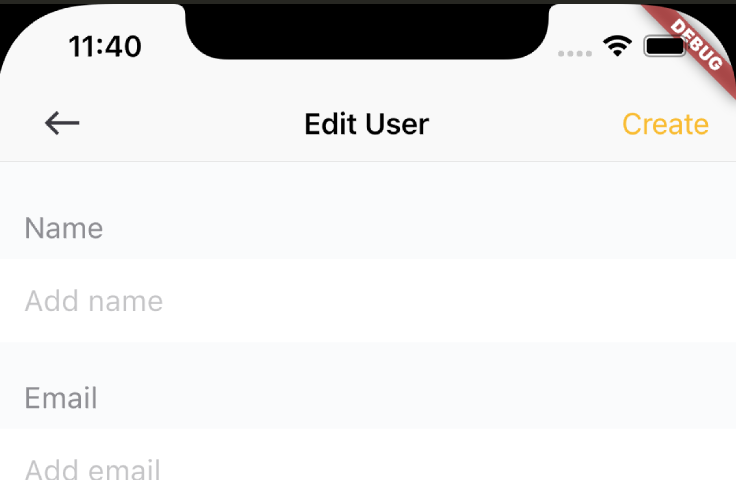
talamaska commentedon Jun 22, 2021
No, just documenting the behavior doesn't solve the issue itself.
Changing the padding to zero is a workaround, not a fix. If we can't use CupertinoButton as is in the navigation bar, then there should be a separate widget just for that. I don't get how can I put a simple IconButton or TextButton or any other button in AppBar and don't have any problems, but for Cupertino I have to deal with this? I think there should be CupertinoNavigationBarButton or something alike. Should we just do that as a wrapper of CupertinoButton and submit a PR?
github-actions commentedon Jul 31, 2021
This thread has been automatically locked since there has not been any recent activity after it was closed. If you are still experiencing a similar issue, please open a new bug, including the output of
flutter doctor -vand a minimal reproduction of the issue.