Repository navigation
TextField should warn on vertical overflow #35706
Description

I tried finding in a lot of resources but unfortunately i could not find a way to align the text vertically centre in a textfield. I also tried using suffixIcon instead of suffix but still not luck. Here is my code :
import 'package:flutter/material.dart';

void main() => runApp(MyApp());

class MyApp extends StatelessWidget {
  @override
  Widget build(BuildContext context) {
    return MaterialApp(
      home: HomePage(),
    );
  }
}

class HomePage extends StatefulWidget {
  @override
  State<StatefulWidget> createState() {
    return _HomePageState();
  }
}

class _HomePageState extends State<HomePage> {
  @override
  Widget build(BuildContext context) {
    return Scaffold(
      appBar: AppBar(
        leading: Icon(
          Icons.menu,
          color: Colors.black,
        ),
        backgroundColor: Colors.white,
        title: Container(
          margin: EdgeInsets.only(bottom: 10),
          child: Image.asset(
            "icons/logo.png",
          ),
        ),
        bottom: PreferredSize(
          child: Padding(
            padding: EdgeInsets.only(
              left: 10,
              right: 10,
              bottom: 10,
            ),
            child: Container(
              height: 40,
              child: TextField(
                textAlignVertical: TextAlignVertical.center,
                textAlign: TextAlign.left,
                maxLines: 1,
                style: TextStyle(
                  fontSize: 13,
                ),
                decoration: InputDecoration(
                    suffixIcon: IconButton(icon: Icon(Icons.search, color: Colors.black,), onPressed: (){}),
                    border: OutlineInputBorder(
                      borderSide: BorderSide(
                        color: Colors.black,
                      ),
                      borderRadius: BorderRadius.all(Radius.circular(15)),
                    )
                ),
              ),
            ),
          ),
          preferredSize: Size(MediaQuery.of(context).size.width, 50),
        ),
      ),
      body: Container(
        margin: EdgeInsets.only(top: 11),
        child: Column(
          children: <Widget>[
            Carousel(),
          ],
        ),
      ),
    );
  }
}

class Carousel extends StatefulWidget {
  @override
  State<StatefulWidget> createState() {
    return _CarouselState();
  }
}

class _CarouselState extends State<Carousel> {
  List<String> urls = [];

  @override
  Widget build(BuildContext context) {
    return Padding(
      padding: EdgeInsets.symmetric(horizontal: 10),
      child: Stack(
        children: <Widget>[
          Image.network(
              "someImageUrlHere."),
          Positioned(
            bottom: 5,
            width: MediaQuery.of(context).size.width - 20,
            child: Row(
              mainAxisAlignment: MainAxisAlignment.center,
              children: <Widget>[
                Text("•"),
                Text("•"),
                Text("•"),
                Text("•"),
                Text("•"),
              ],
            ),
          ),
        ],
      ),
    );
  }
}
What could be the issue that is causing this problem ? and how can i solve this issue ?
Activity
vagrantrobbie commentedon Jul 9, 2019
I think this a was more of a StackOverflow question.
I've modified your
PreferredSizeWidget. AddedcontentPadding: EdgeInsets.symmetric(vertical: 0.0, horizontal: 10.0),and adjusted TextStyle height. I think you just fiddle around with the height, ie line height, until it sits right for the particular fontLongCatIsLooong commentedon Jul 17, 2019
There needs to be some visual indication in debug mode, similar to what we have for overflowing content, to warn the user when something in the
InputDecoratoroverflows.vagrantrobbie commentedon Jul 17, 2019
I haven't looked at how the TextField Widget works exactly but I image their is a Stack Widget in there with Overflow clip.
I don't think you really need a visual indicator here as it would be expected behaviour to have the inside clip to the bounds, if my assumption is correct.
kf6gpe commentedon Jan 6, 2020
Leaving open per @LongCatIsLooong comment; I think that's a good adviosry change.,
Daniate commentedon Feb 8, 2020
I had the same problem. When I set the


bordertoInputBorder.none, it becomes correct.Daniate commentedon Mar 4, 2020
see #27838,https://github.com/flutter/flutter/issues/27838#issuecomment-588176293
Daniel-BD commentedon May 20, 2020
textAlignVertical seems to be at least somewhat broken. I can't get it to work or even make any valuable difference...
It's impossible to get the text centered by using
TextAlignVertical.centerand using different values fory:makes little difference, I can only push the text further down...This is my TextField with

TextAlignVertical.centerThis is with
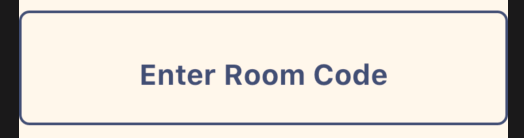
TextAlignVertical(y: -1.0)This is with
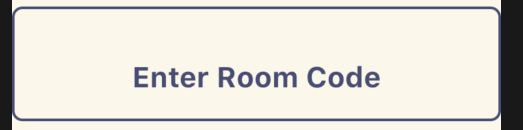
TextAlignVertical(y: 1.0)As you can see, the value of 0 (.center) and -1.0 is the same, while 1.0 pushes it further down. What is actually needed in order to center the text is to have it be pushed UP, which I can't do.
It may be that I'm doing something wrong, but then I think the API should be made more intuitive. I've hade many struggles with aligning text in TextField before, and judging by posts on StackOverflow, a lot of people are doing weird hacks to get TextField text alignment to a place they want it.
This is my code:
Flutter doctor:
Daniel-BD commentedon May 20, 2020
After some more testing, it seems like having a different font size for
hintStyleandstyleis causing this problem... If they're the same size, then it seems to be working. Is this something that can be fixed somehow?Edit:
After some more tinkering, this is how I solved having the text be centered, while still having two different styles for
hintStyleandstyle:First the
styleproperty on TextField:and the same for
hintStylein theInputDecorationAnd then this on the TextField's
onChangedproperty:Yeah, it's a weird hack, just like I said I saw a lot of on StackOverflow in the previous post :)
TahaTesser commentedon Jul 16, 2020
flutter doctor -v
[-]Vertically Centre Align Text in TextField Flutter[/-][+]Visual indication in debug mode when Text in TextField isn't Center Align[/+]24 remaining items
LongCatIsLooong commentedon May 8, 2025
I think what happened is that the InputDecorator layout algorithm prioritize content padding over the text content even in a single line text field.
So the top content padding pushes the text down when there isn't enough vertical space, making it look off-centered.
Options I can think of:
debugInputDecoratorOverflowflag so which shows a visual indicator similar to the Row/Column overflow indicator when turned on.I'm leaning towards option 1 since the overflow warning is usually not very actionable (dynamically adjusting the vertical padding based on the amount of vertical space available would require LayoutBuilder or a custom RenderBox). I'll introduce an opt-in flag to indicate that in a single-line text field the vertical content padding is maintained only when there is enough vertical space, and see if the default value of the flag can be changed to opt-out.
gnprice commentedon May 8, 2025
On seeing an overflow warning, I'd think the way to act on it would be:
I agree it'd usually be messy if the developer needed to dynamically adjust the padding. What's the situation where that would be needed, though?
The main thing that comes to mind is that one might do that as a way of controlling the vertical alignment. But I believe that's what
textAlignVerticalis for.flutter-triage-bot commentedon Sep 26, 2025
This issue is assigned to @LongCatIsLooong but has had no recent status updates. Please consider unassigning this issue if it is not going to be addressed in the near future. This allows people to have a clearer picture of what work is actually planned. Thanks!
flutter-triage-bot commentedon Dec 12, 2025
This issue was assigned to @LongCatIsLooong but has had no status updates in a long time. To remove any ambiguity about whether the issue is being worked on, the assignee was removed.