Repository navigation
Colours appear lighter on iOS compared to Android #39113
Description
Activity
What Android device and version are you using? If it's a recent version, and you go into Settings -> Display -> Colors, what is that set to (Natural, Boosted, etc...)?
I've tested this on an emulated Pixel 3 and a physical Samsung S8, both running Android 9, neither have any colour boosting enabled, and the colours appear darker on both.
I believe I may of been incorrect about Android being at fault with this issue, I will rename it to "Colours appear lighter on iOS compared to Android" to better reflect the real issue.
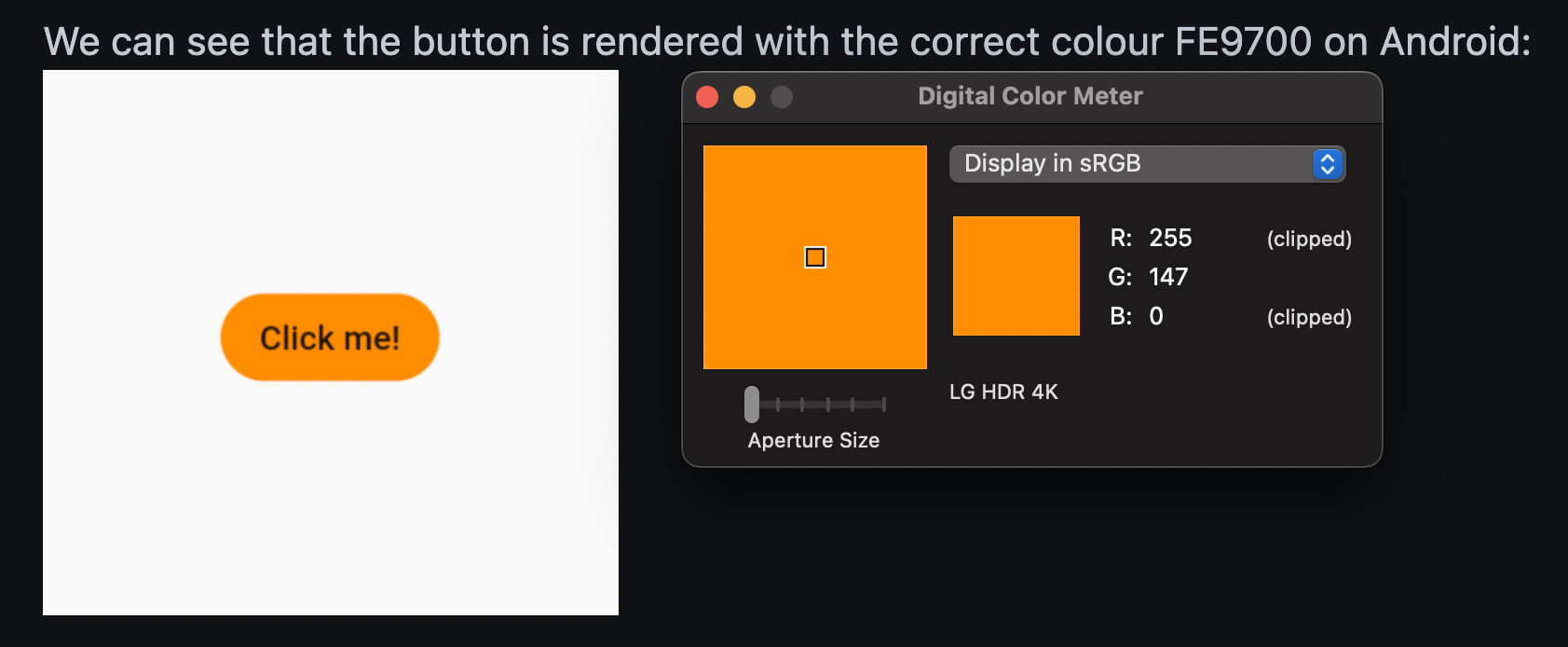
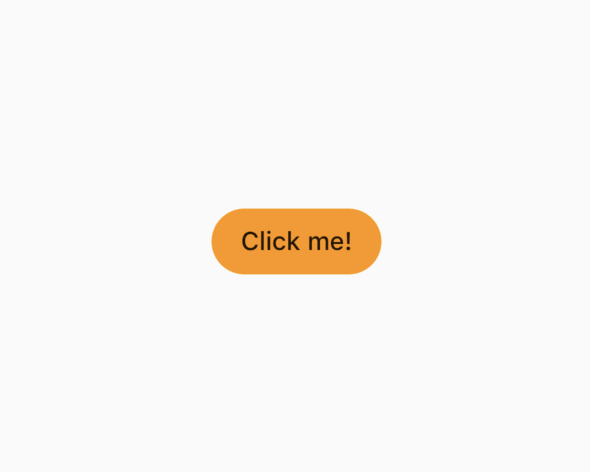
After looking into the screenshots I attached to this ticket, I can see that Android is correctly rendering the button with the colour FE9700, however, iOS renders the button with the colour F19B38.
I've tested this on a Simulated iPhone XS, and a physical iPhone 6, both runnning the latest iOS 12.4
- changed the title
[-]Colours appear darker on Android compared to iOS[/-][+]Colours appear lighter on iOS compared to Android[/+]on Aug 24, 2019 That is the result of iOS applying color management to the framebuffer produced by Flutter. It assumes that the output of Flutter is sRGB (which it is), and then (on nearly all iPhone devices) converts to Display P3, which has a wider gamut. You can actually reproduce this with a Mac's Color Sync utility, using the Calculator tab to convert from sRGB to Display P3, and plugging the colors in on the sRGB side.
If you were running on an Android device with the color mode set to 'Natural' (may or may not be available, depending on device and android version), then you'd see similar results. However, because people are accustomed to seeing very bright colors on their high end phones, most Android device manufacturers choose to boost colors (basically, taking the sRGB colors and directly feeding them to the screen, resulting in artificially bright/saturated results).
how can I set P3 colors on my flutter app (instead of sRGB), so I can achieve those vivid P3 colors please?
Reacted by Thomas Kliszowski, Ajmal Salim, Serena Lambert, Jabed Amin, Will Salmon, Armando Jimenez and Vishnu Mohandasit looks lighter on Android than iOS for me
flutter doctor -v
[✓] Flutter (Channel dev, 1.20.0-2.0.pre, on Mac OS X 10.15.5 19F101, locale en-GB) • Flutter version 1.20.0-2.0.pre at /Users/tahatesser/Code/flutter_dev • Framework revision 15a28159bc (8 days ago), 2020-06-23 04:52:58 -0700 • Engine revision 91a63d6a44 • Dart version 2.9.0 (build 2.9.0-19.0.dev 7e72c9ae7e) [✓] Android toolchain - develop for Android devices (Android SDK version 30.0.0) • Android SDK at /Users/tahatesser/Code/sdk • Platform android-30, build-tools 30.0.0 • ANDROID_HOME = /Users/tahatesser/Code/sdk • Java binary at: /Applications/Android Studio.app/Contents/jre/jdk/Contents/Home/bin/java • Java version OpenJDK Runtime Environment (build 1.8.0_242-release-1644-b3-6222593) • All Android licenses accepted. [✓] Xcode - develop for iOS and macOS (Xcode 11.5) • Xcode at /Applications/Xcode.app/Contents/Developer • Xcode 11.5, Build version 11E608c • CocoaPods version 1.9.3 [✓] Chrome - develop for the web • Chrome at /Applications/Google Chrome.app/Contents/MacOS/Google Chrome [✓] Android Studio (version 4.0) • Android Studio at /Applications/Android Studio.app/Contents • Flutter plugin version 47.0.2 • Dart plugin version 193.7361 • Java version OpenJDK Runtime Environment (build 1.8.0_242-release-1644-b3-6222593) [✓] VS Code (version 1.46.1) • VS Code at /Applications/Visual Studio Code.app/Contents • Flutter extension version 3.12.1 [✓] Connected device (4 available) • SM M305F • 32003c30dc19668f • android-arm64 • Android 10 (API 29) • macOS desktop • macos • darwin-x64 • Mac OS X 10.15.5 19F101 • Web Server • web-server • web-javascript • Flutter Tools • Chrome • chrome • web-javascript • Google Chrome 83.0.4103.116 • No issues found!Still reproducible on 1.22.6. Even images appear lighter on iOS Physical Device! Most probably coz of Display P3?
Flutter 1.22.6 • channel stable • https://github.com/flutter/flutter.git
Framework • revision 9b2d32b (2 weeks ago) • 2021-01-22 14:36:39 -0800
Engine • revision 2f0af37152I really need display P3 for iOS soon. Are there any developments with this issue?
Reacted by Kristupas Kuras, Ajmal Salim, Armando Jimenez and Taras TatarynI can't stand the way colors look on Flutter apps compared to others, when Flutter will make a use of P3 color gamut? Can't wait!
Reacted by Armando JimenezReproducible
IOS | MacOS | Android

code sample
import 'package:flutter/material.dart';

void main() {
  runApp(
    MaterialApp(
      home: Scaffold(
        body: Center(
          child: ElevatedButton(
            style: ElevatedButton.styleFrom(
              foregroundColor: Colors.white,
              backgroundColor: const Color(0xFFFE9700),
              shape: const StadiumBorder(),
            ),
            onPressed: () {},
            child: const Text('Click me!'),
          ),
        ),
      ),
    ),
  );
}
flutter doctor -v (mac)
[✓] Flutter (Channel master, 3.7.0-3.0.pre.33, on macOS 12.6 21G115 darwin-arm64, locale en-IN)
    • Flutter version 3.7.0-3.0.pre.33 on channel master
    • Upstream repository https://github.com/flutter/flutter.git
    • Framework revision 5201856805 (38 minutes ago), 2022-12-05 18:27:21 -0800
    • Engine revision a309d239c4
    • Dart version 2.19.0 (build 2.19.0-463.0.dev)
    • DevTools version 2.20.0
    • If those were intentional, you can disregard the above warnings; however it is recommended to use "git" directly
      to perform update checks and upgrades.

[✓] Android toolchain - develop for Android devices (Android SDK version 33.0.0-rc4)
    • Android SDK at /Users/mahesh/Library/Android/sdk
    • Platform android-33, build-tools 33.0.0-rc4
    • ANDROID_HOME = /Users/mahesh/Library/Android/sdk
    • Java binary at: /Applications/Android Studio.app/Contents/jre/Contents/Home/bin/java
    • Java version OpenJDK Runtime Environment (build 11.0.12+0-b1504.28-7817840)
    • All Android licenses accepted.

[✓] Xcode - develop for iOS and macOS (Xcode 14.0.1)
    • Xcode at /Applications/Xcode.app/Contents/Developer
    • Build 14A400
    • CocoaPods version 1.11.3

[✓] Chrome - develop for the web
    • Chrome at /Applications/Google Chrome.app/Contents/MacOS/Google Chrome

[✓] Android Studio (version 2021.2)
    • Android Studio at /Applications/Android Studio.app/Contents
    • Flutter plugin can be installed from:
      🔨 https://plugins.jetbrains.com/plugin/9212-flutter
    • Dart plugin can be installed from:
      🔨 https://plugins.jetbrains.com/plugin/6351-dart
    • Java version OpenJDK Runtime Environment (build 11.0.12+0-b1504.28-7817840)

[✓] IntelliJ IDEA Community Edition (version 2021.2.1)
    • IntelliJ at /Applications/IntelliJ IDEA CE.app
    • Flutter plugin version 61.2.4
    • Dart plugin version 212.5080.8

[✓] VS Code (version 1.70.2)
    • VS Code at /Applications/Visual Studio Code.app/Contents
    • Flutter extension version 3.55.20221129

[✓] Connected device (3 available)
    • iPhone 12 Pro (mobile) • 026D5789-9E78-4AD5-B1B2-3F8D4E7F65E4 • ios            •
      com.apple.CoreSimulator.SimRuntime.iOS-14-5 (simulator)
    • macOS (desktop)        • macos                                • darwin-arm64   • macOS 12.6 21G115 darwin-arm64
    • Chrome (web)           • chrome                               • web-javascript • Google Chrome 108.0.5359.94

[✓] HTTP Host Availability
    • All required HTTP hosts are available

• No issues found!
[✓] Flutter (Channel stable, 3.3.9, on macOS 12.6 21G115 darwin-arm, locale en-IN) • Flutter version 3.3.9 on channel stable at /Users/mahesh/Development/flutter • Upstream repository https://github.com/flutter/flutter.git • Framework revision b8f7f1f986 (24 hours ago), 2022-11-23 06:43:51 +0900 • Engine revision 8f2221fbef • Dart version 2.18.5 • DevTools version 2.15.0 [✓] Android toolchain - develop for Android devices (Android SDK version 33.0.0-rc4) • Android SDK at /Users/mahesh/Library/Android/sdk • Platform android-33, build-tools 33.0.0-rc4 • ANDROID_HOME = /Users/mahesh/Library/Android/sdk • Java binary at: /Applications/Android Studio.app/Contents/jre/Contents/Home/bin/java • Java version OpenJDK Runtime Environment (build 11.0.12+0-b1504.28-7817840) • All Android licenses accepted. [✓] Xcode - develop for iOS and macOS (Xcode 14.0.1) • Xcode at /Applications/Xcode.app/Contents/Developer • Build 14A400 • CocoaPods version 1.11.3 [✓] Chrome - develop for the web • Chrome at /Applications/Google Chrome.app/Contents/MacOS/Google Chrome [✓] Android Studio (version 2021.2) • Android Studio at /Applications/Android Studio.app/Contents • Flutter plugin can be installed from: 🔨 https://plugins.jetbrains.com/plugin/9212-flutter • Dart plugin can be installed from: 🔨 https://plugins.jetbrains.com/plugin/6351-dart • Java version OpenJDK Runtime Environment (build 11.0.12+0-b1504.28-7817840) [✓] IntelliJ IDEA Community Edition (version 2021.2.1) • IntelliJ at /Applications/IntelliJ IDEA CE.app • Flutter plugin version 61.2.4 • Dart plugin version 212.5080.8 [✓] VS Code (version 1.70.2) • VS Code at /Applications/Visual Studio Code.app/Contents • Flutter extension version 3.53.20221101 [✓] Connected device (3 available) • iPhone 12 Pro (mobile) • 026D5789-9E78-4AD5-B1B2-3F8D4E7F65E4 • ios • com.apple.CoreSimulator.SimRuntime.iOS-14-5 (simulator) • macOS (desktop) • macos • darwin-arm64 • macOS 12.6 21G115 darwin-arm • Chrome (web) • chrome • web-javascript • Google Chrome 107.0.5304.110 [✓] HTTP Host Availability • All required HTTP hosts are available • No issues found!7 remaining items
This isn't actually a bug in Flutter per se, but we may be able to address it in Flutter.
Here is the sRGB reading for the Android image:
Here's the sRGB reading for the iOS image:
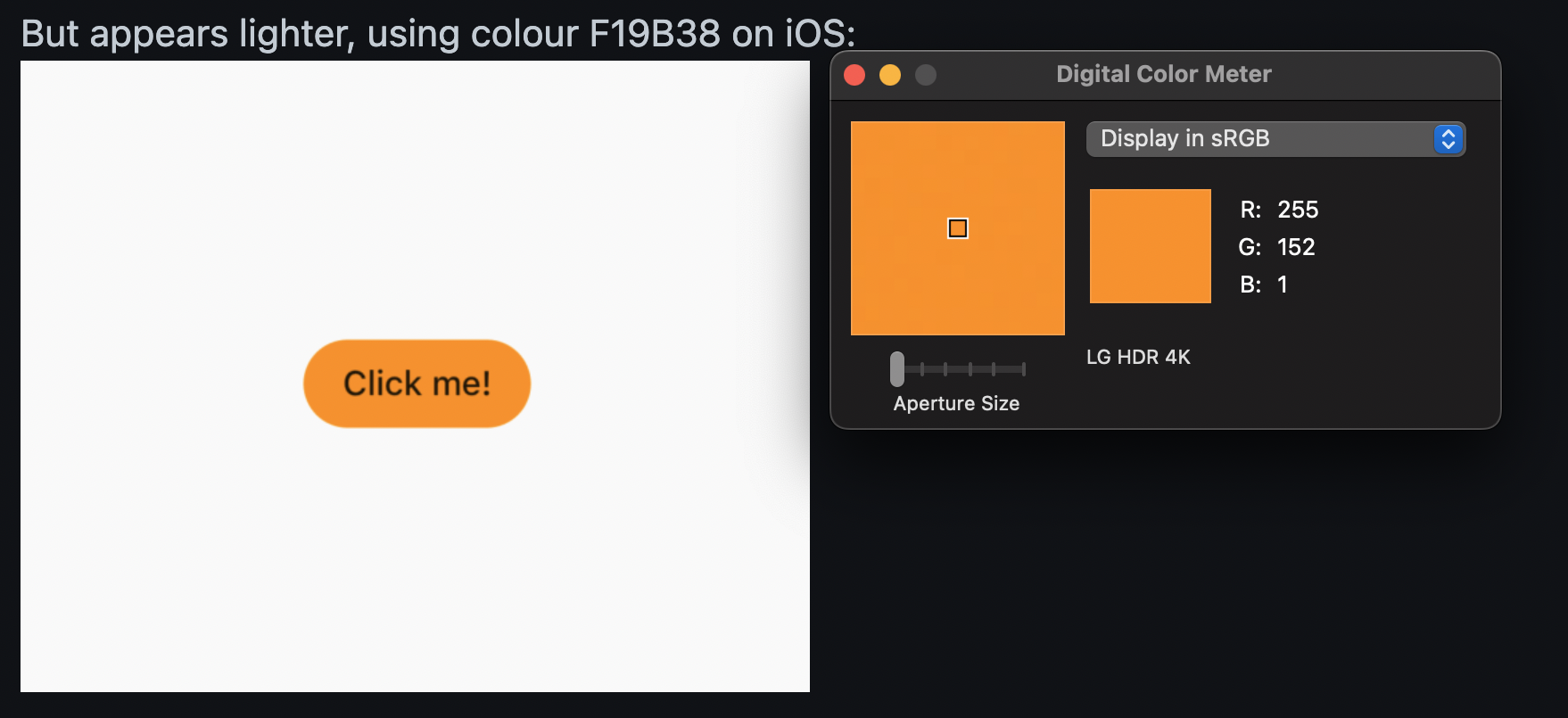
Notice that the Android screenshot isn't in the sRGB colorspace (it says "clipped"). This is, as Brian mentioned, a result of the Android device somewhere in the rendering pipeline beyond Flutter (Operating System, Driver, Display). The iOS color almost matches the specified color. The discrepancy ((255, 152, 1) vs (254, 151, 0)) is probably sampling/roundoff error when converting and capturing the screenshot.
The color mentioned in the description erroneously specifies the iOS color as F19B38, they sampled the color in Display P3 and manually converted the values to a hash value (implicitly converting it to sRGB incorrectly).
Sooo... this bug could potentially be fixed without adding support for Display P3 (what that means is another discussion). It could be a matter of telling Android to somehow not extrapolate sRGB colors to Display P3 colors. Some setting on the Androids drawing surface might be able to do that (for example, setting it to Display P3 and maybe explicitly converting the colors with a fragment shader?). Implementing some support for Display P3 will potentially fix this issue though since the renderer would have to reserve the space for these extrapolated Display P3 colors with real Display P3 colors.
Thanks for looking into this more!
Reacted by gaaclarke, Michael McCormick and Mahesh Jamdade@brianosman I suspect this issue may be related to the
EGL_GL_COLORSPACEsetting of the surface provided by Skia. It looks like Skia isn't setting that explicitly and the default value isEGL_GL_COLORSPACE_LINEAR. I suspect settingEGL_GL_COLORSPACEtoEGL_GL_COLORSPACE_SRGBwill force our colors to be in the sRGB colorspace. It sounds likeEGL_GL_COLORSPACE_LINEARmay be extrapolating the colors into the Display P3 space where it is available.I can try it out but it's going to take some time so I thought I'd pick your brain while I'm waiting on compilation.
- Unfortunately, that setting won't address this issue. It's very poorly named, and has nothing to do with gamut (which is the real problem here). It primarily changes how blending works when drawing to the surface (whether the values are encoded with the sRGB transfer function or not). Newer Android API revisions do have the ability for apps to specify that they operate in wide-gamut color, but it has to be controlled via Android API <https://developer.android.com/training/wide-color-gamut> (it can't be done at the GL or EGL level).…On Tue, Jan 3, 2023 at 7:29 PM gaaclarke ***@***.***> wrote: @brianosman <https://github.com/brianosman> I suspect this issue may be related to the EGL_GL_COLORSPACE <https://registry.khronos.org/EGL/extensions/KHR/EGL_KHR_gl_colorspace.txt> setting of the surface provided by Skia. It looks like Skia isn't setting that explicitly and the default value is EGL_GL_COLORSPACE_LINEAR <https://registry.khronos.org/EGL/extensions/EXT/EGL_EXT_gl_colorspace_display_p3.txt>. I suspect setting EGL_GL_COLORSPACE to EGL_GL_COLORSPACE_SRGB will force our colors to be in the sRGB colorspace. It sounds like EGL_GL_COLORSPACE_LINEAR may be extrapolating the colors into the Display P3 space where it is available. I can try it out but it's going to take some time so I thought I'd pick your mind while I'm waiting on compilation. — Reply to this email directly, view it on GitHub <#39113 (comment)>, or unsubscribe <https://github.com/notifications/unsubscribe-auth/AEMSDHUMYU2RZ2XLY7FAAXDWQS76VANCNFSM4IO6LQ5A> . You are receiving this because you were mentioned.Message ID: ***@***.***>
I tried to reproduce the issue and set the operating system color to "boosted" and "adjusted" and got the same results as iOS on a Pixel 4a on Android 13:
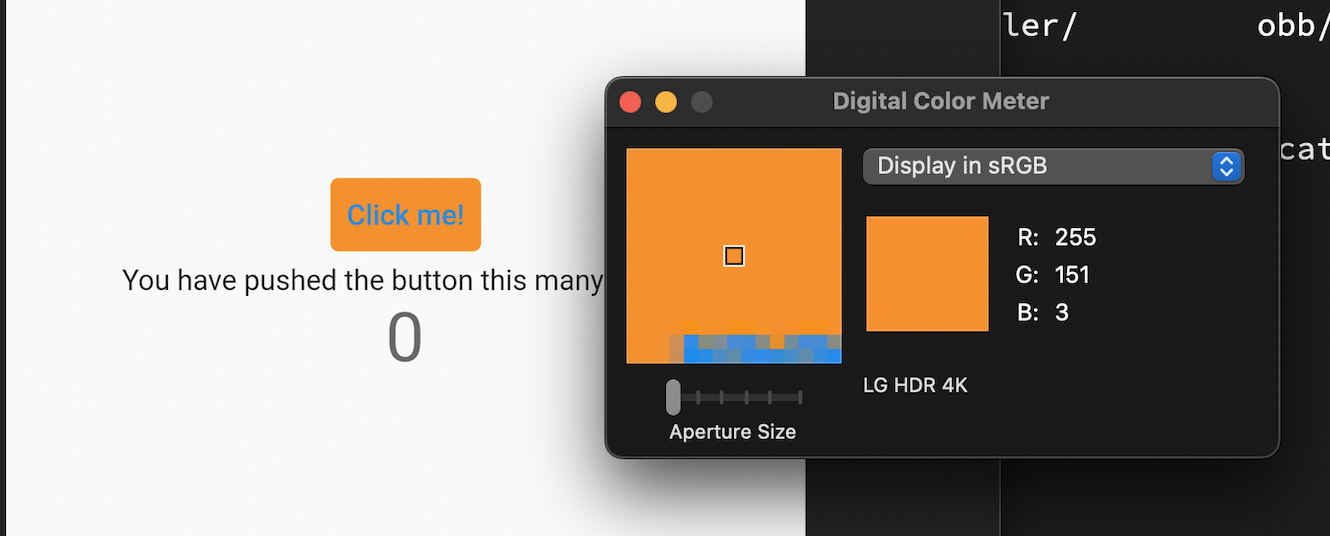
So, this seems to suggest that the problem isn't universal across devices with the expanded color gamut. Maybe it doesn't manifest on Android 13?
(I was able to verify that my device supports wide gamut colors in the Photos app with a test image.)
After reading Brian's article it seems like setting
EGL_GL_COLORSPACE_KHRtoEGL_GL_COLORSPACE_DISPLAY_P3_EXTmay fix the issue. But since I don't know what devices are affected and it doesn't manifest on my device it's not possible for me to test that theory.This bug is unactionable until we are able to identify a device that can reproduce the issue. @MichaelM97 @maheshmnj do you have info on what device you were seeing this on? Does the problem persist with Android 13?
Engine hash
methodology
- Take screenshot on android device
- download the screenshot with
adb - Open the image in
Preview, verify the colorspace of the screenshot - Use
Digital Color Meterto view the pixel color
@gaaclarke I was able to reproduce it on an Android emulator Pixel 4 api 30 as can be seen in the below screenshot
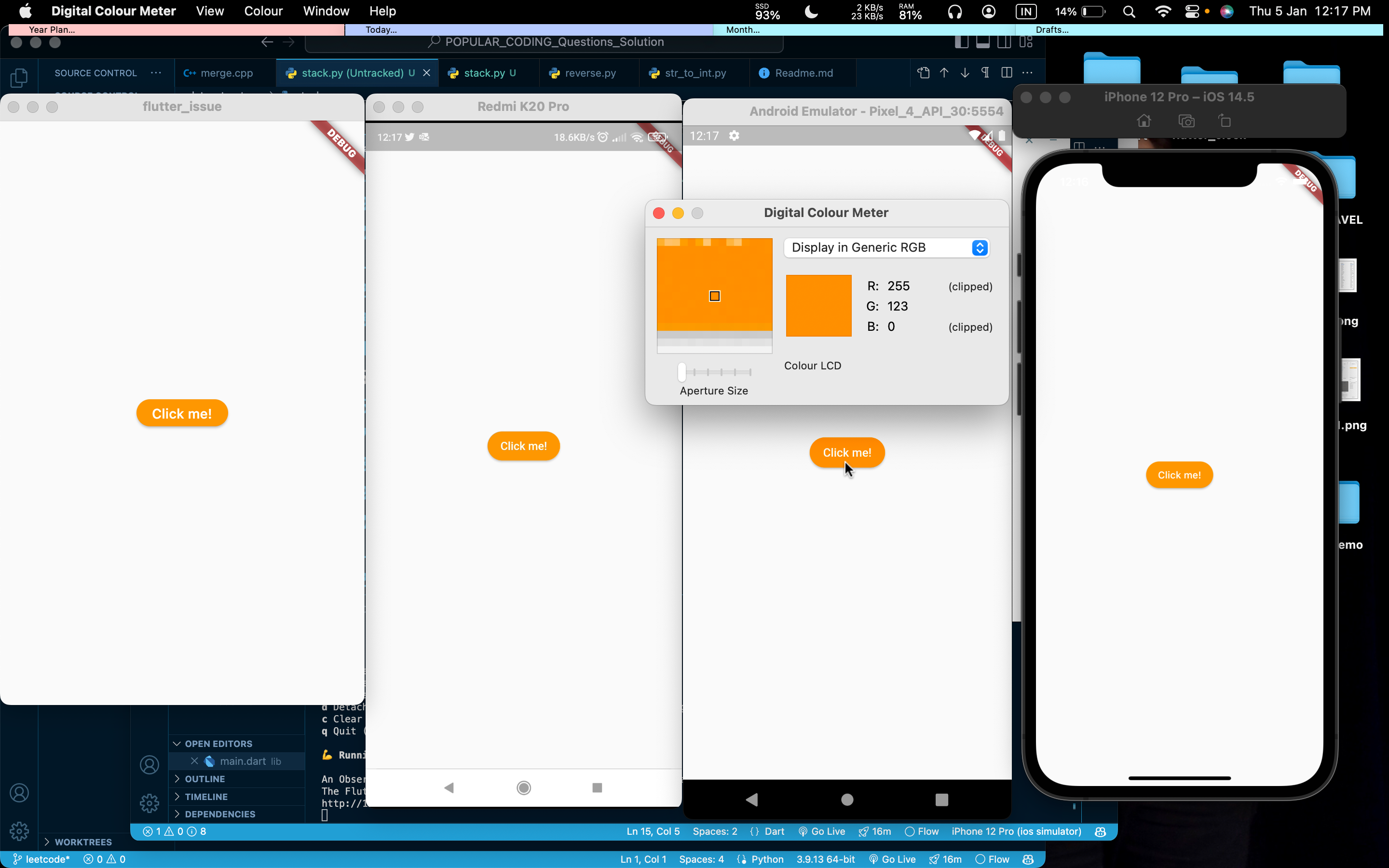
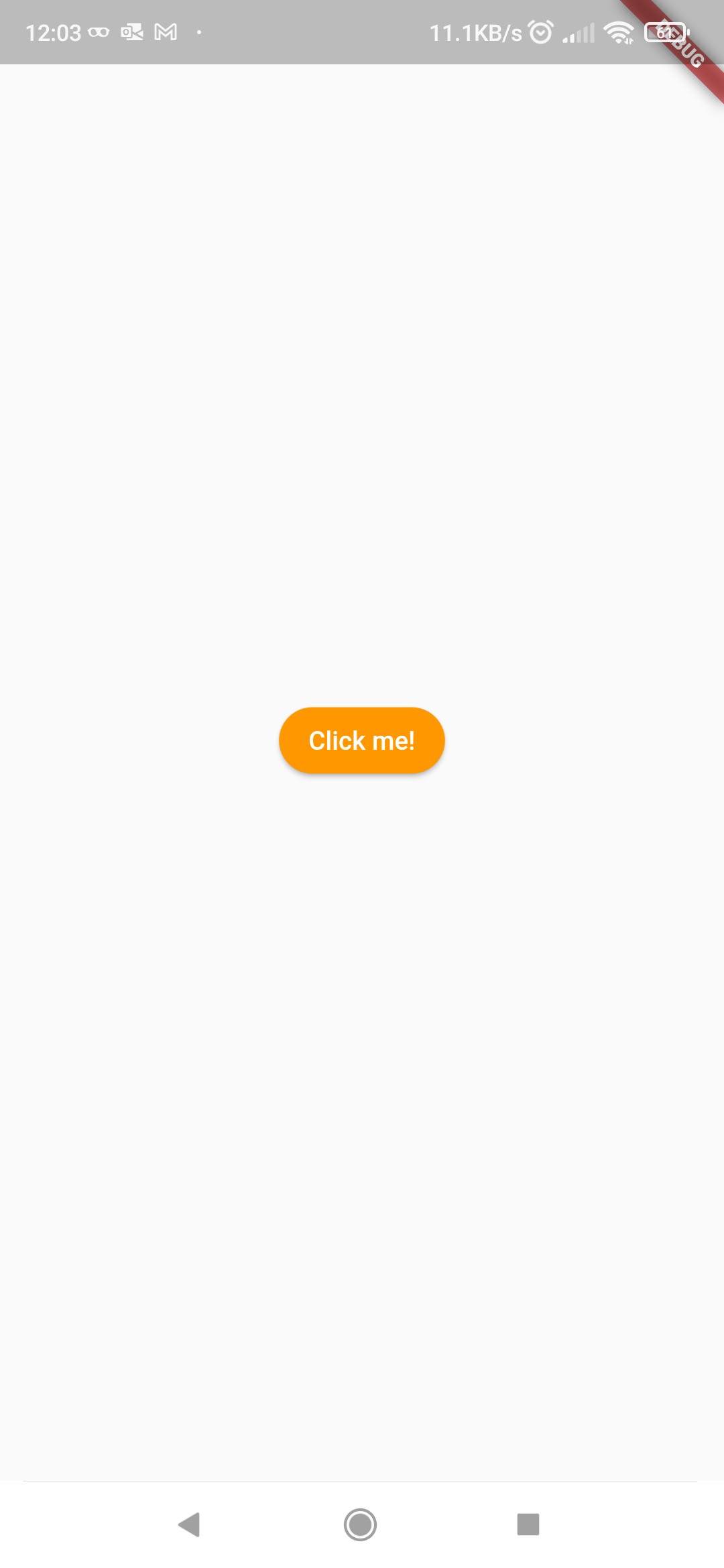
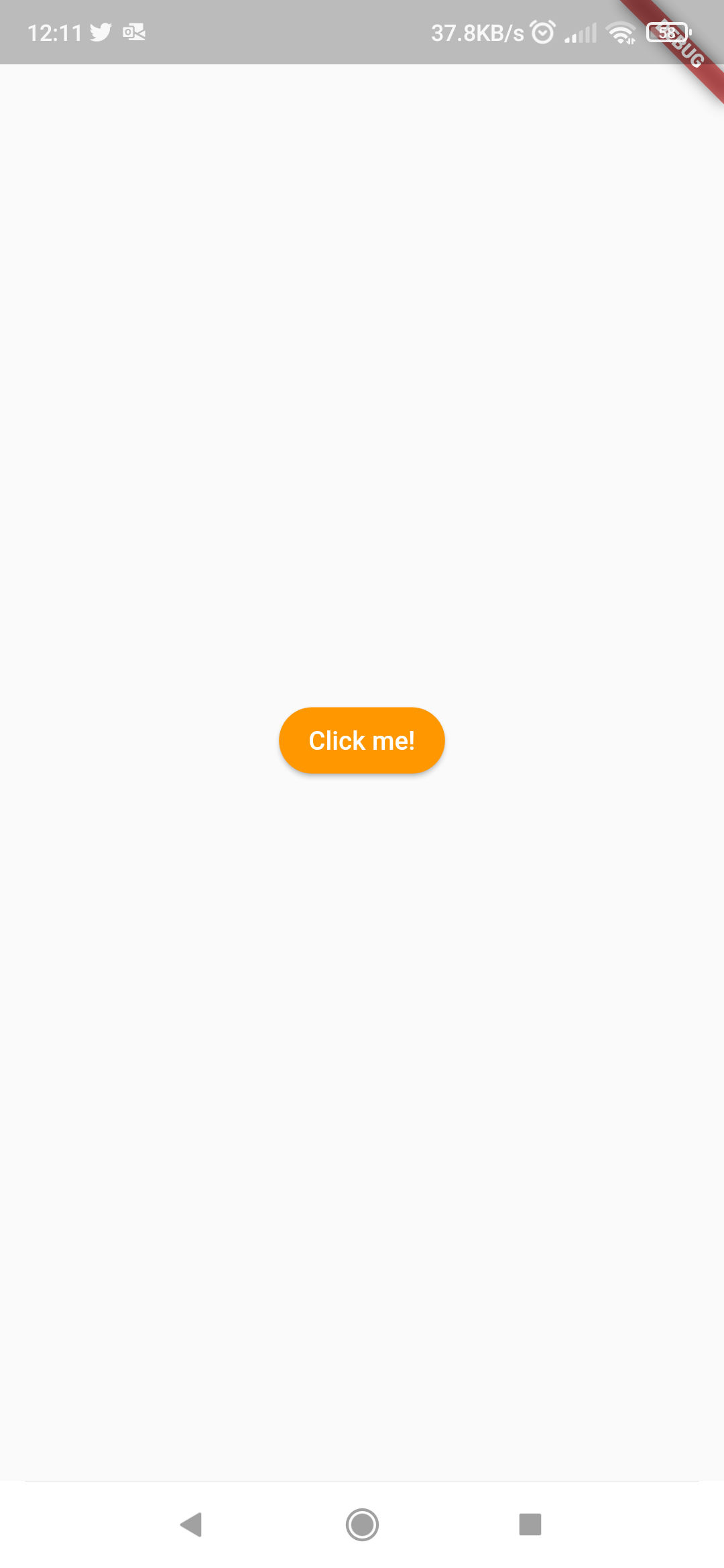
I am also able to reproduce it on my physical device Android Xiaomi Redmi k20 pro (Android 11), But Surprisingly when I take a screenshot either by adb or flutter tool or screenshot from device and upload it here, I don't see the issue. The button has dark color only when viewing the screenshots or the actual app on my physical device.
Xiaomi Screenshot flutter screenshot adb screenshot 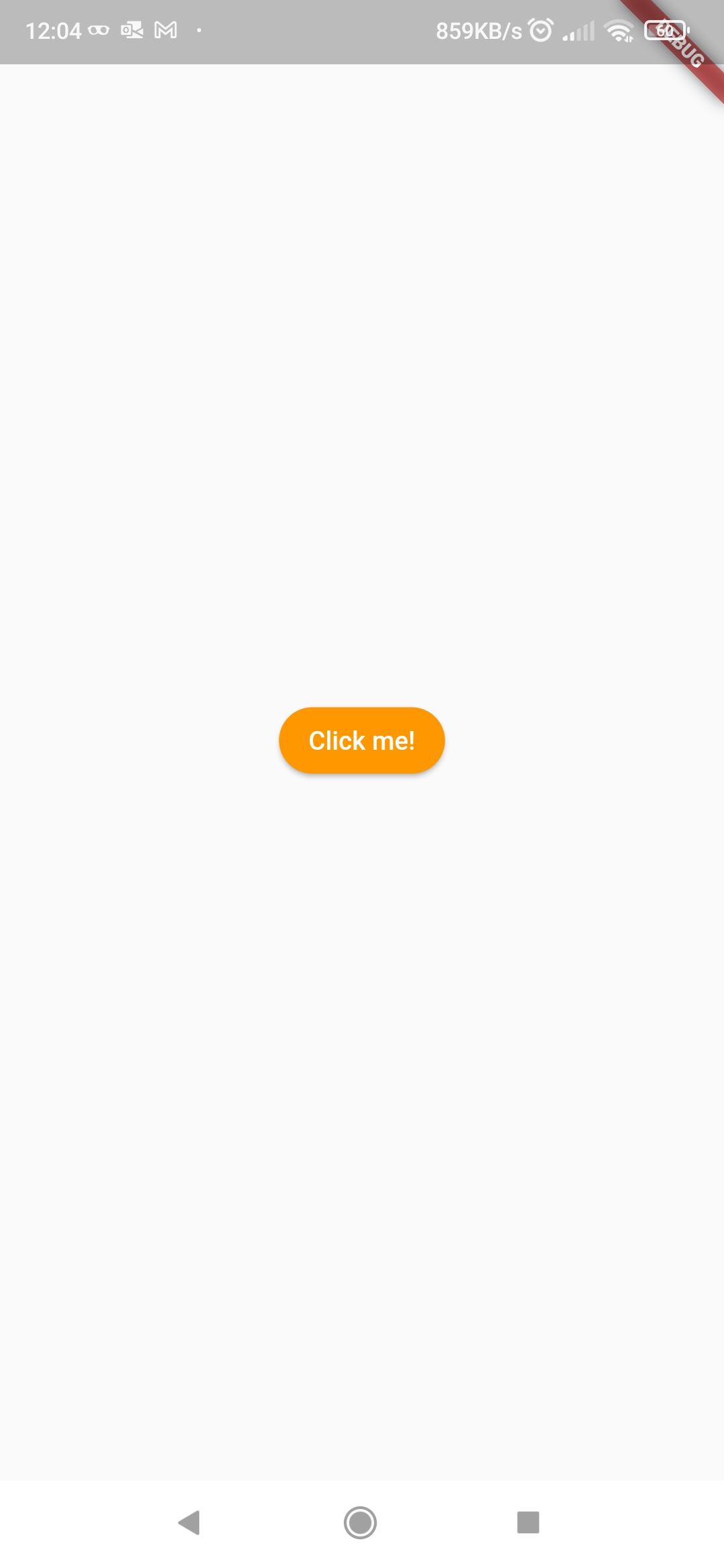
logs
mahesh@Maheshs-MacBook-Air-M1 flutter_issue % adb -s 10.0.0.252 shell screencap -p /sdcard/screen.png
mahesh@Maheshs-MacBook-Air-M1 flutter_issue % adb -s 10.0.0.252 pull /sdcard/screen.png
/sdcard/screen.png: 1 file pulled, 0 skipped. 0.9 MB/s (46295 bytes in 0.049s)
mahesh@Maheshs-MacBook-Air-M1 flutter_issue %
flutter doctor -v (mac)
[✓] Flutter (Channel master, 3.7.0-13.0.pre.131, on macOS 13.1 22C65 darwin-arm64, locale en-IN)
    • Flutter version 3.7.0-13.0.pre.131 on channel master at /Users/mahesh/Development/flutter_master
    • Upstream repository https://github.com/flutter/flutter.git
    • Framework revision 0196e6050b (2 days ago), 2022-12-31 11:10:23 -0500
    • Engine revision 932591ec04
    • Dart version 3.0.0 (build 3.0.0-76.0.dev)
    • DevTools version 2.20.0
    • If those were intentional, you can disregard the above warnings; however it is recommended to use "git" directly to perform update checks
      and upgrades.

[✓] Android toolchain - develop for Android devices (Android SDK version 33.0.0-rc4)
    • Android SDK at /Users/mahesh/Library/Android/sdk
    • Platform android-33, build-tools 33.0.0-rc4
    • ANDROID_HOME = /Users/mahesh/Library/Android/sdk
    • Java binary at: /Applications/Android Studio.app/Contents/jre/Contents/Home/bin/java
    • Java version OpenJDK Runtime Environment (build 11.0.12+0-b1504.28-7817840)
    • All Android licenses accepted.

[✓] Xcode - develop for iOS and macOS (Xcode 14.0.1)
    • Xcode at /Applications/Xcode.app/Contents/Developer
    • Build 14A400
    • CocoaPods version 1.11.3

[✓] Chrome - develop for the web
    • Chrome at /Applications/Google Chrome.app/Contents/MacOS/Google Chrome

[✓] Android Studio (version 2021.2)
    • Android Studio at /Applications/Android Studio.app/Contents
    • Flutter plugin can be installed from:
      🔨 https://plugins.jetbrains.com/plugin/9212-flutter
    • Dart plugin can be installed from:
      🔨 https://plugins.jetbrains.com/plugin/6351-dart
    • Java version OpenJDK Runtime Environment (build 11.0.12+0-b1504.28-7817840)

[✓] IntelliJ IDEA Community Edition (version 2021.2.1)
    • IntelliJ at /Applications/IntelliJ IDEA CE.app
    • Flutter plugin version 61.2.4
    • Dart plugin version 212.5080.8

[✓] VS Code (version 1.74.2)
    • VS Code at /Applications/Visual Studio Code.app/Contents
    • Flutter extension version 3.56.0

[✓] Connected device (3 available)
    • iPhone 12 Pro (mobile) • 026D5789-9E78-4AD5-B1B2-3F8D4E7F65E4 • ios            • com.apple.CoreSimulator.SimRuntime.iOS-14-5 (simulator)
    • macOS (desktop)        • macos                                • darwin-arm64   • macOS 13.1 22C65 darwin-arm64
    • Chrome (web)           • chrome                               • web-javascript • Google Chrome 108.0.5359.124

[✓] HTTP Host Availability
    • All required HTTP hosts are available

• No issues found!
[✓] Flutter (Channel stable, 3.3.9, on macOS 12.6 21G115 darwin-arm, locale en-IN) • Flutter version 3.3.9 on channel stable at /Users/mahesh/Development/flutter • Upstream repository https://github.com/flutter/flutter.git • Framework revision b8f7f1f986 (24 hours ago), 2022-11-23 06:43:51 +0900 • Engine revision 8f2221fbef • Dart version 2.18.5 • DevTools version 2.15.0 [✓] Android toolchain - develop for Android devices (Android SDK version 33.0.0-rc4) • Android SDK at /Users/mahesh/Library/Android/sdk • Platform android-33, build-tools 33.0.0-rc4 • ANDROID_HOME = /Users/mahesh/Library/Android/sdk • Java binary at: /Applications/Android Studio.app/Contents/jre/Contents/Home/bin/java • Java version OpenJDK Runtime Environment (build 11.0.12+0-b1504.28-7817840) • All Android licenses accepted. [✓] Xcode - develop for iOS and macOS (Xcode 14.0.1) • Xcode at /Applications/Xcode.app/Contents/Developer • Build 14A400 • CocoaPods version 1.11.3 [✓] Chrome - develop for the web • Chrome at /Applications/Google Chrome.app/Contents/MacOS/Google Chrome [✓] Android Studio (version 2021.2) • Android Studio at /Applications/Android Studio.app/Contents • Flutter plugin can be installed from: 🔨 https://plugins.jetbrains.com/plugin/9212-flutter • Dart plugin can be installed from: 🔨 https://plugins.jetbrains.com/plugin/6351-dart • Java version OpenJDK Runtime Environment (build 11.0.12+0-b1504.28-7817840) [✓] IntelliJ IDEA Community Edition (version 2021.2.1) • IntelliJ at /Applications/IntelliJ IDEA CE.app • Flutter plugin version 61.2.4 • Dart plugin version 212.5080.8 [✓] VS Code (version 1.70.2) • VS Code at /Applications/Visual Studio Code.app/Contents • Flutter extension version 3.53.20221101 [✓] Connected device (3 available) • iPhone 12 Pro (mobile) • 026D5789-9E78-4AD5-B1B2-3F8D4E7F65E4 • ios • com.apple.CoreSimulator.SimRuntime.iOS-14-5 (simulator) • macOS (desktop) • macos • darwin-arm64 • macOS 12.6 21G115 darwin-arm • Chrome (web) • chrome • web-javascript • Google Chrome 107.0.5304.110 [✓] HTTP Host Availability • All required HTTP hosts are available • No issues found!Let me know incase any further clarification is required.
Reacted by gaaclarkeWithout additional information, we are unfortunately not sure how to resolve this issue. We are therefore reluctantly going to close this bug for now.
If you find this problem please file a new issue with the same description, what happens, logs and the output of 'flutter doctor -v'. All system setups can be slightly different so it's always better to open new issues and reference the related ones.
Thanks for your contribution.This thread has been automatically locked since there has not been any recent activity after it was closed. If you are still experiencing a similar issue, please open a new bug, including the output of
flutter doctor -vand a minimal reproduction of the issue.- locked as resolved and limited conversation to collaborators
on Mar 4, 2023


Using the following example:
We can see that the button is rendered with the correct colour FE9700 on Android:

But appears lighter, using colour F19B38 on iOS:
This may relate to an older issue -> #11410.