Repository navigation
showModalBottomSheet not respecting safearea with android:windowTranslucentNavigation #48677
Description

I set my main window to
true
to get translucent appBar. If I turn this off, it works fine.
Everything seems to work fine except for showModalBottomSheet which will be positioned too low and behind the system navigation bar.
latest flutter, all packages on latest versions.
[✓] Flutter (Channel stable, v1.12.13+hotfix.5, on Linux, locale en_US.UTF-8)
• Flutter version 1.12.13+hotfix.5 at /home/steve/google/flutter
• Framework revision 27321eb (5 weeks ago), 2019-12-10 18:15:01 -0800
• Engine revision 2994f7e
• Dart version 2.7.0
[✓] Android toolchain - develop for Android devices (Android SDK version 29.0.2)
• Android SDK at /home/steve/Android/Sdk
• Android NDK location not configured (optional; useful for native profiling support)
• Platform android-29, build-tools 29.0.2
• Java binary at: /home/steve/google/android-studio/jre/bin/java
• Java version OpenJDK Runtime Environment (build 1.8.0_202-release-1483-b49-5587405)
• All Android licenses accepted.
[✓] Android Studio (version 3.5)
• Android Studio at /home/steve/google/android-studio
• Flutter plugin version 42.1.1
• Dart plugin version 191.8593
• Java version OpenJDK Runtime Environment (build 1.8.0_202-release-1483-b49-5587405)
[✓] VS Code (version 1.41.1)
• VS Code at /usr/share/code
• Flutter extension version 3.7.1
[✓] Connected device (1 available)
• Android SDK built for x86 • emulator-5554 • android-x86 • Android 10 (API 29) (emulator)
Activity
sgehrman commentedon Jan 12, 2020
VladyslavBondarenko commentedon Jan 13, 2020
Hi @sgehrman
You can manually receive height of this navigation via
MediaQuery.of(context).viewInsets.bottomand use it for adding needed padding/marginThis is my code sample
sgehrman commentedon Jan 22, 2020
MalteMagnussen commentedon Aug 11, 2020
Having this issue as well.
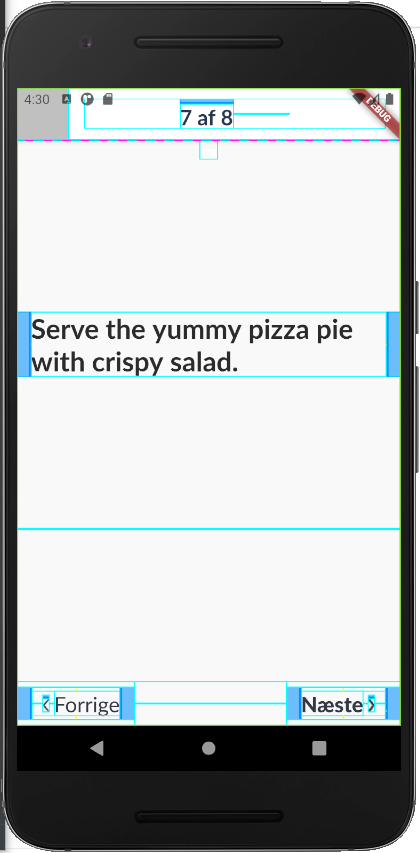
Not sure how I'd get safeArea on this, so the top isn't hitting the status bar.
I tried wrapping various things, such as the BottomModalSheet itself, in SafeArea, but no luck.
ThiagoFontes commentedon Dec 7, 2020
If you create a new MaterialApp you'll be able to use SafeArea again, so far it was the only way I was able to
Working example for me with modal bottomsheets:
github-actions commentedon Aug 4, 2022
This thread has been automatically locked since there has not been any recent activity after it was closed. If you are still experiencing a similar issue, please open a new bug, including the output of
flutter doctor -vand a minimal reproduction of the issue.