Repository navigation
TabBar shadows are clipped and indicator height cannot be reduced #59728
Description

Hello!
To understand what am I trying to achieve, have a look at the attached image.

But as you can see, the tab's shadow can not fit inside the Tab. So how do I make space for the shadow?
Also, how do I change the indicators size? For example, I want to make my tabs indicator height smaller.
I can't find any way to configure that.
Here is how I build a Tab:
Tab buildTab(CategoryModel category) {
    return Tab(child: ConstrainedBox(
      constraints: BoxConstraints(
        minWidth: 48,
      ),
      child: Text(category.name, textAlign: TextAlign.center,),
    ),);
  }
And this is how I builde the TabBar:
return TabBar(
      indicator: BoxDecoration(
          color: Colors.blue,
          borderRadius: const BorderRadius.all(
            const Radius.circular(999.0),
          ),
          boxShadow: const [BoxShadow(color: Colors.blueAccent, blurRadius: 6.0)]
      ),
      unselectedLabelColor: Colors.blue,
      labelColor: Colors.white,
      isScrollable: true,
      tabs: tabs,
    );
Activity
payam-zahedi commentedon Aug 6, 2020
@shihaohong @pedromassango @TahaTesser hi guys, I want to create PR for this issue. do you have any idea about how can I solve this?
I fork the repo and clone it should I work on a stable branch? or should I use master branch for PR?
emem365 commentedon Aug 7, 2020
Hi @sanisloandras, I looked into the code a bit to see how this is implemented. Basically, the way these indicators are implemented is by using a CustomPainter, which creates a sort of rectangular canvas according to the size of the tabs, and then draws the indicator on it. Now CustomPainters cannot really paint outside the canvas, hence, the shadow cannot go outside. So your best bet at this point would be, either to get rid of the shadow, or to try and find a workaround with indicator size.
Regarding that, TabBar has a property called indicatorSize this is is how the comments in the code define it
Here TabBarIndicatorSize is an enum :
See, if any of those work for your needs.
To decrease the height, I couldn't find anything yet, my first guess was that you could probably work with the property indicatorPadding:
but as it says EdgeInsets.top and bottom are ignored, I think you'll need something else. Iam not really sure at this point, maybe someone else can help with that, or maybe we really need a PR to implement this thing. I'll try to figure this out a bit, and comment back if I find something
emem365 commentedon Aug 7, 2020
I am pretty new to open source and trying to see if I can contribute to flutter somehow.
@TahaTesser , if you could maybe point me in the right direction, I'd like to help with this issue :)
Can we extend Decoration class and use it to create a Custom Indicator according to our needs? I guess, this could work?
shihaohong commentedon Aug 10, 2020
It seems like one approach for making the shadows fit inside the tab bar is to increase the size of the tab bar itself, since the shadows are being clipped from not being able to fit vertically.
As for the indicator size itself, you'll need to look closer into the indicator paint logic, since I'm not exactly sure how that's defined and how to modify it. My hunch is that it's currently set at the default height of 48px to adhere to the Material accessibility guidelines. However, it's okay to make it possible to specify a non-default height for the indicator or the widget that the indicator wraps.
It looks like this issue can be broken down into two separate fixes:
@emem365 @payam-zahedi Look at https://github.com/flutter/flutter/blob/master/CONTRIBUTING.md for more specifics on Flutter's contributing workflow, but I think the best way to start is to get through that, fix the issue in your own fork in a new branch, and then submit a PR for code review.
[-]TabBar improvements[/-][+]TabBar shadows are clipped and indicator height cannot be reduced[/+]emem365 commentedon Aug 11, 2020
ok @shihaohong, I'll try to submit a PR soon :)
emem365 commentedon Aug 13, 2020
Hey, @shihaohong. I looked into what you suggested, and I tried to work some stuff out. I have tried to make it possible for us to change internal padding while painting the indicator.
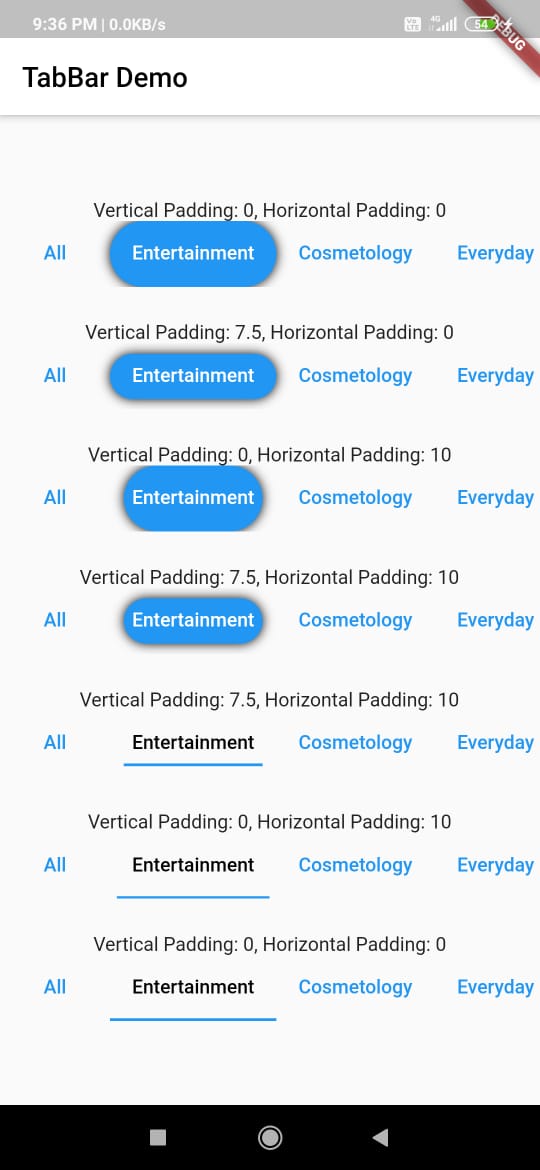
I have created a PR and I had some doubts with the stuff I was doing in the PR. Like, originally, the property indicatorPadding was being used only when using the default UnderlineTabIndicator and would work for only horizontal padding. If I add ability to add indicatorPadding to the _IndicatorPainter, that makes me not give any insets property to the UnderlineTabIndicator. Also, we can no longer ignore the vertical padding in this case.
If someone could please, take a look at the PR (#63683) and give their opinion on if I am doing this right or not That would be really helpful.
Also, with respect to the fixes you suggested:
Do you think I should still work on the height somehow?
6 remaining items
nzackoya commentedon Feb 22, 2022
indicatorPaddingfixes the issue I guessmaheshj01 commentedon Dec 24, 2022
I am able to reproduce the issue on stable 3.3 and master 3.7 also notice the selected tab is going out of TabBar.
flutter doctor -v (mac)