You signed in with another tab or window. Reload to refresh your session.You signed out in another tab or window. Reload to refresh your session.You switched accounts on another tab or window. Reload to refresh your session.Dismiss alert
We'll want more details from https://developer.apple.com/videos/play/wwdc2020/10174/. So far, it seems like it's just a separate build target in Xcode and you choose which target your sources get compiled into. Hopefully that includes selection for frameworks too.
Would that work because the limit for a clip is 10mb (if I remember correctly) and flutters framework is more than that. I could be wrong though. @xster
Would be great if it is cross platform. Clips for iOS, and Instant Apps for Android?
Reacted by Amine BEN TILI, Isak, minestarnl, Samuele Mazza, Konrad Kiss, Elias Deuss, Ludwik Trammer, Sethu Narayan Senthil, Daniel Ulbrich, TimmyTwoPints and 65 more
Reacted by MATTYGILO, Nor.Arrsgd, Qiming Weng, Lukas Scholten, József Barát, Jonata Santos, Yann Moussaba, Sadman Samee, Jaco Koenig and James Howe
Reacted by Ludwik Trammer, Isak, Lee Higgins, Jamie Gardner, Tomas Baran, Daniel Ulbrich, TimmyTwoPints, Albert- Jan Plate, Rami B., humqn and 23 more
Reacted by MATTYGILO, Lukas Scholten, Jonata Santos, Yann Moussaba, Sadman Samee, Albert Putra Purnama and Jaco Koenig
Reacted by AirborneEagle, Abdel, MATTYGILO, Ryan, Kasi E., József Barát, Jonata Santos, Yann Moussaba, Sadman Samee and Jaco Koenig
well, exporting thin builds of our full app most of them show around 10MB. Given that, I assume that a size-optimized target for App Clip including only necessary features should be well below 10 MB. I guess we'd just need a mechanism for the new target, right?
Associated Domains feature is already integrated (for us, by using unilink package)
I was able to create an App Clip running the Flutter demo by opening ios/Runner.xcworkspace in Xcode 12 and manually adding the target. This is not for the faint of heart and requires some Xcode knowledge to pull off.
Open ios/Runner.xcworkspace
Open the Project settings and hit the + to add a new target
Add an App Clip Target
Interface: Storyboard, Life Cycle: UI App Delegate
When prompted, hit Activate.
Delete the newly created AppDelegate.swift, ViewController.swift, Main.storyboard, Assets.xcassets, LaunchScreen.storyboard
Open Project (not Target!) settings > Info > Deployment Configurations. Base the new App Clip target on the same configurations as your Flutter Runner target. This will give them access to all the Flutter build settings (build number from your pubspec.yaml, etc). So "None" will become either "Debug" or "Release". Set the iOS Deployment Target to 13 (I couldn't get this working on < 13).
Compile/embed your exiting Runner Swift files and assets into both Runner and the new App Clip target by setting the membership of each of the following files:
AppDelegate.swift, ViewController.swift, Main.storyboard, Assets.xcassets, LaunchScreen.storyboard
etc
Open the App Clip Info.plist. Set Build version string (short) to $(FLUTTER_BUILD_NAME) and Bundle version to $(FLUTTER_BUILD_NUMBER). These need to match between the app and app clip target.
Create a new entitlements file for your Runner app. Selecting the Runner group, File > New > File... Property List
Call it Runner.entitlements (the entitlements extension is important) and add it to the Runner target.
Add the same Associated Domains you added to the App Clip entitlements file. DO NOT add the Parent Application Identifiers.
Open up your Runner target build settings. Set Code Signing Entitlements to the path of the Runner.entitlements file you just made, like Runner/Runner.entitlements.
Open up your App Clip target build settings. Set iOS Deployment Target to iOS 13.0 (or just delete the setting to inherit).
Still in your App Clip target build settings, in Framework Search Paths add $(inherited) and $(PROJECT_DIR)/Flutter in order so it can find the Flutter framework.
Still in your App Clip target build settings, set Objective-C Bridging Header to Runner/Runner-Bridging-Header.h.
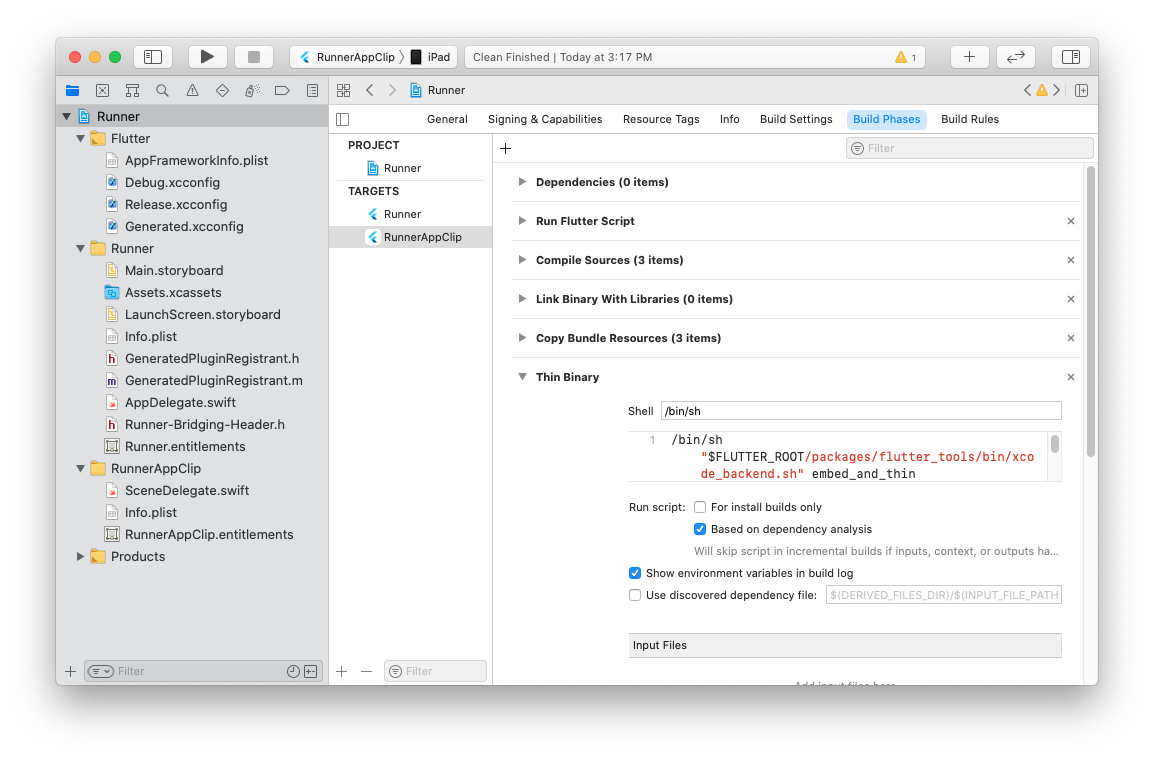
Now go to your App Clip target Build Phases tab. Add a New Run Script Phase.
Drag it it so it's right below Dependencies, and paste the following (this matches the build phase in your Runner target).
This will embed your Dart code and the Flutter engine into the App Clip bundle.
Run the App Clip scheme, targeting a iOS 14 device.
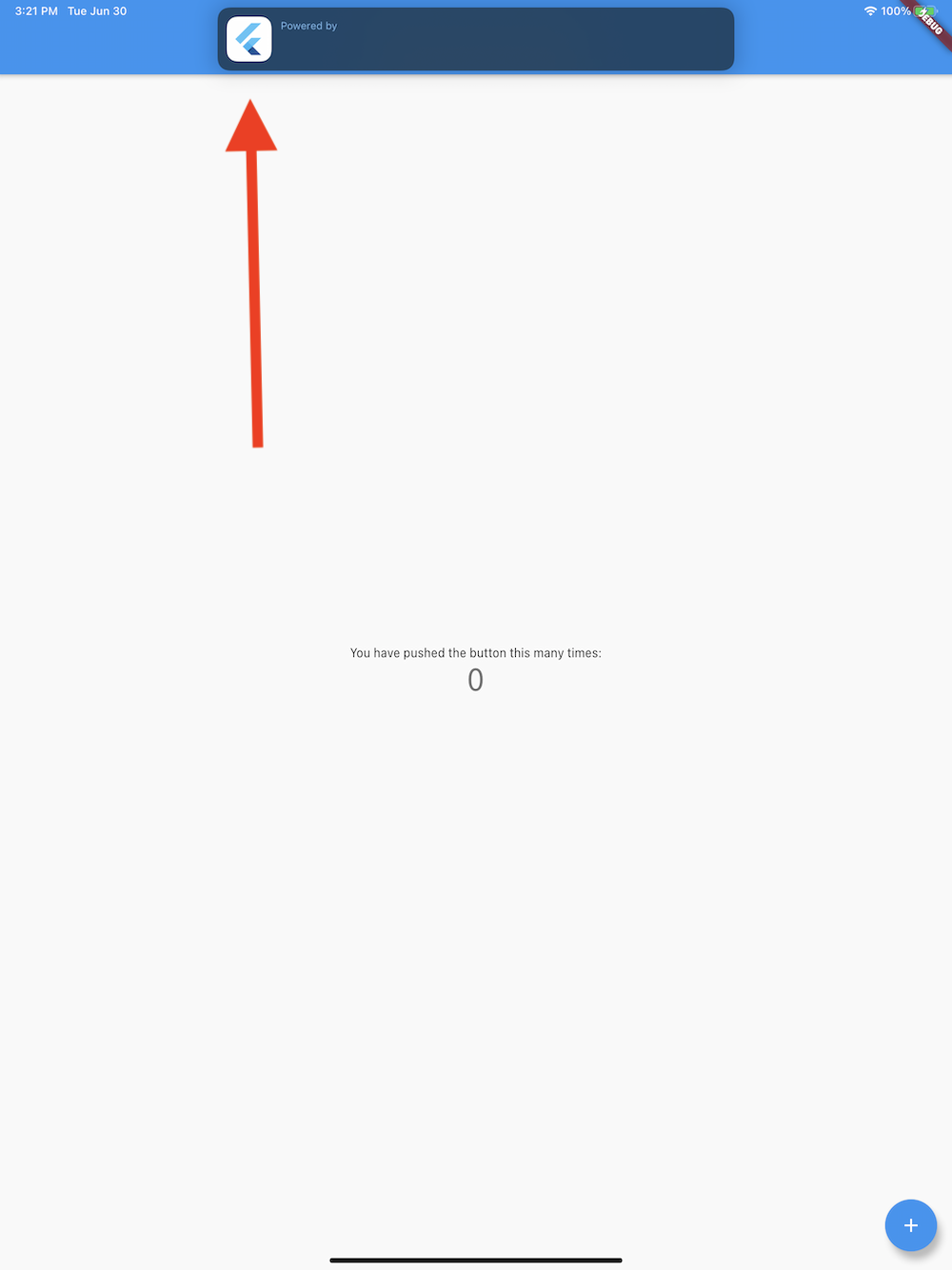
And it worked! Note the "Powered by" banner at the top.
Caveats
I make no guarantee of this working for your project, it's just a proof of concept to get you started. Please don't @ me to fix any linker errors, build setting problems, etc. 🙂
Obviously this is all manual, and ideally Flutter tooling would do all this for you.
I wasn't able to connect to the observatory, possibly because an entitlement is missing?
This will embed your entire app into the App Clip. You'll need to figure out the right entrypoint (and create a separate AppDelegate for each target, don't share them). It needs to stay under 10MB per Apple's requirements.
This could potentially be solved by embedding two Flutter add-to-app modules into a host app clip target?
I didn't have any plugins. Hopefully it would be pretty easy to add the new target to your ios/Podfile but I didn't try, maybe (in master) something like:
Here's a zipped up version of that ios directory so you can open the Xcode project yourself and drop into a newly created flutter create test_appclip demo project. You'll need to change the signing team. ios.zip
Reacted by gaaclarke, Elias Deuss, Jonah Williams, clocksmith, Noah Joshua, YuheiNakasaka, WMXPY, Isak, Rami, Peter Lee and 65 more
Reacted by Remi ROBERT, Ivan Huerta, AirborneEagle, Abdel, Bruno Macabeus, Rodrigo Recio, Andrew Coutts, Lukas Scholten, Sadman Samee, Rohan Taneja and 2 more
Reacted by xster, WMXPY, Isak, pierre, Justin McCandless, Remi ROBERT, Tom Gilder, MURAMATSU Ryunosuke, mono — Masayuki Ono, Dimitri Dessus and 20 more
Reacted by Ch Ammar Sultan
Reacted by xster, WMXPY, Isak, Tomas Baran, Remi ROBERT, Kasymbekov Sultanmyrza, Tom Gilder, Dimitri Dessus, Ivan Huerta, Jinsol Kim and 13 more
Reacted by Isak, Remi ROBERT, Thenesh, Dimitri Dessus, Ivan Huerta, AirborneEagle, Bartu OZEL, Abdel, Kasi E., Rodrigo Recio and 7 more
@miguelpruivo could you open a new issue for it? Sounds like you're asking for something slightly different than the premise of this bug. i.e. you want to have your App Clip be a standard SwiftUI App Clip rather than a Flutter powered App Clip while your main app is Flutter. Is that right? Could you describe your reproduction steps / project and the exact error?
I have added app clip into our flutter project and run well, but how to split part of plugins and assets out to app clip target? because app clip size has constraints.
@majingAragon can you open another issue describing your issue? Splitting plugins and assets are likely not very useful unless you also split the Dart code referencing those different subsets of plugins and assets (which is currently not supported).
We're doing some work in that area in #57617 and you can track our progress there.
When are you going to fully support app clips in a Flutter project? The official docs says that it's possible. I have succeded to create an app clip. But the size of a simple app clip, is way over the 10MB limit from just showing a simple screen. I've also tried to embed a simple swift view, without any shared resources from the main Flutter app. But the Flutter Framework is by default embedded in the app clip target. Therefore i wouldn't say that Flutter supports app clips yet.
I've really tried everything to keep app clip size down to minimum but it's seems impossible. Am i doing something wrong or are you working to solve this issue?
I've also tried to embed a simple swift view, without any shared resources from the main Flutter app. But the Flutter Framework is by default embedded in the app clip target.
If you don't have any Flutter elements in your app clip then you shouldn't be embedding any Flutter frameworks or plugins. There's no "default" here--you have control of what gets embedded in your app clip target.
But the size of a simple app clip, is way over the 10MB limit from just showing a simple screen.
I've also tried to embed a simple swift view, without any shared resources from the main Flutter app. But the Flutter Framework is by default embedded in the app clip target.
If you don't have any Flutter elements in your app clip then you shouldn't be embedding any Flutter frameworks or plugins. There's no "default" here--you have control of what gets embedded in your app clip target.
But the size of a simple app clip, is way over the 10MB limit from just showing a simple screen.
Out of curiosity, how are you measuring it?
Ok, maybe i'm missing something then. I'll try to create the app clip again from scratch and see if i'm able to exclude the Flutter framework in some way. I'm not embedding it all, when archiving the app clip, the framework gets embedded.
I measure my app clip as seen in apple documentation/guidelines. Archive and export as ad hoc or development, app thining and after that checking the app thinning size report text file.
If anyone has done this successful (and keeping app clip size below 10MB) please let me know.
Also note you can ship an app clip in a Flutter app, just not a FLUTTER app clip.
That's interesting. I've tried a native app clip embedded in a Flutter app. No luck, the app clip gets too big. But maybe i'm doing something wrong with the configuration for the app clip target. I would appreciate a small tutorial for that, because i've struggle hours.
You should just be able to open ios/Runner.xcworkspace, add the app clip target, and make sure not to reference Flutter at all. Flutter's pretty much just a few embedded frameworks in a normal iOS app, with a script to generate your compiled dart code, it's not that magic. So any vanilla non-Flutter App Clip tutorial online should work. You can dig into the generated App Clip bundle to make sure there's no Flutter pieces sneaking in.
This thread has been automatically locked since there has not been any recent activity after it was closed. If you are still experiencing a similar issue, please open a new bug, including the output of flutter doctor -v and a minimal reproduction of the issue.
Activity
edeuss commentedon Jun 22, 2020
Would that work because the limit for a clip is 10mb (if I remember correctly) and flutters framework is more than that. I could be wrong though. @xster
jonahwilliams commentedon Jun 22, 2020
The default demo app is about 5.4 MB, that is plenty of room for small applications
vincentracine commentedon Jun 23, 2020
As the adoption of NFC increases, this feature will become a must-have.
newmskywalker commentedon Jun 24, 2020
Would be great if it is cross platform. Clips for iOS, and Instant Apps for Android?
marqueeeeeee commentedon Jun 24, 2020
it looks like it is possible based from the initial documents and it is similar to universal links.
xster commentedon Jun 26, 2020
right, the devil's in the details but from https://developer.apple.com/videos/play/wwdc2020/10174/, it seems so far like there aren't any blocking conceptual issues.
chris-schra commentedon Jun 29, 2020
well, exporting thin builds of our full app most of them show around 10MB. Given that, I assume that a size-optimized target for App Clip including only necessary features should be well below 10 MB. I guess we'd just need a mechanism for the new target, right?
Associated Domains feature is already integrated (for us, by using unilink package)
anandat commentedon Jun 29, 2020
hmm right as per the app clip example given by apple ex : fruta
Isakdl commentedon Jun 30, 2020
Really cool feature, would love to implement this in our app! These issues would probably help make this easier / viable #16815 #16813
jmagman commentedon Jun 30, 2020
I was able to create an App Clip running the Flutter demo by opening
ios/Runner.xcworkspacein Xcode 12 and manually adding the target. This is not for the faint of heart and requires some Xcode knowledge to pull off.ios/Runner.xcworkspaceAppDelegate.swift, ViewController.swift, Main.storyboard, Assets.xcassets, LaunchScreen.storyboard
etc
Build version string (short)to$(FLUTTER_BUILD_NAME)andBundle versionto$(FLUTTER_BUILD_NUMBER). These need to match between the app and app clip target.Runner.entitlements(the entitlements extension is important) and add it to the Runner target.Code Signing Entitlementsto the path of the Runner.entitlements file you just made, likeRunner/Runner.entitlements.iOS Deployment Targetto iOS 13.0 (or just delete the setting to inherit).Framework Search Pathsadd$(inherited)and$(PROJECT_DIR)/Flutterin order so it can find the Flutter framework.Objective-C Bridging HeadertoRunner/Runner-Bridging-Header.h./bin/sh "$FLUTTER_ROOT/packages/flutter_tools/bin/xcode_backend.sh" buildThis will compile your Dart code. This should only happen once when you build your project since the back end will cache the results.

/bin/sh "$FLUTTER_ROOT/packages/flutter_tools/bin/xcode_backend.sh" embed_and_thinThis will embed your Dart code and the Flutter engine into the App Clip bundle.
And it worked! Note the "Powered by" banner at the top.
Caveats
ios/Podfilebut I didn't try, maybe (in master) something like:Here's a zipped up version of that
iosdirectory so you can open the Xcode project yourself and drop into a newly createdflutter create test_appclipdemo project. You'll need to change the signing team.ios.zip
edeuss commentedon Jun 30, 2020
@jmagman Wow, thanks for workaround. Also I think you meant 10mb not 10GB.
17 remaining items
xster commentedon Sep 26, 2020
@miguelpruivo could you open a new issue for it? Sounds like you're asking for something slightly different than the premise of this bug. i.e. you want to have your App Clip be a standard SwiftUI App Clip rather than a Flutter powered App Clip while your main app is Flutter. Is that right? Could you describe your reproduction steps / project and the exact error?
xster commentedon Sep 26, 2020
FWIW, this is what it's supposed to look like after you install the App Clip on your test phone and then scan a generated QR code following https://developer.apple.com/documentation/app_clips/testing_your_app_clip_s_launch_experience
Another note: I never got the QR code scanning described in https://developer.apple.com/documentation/app_clips/testing_your_app_clip_s_launch_experience to work through the normal camera app for some reason. Though the built-in QR scanner that can be added to the Control Panel worked well.
majingAragon commentedon Sep 27, 2020
I have added app clip into our flutter project and run well, but how to split part of plugins and assets out to app clip target? because app clip size has constraints.
miguelpruivo commentedon Sep 27, 2020
@majingAragon I need to know this as well. Currently clip is inheriting all the Runner dependencies, which makes it bloated and bigger than 10MB.
xster commentedon Sep 28, 2020
@majingAragon can you open another issue describing your issue? Splitting plugins and assets are likely not very useful unless you also split the Dart code referencing those different subsets of plugins and assets (which is currently not supported).
We're doing some work in that area in #57617 and you can track our progress there.
espling commentedon Nov 5, 2020
When are you going to fully support app clips in a Flutter project? The official docs says that it's possible. I have succeded to create an app clip. But the size of a simple app clip, is way over the 10MB limit from just showing a simple screen. I've also tried to embed a simple swift view, without any shared resources from the main Flutter app. But the Flutter Framework is by default embedded in the app clip target. Therefore i wouldn't say that Flutter supports app clips yet.
I've really tried everything to keep app clip size down to minimum but it's seems impossible. Am i doing something wrong or are you working to solve this issue?
jmagman commentedon Nov 5, 2020
If you don't have any Flutter elements in your app clip then you shouldn't be embedding any Flutter frameworks or plugins. There's no "default" here--you have control of what gets embedded in your app clip target.
Out of curiosity, how are you measuring it?
espling commentedon Nov 5, 2020
Ok, maybe i'm missing something then. I'll try to create the app clip again from scratch and see if i'm able to exclude the Flutter framework in some way. I'm not embedding it all, when archiving the app clip, the framework gets embedded.
I measure my app clip as seen in apple documentation/guidelines. Archive and export as ad hoc or development, app thining and after that checking the app thinning size report text file.
If anyone has done this successful (and keeping app clip size below 10MB) please let me know.
jerryzhoujw commentedon Nov 13, 2020
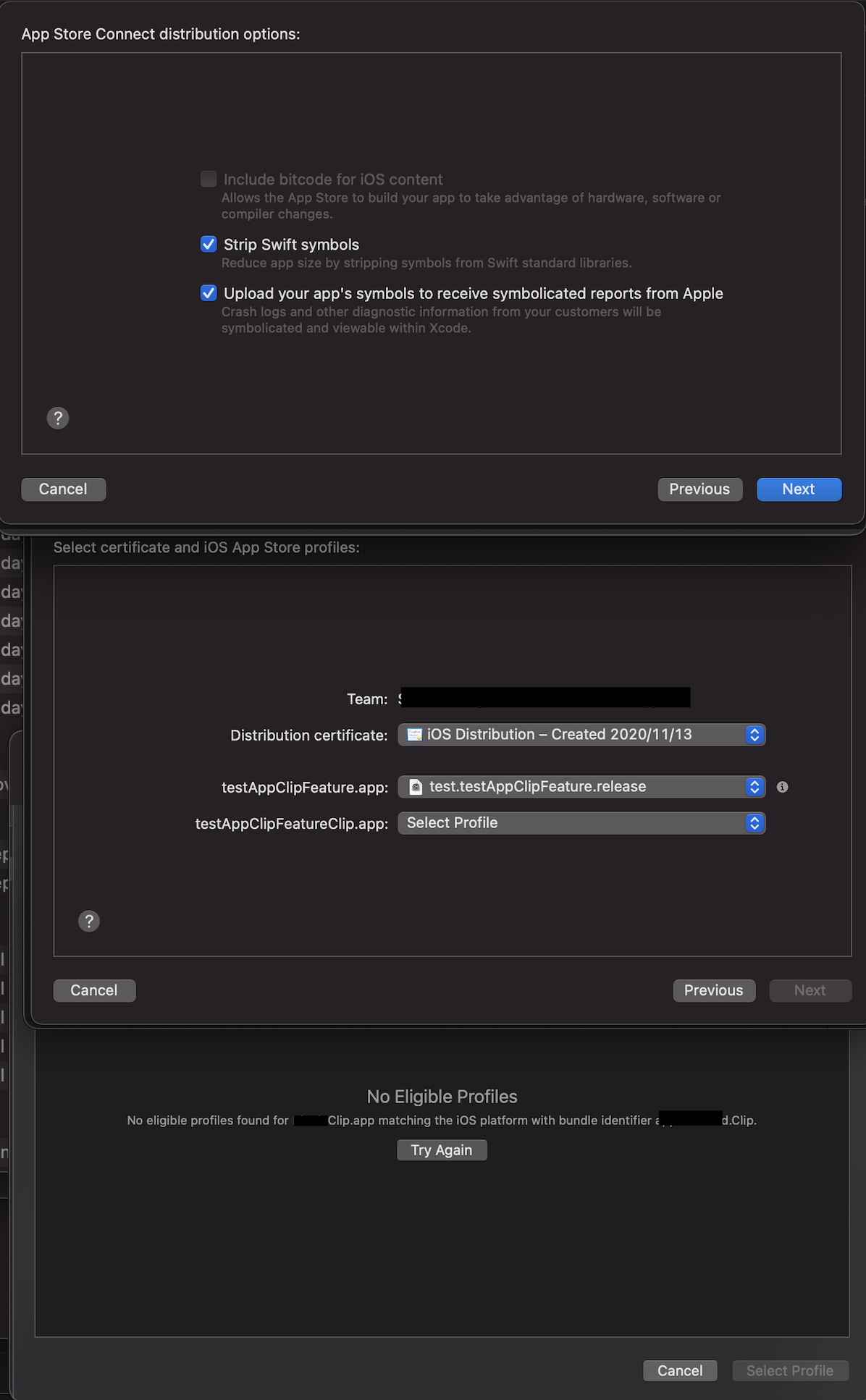
Update: it's not related to BitCode.
With bitcode = YES, I can't distribute app with AppClip to apple store.Maybe it's apple's bug, not sure, I'm still searhing.distribute_with_bitcode_NO not work(Left) || distribute_with_bitcode_YES works(Right)

espling commentedon Dec 4, 2020
It's now official that it's not possible to ship an app clip in a Flutter app. The documentation is also updated with this information.
#71098
And this is a minimal app. My app is way bigger than this (and so is the app clip). Hope they will fix this asap.
jmagman commentedon Dec 4, 2020
Also note you can ship an app clip in a Flutter app, just not a FLUTTER app clip.
espling commentedon Dec 4, 2020
That's interesting. I've tried a native app clip embedded in a Flutter app. No luck, the app clip gets too big. But maybe i'm doing something wrong with the configuration for the app clip target. I would appreciate a small tutorial for that, because i've struggle hours.
jmagman commentedon Dec 4, 2020
You should just be able to open
ios/Runner.xcworkspace, add the app clip target, and make sure not to reference Flutter at all. Flutter's pretty much just a few embedded frameworks in a normal iOS app, with a script to generate your compiled dart code, it's not that magic. So any vanilla non-Flutter App Clip tutorial online should work. You can dig into the generated App Clip bundle to make sure there's no Flutter pieces sneaking in.github-actions commentedon Aug 9, 2021
This thread has been automatically locked since there has not been any recent activity after it was closed. If you are still experiencing a similar issue, please open a new bug, including the output of
flutter doctor -vand a minimal reproduction of the issue.