Skip to content

Floating SliverPersistantHeader hidden by pinned SliverAppBar #64137

Closed

Description

@RobinLbt

Hi,

I'm trying to have a SliverAppBar (which is fixed/pinned to the top) and under it a floating persistant header.

It goes like this :

import 'package:flutter/material.dart';

class SliverExample extends StatefulWidget {

  @override
  _SliverExampleState createState() => _SliverExampleState();
}

class _SliverExampleState extends State<SliverExample> {
  @override
  Widget build(BuildContext context) {
    return Scaffold(
      body: CustomScrollView(
        physics: BouncingScrollPhysics(),
        slivers: [
          SliverAppBar(
            pinned: true,
            title: Text('Pinned AppBar'),
          ),
          SliverPersistentHeader(
            floating: true,
            delegate: FloatingHeader(),
          ),
          SliverList(
              delegate: SliverChildListDelegate([
            Container(
                height: 2000,
                color: Colors.white,
                child: Center(
                    child: Column(
                        mainAxisAlignment: MainAxisAlignment.spaceBetween,
                        children: [
                      Text('TOP'),
                      Text('MIDDLE'),
                      Text('BOTTOM'),
                    ]))),
          ]))
        ],
      ),
    );
  }
}

class FloatingHeader extends SliverPersistentHeaderDelegate {
  @override
  Widget build(
      BuildContext context, double shrinkOffset, bool overlapsContent) {
    return Container(
      color: Colors.red,
      child: Center(
          child:
              Text('Floating Header', style: TextStyle(color: Colors.white))),
    );
  }

  @override
  bool shouldRebuild(SliverPersistentHeaderDelegate _) => true;

  @override
  double get maxExtent => 250.0;

  @override
  double get minExtent => 80.0;
}

It works, but the problem is when you scroll down (and so the floating header disappear), and scroll back up so the header appears again, it appears but the top part is hidden by the SliverAppBar.

Then when you scroll back to the top of the page, everything is positionned as you would expect it to be (the SliverAppBar at the top and under it the floating header completely visible).

Here is what it looks like :
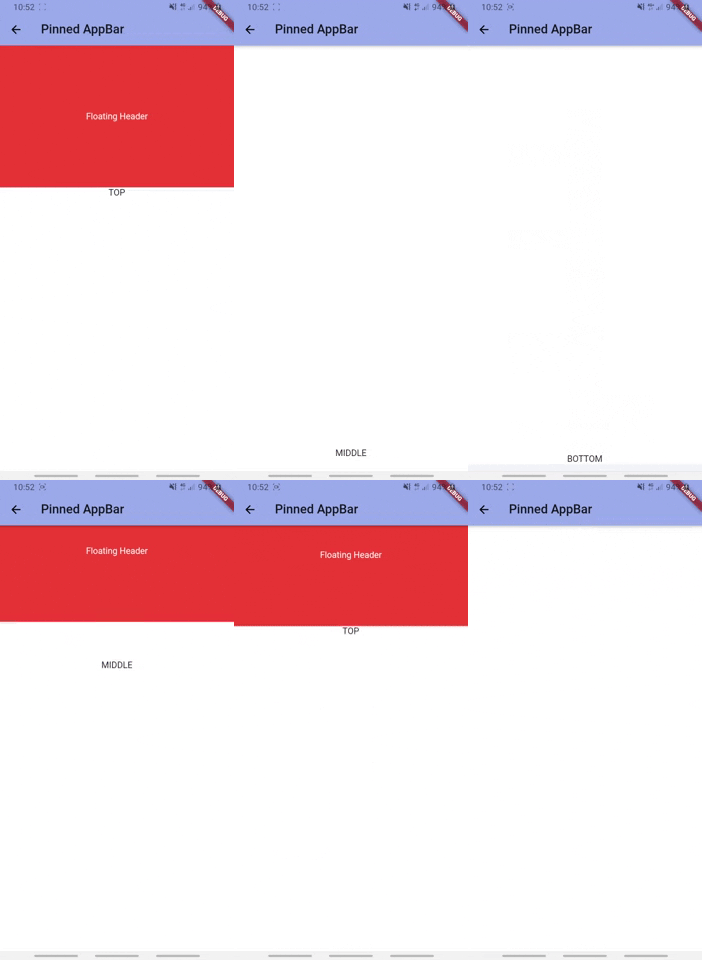
Example sliverPersistantHeader hidden by SliverAppBar

I don't know if this is a bug or I'm missing something.
How can I deal with that ? Such as the floating persistant header always appears completely under the SliverAppBar when you scroll back up after scrolling down for a while.

Activity

  1. darshankawar commented on Aug 19, 2020

    @darshankawar
    Member

    Hi @RobinLbt,
    The experience seems to be as expected to me. Unless you scroll down completely, you won't see the Top section appear below Floating Header and for it, you'll need to scroll down completely because you have wrapped the entire scaffold body with CustomScrollView.
    This is working as intended.

  2. added
    in triagePresently being triaged by the triage team
    waiting for responseThe Flutter team cannot make further progress on this issue until the original reporter responds
    on Aug 19, 2020
  3. RobinLbt commented on Aug 19, 2020

    @RobinLbt
    Author

    Thank you for your quick answer @darshankawar,

    I'm not sure if we are talking about the same thing, I'm not trying to put the SliverAppBar below the floating header.
    If you look at the gif, you can see when I'm scrolling down and then up:

    • The SliverAppBar is pinned , desired behaviour
    • The SliverPersistantHeader is floating, desired behaviour
    • The SliverPersistantHeader is behind the SliverAppBar, desired behaviour
    • But the top part of the SliverPersistantHeader is hidden (the size of the SliverAppBar because it's behind it), unless you scroll to the very top where it appears 100%. I don't think this is a desired behaviour, who would want to hide a part of the header when it supposed to appears completely ?
  4. removed
    waiting for responseThe Flutter team cannot make further progress on this issue until the original reporter responds
    on Aug 19, 2020
  5. darshankawar commented on Aug 19, 2020

    @darshankawar
    Member

    @RobinLbt I see what you are saying. Probably I misread your issue. Keeping this issue open for further analysis.

    flutter doctor -v
    Flutter 1.20.2 • channel stable • https://github.com/flutter/flutter.git
    Framework • revision bbfbf1770c (15 hours ago) • 2020-08-13 08:33:09 -0700
    Engine • revision 9d5b21729f
    Tools • Dart 2.9.1
    
    Running flutter doctor...
    Doctor summary (to see all details, run flutter doctor -v):
    [✓] Flutter (Channel stable, 1.20.2, on Mac OS X 10.15.2 19C57, locale en-US)
    [!] Android toolchain - develop for Android devices (Android SDK version 29.0.3)
        ✗ Android license status unknown.
          Try re-installing or updating your Android SDK Manager.
          See https://developer.android.com/studio/#downloads or visit https://flutter.dev/docs/get-started/install/macos#android-setup for detailed instructions.
    [✓] Xcode - develop for iOS and macOS (Xcode 11.6)
    [✓] Android Studio (version 3.6)
    [✓] Connected device (1 available)
    
    ! Doctor found issues in 1 category.
    
    
  6. added
    f: scrollingViewports, list views, slivers, etc.
    frameworkflutter/packages/flutter repository. See also f: labels.
    has reproducible stepsThe issue has been confirmed reproducible and is ready to work on
    and removed
    in triagePresently being triaged by the triage team
    on Aug 19, 2020
  7. HansMuller commented on Aug 19, 2020

    @HansMuller
    Contributor

    CC @Piinks - have we seen this issue before?

  8. goderbauer commented on Aug 19, 2020

    @goderbauer
    Member

    Can the top appbar just live outside the scrollview, e.g. by setting Scaffold.appBar?

  9. Piinks commented on Aug 19, 2020

    @Piinks
    Contributor

    Just playing around with this a bit, I borrowed from this popular Medium article about Sliver composition and plugged in your reproduction:
    https://medium.com/flutter/slivers-demystified-6ff68ab0296f

    import 'package:flutter/material.dart';
    import 'dart:math' as math;
    
    void main() => runApp(MyApp());
    
    class MyApp extends StatelessWidget {
      @override
      Widget build(BuildContext context) {
        return MaterialApp(
          home: Scaffold(
            body: CollapsingList(),
          ),
        );
      }
    }
    
    class _SliverAppBarDelegate extends SliverPersistentHeaderDelegate {
      _SliverAppBarDelegate({
        @required this.minHeight,
        @required this.maxHeight,
        @required this.child,
      });
      final double minHeight;
      final double maxHeight;
      final Widget child;
      @override
      double get minExtent => minHeight;
      @override
      double get maxExtent => math.max(maxHeight, minHeight);
      @override
      Widget build(
          BuildContext context, double shrinkOffset, bool overlapsContent) {
        return new SizedBox.expand(child: child);
      }
    
      @override
      bool shouldRebuild(_SliverAppBarDelegate oldDelegate) {
        return maxHeight != oldDelegate.maxHeight ||
            minHeight != oldDelegate.minHeight ||
            child != oldDelegate.child;
      }
    }
    
    class CollapsingList extends StatelessWidget {
      SliverPersistentHeader makeHeader(
        String headerText,
        double minHeight,
        double maxHeight,
        Color color,
      ) {
        return SliverPersistentHeader(
          pinned: true,
          delegate: _SliverAppBarDelegate(
            minHeight: minHeight,
            maxHeight: maxHeight,
            child: Container(
              color: color,
              child: Center(
                child: Text(
                  headerText,
                  style: TextStyle(color: Colors.white),
                ),
              )
            ),
          ),
        );
      }
    
      @override
      Widget build(BuildContext context) {
        return CustomScrollView(
          slivers: <Widget>[
            makeHeader('Pinned', 100, 100, Colors.blue),
            makeHeader('Floating', 0, 250, Colors.red),
            SliverList(
              delegate: SliverChildListDelegate([
                Container(
                  height: 2000,
                  color: Colors.white,
                  child: Center(
                    child: Column(
                      mainAxisAlignment: MainAxisAlignment.spaceBetween,
                      children: [
                        Text('TOP'),
                        Text('MIDDLE'),
                        Text('BOTTOM'),
                      ]
                    )
                  )
                ),
              ])
            )
          ],
        );
      }
    }

    Does this create the effect you were looking for @RobinLbt ? I highly recommend the article as well. :)

  10. added
    waiting for responseThe Flutter team cannot make further progress on this issue until the original reporter responds
    on Aug 19, 2020
  11. RobinLbt commented on Aug 20, 2020

    @RobinLbt
    Author

    @Piinks thank you for providing an example. It's definitely better !
    There is still a problem, the floating header appears only at the top of the page now, not when you scroll down and then scroll up a bit (in the middle of the page for example) like it should.
    Is it even possible ?

  12. removed
    waiting for responseThe Flutter team cannot make further progress on this issue until the original reporter responds
    on Aug 20, 2020
  13. RobinLbt commented on Aug 21, 2020

    @RobinLbt
    Author

    Can the top appbar just live outside the scrollview, e.g. by setting Scaffold.appBar?

    Yes this is working ! I'm closing the issue. Thanks you everyone.

  14. github-actions commented on Aug 13, 2021

    @github-actions

    This thread has been automatically locked since there has not been any recent activity after it was closed. If you are still experiencing a similar issue, please open a new bug, including the output of flutter doctor -v and a minimal reproduction of the issue.

  15. locked as resolved and limited conversation to collaborators on Aug 13, 2021
Sign up for free to join this conversation on GitHub. Already have an account? Sign in to comment

Metadata

Metadata

Assignees

No one assigned

    Labels

    f: scrollingViewports, list views, slivers, etc.found in release: 1.20Found to occur in 1.20frameworkflutter/packages/flutter repository. See also f: labels.has reproducible stepsThe issue has been confirmed reproducible and is ready to work onp: material_uimaterial_ui package in flutter/packages

    Type

    No type

    Projects

    No projects

      Milestone

      No milestone

      Relationships

      None yet

      Development

      No branches or pull requests

      Issue actions