Skip to content

On some devices, native keyboard cannot be closed with back button #66036

Closed

Description

@ksankumar

Device: Samsung S8, S9
Branch: master

android native keyboard not able to close when we tab hide keyboard and back button in samsung devices with master branch. Works fine with stable branch.

import 'package:flutter/material.dart';

void main() {
  runApp(MyApp());
}

class MyApp extends StatelessWidget {
  @override
  Widget build(BuildContext context) {
    return MaterialApp(
      title: 'Flutter Test',
      theme: ThemeData(
        primarySwatch: Colors.blue,
        visualDensity: VisualDensity.adaptivePlatformDensity,
      ),
      home: MyHomePage(),
    );
  }
}

class MyHomePage extends StatefulWidget {
  MyHomePage({Key key}) : super(key: key);

  @override
  _MyHomePageState createState() => _MyHomePageState();
}

class _MyHomePageState extends State<MyHomePage> {
  Widget build(BuildContext context) {
    return Scaffold(
      appBar: AppBar(title: Text('Keyboard Input')),
      body: Center(
        child: TextField(),
      ),
    );
  }
}
flutter doctor
Doctor summary (to see all details, run flutter doctor -v):
[√] Flutter (Channel master, 1.22.0-10.0.pre.222, on Microsoft Windows [Version 10.0.18362.1082], locale en-US)

[√] Android toolchain - develop for Android devices (Android SDK version 29.0.3)
[√] Chrome - develop for the web
[√] Android Studio (version 4.0)
[√] IntelliJ IDEA Community Edition (version 2019.3)
[√] VS Code (version 1.49.0)
[√] Connected device (3 available)
• No issues found!

ezgif com-video-to-gif

Activity

  1. chocolatkey commented on Sep 17, 2020

    @chocolatkey

    I have the same problem, using beta 1.22.0-12.1.pre. FocusScope.of(context).unfocus(); dismisses the keyboard, but as soon as the textfield is selected again, this happens.

  2. hamdikahloun commented on Sep 17, 2020

    @hamdikahloun
    Member

    Hi @ksankumar
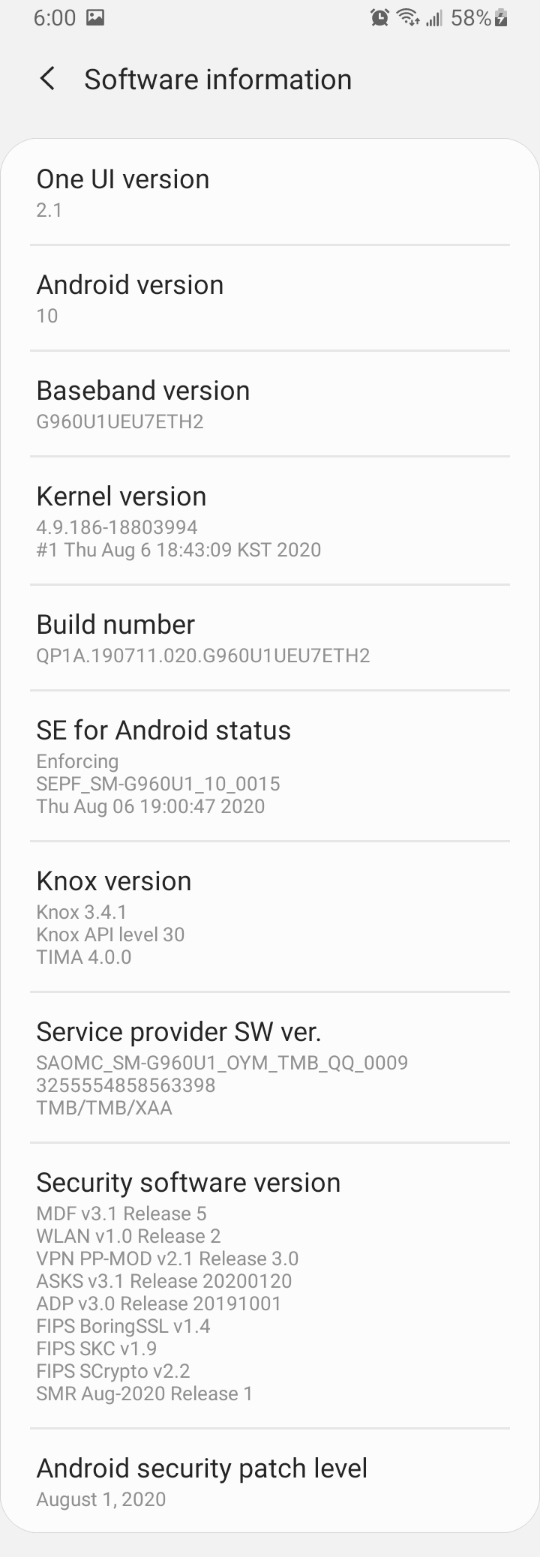
    Can you provide please the devices info (Android Version, Model Number...)

  3. ksankumar commented on Sep 17, 2020

    @ksankumar
    Author
  4. chocolatkey commented on Sep 17, 2020

    @chocolatkey

    Screenshot_20200917-161911_Settings.jpg

    Additional note: did not happen in the previous beta

  5. jason-simmons commented on Sep 18, 2020

    @jason-simmons
    Member

    Reproduced this on a Nexus 7

    This regressed with 0d8de39

    @mdebbar @gspencergoog @chunhtai

  6. TahaTesser commented on Sep 18, 2020

    @TahaTesser
    Contributor

    I cannot reproduce on Realme device
    and
    @darshankawar tested on S10+, latest master, also doesn't reproduce for him

    code sample
    import 'package:flutter/material.dart';
    
    void main() {
      runApp(MyApp());
    }
    
    class MyApp extends StatelessWidget {
      @override
      Widget build(BuildContext context) {
        return MaterialApp(
          title: 'Flutter Test',
          theme: ThemeData(
            primarySwatch: Colors.blue,
            visualDensity: VisualDensity.adaptivePlatformDensity,
          ),
          home: MyHomePage(),
        );
      }
    }
    
    class MyHomePage extends StatefulWidget {
      MyHomePage({Key key}) : super(key: key);
    
      @override
      _MyHomePageState createState() => _MyHomePageState();
    }
    
    class _MyHomePageState extends State<MyHomePage> {
      Widget build(BuildContext context) {
        return Scaffold(
          appBar: AppBar(title: Text('Keyboard Input')),
          body: Center(
            child: TextField(),
          ),
        );
      }
    }
    
    flutter doctor -v
    [✓] Flutter (Channel master, 1.22.0-10.0.pre.251, on Mac OS X 10.15.6 19G2021
        x86_64, locale en-GB)
        • Flutter version 1.22.0-10.0.pre.251 at
          /Users/tahatesser/Code/flutter_master
        • Framework revision d26268bb9e (7 hours ago), 2020-09-18 09:06:26 +0900
        • Engine revision 2abe69c608
        • Dart version 2.10.0 (build 2.10.0-136.0.dev)
    
     
    [✓] Android toolchain - develop for Android devices (Android SDK version 30.0.2)
        • Android SDK at /Users/tahatesser/Code/sdk
        • Platform android-30, build-tools 30.0.2
        • ANDROID_HOME = /Users/tahatesser/Code/sdk
        • Java binary at: /Applications/Android
          Studio.app/Contents/jre/jdk/Contents/Home/bin/java
        • Java version OpenJDK Runtime Environment (build
          1.8.0_242-release-1644-b3-6222593)
        • All Android licenses accepted.
    
    [✓] Xcode - develop for iOS and macOS (Xcode 12.0)
        • Xcode at /Applications/Xcode.app/Contents/Developer
        • Xcode 12.0, Build version 12A7209
        • CocoaPods version 1.9.3
    
    [✓] Chrome - develop for the web
        • Chrome at /Applications/Google Chrome.app/Contents/MacOS/Google Chrome
    
    [✓] Android Studio (version 4.0)
        • Android Studio at /Applications/Android Studio.app/Contents
        • Flutter plugin version 49.0.2
        • Dart plugin version 193.7547
        • Java version OpenJDK Runtime Environment (build
          1.8.0_242-release-1644-b3-6222593)
    
    [✓] VS Code (version 1.49.1)
        • VS Code at /Applications/Visual Studio Code.app/Contents
        • Flutter extension version 3.14.1
    
     
    [✓] Connected device (4 available)            
        • RMX2001 (mobile) • EUYTFEUSQSRGDA6D • android-arm64  • Android 10 (API 29)
        • macOS (desktop)  • macos            • darwin-x64     • Mac OS X 10.15.6
          19G2021 x86_64
        • Web Server (web) • web-server       • web-javascript • Flutter Tools
        • Chrome (web)     • chrome           • web-javascript • Google Chrome
          85.0.4183.102
    
    • No issues found!

    Labelling the issue base on #66036 (comment)

  7. changed the title [-]Android native back/keyboard close not working[/-] [+]On some devices, native keyboard cannot be closed with back button[/+] on Sep 18, 2020
  8. added
    a: text inputEntering text in a text field or keyboard related problems
    engineflutter/engine related. See also e: labels.
    frameworkflutter/packages/flutter repository. See also f: labels.
    platform-androidAndroid applications specifically
    on Sep 18, 2020
  9. hamdikahloun commented on Sep 18, 2020

    @hamdikahloun
    Member

    I cannot reproduce on:

    SM-G950F (Samsung Galaxy S8)
    SM-F916U (Samsung Galaxy Z Fold 2)
    SM-G960F (Samsung Galaxy S9)

    code sample
    import 'package:flutter/material.dart';
    
    void main() {
      runApp(MyApp());
    }
    
    class MyApp extends StatelessWidget {
      @override
      Widget build(BuildContext context) {
        return MaterialApp(
          title: 'Flutter Test',
          theme: ThemeData(
            primarySwatch: Colors.blue,
            visualDensity: VisualDensity.adaptivePlatformDensity,
          ),
          home: MyHomePage(),
        );
      }
    }
    
    class MyHomePage extends StatefulWidget {
      MyHomePage({Key key}) : super(key: key);
    
      @override
      _MyHomePageState createState() => _MyHomePageState();
    }
    
    class _MyHomePageState extends State<MyHomePage> {
      Widget build(BuildContext context) {
        return Scaffold(
          appBar: AppBar(title: Text('Keyboard Input')),
          body: Center(
            child: TextField(),
          ),
        );
      }
    }
    
    flutter doctor -v
    [√] Flutter (Channel master, 1.22.0-10.0.pre.40, on Microsoft Windows [version 10.0.19041.508], locale fr-FR)
        • Flutter version 1.22.0-10.0.pre.40 at D:\flutter
        • Framework revision 9234389a59 (36 minutes ago), 2020-09-18 09:25:19 +0100
        • Engine revision 2abe69c608
        • Dart version 2.10.0 (build 2.10.0-136.0.dev)
    
    
    [√] Android toolchain - develop for Android devices (Android SDK version 30.0.1)
        • Android SDK at C:\Users\hamdi\AppData\Local\Android\Sdk
        • Platform android-30, build-tools 30.0.1
        • ANDROID_HOME = C:\Users\hamdi\AppData\Local\Android\Sdk
        • Java binary at: C:\Program Files\Android\Android Studio\jre\bin\java
        • Java version OpenJDK Runtime Environment (build 1.8.0_242-release-1644-b01)
        • All Android licenses accepted.
    
    [√] Chrome - develop for the web
        • Chrome at C:\Program Files (x86)\Google\Chrome\Application\chrome.exe
    
    [√] Visual Studio - develop for Windows (Visual Studio Community 2019 16.6.3)
        • Visual Studio at C:\Program Files (x86)\Microsoft Visual Studio\2019\Community
        • Visual Studio Community 2019 version 16.6.30225.117
        • Windows 10 SDK version 10.0.18362.0
    
    [√] Android Studio (version 4.0)
        • Android Studio at C:\Program Files\Android\Android Studio
        • Flutter plugin version 48.1.2
        • Dart plugin version 193.7547
        • Java version OpenJDK Runtime Environment (build 1.8.0_242-release-1644-b01)
    
    [√] VS Code (version 1.49.0)
        • VS Code at C:\Users\hamdi\AppData\Local\Programs\Microsoft VS Code
        • Flutter extension version 3.14.1
    
    [√] Connected device (5 available)
        • SM G960F (mobile) • localhost:63921 • android-arm64  • Android 10 (API 29)
        • Windows (desktop) • windows         • windows-x64    • Microsoft Windows [version 10.0.19041.508]
        • Web Server (web)  • web-server      • web-javascript • Flutter Tools
        • Chrome (web)      • chrome          • web-javascript • Google Chrome 85.0.4183.102
        • Edge (web)        • edge            • web-javascript • Microsoft Edge 85.0.564.44
    
    • No issues found!
    
  10. dujianchi commented on Sep 26, 2020

    @dujianchi

    reproduce on Xiaomi(MIUI12/Android10) and Huawei(EMUI8/Android8).
    code:

    import 'package:flutter/material.dart';
    
    void main() {
      runApp(MyApp());
    }
    
    class MyApp extends StatelessWidget {
      @override
      Widget build(BuildContext context) {
        return MaterialApp(
          title: 'Flutter Demo',
          theme: ThemeData(
            primarySwatch: Colors.blue,
            visualDensity: VisualDensity.adaptivePlatformDensity,
          ),
          home: MyHomePage(title: 'Flutter Demo Home Page'),
        );
      }
    }
    
    class MyHomePage extends StatefulWidget {
      MyHomePage({Key key, this.title}) : super(key: key);
      final String title;
    
      @override
      _MyHomePageState createState() => _MyHomePageState();
    }
    
    class _MyHomePageState extends State<MyHomePage> {
      @override
      Widget build(BuildContext context) {
        return Scaffold(
          appBar: AppBar(
            title: Text(widget.title),
          ),
          body: TextField(
            decoration:
                InputDecoration(labelText: 'this is a annoying input field'),
          ),
        );
      }
    }
    

    doctor:

    Doctor summary (to see all details, run flutter doctor -v):
    [√] Flutter (Channel beta, 1.22.0-12.1.pre, on Microsoft Windows [Version 10.0.18363.1082], locale zh-CN)
    [√] Android toolchain - develop for Android devices (Android SDK version 30.0.2)
    [√] Chrome - develop for the web
    [!] Android Studio (version 4.0)
        X Flutter plugin not installed; this adds Flutter specific functionality.
        X Dart plugin not installed; this adds Dart specific functionality.
    [√] Connected device (4 available)
    
    ! Doctor found issues in 1 category.
    

    Uploading screenrecorder.gif…

  11. ganeshshirole commented on Sep 26, 2020

    @ganeshshirole

    Same issue is there on beta version please resolve this as soon as possible.
    I have to deploy app on playstore

  12. chinmaygarde commented on Sep 28, 2020

    @chinmaygarde
    Contributor

    cc @gspencergoog @jason-simmons. We should revert 0d8de39 and cherry pick it into the beta.

  13. jason-simmons commented on Sep 28, 2020

    @jason-simmons
    Member

    It looks like this was fixed by 0d945a1

    @pcsosinski @christopherfujino That change should be cherry picked.

  14. github-actions commented on Aug 12, 2021

    @github-actions

    This thread has been automatically locked since there has not been any recent activity after it was closed. If you are still experiencing a similar issue, please open a new bug, including the output of flutter doctor -v and a minimal reproduction of the issue.

  15. locked as resolved and limited conversation to collaborators on Aug 12, 2021
  16. added
    P0Critical issues such as a build break or regression
    and removed on Jun 28, 2023
Sign up for free to join this conversation on GitHub. Already have an account? Sign in to comment

Metadata

Metadata

Assignees

Labels

P0Critical issues such as a build break or regressiona: text inputEntering text in a text field or keyboard related problemse: device-specificOnly manifests on certain devicesengineflutter/engine related. See also e: labels.found in release: 1.22Found to occur in 1.22frameworkflutter/packages/flutter repository. See also f: labels.platform-androidAndroid applications specifically

Type

No type

Projects

No projects

    Relationships

    None yet

    Development

    No branches or pull requests

    Issue actions