Repository navigation
CupertinoSliverNavigationBar largeTitle gets bigger when transition finishes #67269
Description

Steps to Reproduce
- Run code in Code sample section (Is a modified version of getting started code from Flutters web page).
- Transition to page and go back
Expected results: Large title should have a smooth transition between text without opacity and with opacity.
Actual results: At the end of the transition the large title pops into a text with bigger size, the transition is not smooth.
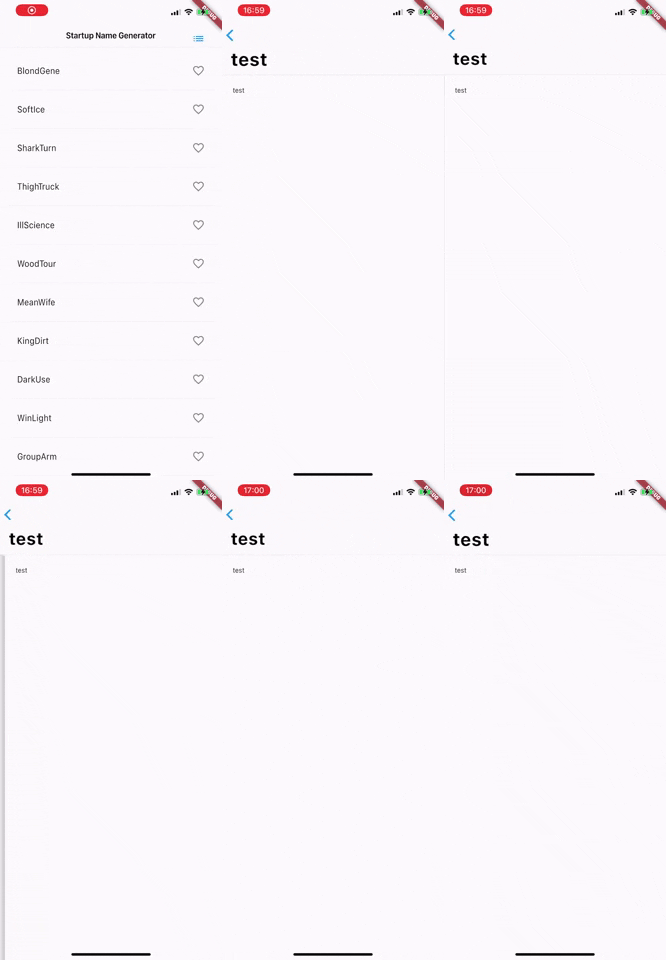
As you can see the large title pops bigger at the end of transition.
Flutter doctor
[✓] Flutter (Channel stable, 1.20.4, on Mac OS X 10.15.6 19G2021, locale en-ES)
[!] Android toolchain - develop for Android devices (Android SDK version 29.0.3)
    ✗ Android license status unknown.
      Try re-installing or updating your Android SDK Manager.
      See https://developer.android.com/studio/#downloads or visit
      https://flutter.dev/docs/get-started/install/macos#android-setup for detailed instructions.
[✓] Xcode - develop for iOS and macOS (Xcode 12.0.1)
[!] Android Studio (version 3.6)
    ✗ Flutter plugin not installed; this adds Flutter specific functionality.
    ✗ Dart plugin not installed; this adds Dart specific functionality.
[✓] IntelliJ IDEA Ultimate Edition (version 2020.1)

[✓] Connected device (2 available)
Code sample
import 'package:flutter/cupertino.dart';
import 'package:flutter/material.dart';
import 'package:english_words/english_words.dart';

void main() => runApp(MyApp());

// #docregion MyApp
class MyApp extends StatelessWidget {
  // #docregion build
  @override
  Widget build(BuildContext context) {
    return MaterialApp(
      title: 'Startup Name Generator',
      theme: ThemeData(
        primaryColor: Colors.white,
      ),
      home: RandomWords(),
    );
  }
// #enddocregion build
}
// #enddocregion MyApp

// #docregion RWS-var
class _RandomWordsState extends State<RandomWords> {
  final _suggestions = <WordPair>[];
  final _saved = <WordPair>{};
  final _biggerFont = TextStyle(fontSize: 18.0);

  // #enddocregion RWS-var

  // #docregion _buildSuggestions
  Widget _buildSuggestions() {
    return ListView.builder(
        padding: EdgeInsets.all(16.0),
        itemBuilder: /*1*/ (context, i) {
          if (i.isOdd) return Divider();
          /*2*/

          final index = i ~/ 2; /*3*/
          if (index >= _suggestions.length) {
            _suggestions.addAll(generateWordPairs().take(10)); /*4*/
          }
          return _buildRow(_suggestions[index]);
        });
  }

  // #enddocregion _buildSuggestions

  // #docregion _buildRow
  Widget _buildRow(WordPair pair) {
    final alreadySaved = _saved.contains(pair);
    return ListTile(
      title: Text(
        pair.asPascalCase,
        style: _biggerFont,
      ),
      trailing: Icon(
        alreadySaved ? Icons.favorite : Icons.favorite_border,
        color: alreadySaved ? Colors.red : null,
      ),
      onTap: () {
        setState(() {
          if (alreadySaved) {
            _saved.remove(pair);
          } else {
            _saved.add(pair);
          }
        });
      },
    );
  }

  // #enddocregion _buildRow

  // #docregion RWS-build
  @override
  Widget build(BuildContext context) {
    return Scaffold(
      appBar: CupertinoNavigationBar(
        middle: Text('Startup Name Generator'),
        trailing: CupertinoButton(child: Icon(Icons.list), onPressed: _pushSaved),
      ),
      body: _buildSuggestions(),
    );
  }

  // #enddocregion RWS-build

  void _pushSaved() {
    Navigator.of(context).push(
      CupertinoPageRoute(
        // NEW lines from here...
        builder: (BuildContext context) {
          return Scaffold(
            body: CustomScrollView(
              slivers: [
                CupertinoSliverNavigationBar(
                  largeTitle: Text('test'),
                ),
                SliverList(
                    delegate: SliverChildListDelegate([
                  Padding(
                    padding: const EdgeInsets.all(20),
                    child: Text('test'),
                  ),
                ]))
              ],
            ),
          );
        }, //...to here.
      ),
    );
  }
// #docregion RWS-var
}
// #enddocregion RWS-var

class RandomWords extends StatefulWidget {
  @override
  State<RandomWords> createState() => _RandomWordsState();
}
Activity
darshankawar commentedon Oct 5, 2020
@hazzo
Can you upgrade to latest stable and try again to see if issue persists ?
Thanks.
hazzo commentedon Oct 5, 2020
@darshankawar
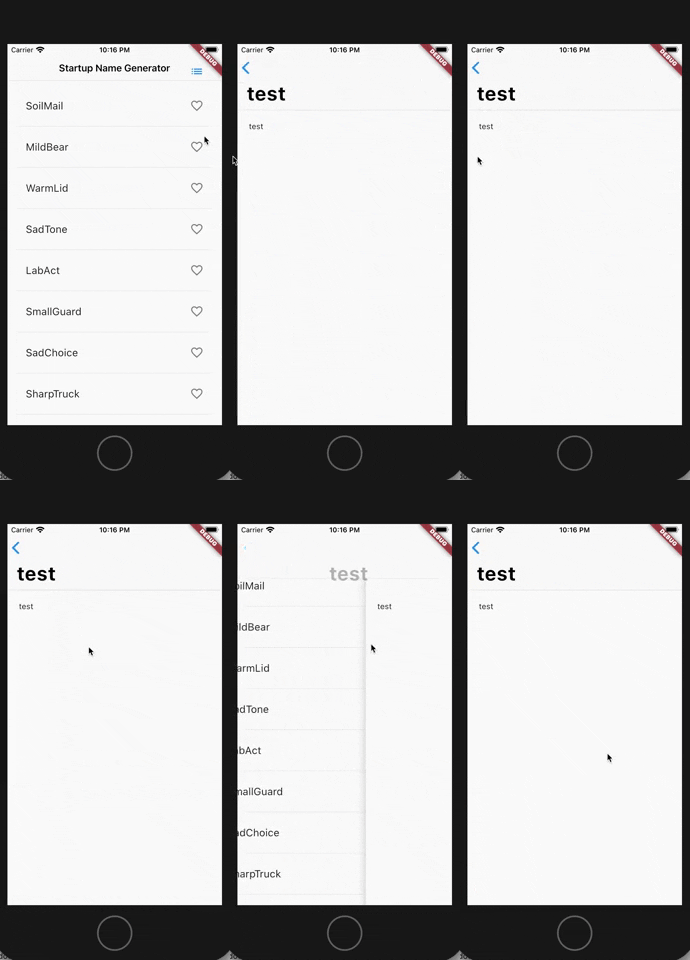
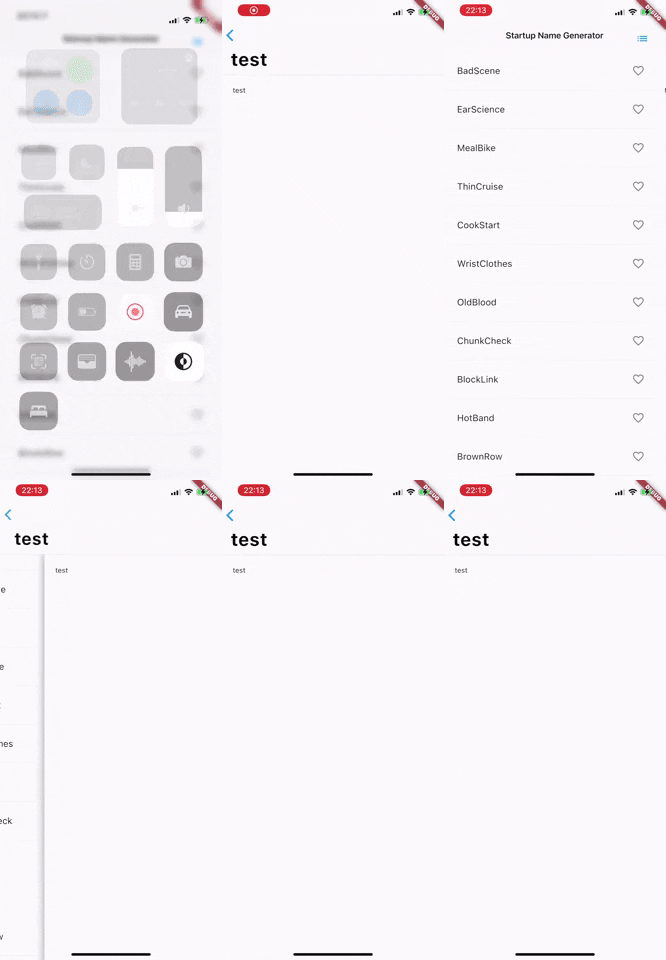
Updated Flutter and problem persists in device (iPhone 11 Pro Max) but does not happen in simulator (iPhone SE 2nd generation). Here are some gifs.
iPhoneSE
iPhone 11 Pro Max
darshankawar commentedon Oct 6, 2020
@hazzo Can you point to the code sample to use to replicate this issue ? or else please provide a minimal code sample.
thanks.
hazzo commentedon Oct 6, 2020
@darshankawar sure, the code sample is in the first post in the collapsing element with title "Code sample", but here is it again.
darshankawar commentedon Oct 6, 2020
@hazzo Thanks for the code sample.
I tried on iPhone SE and iPhone 11 Pro max simulators but didn't see the issue. I am on latest stable.
67269.mov.zip
flutter doctor -v
hazzo commentedon Oct 6, 2020
Hmmm the issue occurs for me in a real device with iOS14, which is an iPhone 11 Pro max.
darshankawar commentedon Oct 7, 2020
@hazzo although I don't have iPhone 11 pro max, I tried the code sample on iPhone 6s with iOS 14 and saw no issues.
So not sure if it's device specific.
RPReplay-Final1602051232.mov.zip
flutter doctor -v
22 remaining items
Update nav_bar.dart and solved large title problem
Updated nav_bar.dart / solved large title problem
Update nav_bar.dart
hazzo commentedon Sep 9, 2023
Almost three years later stumbled with the same problem. Searched on google for possible bug and the second result it's my open issue 🥲 without apparent resolution. Rolling back again to material app bar. It's a pitty.
victorsanni commentedon May 2, 2025
Closing as duplicate of #90589. This is a text scaling issue with the nav bars. Please feel free to reopen otherwise.
github-actions commentedon May 19, 2025
This thread has been automatically locked since there has not been any recent activity after it was closed. If you are still experiencing a similar issue, please open a new bug, including the output of
flutter doctor -vand a minimal reproduction of the issue.