Repository navigation
Add CupertinoFormRow #69916

Description

Related: #26745
We would like to provide a more native look for forms in Cupertino.
So far, forms in Material are unlike the traditional look in iOS. As an example, TextFormField in Material displays a red helper text underneath the TextField when an error appears after validation. This experience is very rare in iOS, therefore supporting something like CupertinoTextFormField, where one has a similar validation experience to that of TextFormField but with an iOS theme, is not the best decision going forward.
About CupertinoTextFormField
- Validation is different in iOS. Oftentimes, an error in a field is reported using an alert view (cupertino dialog) which covers the center of the screen. In standard iOS forms, the dialog simply draws the user's attention to red-outlined inputs that need fixing. This is different to that of material, where submitting an invalid form input results in a helper text appearing beneath the widget, in red.

- Furthermore, supporting the helper text style for Cupertino widgets (like
CupertinoTextField,) isn't as straight-forward as the implementation in the Material counter-parts (likeTextFormField.) This is becauseTextField's decorator type is anInputDecorator, as opposed toCupertinoTextField's decorator type which is aBoxDecorator. This means that in order to support a helper text, we would have to wrap theCupertinoTextFieldanyway. So we might as well do it the right (iOS) way.
The iOS Way
In iOS, standard forms take the following look:

CupertinoFormRow
If we want to support forms for Cupertino widgets, I believe we should provide the aesthetic that's shown above. This would mean creating a CupertinoFormRow that has a label to its left and a child widget to its right.
Upon submission of the form, there should be the option to display a dialog encompassing all relevant errors. The most common user experience is something to the order of "Please fix the errors indicated in the form" but of course, that message should be determined by the developer. More importantly, the label within the CupertinoFormRow would turn red upon an invalid input submission.
CupertinoFormRow lets developers create their rows with the Cupertino look, while also giving them the freedom over the child widget displayed. This provides an experience consistent with iOS, while also avoiding the need to implement FormField support for each existing Cupertino widget.
Outstanding Tasks
- Create
CupertinoFormRow -
- Support left helper text
-
- Support right child widget
-
- Support validation and red color behavior
- Support
onValidateproperty forFormto have an input validation behavior on submission -
- Provide a default
onValidatestatic function defined withinCupertinoFormRowto pass toForm.onValidate
- Provide a default
- Create
CupertinoFormSection
cc: @xster
Activity
xster commentedon Nov 5, 2020
We've also explicitly decided to make this separately from the #19228 since the iOS API for forms are less rigid about the content layout than table views and forms have 1 single primary "data entry" widgets per row.
2 minor observations we should account for:
Such as in
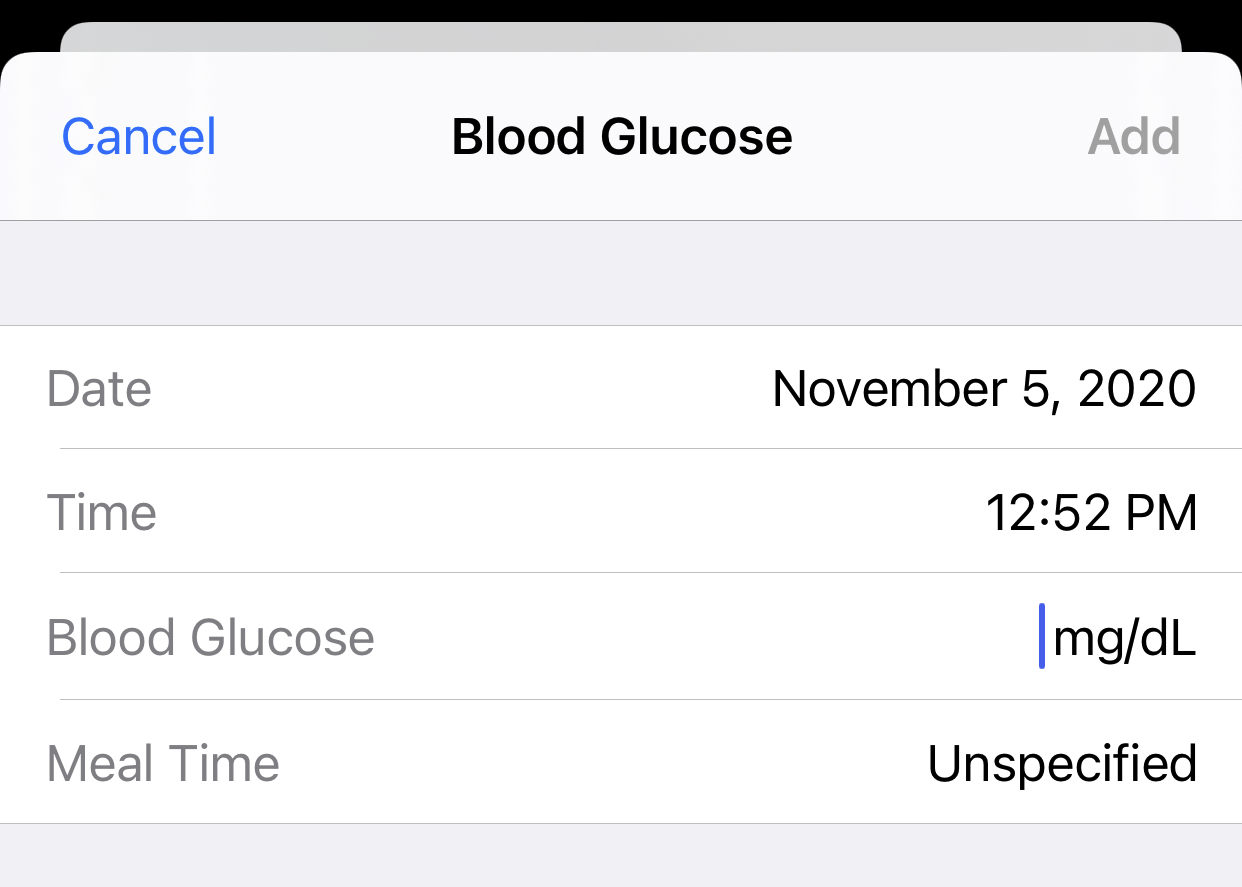
We should also look into who should draw the dividers, which may not be trivial. Drawing dividers in the CupertinoFormRows make them easier to use without CupertinoFormSections but rows won't know if they're the first or the last entry (dividers in the middle don't go edge-to-edge). Drawing dividers in CupertinoFormSection is easier to get the look correct, but it makes CupertinoFormRows less convenient to use on their own. I'm leaning towards the latter currently to prefer structuring the code to make the UI as correct as possible.
DanielEdrisian commentedon Nov 5, 2020
This is similar to how SwiftUI does it, so I am also in favor of CupertinoFormSections. I think it would be able to fix the divider issue pretty well. Adding it to the tasks.
Daniel-BD commentedon Nov 6, 2020
You asked for feedback in #26745, so I'd just like to say that this looks like a great approach! I would be much more happy with this rather than just wrapping CupertinoTextField to support helper text. :)
github-actions commentedon Aug 9, 2021
This thread has been automatically locked since there has not been any recent activity after it was closed. If you are still experiencing a similar issue, please open a new bug, including the output of
flutter doctor -vand a minimal reproduction of the issue.