Skip to content

[SchedulerBinding] SchedulerBinding.instance.scheduleTask is jammed when Priority is idle #73766

Closed

Description

@SixSheeppp

I found SchedulerBinding.instance.scheduleTask can be stucked in a specific scene.

Here is my example code

const tag = "ScheduleTest";

class ScheduleTestPage1 extends StatelessWidget {
  @override
  Widget build(BuildContext context) {
    return Scaffold(
      body: Column(
        mainAxisAlignment: MainAxisAlignment.center,
        children: [
          Center(
            child: Container(
              width: 50,
              height: 50,
              child: CircularProgressIndicator(),
            ),
          ),
          FlatButton(
              onPressed: () {
                Navigator.of(context).push(MaterialPageRoute(builder: (context) {
                  return ScheduleTestPage2();
                })).then((value) {
                  SchedulerBinding.instance.scheduleTask(() {
                    print("$tag>>>>>>scheduleTask1");
                  }, Priority.touch);

                  Future.delayed(Duration(seconds: 1), () {
                    SchedulerBinding.instance.scheduleTask(() {
                      print("$tag>>>>>>scheduleTask2");
                    }, Priority.touch);
                  });
                });
              },
              child: Text("click me "))
        ],
      ),
    );
  }
}

class ScheduleTestPage2 extends StatefulWidget {
  @override
  State<StatefulWidget> createState() {
    return _ScheduleTest2State();
  }
}

class _ScheduleTest2State extends State<ScheduleTestPage2> {
  @override
  Widget build(BuildContext context) {
    return Scaffold(
      body: Center(
        child: Container(
          width: 100,
          height: 50,
          child: FlatButton(
            onPressed: () {
              Navigator.of(context).pop();
            },
            child: Text("Back"),
          ),
        ),
      ),
    );
  }

  @override
  void dispose() {
    super.dispose();
    SchedulerBinding.instance.scheduleTask(() {
      print("$tag>>>>>> call ScheduleTestPage2 dispose");
      // do something such as Exception .    throw Exception("Exception Test");
    }, Priority.idle);
  }
}

The console just print 1 log.
image

After debug the SchedulerBinding, I found the task was not been executed because of these code.

bool defaultSchedulingStrategy({ required int priority, required SchedulerBinding scheduler }) {
if (scheduler.transientCallbackCount > 0)
return priority >= Priority.animation.value;
return true;
}

The transientCallbackCount will be increased by Ticker in SingleTickerProviderStateMixin.didChangeDependencies

set muted(bool value) {
if (value == muted)
return;
_muted = value;
if (value) {
unscheduleTick();
} else if (shouldScheduleTick) {
scheduleTick();
}
}

I draw a timeline might explain the issue.
image

Because of _taskQueue.isEmpty is not true, so the remain task will not have chance to be executed :(

Activity

  1. pedromassangocode commented on Jan 12, 2021

    @pedromassangocode

    Hi @SixSheeppp
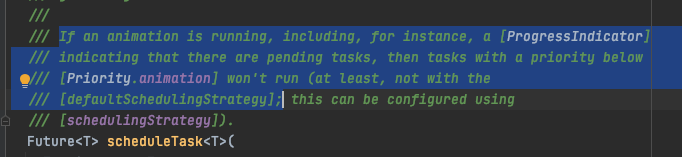
    As the docs says:
    Screen Shot 2021-01-12 at 09 40 28

    In your code you have a CircularProgressIndicator which is a ProgressIndicator but one of your tasks has a priority bellow animation which means it will only run once the ProgressIndicator is done and that is preventing all your tasks to run.

    You have to choices: override schedulingStrategy or change your task with Priority.idle to some priority higher or equals to Priority.animation.

    I do think the issue is still valid since even the first task with a priority higher than animation is not running.

    flutter doctor -v
    [✓] Flutter (Channel master, 1.26.0-2.0.pre.295, on Mac OS X 10.15.7 19H2 darwin-x64, locale en)
        • Flutter version 1.26.0-2.0.pre.295 at /Users/pedromassango/dev/SDKs/flutter_master
        • Framework revision c19fdad097 (4 hours ago), 2021-01-11 22:19:02 -0500
        • Engine revision 0ed964d6b7
        • Dart version 2.12.0 (build 2.12.0-212.0.dev)
    
    [✓] Android toolchain - develop for Android devices (Android SDK version 30.0.2)
        • Android SDK at /Users/pedromassango/Library/Android/sdk
        • Platform android-30, build-tools 30.0.2
        • Java binary at: /Applications/Android Studio.app/Contents/jre/jdk/Contents/Home/bin/java
        • Java version OpenJDK Runtime Environment (build 1.8.0_242-release-1644-b3-6915495)
        • All Android licenses accepted.
    
    [!] Xcode - develop for iOS and macOS (Xcode 12.1)
        • Xcode at /Applications/Xcode.app/Contents/Developer
        • Xcode 12.1, Build version 12A7403
        ! CocoaPods 1.9.3 out of date (1.10.0 is recommended).
            CocoaPods is used to retrieve the iOS and macOS platform side's plugin code that responds to your plugin usage on the Dart side.
            Without CocoaPods, plugins will not work on iOS or macOS.
            For more info, see https://flutter.dev/platform-plugins
          To upgrade see https://guides.cocoapods.org/using/getting-started.html#installation for instructions.
    
    [✓] Chrome - develop for the web
        • Chrome at /Applications/Google Chrome.app/Contents/MacOS/Google Chrome
    
    [✓] Android Studio (version 4.1)
        • Android Studio at /Applications/Android Studio.app/Contents
        • Flutter plugin can be installed from:
          🔨 https://plugins.jetbrains.com/plugin/9212-flutter
        • Dart plugin can be installed from:
          🔨 https://plugins.jetbrains.com/plugin/6351-dart
        • Java version OpenJDK Runtime Environment (build 1.8.0_242-release-1644-b3-6915495)
    
    [✓] IntelliJ IDEA Community Edition (version 2020.3.1)
        • IntelliJ at /Applications/IntelliJ IDEA CE.app
        • Flutter plugin version 52.1.5
        • Dart plugin version 203.6912
    
    [✓] VS Code (version 1.52.1)
        • VS Code at /Applications/Visual Studio Code.app/Contents
        • Flutter extension version 3.18.1
    
    [✓] Connected device (3 available)
        • sdk gphone x86 64 (mobile) • emulator-5554 • android-x64    • Android 11 (API 30) (emulator)
        • macOS (desktop)            • macos         • darwin-x64     • Mac OS X 10.15.7 19H2 darwin-x64
        • Chrome (web)               • chrome        • web-javascript • Google Chrome 87.0.4280.141
    
    ! Doctor found issues in 1 category.
    Process finished with exit code 0
  2. added
    frameworkflutter/packages/flutter repository. See also f: labels.
    has reproducible stepsThe issue has been confirmed reproducible and is ready to work on
    on Jan 12, 2021
  3. SixSheeppp commented on Jan 12, 2021

    @SixSheeppp
    Author

    Hi @SixSheeppp
    As the docs says:
    Screen Shot 2021-01-12 at 09 40 28

    In your code you have a CircularProgressIndicator which is a ProgressIndicator but one of your tasks has a priority bellow animation which means it will only run once the ProgressIndicator is done and that is preventing all your tasks to run.

    You have to choices: override schedulingStrategy or change your task with Priority.idle to some priority higher or equals to Priority.animation.

    I do think the issue is still valid since even the first task with a priority higher than animation is not running.

    flutter doctor -v

    My current soluation is to change the Task prioiry to animation .

  4. noinskit commented on Feb 23, 2022

    @noinskit

    I'm hitting a similar issue - once I schedule a task with Priority.idle in my app, no tasks (even with Priority.animation or Priority.touch) get executed. The schedulingStrategy callback is not even called for them from then on.

    Is it the same as this issue?
    If the SchedulingBinding scheduler can easily get stuck forever, shouldn't this get a higher priority?

  5. added
    P2Important issues not at the top of the work list
    on Jun 16, 2022
  6. danagbemava-nc commented on Mar 21, 2024

    @danagbemava-nc
    Member

    I see only one output of the ScheduleTest>>>>>>scheduleTask1 on the latest versions of stable & master.

    Updating labels.

    Launching lib/main.dart on Pixel 7 in debug mode...
    ✓  Built build/app/outputs/flutter-apk/app-debug.apk.
    Connecting to VM Service at ws://127.0.0.1:57386/S05WLUFn-Uc=/ws
    D/VRI[MainActivity](31623): Draw frame after cancel
    W/WindowOnBackDispatcher(31623): OnBackInvokedCallback is not enabled for the application.
    W/WindowOnBackDispatcher(31623): Set 'android:enableOnBackInvokedCallback="true"' in the application manifest.
    I/flutter (31623): ScheduleTest>>>>>>scheduleTask1
    W/WindowOnBackDispatcher(31623): OnBackInvokedCallback is not enabled for the application.
    W/WindowOnBackDispatcher(31623): Set 'android:enableOnBackInvokedCallback="true"' in the application manifest.
    W/WindowOnBackDispatcher(31623): OnBackInvokedCallback is not enabled for the application.
    W/WindowOnBackDispatcher(31623): Set 'android:enableOnBackInvokedCallback="true"' in the application manifest.
    
    updated sample
    import 'package:flutter/material.dart';
    import 'package:flutter/scheduler.dart';
    
    void main() {
      runApp(MyApp());
    }
    
    class MyApp extends StatelessWidget {
      // This widget is the root of your application.
      @override
      Widget build(BuildContext context) {
        return MaterialApp(
          title: 'Flutter Demo',
          theme: ThemeData(primarySwatch: Colors.blue),
          //home: MyHomePage(title: 'Flutter Demo Home Page'),
          home: ScheduleTestPage1(),
        );
      }
    }
    
    const tag = "ScheduleTest";
    
    class ScheduleTestPage1 extends StatelessWidget {
      @override
      Widget build(BuildContext context) {
        return Scaffold(
          body: Column(
            mainAxisAlignment: MainAxisAlignment.center,
            children: [
              const Center(
                child: SizedBox(
                  width: 50,
                  height: 50,
                  child: CircularProgressIndicator(),
                ),
              ),
              TextButton(
                onPressed: () {
                  Navigator.of(context).push(MaterialPageRoute(builder: (context) {
                    return ScheduleTestPage2();
                  })).then((value) {
                    SchedulerBinding.instance.scheduleTask(() {
                      print("$tag>>>>>>scheduleTask1");
                    }, Priority.touch);
    
                    Future.delayed(const Duration(seconds: 1), () {
                      SchedulerBinding.instance.scheduleTask(() {
                        print("$tag>>>>>>scheduleTask2");
                      }, Priority.touch);
                    });
                  });
                },
                child: const Text("click me "),
              )
            ],
          ),
        );
      }
    }
    
    class ScheduleTestPage2 extends StatefulWidget {
      @override
      State<StatefulWidget> createState() {
        return _ScheduleTest2State();
      }
    }
    
    class _ScheduleTest2State extends State<ScheduleTestPage2> {
      @override
      Widget build(BuildContext context) {
        return Scaffold(
          body: Center(
            child: SizedBox(
              width: 100,
              height: 50,
              child: TextButton(
                onPressed: () {
                  Navigator.of(context).pop();
                },
                child: const Text("Back"),
              ),
            ),
          ),
        );
      }
    
      @override
      void dispose() {
        super.dispose();
        SchedulerBinding.instance.scheduleTask(() {
          print("$tag>>>>>> call ScheduleTestPage2 dispose");
          // do something such as Exception .    throw Exception("Exception Test");
        }, Priority.idle);
      }
    }
    flutter doctor -v
    [!] Flutter (Channel stable, 3.19.3, on macOS 14.3.1 23D60 darwin-arm64, locale en-GB)
        • Flutter version 3.19.3 on channel stable at /Users/nexus/dev/sdks/flutter
        ! Warning: `flutter` on your path resolves to /Users/nexus/dev/sdks/flutters/bin/flutter, which is not inside your current Flutter SDK checkout at /Users/nexus/dev/sdks/flutter. Consider adding /Users/nexus/dev/sdks/flutter/bin to the front of your path.
        ! Warning: `dart` on your path resolves to /Users/nexus/dev/sdks/flutters/bin/dart, which is not inside your current Flutter SDK checkout at /Users/nexus/dev/sdks/flutter. Consider adding /Users/nexus/dev/sdks/flutter/bin to the front of your path.
        • Upstream repository https://github.com/flutter/flutter.git
        • Framework revision ba39319843 (2 weeks ago), 2024-03-07 15:22:21 -0600
        • Engine revision 2e4ba9c6fb
        • Dart version 3.3.1
        • DevTools version 2.31.1
        • If those were intentional, you can disregard the above warnings; however it is recommended to use "git" directly to perform update checks and upgrades.
    
    [✓] Android toolchain - develop for Android devices (Android SDK version 34.0.0)
        • Android SDK at /Users/nexus/Library/Android/sdk
        • Platform android-34, build-tools 34.0.0
        • Java binary at: /Users/nexus/Applications/Android Studio.app/Contents/jbr/Contents/Home/bin/java
        • Java version OpenJDK Runtime Environment (build 17.0.7+0-17.0.7b1000.6-10550314)
        • All Android licenses accepted.
    
    [✓] Xcode - develop for iOS and macOS (Xcode 15.2)
        • Xcode at /Applications/Xcode-15.2.0.app/Contents/Developer
        • Build 15C500b
        • CocoaPods version 1.14.3
    
    [✓] Chrome - develop for the web
        • Chrome at /Applications/Google Chrome.app/Contents/MacOS/Google Chrome
    
    [✓] Android Studio (version 2023.1)
        • Android Studio at /Users/nexus/Applications/Android Studio.app/Contents
        • Flutter plugin can be installed from:
          🔨 https://plugins.jetbrains.com/plugin/9212-flutter
        • Dart plugin can be installed from:
          🔨 https://plugins.jetbrains.com/plugin/6351-dart
        • Java version OpenJDK Runtime Environment (build 17.0.7+0-17.0.7b1000.6-10550314)
    
    [✓] IntelliJ IDEA Ultimate Edition (version 2023.2.5)
        • IntelliJ at /Users/nexus/Applications/IntelliJ IDEA Ultimate.app
        • Flutter plugin version 77.2.2
        • Dart plugin version 232.10286
    
    [✓] VS Code (version 1.87.2)
        • VS Code at /Applications/Visual Studio Code.app/Contents
        • Flutter extension version 3.84.0
    
    [✓] Connected device (3 available)
        • Pixel 7 (mobile) • 28291FDH2001SA • android-arm64  • Android 14 (API 34)
        • macOS (desktop)  • macos          • darwin-arm64   • macOS 14.3.1 23D60 darwin-arm64
        • Chrome (web)     • chrome         • web-javascript • Google Chrome 123.0.6312.58
        ! Error: Browsing on the local area network for Dean’s iPad. Ensure the device is unlocked and attached with a cable or associated with the same local area network as this Mac.
          The device must be opted into Developer Mode to connect wirelessly. (code -27)
    
    [✓] Network resources
        • All expected network resources are available.
    
    ! Doctor found issues in 1 category.
    
    [✓] Flutter (Channel master, 3.21.0-11.0.pre.64, on macOS 14.3.1 23D60 darwin-arm64, locale en-GB)
        • Flutter version 3.21.0-11.0.pre.64 on channel master at /Users/nexus/dev/sdks/flutters
        • Upstream repository https://github.com/flutter/flutter.git
        • Framework revision 0e268b5024 (7 hours ago), 2024-03-21 00:34:15 -0400
        • Engine revision a73e01364d
        • Dart version 3.4.0 (build 3.4.0-253.0.dev)
        • DevTools version 2.34.0-dev.5
    
    [✓] Android toolchain - develop for Android devices (Android SDK version 34.0.0)
        • Android SDK at /Users/nexus/Library/Android/sdk
        • Platform android-34, build-tools 34.0.0
        • Java binary at: /Users/nexus/Applications/Android Studio.app/Contents/jbr/Contents/Home/bin/java
        • Java version OpenJDK Runtime Environment (build 17.0.7+0-17.0.7b1000.6-10550314)
        • All Android licenses accepted.
    
    [✓] Xcode - develop for iOS and macOS (Xcode 15.2)
        • Xcode at /Applications/Xcode-15.2.0.app/Contents/Developer
        • Build 15C500b
        • CocoaPods version 1.14.3
    
    [✓] Chrome - develop for the web
        • Chrome at /Applications/Google Chrome.app/Contents/MacOS/Google Chrome
    
    [✓] Android Studio (version 2023.1)
        • Android Studio at /Users/nexus/Applications/Android Studio.app/Contents
        • Flutter plugin can be installed from:
          🔨 https://plugins.jetbrains.com/plugin/9212-flutter
        • Dart plugin can be installed from:
          🔨 https://plugins.jetbrains.com/plugin/6351-dart
        • Java version OpenJDK Runtime Environment (build 17.0.7+0-17.0.7b1000.6-10550314)
    
    [✓] IntelliJ IDEA Ultimate Edition (version 2023.2.5)
        • IntelliJ at /Users/nexus/Applications/IntelliJ IDEA Ultimate.app
        • Flutter plugin version 77.2.2
        • Dart plugin version 232.10286
    
    [✓] VS Code (version 1.87.2)
        • VS Code at /Applications/Visual Studio Code.app/Contents
        • Flutter extension version 3.84.0
    
    [✓] Connected device (4 available)
        • Pixel 7 (mobile)                • 28291FDH2001SA        • android-arm64  • Android 14 (API 34)
        • macOS (desktop)                 • macos                 • darwin-arm64   • macOS 14.3.1 23D60 darwin-arm64
        • Mac Designed for iPad (desktop) • mac-designed-for-ipad • darwin         • macOS 14.3.1 23D60 darwin-arm64
        • Chrome (web)                    • chrome                • web-javascript • Google Chrome 123.0.6312.58
        ! Error: Browsing on the local area network for Dean’s iPad. Ensure the device is unlocked and attached with a cable or associated with the same local area network as this Mac.
          The device must be opted into Developer Mode to connect wirelessly. (code -27)
    
    [✓] Network resources
        • All expected network resources are available.
    
    • No issues found!
    
  7. added
    P1High-priority issues at the top of the work list
    and removed
    P2Important issues not at the top of the work list
    on Jul 2, 2024
  8. jiahaog commented on Jul 2, 2024

    @jiahaog
    Member

    This is affecting customer: money. See b/348139405 for more details.

  9. lauweijie commented on Jul 2, 2024

    @lauweijie
    Contributor

    I believe this is what is happening:

    scheduleTask() starts the event loop by calling _ensureEventLoopCallback() if the task queue is empty (i.e. isFirstTask). The assumption is that if there are existing tasks in the queue, the event loop should still be alive.

    _ensureEventLoopCallback() in turn calls _runTasks().

    void _runTasks() {
      _hasRequestedAnEventLoopCallback = false;
      if (handleEventLoopCallback()) {
        _ensureEventLoopCallback();
      } // runs next task when there's time
    }

    runTasks() calls handleEventLoopCallback() and if the return value is true, keeps the event loop alive by calling _ensureEventLoopCallback(). Hence handleEventLoopCallback() should only return false when there are no more events in the task queue, as the dartdoc suggests.

    I think the root cause lies with handleEventLoopCallback() returning false even though there are still tasks in the queue.

    The highest priority task is returned from the queue. It is passed into schedulingStrategy() to determine whether the task should run. The default strategy returns false if the priority is Priority.idle and transientCallbackCount > 0. When this happens, the function returns false and the event loop is stopped, even though the task queue is non-empty.

      /// Execute the highest-priority task, if it is of a high enough priority.
      ///
      /// Returns true if a task was executed and there are other tasks remaining
      /// (even if they are not high-enough priority).
      ///
      /// Returns false if no task was executed, which can occur if there are no
      /// tasks scheduled, if the scheduler is [locked], or if the highest-priority
      /// task is of too low a priority given the current [schedulingStrategy].
      ///
      /// Also returns false if there are no tasks remaining.
      @visibleForTesting
      @pragma('vm:notify-debugger-on-exception')
      bool handleEventLoopCallback() {
        if (_taskQueue.isEmpty || locked) {
          return false;
        }
        final _TaskEntry<dynamic> entry = _taskQueue.first;
        if (schedulingStrategy(priority: entry.priority, scheduler: this)) {
          try {
            _taskQueue.removeFirst();
            entry.run();
          } catch (exception, exceptionStack) {
            // <removed for brevity>
          }
          return _taskQueue.isNotEmpty;
        }
        return false;  // <-- this should return true, since there are indeed still tasks in the queue
      }

    When a new task is later scheduled, even if it now has a high priority, _ensureEventLoopCallback is not called because the task queue is non-empty.

    Henceforth, the event loop is never triggered for the rest of the app lifecycle, which causes subsequent scheduled tasks to no longer be run.

    If the analysis above is correct, this issue could be fixed by changing return false; to return true; here.

  10. lauweijie commented on Jul 2, 2024

    @lauweijie
    Contributor

    Duplicate issue: #82016.

    There were some attempts there for a PR (#116422) but was abandoned.

  11. jiahaog commented on Jul 2, 2024

    @jiahaog
    Member

    cc @goderbauer who might be able to help here.

  12. jiahaog commented on Jul 2, 2024

    @jiahaog
    Member

    @lauweijie please let us know if the priority here is right as well. If we have a workaround, we can reduce the priority.

  13. added
    r: fixedIssue is closed as already fixed in a newer version
    on Jul 3, 2024
  14. github-actions commented on Jul 17, 2024

    @github-actions

    This thread has been automatically locked since there has not been any recent activity after it was closed. If you are still experiencing a similar issue, please open a new bug, including the output of flutter doctor -v and a minimal reproduction of the issue.

  15. locked as resolved and limited conversation to collaborators on Jul 17, 2024
Sign up for free to join this conversation on GitHub. Already have an account? Sign in to comment

Metadata

Metadata

Assignees

No one assigned

    Labels

    P1High-priority issues at the top of the work lista: animationAnimation APIscustomer: money (g3)found in release: 3.19Found to occur in 3.19found in release: 3.21Found to occur in 3.21frameworkflutter/packages/flutter repository. See also f: labels.has reproducible stepsThe issue has been confirmed reproducible and is ready to work onr: fixedIssue is closed as already fixed in a newer versionteam-frameworkOwned by Framework teamtriaged-frameworkTriaged by Framework team

    Type

    No type

    Projects

    No projects

      Milestone

      No milestone

      Relationships

      None yet

      Development

      No branches or pull requests

      Issue actions