Skip to content

[Web][Channel beta] Unable to paint new Scrollbar #75643

Closed

Description

@franarolas

I really can't find a way to change the default color of the new Scrollbar, I can change the Thumb color using the RawScrollbar class but not the trackColor and the trackBorderColor.
I tried with the ScrollbarThemeData and the ScrollbarPainter but the Scrollbar class just ignores them.

Related to #70866

Steps to Reproduce

Clone the sample code: Example
You can switch the body of the scaffold between Test1(ScrollbarThemeData) and Test2(ScrollbarPainter).

Expected results: Thumb, Track and Track border should be painted.

Actual results: They ignore the data colors.

Logs
[√] Flutter (Channel beta, 1.26.0-17.3.pre, on Microsoft Windows [Versión 10.0.19042.630], locale es-ES)
    • Flutter version 1.26.0-17.3.pre at C:\flutter
    • Framework revision 4b50ca7f7f (4 days ago), 2021-02-04 19:44:27 -0800
    • Engine revision 2c527d6c7e
    • Dart version 2.12.0 (build 2.12.0-259.8.beta)

[√] Android toolchain - develop for Android devices (Android SDK version 29.0.3)
    • Android SDK at C:\Users\F-Desktop\AppData\Local\Android\sdk
    • Platform android-29, build-tools 29.0.3
    • Java binary at: C:\Program Files\Android\Android Studio\jre\bin\java
    • Java version OpenJDK Runtime Environment (build 1.8.0_212-release-1586-b04)
    • All Android licenses accepted.

[√] Chrome - develop for the web
    • Chrome at C:\Program Files (x86)\Google\Chrome\Application\chrome.exe

[√] Android Studio (version 3.6)
    • Android Studio at C:\Program Files\Android\Android Studio
    • Flutter plugin version 44.0.2
    • Dart plugin version 192.7761
    • Java version OpenJDK Runtime Environment (build 1.8.0_212-release-1586-b04)

[√] IntelliJ IDEA Ultimate Edition (version 2020.3)
    • IntelliJ at C:\Program Files\JetBrains\IntelliJ IDEA 2019.3.3
    • Flutter plugin version 53.0.5
    • Dart plugin version 203.6912

[√] VS Code, 64-bit edition (version 1.50.1)
    • VS Code at C:\Program Files\Microsoft VS Code
    • Flutter extension version 3.16.0

[√] Connected device (2 available)
    • Chrome (web) • chrome • web-javascript • Google Chrome 88.0.4324.146
    • Edge (web)   • edge   • web-javascript • Microsoft Edge 87.0.664.75

• No issues found!

Activity

  1. Piinks commented on Feb 8, 2021

    @Piinks
    Contributor

    Copied reproduction code over from link for reference:

    import 'package:flutter/material.dart';
    
    void main() {
      runApp(MyApp());
    }
    
    class MyApp extends StatelessWidget {
      @override
      Widget build(BuildContext context) {
        return MaterialApp(
          debugShowCheckedModeBanner: false,
          title: 'Scrollbar tests',
          theme: ThemeData(
            primarySwatch: Colors.blue,
          ),
          home: Scaffold(
            body: Test1(),
          ),
        );
      }
    }
    
    class Test1 extends StatelessWidget {
      @override
      Widget build(BuildContext context) {
        return ScrollbarTheme(
          data: ScrollbarThemeData(
            thumbColor: MaterialStateColor.resolveWith((states) => Colors.red),
            trackBorderColor: MaterialStateColor.resolveWith((states) => Colors.green),
            trackColor: MaterialStateColor.resolveWith((states) => Colors.blue),
          ),
          child: Scrollbar(
            isAlwaysShown: true,
            showTrackOnHover: true,
            thickness: 12,
            radius: Radius.circular(8),
            child: ListView.builder(
                itemCount: 50,
                itemBuilder: (context, index) {
                  return ListTile(
                    title: Text(' - ${index+1} - '),
                    subtitle: Text('Scrollbar tests'),
                    tileColor: index % 2 == 0 ? Colors.white70: Colors.white10,
                  );
                }),
          ),
        );
      }
    }
    
    class Test2 extends StatelessWidget {
      @override
      Widget build(BuildContext context) {
        return CustomPaint(
          painter: ScrollbarPainter(
            color: Colors.red,
            trackBorderColor: Colors.green,
            trackColor: Colors.blue,
            fadeoutOpacityAnimation: const AlwaysStoppedAnimation<double>(1.0),
          ),
          child: Scrollbar(
            isAlwaysShown: true,
            showTrackOnHover: true,
            radius: Radius.circular(8),
            thickness: 12,
            child: ListView.builder(
                itemCount: 50,
                itemBuilder: (context, index) {
                  return ListTile(
                    title: Text(' - ${index+1} - '),
                    subtitle: Text('Scrollbar tests'),
                    tileColor: index % 2 == 0 ? Colors.white70: Colors.white10,
                  );
                }),
          ),
        );
      }
    }

    Hi @franarolas I can see what is going on here...

    Regarding Test1, the ScrollbarTheme cannot be within the same context of the Scrollbar. When the Scrollbar calls Theme.of(context) to inform the coloring, it does not find the one you intend it to find because it is built in the same context. This is similar to trying to call Scaffold.of(context) within the same context that the Scaffold is being built, it will not get the right one.

    You can fix this by adding a Builder in between to get a new context, like this:

    ...
    Widget build(BuildContext context) {
        return Theme(
          data: ThemeData(
            scrollbarTheme: ScrollbarThemeData(
              thumbColor: MaterialStateColor.resolveWith((states) => Colors.red),
              trackBorderColor: MaterialStateColor.resolveWith((states) => Colors.green),
              trackColor: MaterialStateColor.resolveWith((states) => Colors.blue),
            ),
          ),
          child: Builder(
            builder: (context) => Scrollbar(...

    Or, you can just provide the ScrollbarThemeData to the ThemeData you are already creating above in your MaterialApp:

    MaterialApp...
      theme: ThemeData(
        primarySwatch: Colors.blue,
        scrollbarTheme: ScrollbarThemeData(
          thumbColor: MaterialStateColor.resolveWith((states) => Colors.red),
          trackBorderColor: MaterialStateColor.resolveWith((states) => Colors.green),
          trackColor: MaterialStateColor.resolveWith((states) => Colors.blue),
        ),
      ),

    As for Test2, I do not expect this to work. The Scrollbar creates and uses its own painter, so wrapping a Scrollbar in a ScrollbarPainter won't affect the Scrollbar.

  2. added
    d: stackoverflowGood question for Stack Overflow
    f: scrollingViewports, list views, slivers, etc.
    frameworkflutter/packages/flutter repository. See also f: labels.
    waiting for responseThe Flutter team cannot make further progress on this issue until the original reporter responds
    on Feb 8, 2021
  3. franarolas commented on Feb 8, 2021

    @franarolas
    Author

    @Piinks

    Regarding Test1, the ScrollbarTheme cannot be within the same context of the Scrollbar. When the Scrollbar calls Theme.of(context) to inform the coloring, it does not find the one you intend it to find because it is built in the same context. This is similar to trying to call Scaffold.of(context) within the same context that the Scaffold is being built, it will not get the right one.

    Oh, I see my mistake there, I haven't had this in mind, I'm sorry you are completely right, thank you, putting the scrollbartheme in the material theme works as expected.

    As for Test2, I do not expect this to work. The Scrollbar creates and uses its own painter, so wrapping a Scrollbar in a ScrollbarPainter won't affect the Scrollbar.

    If this is the expected behaviour, I will just close the issue.

    Thank you again.

  4. removed
    waiting for responseThe Flutter team cannot make further progress on this issue until the original reporter responds
    on Feb 8, 2021
  5. sedagurocak commented on Jun 16, 2021

    @sedagurocak

    I have this problem on app. The track color is not change when I use ScrollBartheme. How can I change track color on mobile app.

    data: ScrollbarThemeData(
    thumbColor: MaterialStateColor.resolveWith((states) => Colors.red),
    trackBorderColor: MaterialStateColor.resolveWith((states) => Colors.green),
    trackColor: MaterialStateColor.resolveWith((states) => Colors.blue),
    ),

    I need to do this;
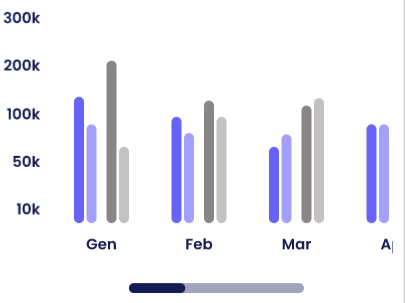
    image

  6. github-actions commented on Jul 31, 2021

    @github-actions

    This thread has been automatically locked since there has not been any recent activity after it was closed. If you are still experiencing a similar issue, please open a new bug, including the output of flutter doctor -v and a minimal reproduction of the issue.

  7. locked as resolved and limited conversation to collaborators on Jul 31, 2021
Sign up for free to join this conversation on GitHub. Already have an account? Sign in to comment

Metadata

Metadata

Assignees

No one assigned

    Labels

    d: stackoverflowGood question for Stack Overflowf: scrollingViewports, list views, slivers, etc.frameworkflutter/packages/flutter repository. See also f: labels.

    Type

    No type

    Projects

    No projects

      Milestone

      No milestone

      Relationships

      None yet

      Development

      No branches or pull requests

      Issue actions