Repository navigation
Opt a subtree out of hitTestSelf culling #75747
Description
Activity
A solution for this would also help with the often raised complained that you can't hit-test children drawn in the visual overflow of a stack (see discussion at #19445).
Reacted by Giraldi Maggio, Steve Alexander, Benno Van Waeyenberg, Henry, Ryan G, Nick Fisher and Tobias Marschallit would be nice if a subtree could opt-in to not doing that culling. Obviously that would in general be expensive but it would be less expensive than doing a full tree walk (unless someone opted out the entire tree, obviously).
I believe choosing the root of the subtree that you want to opt out will not not be easy. The root will not be the transform widget that moves a child out of its bounds. It has to be an ancestor, who has the transformed descendant still in its bounds. Otherwise, the hit test would never reach the transform widget or the transformed child. I am wondering, if in practice that would encourage people to basically opt-out the entire tree...
Would be interesting to study a use case, that we would enable (or make significantly simpler over e.g. re-organizing the widget tree) by having this mechanism. Do we have one?
I can certainly provide a number of use cases, just slammed right now. I'll circle back in a cpl weeks when things calm down a bit.
Generally speaking, it's any time you want to de-couple things, and have some child with children of it's own, that want to hang off the side of that parent. Think a classic web-menu with pop-out panels that overhang outside a column/row, or an expanding search bar that starts in a column, but then expands downward, or even a panel with a scrollbar, where the scrollbar sits in negative padding. All of these things want to start inside the box-layout of Flutter (column/row/positioned) but then easily expand outside it.
If you can't just offset a child outside yourself, the alternative, usually involves creating an over-sized stack and passing around a bunch of padding and size values between widgets. In practice, this is not too bad if you plan from the start for it, but it's really limiting when requirements change, and you have some large complex widget tree, that is not going to bend itself easily to changing form.
As a simple example, lets say I have a system for sizing content in a stack, and it looks like this:
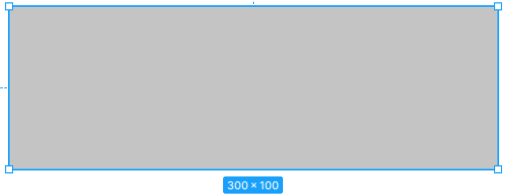
Immediately we run into this issue. The most maintainable and portable way to build it as an end user of Flutter is:
- Define the content box, in a Stack, at it's true height 300x100
- From within the box, decorate itself by offseting the drag handles slightly into negative space
- Moving the "300x100" into negative space, relative to our center (lets assume this thing needs to be clickable as well).
What we want to write is something really simple like this, where all the sizing info is self-contained within the Box widget:
Stack(
children: [
    MyBoxContent(),
    // Corners can sit in negative space, very easy to change size of these btns later.
   // All the sizing logic is here, relative to this box. No co-ordination with parent needed.
    Positoned(
      top: -btnSize/2,  left: -btnSize/2, right: -btnSize/2, bottom: -btnSize/2,
      child: SelectionHandles(btnSize)
    ),
    /// Bottom SizePanel
    Align(
        alignment: Alignment.bottomCenter,
        child: FractionalTranslation(
            offset: Offset(0, -1),
            child: SizePanel()))
  ]
)
The parent does need to be concerned with what we're doing in our negative margins, it just sizes the box. The box is free to decorate itself with any "hanging widgets" it needs, without fighting the frameworks hit-detection algorithm.
This creates a super portable 'thing' there is no impact to the Widget tree around, and its super portable. From outside, the code is easily read. So you can imagine how useful this can be when you get some last-minute design request to move some thing slightly outside it's parent bounds. One approach can easily be a can-of-worms, with regressions and side effects, the other can be a 5m fix.
If we can't just use the offset trick, we would actually need to make the size of our box something like:
// Each box needs this sizing info, from the parent, who really shouldn't care about this cludge...
width: 300 + btnSize/2,
// Add more extra height into the box, just to support hit detection, that the box will need to remove later
height: 300 + btnSize/2 + Insets.paddingLarge + SizePanel.kHeight,
And inside the box, we need to size our content in some hack way like:
content.width = widget.width - CornersBtns.kBtnSize; // 2 halfs combined, is the 'extra' space passed in from parent
content.height = widget.height -  SizePanel.height; // We need to just know that our parent has passed us this extra space
These two layers need to coordinate somehow, either by passing down but sizing info, or defining a bunch of constants. Now what happens when padding changes in the design, 2,3,4 widgets are touched. Worse, the code here is quite hard to read and maintain.
This code is extremely representative of what gets written when we are trying to work around these sorts of issues, where anytime something wants to "go outside the box", our only answer is "add more box". It's just extremely flexible when the former is a true option.
Reacted by Jian Guo, Benno Vasconcellos and Frank PapeThe usual solution to that problem is the Overlay. See e.g. how the text editing toolbar is done.
Reacted by Henry and Frank PapeYa, I think that's kinda the problem this would address. It would give us some middle ground. It also shows the problem with giving examples, because the response will tend to be "Use overlay".
Overlay is quite complicated to learn, and verbose to use. Kinda feels like a sledgehammer when what you more-often need is a chisel? Especially once you add the LayerLink and CompositeTransformFollower into the mix, vs this, which is like 20 characters and a smidge of negative padding and gets all of the following behavior for free.
Many devs have no clue how to use Overlay, and are scared off of the code when they find it. While everyone is familiar with the concept of negative margin, and virtually no one expects btns to stop working when in negative space.
Yes we have to manage sorting if we go outside our bounds, but that's expected from other stacks that work this way (dom, unity, flash), so it's a universal thing almost every developer is somewhat familiar with. Flutter is well-suited to tweaking render order anyways, it can do just-in-time imperative re-orders with dart, or flow the
Flexibleup/down, so it's never much of a problem to put something "on top", it's actually much easier here to control our render order than any of those other stacks because it's all dart code and List<>'s.Like if you look at it from the perspective of the developer writing code, there is absolutely no attraction to using a more complex approach if the simple one will do. We just want the most options possible, and will always favor the simplest most maintainable KISS approach. If we do have a single thing, that needs a full-screen Modal, we can opt for Overlay. If we have a bunch of multi-select boxes, or some btns we just want to nudge over -10px to line-up visually, Overlay is not particularly well suited.
A simple Widget that just says "Anything in this sub-tree is clickable, if it's visible" would be a great tool in the toolbox.
Reacted by Henry, dyecks and Frank PapeHaving been on the CSS working group in an earlier life, I have to say I get much much more scared by negative margins than anything like the Overlay. :-)
Anyway I'm not saying Overlay is the answer; if I was, I wouldn't have filed this bug. I'm just saying that that's the way to do it today. (Maybe we need more examples of how to do it.)
No worries I get it. Everything is double-edged. Flutter is such an expressive framework though, I always feel it's a shame to be locked too rigidly inside the box (well we're not actually, just our hits are :'( )
By way of example, here is a specific use case I don't think overlay actually supports (negative margins wouldn't either fwiw):
ED8UPxabIV.mp4
Here we want the overlay always to have 1px outline, but to otherwise follow the "global-size" of of the follow-target.
With overlay, using
CompositeTransformFollower, the overlay is actually transformed rather than sized to match. In this example the red-box is an OverlayEntry, If using Overlay for the use case above, I would want "Hello" to maintain it's size, and the margins around it change, but instead the whole thing is zoomed. In this case we are just parented inside aInteractiveViewer.HIYW5VmEAX.mp4
This isn't really related to this issue, but a good use case where Overlay should be the perfect solution, but doesn't quite work as needed, but that small gap makes it basically unusable for the use-case.
A nice thing about having this Widget is that it will let us put some sort of number to this. Curious if we're talking 10ms, 1ms or .1ms when we say it's an expensive thing to apply to the tree.
As an example of why Overlay is just hard to deal with, I had an idea: "What if I can use a LayerLink, but use just the position and size, but not the scale."... then I could easily implement the Figma Style UI above. Now I have a head-ache after diving into
LeaderLayer,ContainerLayer,CompositedTransformFollowerandRenderFollowerLayer, and still don't feel like I have any clue the answer to my Q.I was really just hoping
LayerLinkwas aChangeNotifierI could bind to, with Pos, Size, and Scale values, which is really all I need to implement my own in-stack Overlay in a clean and simple way, or do my own positioning within the OverlayEntry, rather than relying on CompositedTransformFollower which is doing things I don't really want.For now I just have to abandon that approach because the overall system would take weeks of dedicated study to understand deeply.
[Edit] Removed section about Nested Navigators, cause I think Overlay can actually be used independently of Navigator, which is quite nice if my understanding is right.
62 remaining items
Hi, is there any updates?
Reacted by Natschz, wwwqyhme, mateoKutnjak, Emmanuel LEFEBVRE DIBON, mikaelho, Paul V., Praveenkumar Ramasamy, ishiWaldemarSV, Lucas, koodimetsa and 11 moreReacted by Paul V. and Pablo PadillaHi there,
Are there any updates on adding a "hitSlop" (RN language) to Flutter?
Coming from React Native, this limitation seems surprising.Yes, I created some mess with hitSlope in the past. There is a learning curve to that.
On the other hand it allows to achieve vetera elegant UI, where the border doesn't have to be huge, the icon small and the touchable area easy to click.
"So it's not like this is preventing people from writing apps" - In a world without timelines, and requirements that are fully known in advance, and every team member is a 3 year flutter veteran, this might be true, but this world doesn't exist.
Bravo for the reply.
Reacted by Mateus Felipe C. C. PintoHi, are there any updates?
Hi, are there any updates?
You can use this library which does everything you want https://pub.dev/packages/defer_pointer
Reacted by Giraldi Maggio and WdestroierHi, are there any updates?
You can use this library which does everything you want https://pub.dev/packages/defer_pointer
I tried this package, but Unfortunately, it's not worked in Gridview
The reference to React Native's
hitSlop(#75747 (comment)) makes for an interesting point of comparison, because RNhitSlopcarries a crucial limitation:By setting
hitSlop, you can let an RN component receive touches that happen outside its own bounds. But no matter how big you sethitSlop, it will never receive touches that happen outside its parent's bounds. In the RN docs' terms:The touch area never extends past the parent view bounds and the Z-index of sibling views always takes precedence if a touch hits two overlapping views.
I imagine the motivation for that limitation is exactly to mitigate the type of performance concern that @Hixie has explained in this thread: it means that when a parent component gets a potential hit, if it's outside its own bounds then it never has to pass it on to its children, regardless of what those children are trying to do with
hitSlop.In my own experience with React Native, the restriction to the parent's bounds feels kind of annoyingly arbitrary, but it doesn't pose much of an obstacle in practice. So I think
hitSlop, even with that limitation, solves a lot of the use cases this issue is about.In Flutter terms, I think the analogous design would look something like:
- A
HitSlopwidget configures aHitSlopRenderObject. - For layout and paint, a
HitSlopRenderObjectdefers to its child. - For hit-testing, a
HitSlopRenderObjectchecks whether the position is in, not its actual size, but an expanded rectangle around its size, expanded by the widget's hit slop value. (Which would perhaps be anEdgeInsetsGeometry, just likePadding.padding.)
I believe that would function a lot like RN's
hitSlop. It'd have the same arbitrary-feeling limitation, but would solve much the same set of use cases. And, crucially, it would cost nothing when you aren't using it, because no other widgets would have to change or gain an extra case to have to check.Reacted by Shahmirzali and Justin McCandless- A
@gnprice in my project we have a widget like that. It works (in some cases) but it is also error prone: Very easy for someone to wrap the widget in a Row that hugs in vertically (or Opacity, ...) and you've reduced the hit test area.
Reacted by Greg PriceHi, are there any updates?
You can use this library which does everything you want https://pub.dev/packages/defer_pointer
I tried this package, but Unfortunately, it's not worked in Gridview
It solved it for me, I put the DeferredPointerHandler at the highest point of the tree on the screen in question and where it needed to be touched I added the DeferPointer and the capture of the touch outside the stack went well.
Reacted by Giraldi Maggio and Wdestroier@andersonmendesdev can you share some code?
Hi, are there any updates?
You can use this library which does everything you want https://pub.dev/packages/defer_pointer
@Vardiak Thank you so much! ❤️
@shahmirzali49 It worked for me on second try. You may need a Builder between DeferredPointerHandler and DeferPointer, read the documentation to understand. That's how InheritedWidgets, such as Provider, work afaik.
The following works:
MaterialApp -> Scaffold -> DeferredPointerHandler -> LayoutBuilder -> Stack -> Transform -> DeferPointer -> Container
The following doesn't work:
MaterialApp -> Scaffold -> LayoutBuilder -> DeferredPointerHandler -> Stack -> Transform -> DeferPointer -> ContainerEdit: and DeferPointer works before or after the Transform widget for me.
Hi Everyone,
Incase we are still facing this issue, I had a workaround for it.-
Since the Clip.none, literally stops you from clicking any area outside the Stack, I added a SizedBox as the parent of the Stack, then made the height to house all my stacked designs.
-
For simplicity sake, I made a modular method for each stacked section;
_profileTopSection() {
    return SizedBox(
      height: 340, // This is the MAGIC trick
      child: Stack(
        alignment: Alignment.center,
        clipBehavior: Clip.none,
        children: [
          Positioned(
            top: 0, // This pushes the _heroSection imple to the topmost section of the screen, covering the AppBar(that's intended)
            child: _heroSection(),
          ),
          Positioned(
            top: heroSectionHeight - (_profileHeight / 1.4), // This is to just get a better placement for the profile image
            child: _profileImage(),
          ),
        ],
      ),
    );
  }
- Now, with the height set to it, I get to reveal the stacked items and expose them to receive the hit signature.
Screen.Recording.2024-11-22.at.6.44.28.AM.mov
-


We often get questions about why hit testing "doesn't work" around transforms. The short answer is that ancestors don't ask their children to hit test if their own hitTestSelf fails (no point asking your children if they were hit if the hit wasn't inside your bounds).
@csells suggested that it would be nice if a subtree could opt-in to not doing that culling. Obviously that would in general be expensive but it would be less expensive than doing a full tree walk (unless someone opted out the entire tree, obviously). I think we would still avoid doing this ever in the Flutter framework since it's better to adjust the widget hierarchy to not have ancestors of the transformed widget be smaller than that widget, but it might be useful in especially elaborate scenes where that is impractical.
One way to do that would be to have HitTestResult have a flag that says whether to apply the hitTestSelf check. Having to check that flag every step of the walk would itself be not cheap, but the cost (which affects every app) might still be worth it?
Another option might be to have a way for a widget to hook into the hit testing of a far ancestor (e.g. via an inherited widget). That would be better in that it would allow the whole thing to be done as a package. Maintaining paint order correctness would be distinctly non-trivial though (maybe even intractable).
Any other ideas?
cc @goderbauer