Repository navigation
[Android] Edge to Edge should only be offered at a higher API #89774

Description
Activity
@Piinks does API 26-28 support using alpha on the background color?
If it does, then I think enabling support already on these API levels is OK, with fair warning in the docs.
I have seen and tested before that when you set background to fully transparent in API29 (or 30 at least), that a semi transparent scrim automatically appears. I also noticed that if you have a color value and the alpha value is not #00, just #1 is enough, then there is no scrim, and it is for all practical reasons pretty much fully transparent on 29+ too. If you in API 26-28 can provide your own scrim by adjusting alpha in the used background color, then that is fine imo.
Just as an example, here is what it looks like, when you start with fully opaque navigation bar, and slide towards opacity 0. As can be seen, when it is fully transparent the scrim appears, but not before that.
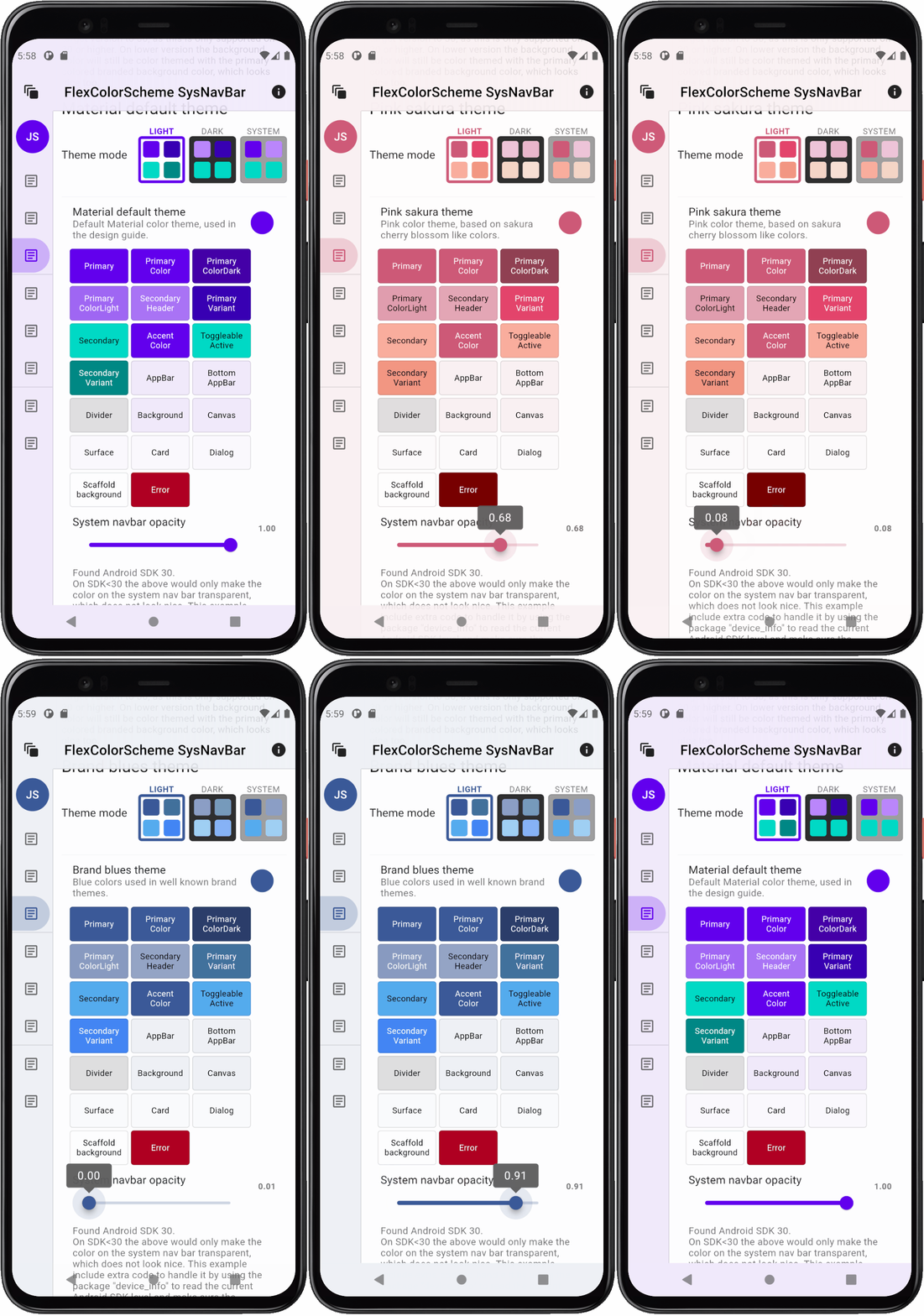
This example uses the old style navigation buttons on purpose to have a bit more area to show the effect on, but it is the same on narrow navbar.
The example is shown with too different themes. These themes are set to automatically alpha blend primary color into color scheme surface and background. These colors are then used here on the AppBar, the fake rail and on the system navigation bar.
There is gradient transparency in AppBar, that is set have no scrim on top icons, this part has worked since early days in Flutter.Then for demo and test purpose, there is the adjustable transparency slider for the system navigation bar.
The above example was made before Edge to Edge support in Flutter, by adding support for it in
MainActivity.kt.I'm going to update my theming solution with support for Flutter's new Edge to Edge solution and remake this demo using only it. Then I should be able to test and see how it behaves on different APIs.
I will post follow-ups from my hands-on findings.
Hey @rydmike Thanks for all of the insight! I think we are going to make this available at 29, because all of the necessary features to control the look of the app are only available starting then. Sure, there are some ways to hack it as early as 26, but that doesn't feel like a great experience for developers. This should be consistent and seamless.
It looks like edge to edge was introduced at 29 as well, so it seems to make the most sense. :)
If you would like the effect in an earlier API, you can still use your workaround with the manual overlay mode.Reacted by TheJulianJES and RydmikeShould
SystemChrome.setEnabledSystemUIMode(SystemUiMode.edgeToEdge)also setsystemNavigationBarColortoColors.transparentfor SDK >= 29?Let's say I want to have a black or white navigation bar (depending on the current theme) for anything older than SDK 29 (where edge to edge isn't possible).
For SDK 29 and newer, I want the edge to edge mode (which apparently requires a transparent navigation bar and doesn't do anything without it?)If that's still the case, I think it would make sense that calling
SystemChrome.setEnabledSystemUIMode(SystemUiMode.edgeToEdge)automatically sets the navigation bar color to transparent and that calls tosetSystemUIOverlayStylewithsystemNavigationBarColorshould not override the transparent color (if edgeToEdge is on and the SDK >= 29).
Since edge to edge is the new thing every app should adopt, simply addingSystemChrome.setEnabledSystemUIMode(SystemUiMode.edgeToEdge)to an app would do the trick.Without these changes, you would still need to check the SDK when setting the navigation bar color, right?
(So, if SDK >= 29: Colors.transparent and otherwise: solid nav bar color depending on the theme for example)
Edit:
Sample code for the current behaviorFuture<void> redoSystemStyle(bool darkMode) async { if (Platform.isAndroid) { final AndroidDeviceInfo androidInfo = await deviceInfoPlugin.androidInfo; final bool edgeToEdge = androidInfo.version.sdkInt != null && androidInfo.version.sdkInt! >= 29; // The check wouldn't be required anymore if https://github.com/flutter/engine/pull/28616 is merged if (edgeToEdge) { SystemChrome.setEnabledSystemUIMode(SystemUiMode.edgeToEdge); } SystemChrome.setSystemUIOverlayStyle(SystemUiOverlayStyle( statusBarColor: Colors.transparent, // This check, however, would still be required, right? systemNavigationBarColor: edgeToEdge ? Colors.transparent : darkMode ? Colors.black : Colors.white, systemNavigationBarContrastEnforced: true, systemNavigationBarIconBrightness: darkMode ? Brightness.light : Brightness.dark, )); } else { SystemChrome.setSystemUIOverlayStyle(const SystemUiOverlayStyle( statusBarColor: Colors.transparent, )); }Here, the second check (setting
systemNavigationBarColortoColors.transparentwhen edge to edge is on) is probably still required even if flutter-team-archive/engine#28616 is merged. Like mentioned above, it would be nice if the app didn't need to check any SDK versions and if it was enough to just callSystemChrome.setEnabledSystemUIMode(SystemUiMode.edgeToEdge).Reacted by RydmikeHey @TheJulianJES thanks for providing more feedback!
I think for now we are keeping the style and the mode separate. You would still need to set theSystemUiOverlayStyle.systemNavigationBarContrastEnforcedif you wanted a truly transparent navigation bar in some cases. We can't assume setting edge to edge means the background is contrast safe with the navigation controls.It might be confusing to have the mode set a navigation bar color, and then have some other method that is supposed to set the color... but have it apply only in some cases. I would recommend opening another issue, specific to this functionality, so we can gather more input from the community. Feel free to ping me on it so I can follow the progress. :)
I think if you set a transparent background color on a lower API level, it won't actually render transparent, I think it will remain the default nav bar color, but I will look into this and confirm the behavior.
Reacted by TheJulianJES@TheJulianJES thx, looked very complete and well formulated. I will follow up there after some more tests and investigation myself too, but my initial reaction was that it covered all the challenges I have been seeing as well.
Reacted by TheJulianJESThis thread has been automatically locked since there has not been any recent activity after it was closed. If you are still experiencing a similar issue, please open a new bug, including the output of
flutter doctor -vand a minimal reproduction of the issue.- locked as resolved and limited conversation to collaborators
on Sep 30, 2021


Internal b/199406748
#81303 added support for Android fullscreen modes like Edge to Edge.
We had not offered this before, so we offered edge to edge at the earliest available API - 16
This does not seem appropriate as you cannot change the navigation bar color until API 26 in the framework, and the contrast scrim is not available until 29 to ensure icons are visible with enough contrast.
API 19-20: We can't set status/navigation bar colors in these versions, so edge to edge cannot be properly configured
API 21-25: These versions support setting the navigation bar color, but the current Flutter Engine implementation does not allow setting the navigation bar color. Flutter has limited this because the ability to alter the navigation bar icon colors is not available until API 26. We investigated making this available on earlier these earlier APIs but found it broke customers. More context here:
API 26-28: These versions support setting both the navigation bar color and navigation bar icon color. However, they will not offer background protection for navigation bar when using transparent color - this is the translucent body scrim that is automatically applied starting at API 29 to ensure proper contrast for the icons.
API 29+: Full-support - maybe we should limit edge to edge to this api and above. I think this was when it was first introduced or recommended.