Repository navigation
The TextField lost it focus when click other blank areas. #92079
Description

The problem happened when I upgraded the flutter to 2.5.3 (like the first gif picture). I don't hope it lost focus (like the second gif picture).


By the way, The cursor height becomes shorter when I delete all characters from TextField (like the following picture).

flutter doctor -v
[√] Flutter (Channel stable, 2.5.3, on Microsoft Windows [Version 10.0.17763.2237], locale    en-US)
    • Flutter version 2.5.3 at D:\SDK\Flutter
    • Upstream repository https://github.com/flutter/flutter.git
    • FLUTTER_GIT_URL = https://gitee.com/mirrors/Flutter.git
    • Framework revision 18116933e7 (4 days ago), 2021-10-15 10:46:35 -0700
    • Engine revision d3ea636dc5
    • Dart version 2.14.4
    • Pub download mirror https://pub.flutter-io.cn
    • Flutter download mirror https://storage.flutter-io.cn

[√] Android toolchain - develop for Android devices (Android SDK version 30.0.3)
    • Android SDK at D:\SDK\Android
    • Platform android-30, build-tools 30.0.3
    • ANDROID_HOME = D:\SDK\Android
    • ANDROID_SDK_ROOT = D:\SDK\Android
    • Java binary at: C:\Program Files\Android\Android Studio\jre\bin\java
    • Java version OpenJDK Runtime Environment (build 11.0.8+10-b944.6842174)
    • All Android licenses accepted.

[√] Chrome - develop for the web
    • CHROME_EXECUTABLE = C:\Program Files (x86)\Microsoft\Edge\Application\msedge.exe

[√] Visual Studio - develop for Windows (Visual Studio Community 2019 16.11.5)
    • Visual Studio at C:\Program Files (x86)\Microsoft Visual Studio\2019\Community
    • Visual Studio Community 2019 version 16.11.31729.503
    • Windows 10 SDK version 10.0.19041.0

[√] Android Studio (version 4.2)
    • Android Studio at C:\Program Files\Android\Android Studio
    • Flutter plugin can be installed from:
       https://plugins.jetbrains.com/plugin/9212-flutter
    • Dart plugin can be installed from:
       https://plugins.jetbrains.com/plugin/6351-dart
    • Java version OpenJDK Runtime Environment (build 11.0.8+10-b944.6842174)

[√] IntelliJ IDEA Community Edition (version 2021.2)
    • IntelliJ at C:\Program Files\JetBrains\IntelliJ IDEA Community Edition 2021.2.3
    • Flutter plugin version 61.2.4
    • Dart plugin version 212.5486

[√] VS Code (version 1.55.2)
    • VS Code at C:\Users\Zhanghuifeng\AppData\Local\Programs\Microsoft VS Code
    • Flutter extension version 3.15.0

[√] Connected device (3 available)
    • Windows (desktop) • windows • windows-x64    • Microsoft Windows [Version 10.0.17763.2237]
    • Chrome (web)      • chrome  • web-javascript • unknown
    • Edge (web)        • edge    • web-javascript • Microsoft Edge 94.0.992.50

• No issues found!
simple code
import 'package:flutter/material.dart';

void main() {
  runApp(const MyApp());
}

class MyApp extends StatelessWidget {
  const MyApp({Key? key}) : super(key: key);

  @override
  Widget build(BuildContext context) {
    return MaterialApp(
      title: 'TextField Demo',
      theme: ThemeData(primarySwatch: Colors.teal),
      home: Scaffold(
        body: Center(
          child: SizedBox(
            width: 200,
            height: 80,
            child: TextField(
              controller: TextEditingController(text: "Hello"),
              minLines: 1,
              textAlignVertical: TextAlignVertical.center,
              cursorHeight: 14,
              decoration: InputDecoration(
                border: const OutlineInputBorder(),
                hintText: "HintText",
                labelText: "LabelText",
                hintStyle: const TextStyle(fontSize: 14),
                labelStyle: const TextStyle(fontSize: 15),
                counterText:  "",
              ),
            ),
          ),
        ),
      ),
    );
  }
}
Activity
MCarlomagno commentedon Oct 19, 2021
Hello! I think you're reporting 2 different issues. As far as I understand, the first one actually is an improvement, in the material design system official page the text field example behaves like in the new example you're showing (unfocusing the text field after clicking outside), please check their guidelines here: https://material.io/components/text-fields.
Anyway, the second one seem to be a valid issue IMO.
YowFung commentedon Oct 19, 2021
@MCarlomagno
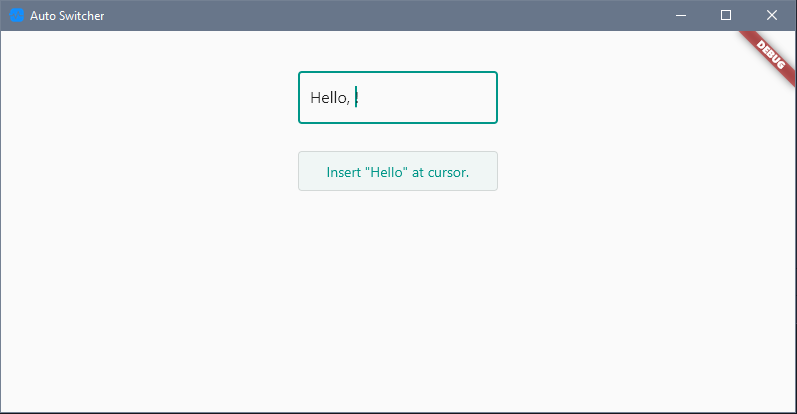
I agree that is a good improvement. But it prevents me from inserting new text at the cursor of the TextField (as in the example below). Because when I click the button, it goes out of focus, and I can't get the cursor position.
danagbemava-nc commentedon Oct 20, 2021
Hi @YowFung, since this is according to the material design spec, this is likely the intended behaviour and if that is the case, it is unlikely to be changed.
You can try using the
TextEditingControllerto insert the text at the position that you want.See this SO thread and see if you can find an implementation that suits your use case.
https://stackoverflow.com/questions/56851701/how-to-set-cursor-position-at-the-end-of-the-value-in-flutter-in-textfield
YowFung commentedon Oct 22, 2021
@danagbemava-nc
Thank you for the reference article. This really solves my main requirements. But this also led to another not-so-friendly experience: every time I clicked on the outer area it lost focus and I have to use
focusNode.requestFocus()method to regain focus.Take a look at the following example effect: Every time I click outside it loses focus, and then I request the focus, so it looks like the border is flashing.

Is there a possibility that we can choose whether or not we want to keep focus (It should be disabled by default according to the material design specification but can be enabled through a property)?
[-]The TextFiled lost it focus when click other blank areas.[/-][+]The TextField lost it focus when click other blank areas.[/+]danagbemava-nc commentedon Oct 22, 2021
Is it necessary for you to do this?
I imagine it can be done, but you'll have to file a proposal for that and layout your use case in detail to help the team understand the need for it
YowFung commentedon Oct 22, 2021
@danagbemava-nc
Yes. If I don't, users of my app will probably not notice that some text is being inserted into this TextField.
What should I do?
danagbemava-nc commentedon Oct 22, 2021
That makes sense.
Create a new issue with the
Feature Requesttemplate and describe your use case and proposed fix.Feel free to tag me in it.
Side note: it's possible there's a way to do this already, but I haven't gone through the docs enough to find out.
I would advise looking through the API docs first before you file the proposal.
Thank you
danagbemava-nc commentedon Oct 27, 2021
Closing from here
github-actions commentedon Nov 10, 2021
This thread has been automatically locked since there has not been any recent activity after it was closed. If you are still experiencing a similar issue, please open a new bug, including the output of
flutter doctor -vand a minimal reproduction of the issue.