We developing application which partially wants to support "Dark mode" - that is, support Keyboard appearance a some part of application.
TextFields' popup menu (cut/copy/paste) honor's only Brightness and it is not possible to change its appearance.
Steps to Reproduce
Having following ColorScheme a Theme, which has Brightness set to "dark"
ThemeData createDarkTheme() {
  final colorScheme = ColorScheme(
    brightness: Brightness.dark,
    primary: Colors.purple.shade300,
    primaryVariant: Colors.purple.shade500,
    secondary: Colors.green,
    secondaryVariant: Colors.green.shade500,
    background: Colors.white,
    surface: Colors.red,
    onPrimary: Colors.black,
    onSecondary: Colors.black,
    onSurface: Colors.black,
    onBackground: Colors.black,
    onError: Colors.white,
    error: Colors.red.shade400,
  );

  return ThemeData.from(colorScheme: colorScheme).copyWith(
    applyElevationOverlayColor: false,
  );
As you can see on image, "toolbar" respects surface color but not onSurface color. Instead it honors Brightness a set White/Black color based on current brightness.
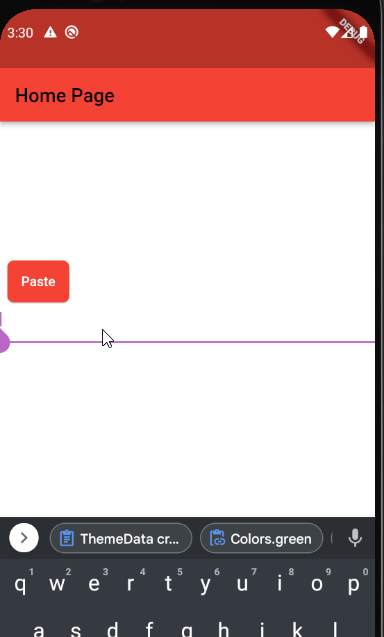
It makes unusable in our case where we have white screen with white input, but user has Dark mode enabled -> then the popup is blank white (with white text).


We developing application which partially wants to support "Dark mode" - that is, support Keyboard appearance a some part of application.
TextFields' popup menu (cut/copy/paste) honor's only Brightness and it is not possible to change its appearance.
Steps to Reproduce
Having following ColorScheme a Theme, which has Brightness set to "dark"
As you can see on image, "toolbar" respects

surfacecolor but notonSurfacecolor. Instead it honors Brightness a set White/Black color based on current brightness.It makes unusable in our case where we have white screen with white input, but user has Dark mode enabled -> then the popup is blank white (with white text).