Skip to content

Handling multi-line items in DropdownButton and DropdownMenuItem #9211

Closed

Description

@hundeva

Internal: b/140830819

Issue

The following screenshot demonstrates the issue.

If the dropdown is open, the items are correctly displayed as - for example - two line items, but if the dropdown is closed, only the first line will be visible, and the dropdown indicator won't be visible.

Steps to Reproduce

See the following test project:

import 'package:flutter/material.dart';

void main() {
  runApp(new MaterialApp(
    home: new Scaffold(
      appBar: new AppBar(
        title: new Text('Test project'),
      ),

      body: new Padding(
        padding: new EdgeInsets.all(16.0),
        child: new TestStatefulWidget(),
      ),
    ),
  ));
}

class TestStatefulWidget extends StatefulWidget {

  @override
  State<StatefulWidget> createState() => new TestStatefulWidgetState();
}

class TestStatefulWidgetState extends State<TestStatefulWidget> {

  static const List<String> shortItems = const [
    'These',
    'items',
    'are',
    'short',
    'enough',
  ];

  static const List<String> longItems = const [
    'These items will probably be longer than what fits on the screen correctly',
    'Because of this, the icon indicator on the right side will not show',
    'Instead, in development mode, a red indicator will display, showing something is wrong',
  ];

  String shortSpinnerValue = shortItems[0];
  String longSpinnerValue = longItems[0];

  @override
  Widget build(BuildContext context) {
    return new Column(
      mainAxisSize: MainAxisSize.min,
      crossAxisAlignment: CrossAxisAlignment.start,
      children: [
        new DropdownButton(
          value: shortSpinnerValue,
          onChanged: (string) => setState(() => shortSpinnerValue = string),
          items: shortItems.map((string) {
            return new DropdownMenuItem(
              child: new Text(string),
              value: string,
            );
          }).toList(),
        ),

        new DropdownButton(
          value: longSpinnerValue,
          onChanged: (string) => setState(() => longSpinnerValue = string),
          items: longItems.map((string) {
            return new DropdownMenuItem(
              child: new Text(string),
              value: string,
            );
          }).toList(),
        ),
      ],
    );
  }
}

Activity

  1. abarth commented on Apr 5, 2017

    @abarth
    Contributor

    Would you expect it to wrap or to have an ellipsis?

  2. hundeva commented on Apr 5, 2017

    @hundeva
    Author

    I'd expect an ellipsis, as in some corner cases, the selectable options may be very long (three, or even more lines is possible).

  3. eseidelGoogle commented on Apr 12, 2017

    @eseidelGoogle
    Contributor

    If you just pass overflow: TextOverflow.elipsis to you Text call in you DropDownMenuItem I think you'll get the effect you want?

  4. added
    frameworkflutter/packages/flutter repository. See also f: labels.
    on Apr 12, 2017
  5. added this to the milestone on Apr 12, 2017
  6. hundeva commented on Apr 12, 2017

    @hundeva
    Author

    Unfortunately, that won't work. If I add overflow: TextOverflow.elipsis to the text fields, the following thing happens:

    • collapsed state, nothing changed
    • expanded state, the list items have been limited to be single line, which is not the desired effect, they should be completely visible, for example all 2 or 3 lines should be visible

    The modified test project:

    import 'package:flutter/material.dart';
    
    void main() {
      runApp(new MaterialApp(
        home: new Scaffold(
          appBar: new AppBar(
            title: new Text('Test project'),
          ),
    
          body: new Padding(
            padding: new EdgeInsets.all(16.0),
            child: new TestStatefulWidget(),
          ),
        ),
      ));
    }
    
    class TestStatefulWidget extends StatefulWidget {
    
      @override
      State<StatefulWidget> createState() => new TestStatefulWidgetState();
    }
    
    class TestStatefulWidgetState extends State<TestStatefulWidget> {
    
      static const List<String> shortItems = const [
        'These',
        'items',
        'are',
        'short',
        'enough',
      ];
    
      static const List<String> longItems = const [
        'These items will probably be longer than what fits on the screen correctly',
        'Because of this, the icon indicator on the right side will not show',
        'Instead, in development mode, a red indicator will display, showing something is wrong',
      ];
    
      String shortSpinnerValue = shortItems[0];
      String longSpinnerValue = longItems[0];
    
      @override
      Widget build(BuildContext context) {
        return new Column(
          mainAxisSize: MainAxisSize.min,
          crossAxisAlignment: CrossAxisAlignment.start,
          children: [
            new DropdownButton(
              value: shortSpinnerValue,
              onChanged: (string) => setState(() => shortSpinnerValue = string),
              items: shortItems.map((string) {
                return new DropdownMenuItem(
                  child: new Text(
                    string,
                    overflow: TextOverflow.ellipsis,
                  ),
                  value: string,
                );
              }).toList(),
            ),
    
            new DropdownButton(
              value: longSpinnerValue,
              onChanged: (string) => setState(() => longSpinnerValue = string),
              items: longItems.map((string) {
                return new DropdownMenuItem(
                  child: new Text(
                    string,
                    overflow: TextOverflow.ellipsis,
                  ),
                  value: string,
                );
              }).toList(),
            ),
          ],
        );
      }
    }
  7. hundeva commented on Sep 20, 2017

    @hundeva
    Author

    Hi,

    Your english is fine, don't worry :)

    The problem with that solution is, it doesn't really adapt to different screen sizes, where I would like it to fit the whole width for example. Of course, I could work around that like, the width of the Container is = width of the screen - width of the dropdown button, but that is a lot of boilerplate, which I would like to avoid.

    Thanks!

  8. maryx commented on Oct 23, 2017

    @maryx
    Contributor

    I have the same question, except that I would like to show the full line, with word wrap, in the expanded state (since the user may not necessarily know what the line says if it ends in ellipses), but show ellipses in the collapsed state.
    Currently, with this setup:

    var units = <DropdownMenuItem>[];
        for (var unit in widget.units) {
          units.add(new DropdownMenuItem(
            value: unit.name,
            child: new Container(
              width: 130.0,
              child: new Text(
                unit.name,
                softWrap: true,
              ),
            ),
          ));
        }
    

    I get this overlapping of text, where the wrapping of the words doesn't change the height of each dropdown menu item. Ideally, each DropdownMenuItem should space according to its text wrap:
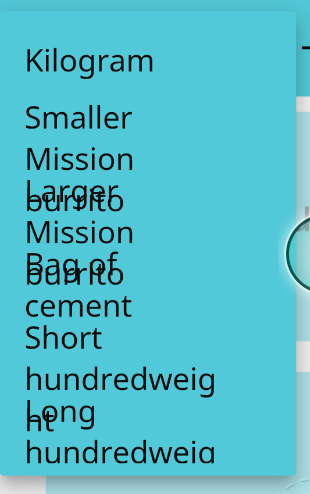
    screen shot 2017-10-22 at 8 44 32 pm

    With a selected item, I get this. Ideally, I would be able to set the overflow to ellipses only for the currently-selected dropdown item in collapsed view. DropdownButton only lets me set a TextStyle though:
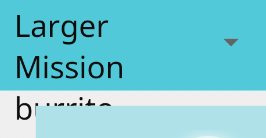
    screen shot 2017-10-22 at 8 47 05 pm

  9. added
    c: datalossCan result in the user losing their state
    p: material_uimaterial_ui package in flutter/packages
    on Oct 24, 2017
  10. modified the milestones: , 3: Current Milestone on Oct 24, 2017
  11. brianegan commented on Oct 31, 2017

    @brianegan
    Contributor

    I think this may be a legit problem with the DropDownButton itself, and might have a simple fix... Happy to submit a PR if you think this is a good solution.

    After looking at the build method of the _DropdownButtonState, it has an IndexedStack and Icon contained in a Row. However, since the IndexedStack is not wrapped in an Expanded, it is allowed to grow indefinitely. Therefore, even if you use TextOverflow.ellipse on your Text Widget, it will continue to Overflow.

    I extracted the DropDownButton into a MyDropdownButton that wraps the IndexedStack with an Expanded to test this theory. The Screenshots and code are below:

    Long Text Without Fix (No Expanded)

    screen shot 2017-10-31 at 12 32 26 pm

    Long Text With Fix

    screen shot 2017-10-31 at 12 32 48 pm

    Code with Fix

        Widget result = new DefaultTextStyle(
          style: _textStyle,
          child: new SizedBox(
            height: widget.isDense ? _denseButtonHeight : null,
            child: new Row(
              mainAxisAlignment: MainAxisAlignment.spaceBetween,
              mainAxisSize: MainAxisSize.min,
              children: <Widget>[
                // If value is null (then _selectedIndex is null) then we display
                // the hint or nothing at all.
    
                // Wrapped IndexedStack with Expanded to ensure it takes up only the available space
                new Expanded(
                  child: new IndexedStack(
                    index: _selectedIndex ?? hintIndex,
                    alignment: Alignment.centerLeft,
                    children: items,
                  ),
                ),
                new Icon(Icons.arrow_drop_down,
                    size: widget.iconSize,
                    // These colors are not defined in the Material Design spec.
                    color: Theme.of(context).brightness == Brightness.light ? Colors.grey.shade700 : Colors.white70
                ),
              ],
            ),
          ),
        )
  12. maryx commented on Oct 31, 2017

    @maryx
    Contributor

    @brianegan You should submit a PR, it would help my current app a lot :). I'm not sure if it's the best solution but the reviewers will give feedback.
    What does a dropdown item look like in that state? Is the text also truncated. or is the item height expanded?

    I am blocked by this issue for an app.

  13. 67 remaining items

  14. malviyaritesh commented on Sep 12, 2019

    @malviyaritesh

    One can create and use custom widget in place of DropdownButtonFormField until isExpanded is officially supported.

    https://gist.github.com/malviyaritesh/04b94f72c5c2047ea4bd06aaf0a99fc7

  15. git-xbits commented on Sep 12, 2019

    @git-xbits

    One can create and use custom widget in place of DropdownButtonFormField until isExpanded is officially supported.

    https://gist.github.com/malviyaritesh/04b94f72c5c2047ea4bd06aaf0a99fc7

    You have a exemple to this project? I have problems with List of objects

  16. malviyaritesh commented on Sep 13, 2019

    @malviyaritesh

    @git-xbits If you know to use DropdownButtonFormField, then MultilineDropdownButtonFormField is just a replacement of it with added properties like isExpanded and isDense.

    To use it, you just need to replace DropdownButtonFormField with MultilineDropdownButtonFormField and provide properties like isExpanded: true & isDense: false.

    Here's a basic example (incomplete to work) showing its uses:

    // ...
    // Other widgets
    // ...
    MultilineDropdownButtonFormField<int>(
      isExpanded: true,
      isDense: false,
      items: [
        DropdownMenuItem(
          child: Text(
            'Very looooooooooooooooooooooooooooooooooooooooooooooooooooooooooooooooong first option',
            overflow: TextOverflow.ellipsis,
            maxLines: 2,
            softWrap: true,
          ),
          value: 1,
        ),
        DropdownMenuItem(
          child: Text(
            'Very looooooooooooooooooooooooooooooooooooooooooooooooooooooooooooooooong second option',
            overflow: TextOverflow.ellipsis,
            maxLines: 2,
            softWrap: true,
          ),
          value: 2,
        ),
        DropdownMenuItem(
          child: Text(
            'Very looooooooooooooooooooooooooooooooooooooooooooooooooooooooooooooooong third option',
            overflow: TextOverflow.ellipsis,
            maxLines: 2,
            softWrap: true,
          ),
          value: 3,
        )
      ],
      decoration: InputDecoration(
        labelText: 'Transportation',
        icon: Icon(Icons.assignment),
      ),
      value: _dropdownValue,
      onChanged: (int value) {
        setState(() {
          _selectedDropdownValue = value;
        });
      },
      onSaved: (int value) => _dropdownValue = value,
    ),
    // ...
    // Other widgets
    // ...
  17. HansMuller commented on Sep 18, 2019

    @HansMuller
    Contributor

    This version of the original example demonstrates how one can use the new selectedItemBuilder feature to customize the way the dropdown's selected item is displayed - and avoid the overflow. It also shows how one can hew to the Material Design spec by limiting dropdown items to two lines of text. Note also that the dropdown button's isExpanded parameter is true in the second dropdown, to force the dropdown's button to fit within the available horizontal space.

    Closed Open
    menu_closed menu_open
  18. HansMuller commented on Sep 18, 2019

    @HansMuller
    Contributor

    I'm going to close this issue because the original problem has been addressed: #9211 (comment)

    Dropdown menus are still limited because their items are fixed height. That came up in some of the feedback, for example #9211 (comment), #9211 (comment), #9211 (comment).

    I've opened a separate issue for the fixed height limitation: #40773

  19. miguelpruivo commented on Oct 18, 2019

    @miguelpruivo

    @HansMuller this doesn't seem to be available for DropdownButtonFormField. Am I missing something?

  20. HansMuller commented on Oct 18, 2019

    @HansMuller
    Contributor

    @miguelpruivo - you are correct, #43021

  21. shihaohong commented on Oct 18, 2019

    @shihaohong
    Contributor

    The DropdownButtonFormField.selectedItemBuilder's equivalent has also been created as well: #42481

  22. darkstarx commented on Oct 12, 2020

    @darkstarx

    Вот понаписали тонны слов. Лучше бы просто исправили. Стыд программистам Google!!!

  23. GSPrakashNaidu commented on Jun 29, 2021

    @GSPrakashNaidu

    I have the same question, except that I would like to show the full line, with word wrap, in the expanded state (since the user may not necessarily know what the line says if it ends in ellipses), but show ellipses in the collapsed state.
    Currently, with this setup:

    var units = <DropdownMenuItem>[];
        for (var unit in widget.units) {
          units.add(new DropdownMenuItem(
            value: unit.name,
            child: new Container(
              width: 130.0,
              child: new Text(
                unit.name,
                softWrap: true,
              ),
            ),
          ));
        }
    

    I get this overlapping of text, where the wrapping of the words doesn't change the height of each dropdown menu item. Ideally, each DropdownMenuItem should space according to its text wrap:
    screen shot 2017-10-22 at 8 44 32 pm

    With a selected item, I get this. Ideally, I would be able to set the overflow to ellipses only for the currently-selected dropdown item in collapsed view. DropdownButton only lets me set a TextStyle though:
    screen shot 2017-10-22 at 8 47 05 pm

    Thank you @maryx :), It worked for me.

  24. github-actions commented on Jul 30, 2021

    @github-actions

    This thread has been automatically locked since there has not been any recent activity after it was closed. If you are still experiencing a similar issue, please open a new bug, including the output of flutter doctor -v and a minimal reproduction of the issue.

  25. locked as resolved and limited conversation to collaborators on Jul 30, 2021
Sign up for free to join this conversation on GitHub. Already have an account? Sign in to comment

Metadata

Metadata

Assignees

Labels

c: datalossCan result in the user losing their statecustomer: quill (g3)frameworkflutter/packages/flutter repository. See also f: labels.p: material_uimaterial_ui package in flutter/packages

Type

No type

Projects

No projects

    Relationships

    None yet

    Development

    No branches or pull requests

    Issue actions